
WhatsApp Messenger – WorkDo Dash SaaS Add-On Guide
Learn how to configure and manage WhatsApp Messenger integration in Dash SaaS.
Introduction
The WhatsApp Messenger Add-On is a communication integration tool designed to connect your business platform with WhatsApp messaging services. This Add-On enables direct customer communication through a chat widget that appears on your platform, allowing users and customers to reach out for support or information instantly. The system integrates seamlessly with multiple business management Add-Ons, including LMS, Support Ticket systems, Hotel Management, Booking Systems, and many other business applications. This integration reduces wait times for customer service and creates a more efficient communication experience by enabling support agents to engage in real-time one-on-one conversations directly through WhatsApp chat functionality.
How to Install the Add-On?
To Set Up the WhatsApp Messenger Add-On, you can follow this link: Setup Add-On.
How To Use the WhatsApp Messenger Add-On?
- To configure the WhatsApp Messenger Add-On, you need to have your WhatsApp contact number ready, as it is required for the integration process. After purchasing the WhatsApp Messenger Add-On in your company login, navigate to the Settings page in your sidebar.
- Click on “Settings” and then locate the “WhatsApp Messenger Settings” section to begin the configuration process. When you click on WhatsApp Messenger, the configuration section will appear, where you can set up the integration.
- Once you enable the WhatsApp Messenger toggle, enter your WhatsApp Contact Number into the designated field. This number will be used for all customer communications through the chat widget. Enable the toggle button for the specific Add-Ons you want to integrate with the WhatsApp Messenger functionality.
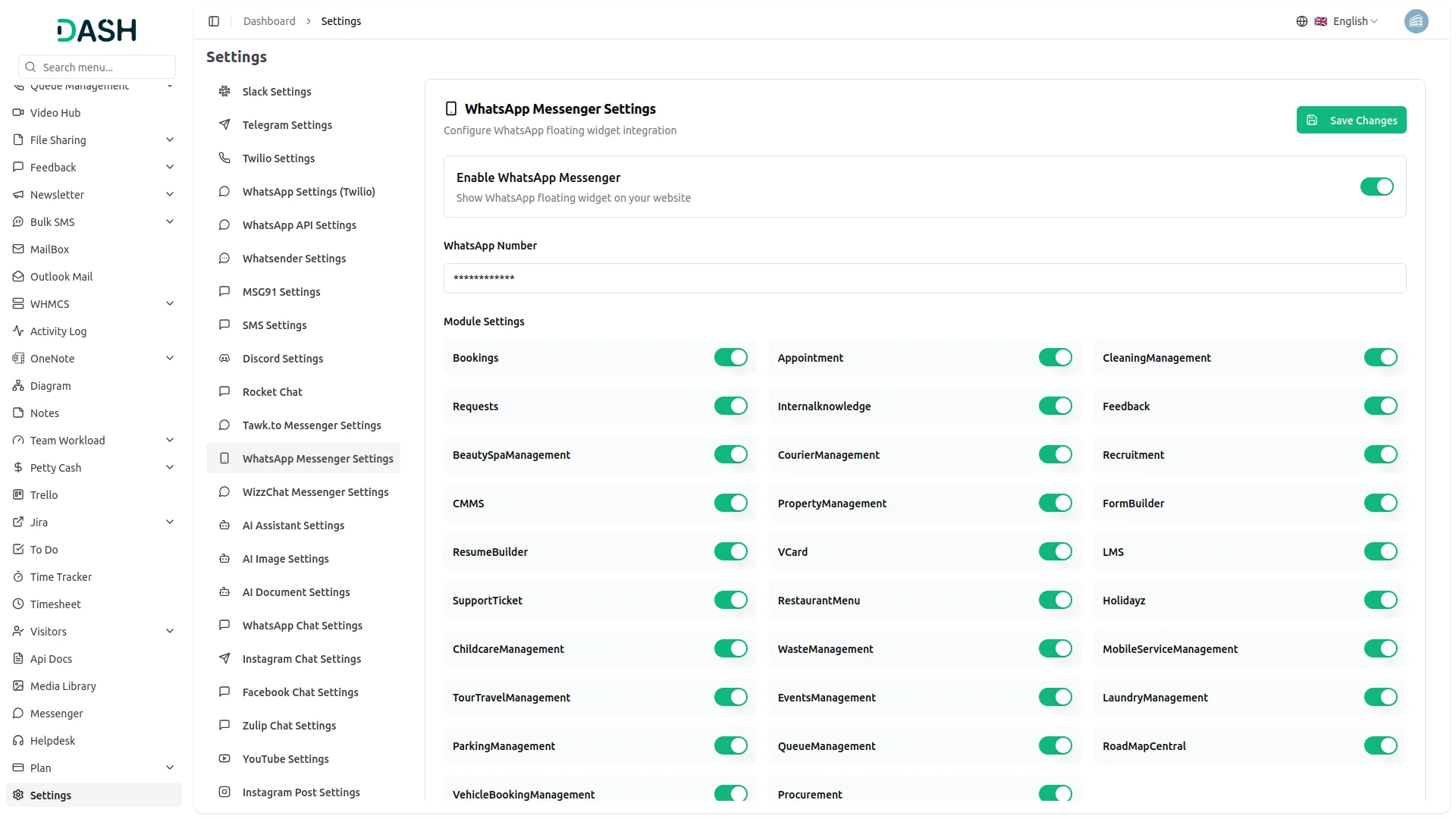
The system supports integration with 29 different Add-Ons:
- Bookings
- Appointment
- Cleaning Management
- Requests
- Internal Knowledge (KB)
- Feedback
- Beauty Spa Management
- Courier Management
- Recruitment
- CMMS
- Property Management
- Form Builder
- Resume Builder
- vCard
- LMS
- Support Ticket
- Restaurant Menu
- Hotel & Room Management
- Childcare Management
- Waste Management
- Mobile Service Management
- Tour & Travel Management
- Events Management
- Laundry Management
- Parking Management
- Queue Management
- RoadMap Central
- Vehicle Booking Management
- Procurement
- After selecting your desired integrations and entering your contact number, click “Save” to apply all changes. Once the configuration is successfully saved, the WhatsApp Messenger feature will be activated across your entire platform.
- Your users and customers will immediately see the chat widget interface, allowing them to reach out for support or information anytime they need assistance.
- This setup enables your support agents to engage in direct one-on-one conversations through the chat system, creating a more efficient customer service experience with reduced response times.
Categories
Related articles
- Make – WorkDo Dash SaaS Add-On Guide
- Easebuzz – BookingGo SaaS Add-On Guide
- PayFast – WorkDo Dash SaaS Add-On Guide
- Zapier – BookingGo SaaS Add-On Guide
- Shopping Cart – BookingGo SaaS Add-On Guide
- Store Locator – eCommerceGo SaaS Add-On Guide
- Courier Management – WorkDo Dash SaaS Add-On Guide
- Partial Payment – eCommerceGo SaaS Add-On Guide
- Security Guard Management – WorkDo Dash SaaS Add-On Guide
- Water Park Management – WorkDo Dash SaaS Add-On Guide
- Appointment – WorkDo Dash SaaS Add-On Guide
- FedaPay – BookingGo SaaS Add-On Guide
We're Here to Help - Let's Talk
Have questions about our solutions, customization services, or business tools? Our team is here to help you. let's talk.