
WhatSender Add-On Integration in Dash SaaS
The Whatsender Add-On allows you to send real-time WhatsApp notifications to users for important updates and actions.
Introduction
The Whatsender Add-On allows you to send real-time WhatsApp notifications to users for important updates and actions. It helps you share alerts like task assignments, invoice updates, or system activities directly through WhatsApp, making sure users stay informed even when they’re not using the main platform. You can connect this Add-On with other features so messages are sent automatically when something important happens. This makes communication faster, keeps everyone in the loop, and helps improve response times.
How To Install The Whatsender Add-On ?
To set up the WhatSender Add-On follow this link: Setup Add-On
Note: You need to add your phone number while creating the user to have access to the Whatsender Add-On.
How To Use The WhatSender Add-On ?
- Once you purchase the Add-On, navigate to the settings page, click on system settings, and find Whatsender.
- On that page, you have to enter the Whatsender API Key, with the help of which you can send messages via WhatSender.
- You will need to create an account in Whatsender, before you generate the API Key. Once you create an account, you can easily generate the API Key.
- To generate the API key, you can follow these steps:
-
Step 1: Create an Account
- Go to https://app.whatsender.io/register
- Sign up for an account or log in if you already have one.
Step 2: Set Up a Device (Connect WhatsApp)
- After logging in, go to your Dashboard.
- Click Add New Device or Connect Device.
- Scan the QR code with your WhatsApp to connect your phone.
- Once connected, your device will appear in the dashboard.
Step 3: Get Your API Token
- Go to the API Settings or Developers section (usually in the left menu).
- Find the API Key / Token section.
- Copy your Bearer Token or Access Token.
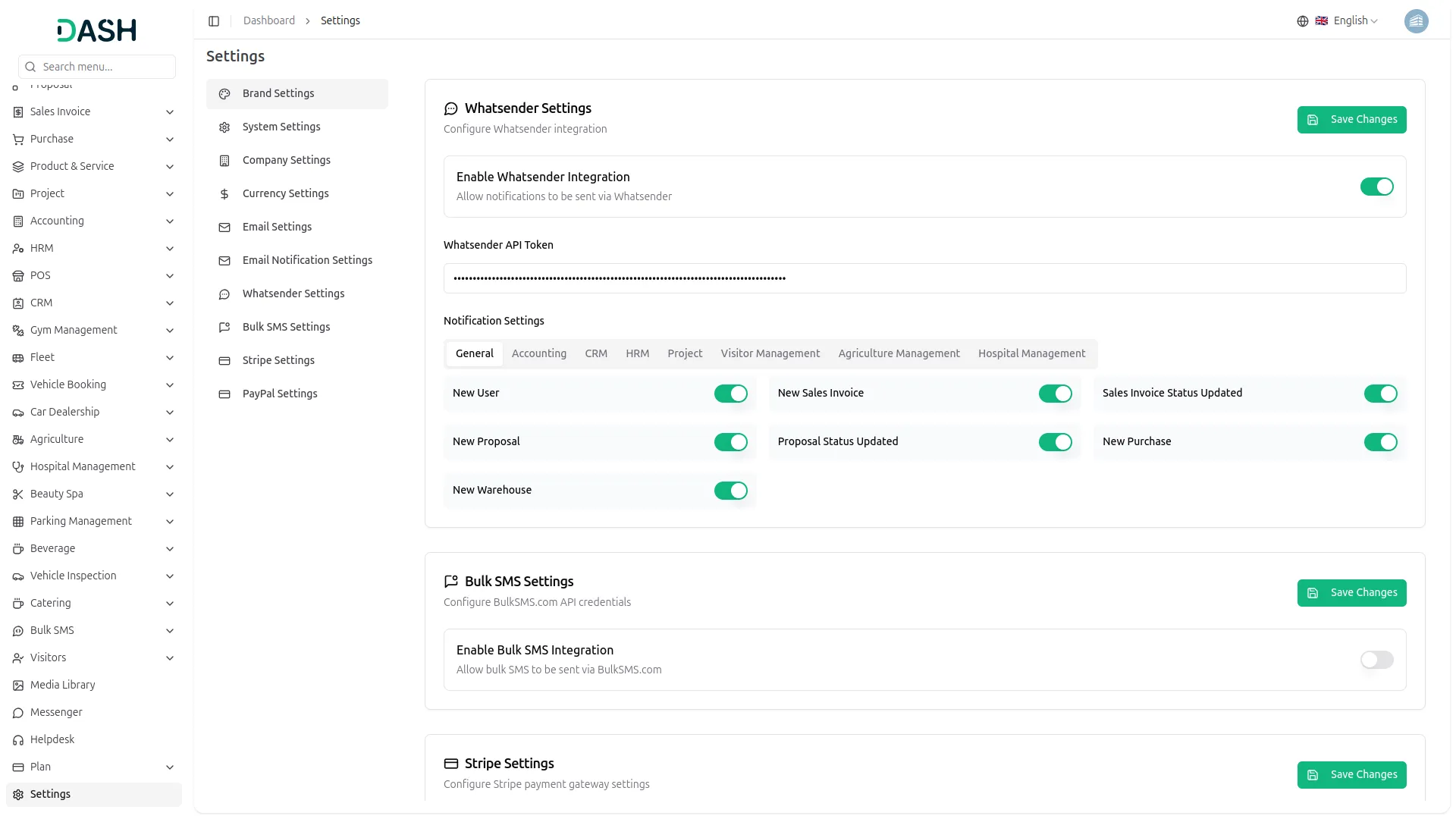
- After you do this, you get a chance to choose the notifications settings. Here is the way you can enable or disable the notifications of the various Add-Ons.
-
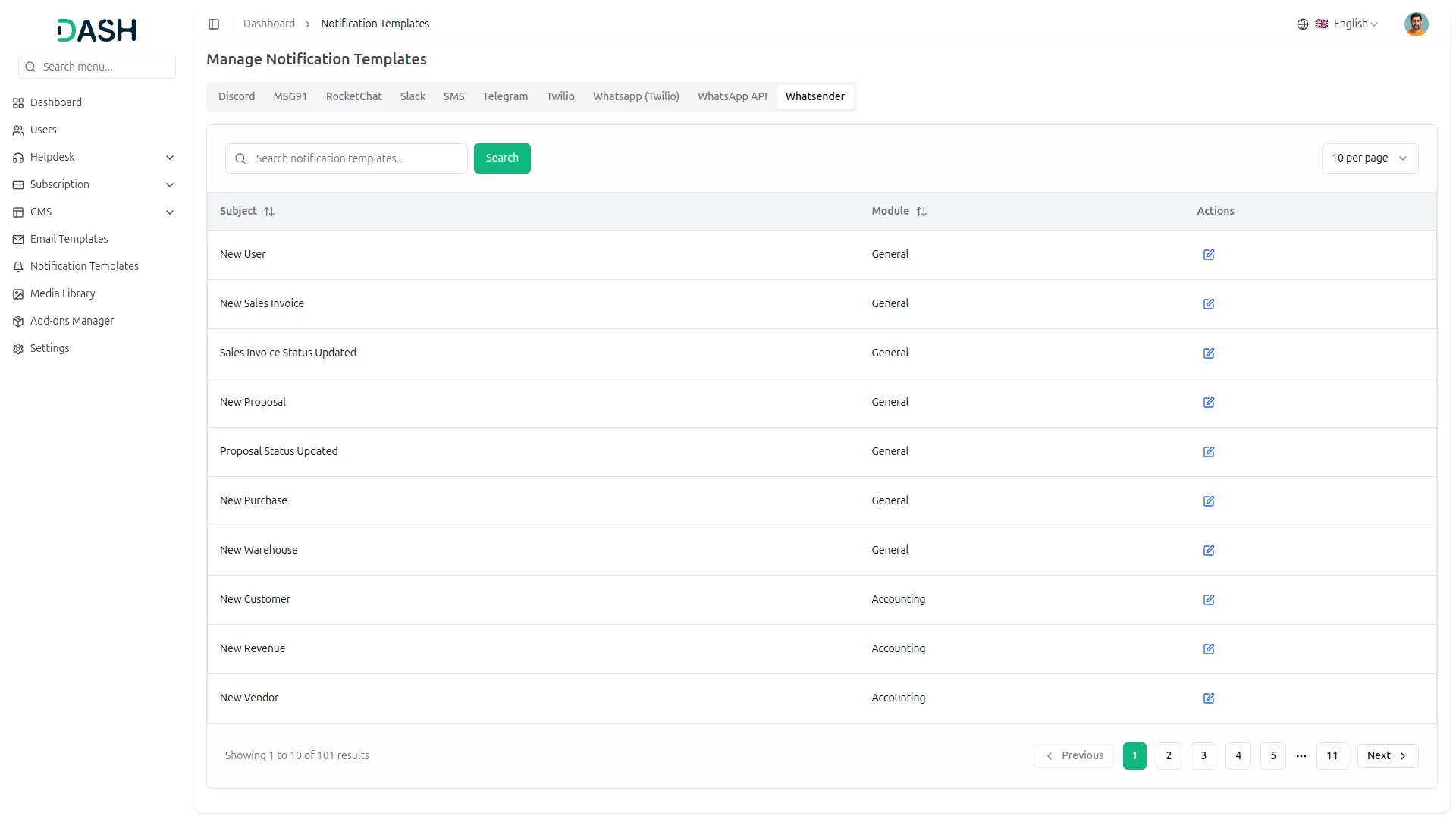
- You can customize notification messages language wise, for example, if you want to change the message for new user notifications, you can do it here.
-
-
For example: If you enable the create user setting from General, then the notification via Whatsender will be sent to that particular user when the user is created.
General
- New User
- New Sales Invoice
- Sales Invoice Status Updated
- New Proposal
- Proposal Status Updated
- New Purchase
- New Warehouse
Account
- New Customer
- New Revenue
- New Vendor
CRM
- New Lead
- Lead to Deal Conversion
- New Deal
- Lead Moved
- Deal Moved
HRM
- New Monthly Payslip
- New Award
- New Event
- Leave Approve/Reject
- New Announcement
- New Holidays
CMMS
- Work Order Request
- New Supplier
- New POS
- Work Order Assigned
- New Part
- New Component
- New Location
- New PMS
Taskly
- New Project
- New Task
- New Bug
- New Task Comment
- New Milestone
- Task Stage Updated
Fix Equipment
- New Accessories
- New Asset
- New Consumables
- New Audit
- New Fix Equipment Component
- New Licence
- New Fix Equipment Location
- New Maintenance
Agriculture Management
- New Agriculture Fleet
- New Agriculture Process
- New Agriculture Cycle
- New Agriculture Office
- New Agriculture Crop
- New Agriculture Activity
- New Agriculture Service
- New Agriculture Cultivation
Categories
Related articles
- Radiology Management Detailed Documentation
- Braintree Payment Gateway Detailed Documentation
- Newspaper Distribution Management Integration in Dash SaaS
- Sendinblue Integration in Dash SaaS
- Car Dealership Integration in Dash SaaS
- Gym Management Integration in Dash SaaS
- Contract Integration in Dash SaaS
- Photo & Studio management Integration in Dash SaaS
- Jira Add-On WorkDo Dash Detailed Documentation
- Social Media Analytics Detailed Documentation
- Google Authentication Integration in BookingGo SaaS
- Business Plan Integration in Dash SaaS
Reach Out to Us
Have questions or need assistance? We're here to help! Reach out to our team for support, inquiries, or feedback. Your needs are important to us, and we’re ready to assist you!

Need more help?
If you’re still uncertain or need professional guidance, don’t hesitate to contact us. You can contact us via email or submit a ticket with a description of your issue. Our team of experts is always available to help you with any questions. Rest assured that we’ll respond to your inquiry promptly.
Love what you see?
Do you like the quality of our products, themes, and applications, or perhaps the design of our website caught your eye? You can have similarly outstanding designs for your website or apps. Contact us, and we’ll bring your ideas to life.