
Paynow – WorkDo Dash SaaS Add-On Guide
Learn how to configure and manage Paynow payment integration in Dash SaaS.
Supported Country Zimbabwe
SSupported Currency Zimbabwean Dollar (ZWL), United States Dollar (USD)
Benefits of Paynow Payment Gateway
Secure & Encrypted Transactions
Paynow leverages advanced encryption and fraud prevention mechanisms to protect every transaction, ensuring a safe and trustworthy payment environment for both merchants and customers.
Diverse Payment Method Support
Paynow is seamlessly integrated with multiple WorkDo Dash modules such as Plan, Bookings, Beauty Spa Management, LMS, Parking Management, Laundry Management, Events Management, and Hotel & Room Management, allowing From mobile money options like EcoCash and OneMoney to Visa/Mastercard, Zimswitch, PayGo, and InnBucks, Paynow accommodates a wide range of payment preferences, making it accessible and convenient for all types of users.
Real-Time Payment Processing
Transactions through Paynow are processed instantly, enabling immediate payment confirmation and eliminating unnecessary delays in service delivery or order fulfillment.
Automatic Payment Reconciliation
Payment statuses are automatically synced and updated within the platform, reducing the need for manual follow-ups and keeping financial records accurate and up to date.
Broad Module Compatibility
Paynow works seamlessly across various WorkDo Dash modules, providing a unified and consistent payment experience whether customers are booking services, purchasing courses, or managing subscriptions.
Simple Setup & Configuration
Super Admins and Companies can configure Paynow directly from their settings panel with minimal effort, requiring no advanced technical knowledge to get started.
How to Access Paynow Add-On?
Ready to enhance your online payment capabilities with Paynow? Follow these simple steps to get started:
- Visit the WorkDo Dash Website
Go to https://www.workdo.io/ to access the WorkDo Dash platform. - Navigate to Dash SaaS Add-Ons
Explore the “Dash SaaS Add-Ons” section to view all available integrations. - Discover Paynow Add-On
Browse the Add-Ons list and locate “Paynow Payment Gateway.” - Activate the Add-On
Click on the Activate button to enable Paynow for your WorkDo Dash account.
Super Admin Settings
(Plan Purchase by the Company)
The Super Admin Settings are accessible only to the highest-level administrator. These settings allow the Super Admin to manage company-level subscriptions and payment configurations.
Key Capabilities:
- Purchase or upgrade company subscription plans
- Configure Paynow API keys for plan payments
- Enable or disable Paynow as a payment gateway
Configuration Path:
Super Admin Login → Settings → Paynow Settings
Company Settings
(Bookings, Beauty Spa, LMS & Other Payments)
Company Settings allow organizations to configure Paynow for receiving payments from customers across multiple modules.
Supported Modules Include:
Configuration Path:
Company Login → Settings → Paynow Settings
Company-Level Capabilities:
- Configure Paynow API keys
- Enable Paynow for selected modules
- Accept online payments from customers
- Manage Bookings, Beauty Spa, and service payments
- Handle tax, coupon, and discount calculations
How to Generate Paynow API Keys?
To integrate Paynow seamlessly into your (Product Name), follow the steps below:
1. Generate API Keys
- Visit the Paynow Developer Portal: https://developers.paynow.co.zw/docs/integration_generation.html
- Log in or create a Paynow account.
- Learn more about Paynow features and API usage.
- Generate your API keys by following the official documentation: https://developers.paynow.co.zw/docs/integration_generation.html
You will receive:
- Integration ID – Used for client-side integration
- Integration Key – Used for server-side payment verification
Configure Paynow Gateway in (Product Name)
2. Login to Admin Panel
Log in to your (Product Name) account using administrator credentials.
3. Access Paynow Settings
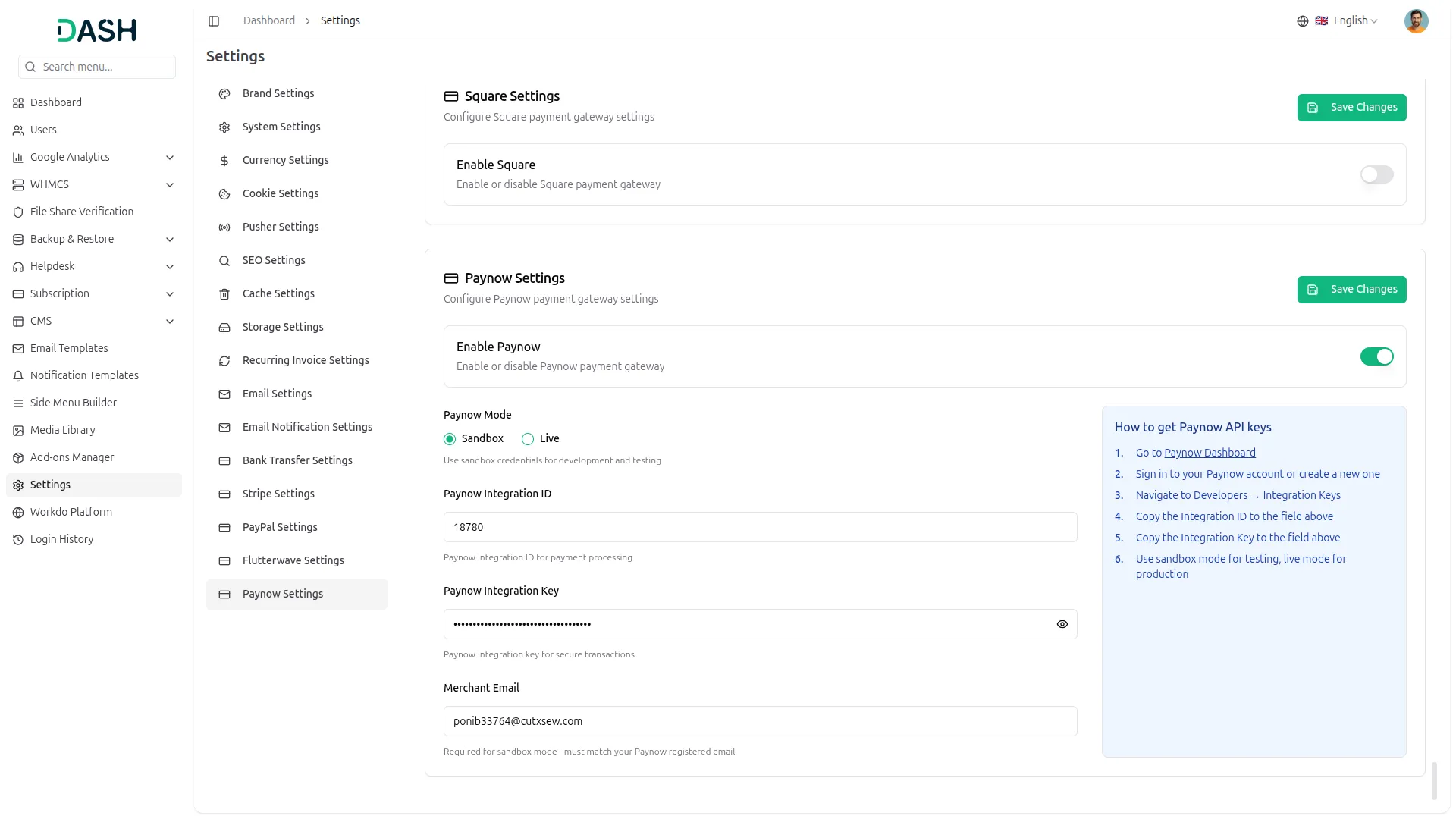
Navigate to the Settings section and select Paynow Settings.
4. Open Paynow Gateway Settings
Scroll down to find the Paynow Payment Gateway option and click to configure it.
5. Enter Required Details
Provide the following details carefully:
- Enable Paynow – Toggle to activate the gateway
- Paynow Mode – Select Sandbox or Live mode
- Integration ID – Enter your Paynow Integration ID
- Integration Key – Enter your Paynow Integration Key
- Merchant Email – Enter your Merchant Email (required for Sandbox mode)
6. Save Settings
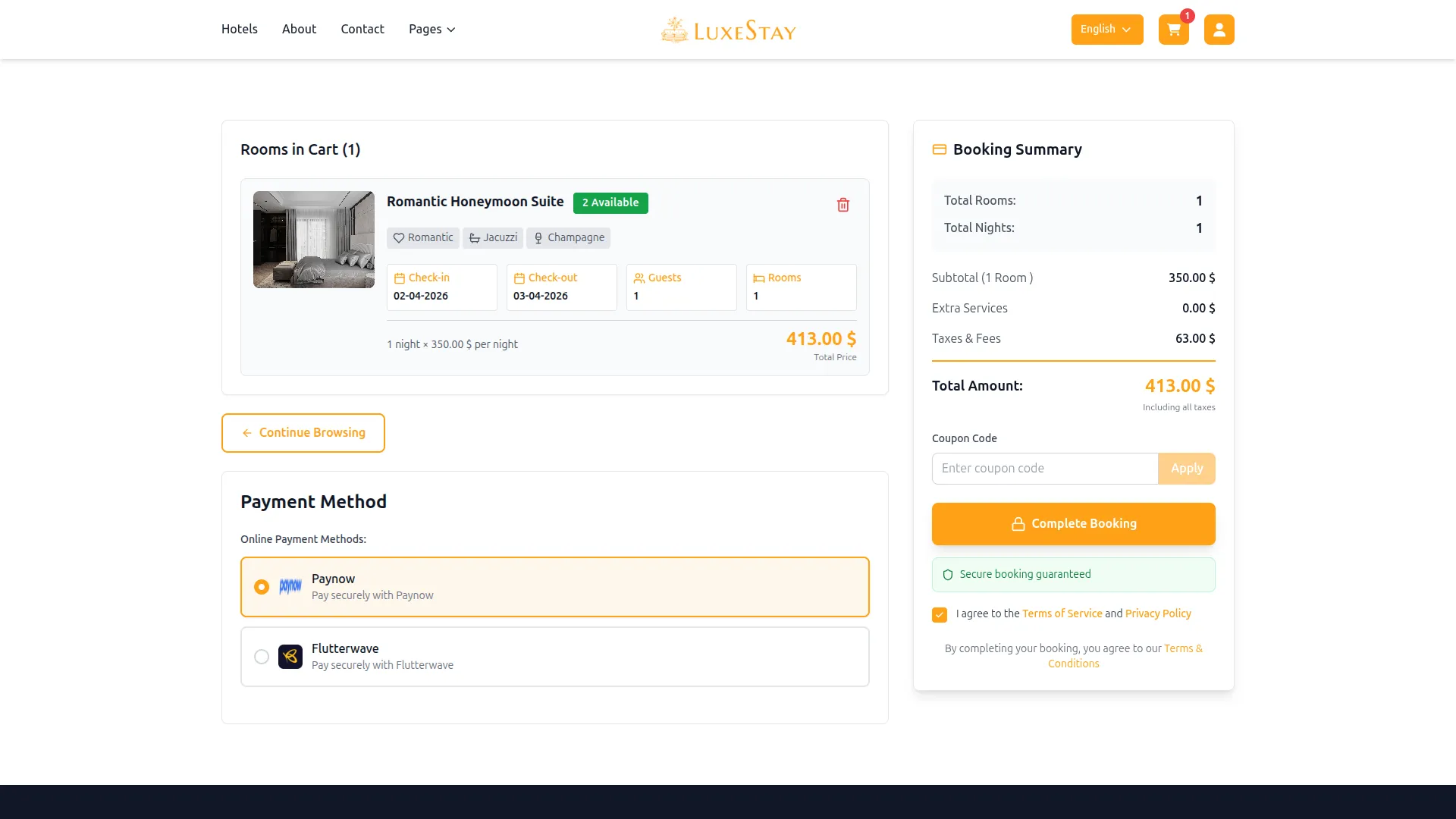
Click Save to apply the configuration. Paynow will now be active across all enabled modules.
This documentation provides a complete overview of the Paynow Payment Gateway integration, covering its key benefits and step-by-step setup process. By integrating Paynow, businesses operating in Zimbabwe can offer customers a reliable, flexible, and secure payment experience while keeping their financial workflows efficient and organized.
Note: The information provided in this documentation is intended for guidance purposes. Please ensure your Paynow account and API credentials are handled securely to guarantee smooth and proper payment processing.
Categories
Related articles
- Contract Template – WorkDo Dash SaaS Add-On Guide
- Compound Service – BookingGo SaaS Add-On Guide
- Property Management – WorkDo Dash SaaS Add-On Guide
- Export Conversations – TicketGo Add-On Guide
- Affiliate Product – eCommerceGo SaaS Add-On Guide
- User Manual – Advocate SaaS
- Collaborative Services – BookingGo SaaS Add-On Guide
- Pabbly Connect – TicketGo Add-On Guide
- PayPay – WorkDo Dash SaaS Add-On Guide
- Language Manager Guide
- Subscribe – eCommerceGo SaaS Add-On Guide
- Cashfree – WorkDo Dash SaaS Add-On Guide
We're Here to Help - Let's Talk
Have questions about our solutions, customization services, or business tools? Our team is here to help you. let's talk.