
SSLCommerz – WorkDo Dash SaaS Add-On Guide
Learn how to configure and manage SSLCommerz integration in WorkDo Dash SaaS easily.
- Supported Countries: Bangladesh, United States, Europe, and India
- Supported Currencies: BDT, USD, EUR, INR
Benefits of SSLCommerz Payment Gateway
Diverse Payment Methods
SSLCommerz accepts payments through a wide variety of channels, including Visa, MasterCard, AMEX, mobile banking platforms like bKash and Nagad, internet banking, and digital wallets, giving every customer a convenient way to pay.
Extensive Bank Network
With support for most major Bangladeshi banks and financial institutions, SSLCommerz ensures broad accessibility and a reliable payment experience for businesses operating in the region.
Real-Time Transaction Confirmation
Every payment made through SSLCommerz is instantly confirmed and updated within the platform, enabling businesses to process orders faster and maintain accurate financial records without delay.
Robust Security Standards
SSLCommerz protects every transaction with strong encryption and built-in fraud prevention mechanisms, ensuring that customer data and business finances remain fully secure at all times.
Effortless Checkout Experience
SSLCommerz offers a clean and intuitive payment interface that reduces friction during checkout, helping businesses achieve higher conversion rates and improved customer satisfaction.
How to Access SSLCommerz Add-On?
- Visit the WorkDo Dash Website Go to https://www.workdo.io to access the WorkDo Dash platform.
- Navigate to Dash SaaS Add-Ons Explore the “Dash SaaS Add-Ons” section to view all available integrations.
- Discover SSLCommerz Add-On Browse the Add-Ons list and locate “SSLCommerz Payment Gateway.”
- Activate the Add-On Click on the Activate button to enable SSLCommerz for your WorkDo Dash account.
Once activated, SSLCommerz becomes available across supported modules based on permissions and settings.
How does SSLCommerz Work?
SSLCommerz serves as a versatile payment gateway by seamlessly integrating with your online platform. Customers are empowered to select their preferred payment method, and SSLCommerz handles the payment transaction with a strong emphasis on security and reliability. The platform features a user-friendly interface and is supported by a responsive customer service team, delivering a dependable and hassle-free payment experience, which makes it a trusted choice for merchants and customers alike.
Super Admin Settings
(Plan Purchase by the Company)
The Super Admin Settings are accessible only to the highest-level administrator. These settings allow the Super Admin to manage company-level subscriptions and payment configurations.
Key Capabilities:
- Purchase or upgrade company subscription plans
- Configure SSLCommerz API credentials for plan payments
- Enable or disable SSLCommerz as a payment gateway
Configuration Path:
Super Admin Login → Settings → SSLCommerz Settings
Company Settings
(Bookings, Beauty Spa, LMS & Other Payments)
Company Settings allow organizations to configure SSLCommerz for receiving payments from customers across multiple modules.
Supported Modules Include:
Configuration Path:
Company Login → Settings → System Settings → SSLCommerz Settings
Company-Level Capabilities:
- Configure SSLCommerz API credentials
- Enable SSLCommerz for selected modules
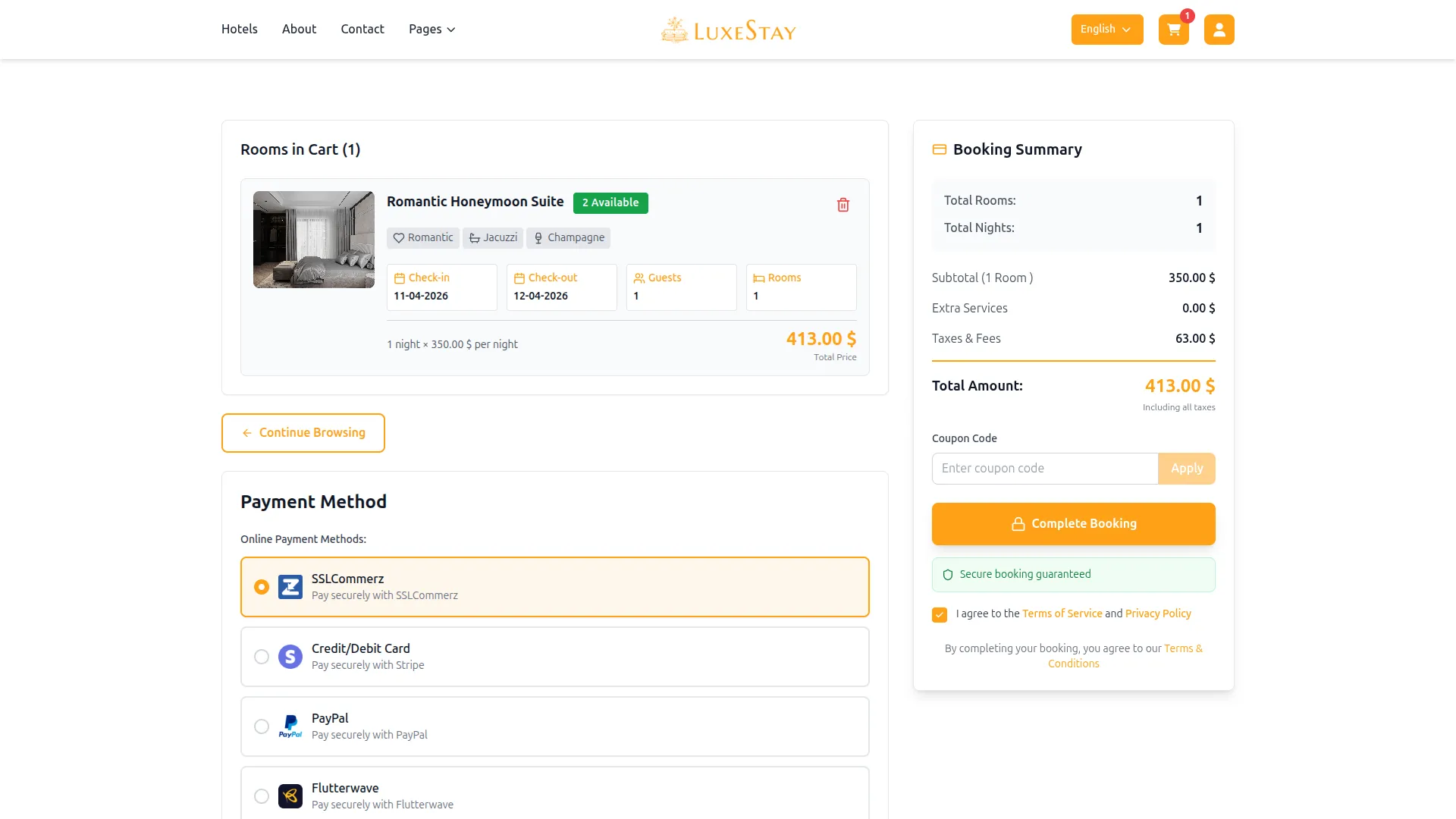
- Accept online payments from customers
- Manage Bookings, Beauty Spa, and service
- Handle tax, coupon, and discount calculations
How to Generate SSLCommerz API Keys?
1. Generate API Key
SSLCommerz payment in Live mode
- Register a Merchant Account (Live Mode)
- Go to the SSLCommerz website: https://www.sslcommerz.com
- Click on “Merchant Signup” or visit: https://developer.sslcommerz.com/registration/
- Fill in your business details and select Live Account.
- Access Your Store Credentials (Store ID & Secret Key)
- First, log in to your merchant account: https://sslcommerz.com/
- After logging in, go to your SSLCommerz Live Dashboard
- Navigate to the “My Stores” section in the menu.
- You will see your Store ID and can generate or copy your API credentials (which include the Store Password / Secret Key).
SSLCommerz payment in Sandbox mode
- Create a Sandbox (Test) Account
- Visit the SSLCommerz Developer Sandbox Portal: https://sandbox.sslcommerz.com
- Click on “Register Now” or go directly to: https://developer.sslcommerz.com/registration/
- Choose “Sandbox” while filling out the form.
- Submit the form. After registration, log in to: https://sandbox.sslcommerz.com
- Get Store ID and Secret Key
- Please check your email to get the store ID and secret key(password) if not received any emails regarding getting the store ID, then follow the steps below.
- Go to “Dashboard”.
- Navigate to “My Stores” on the sidebar.
- You will see a default store listed.
- Click on the store to view:
- Store ID: Your store ID
- Store Password (Secret Key): password
2. Configure SSLCommerz Gateway in (Product Name):
- Log in to your (Product Name) account with administrator credentials.
- Navigate to the settings page.
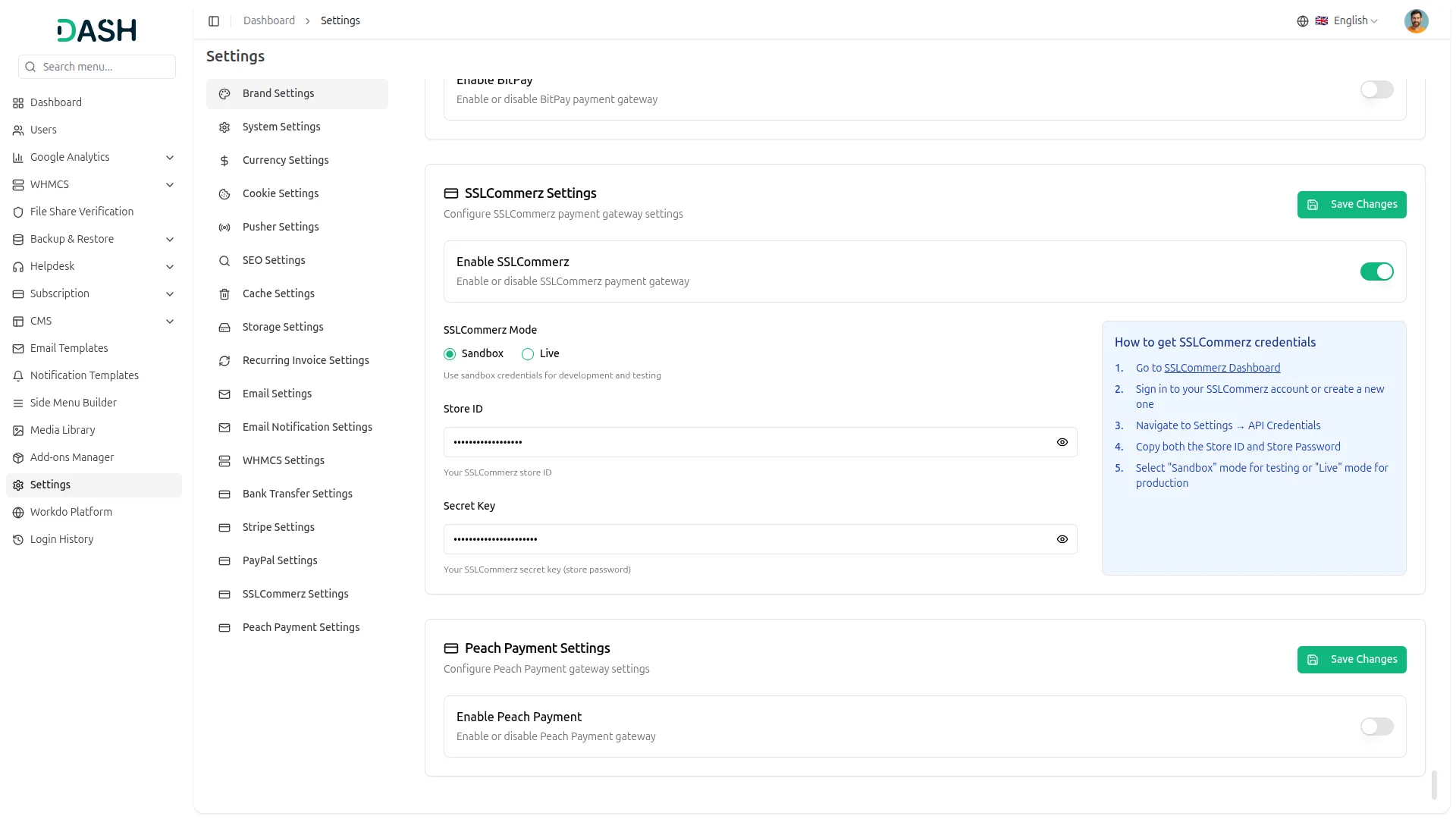
3. Set Up SSLCommerz Gateway:
- Scroll down the page until you find the SSLCommerz Gateway option.
- Click on the SSLCommerz Gateway to access its configuration settings.
4. Enter Required Details:
In the settings, provide the following essential details:
- Store ID
- Secret Key
5. Save Your Settings:
- After entering the necessary details, save the settings to activate the SSLCommerz Payment Gateway within your platform.
- This detailed documentation overviews SSLCommerz Payment Integration, its benefits, and the integration process. By integrating SSLCommerz, businesses and organizations can offer their customers a secure and flexible payment experience while streamlining their payment processes.
Note: The SSLCommerz Add-On is a paid feature and can be accessed by users who have purchased it. By integrating the SSLCommerz Add-On into your WorkDo Dash SaaS account, you’ll provide a reliable and user-friendly payment gateway that supports global transactions.
Categories
Related articles
- Sign in with Facebook – WorkDo Dash SaaS Add-On Guide
- Zapier – BookingGo SaaS Add-On Guide
- eCommerceGo SaaS Add-On Setup Guide
- Webhook – WorkDo Dash SaaS Add-On Guide
- Rocket.Chat Credentials Generation Guide
- PhonePe – BookingGo SaaS Add-On Guide
- Medical Lab Management – WorkDo Dash SaaS Add-On Guide
- Optical Eyecare Center – WorkDo Dash SaaS Add-On Guide
- Whereby Meeting – WorkDo Dash SaaS Add-On Guide
- Authorize.Net – BookingGo SaaS Add-On Guide
- LinePay – BookingGo SaaS Add-On Guide
- Pusher Configuration Guide
We're Here to Help - Let's Talk
Have questions about our solutions, customization services, or business tools? Our team is here to help you. let's talk.