
Paiement Pro – WorkDo Dash SaaS Add-On Guide
Learn how to configure and manage Paiement Pro payment integration in Dash SaaS.
Supported Countries: United States, United Kingdom, Canada, Australia, Germany, France, Spain, Italy, Netherlands, Switzerland.
Supported Currencies USD, EUR, GBP, CAD, AUD, CHF, JPY, NZD, SGD, HKD.
Benefits of Paiement PRO Payment Gateway:
Strong Transaction Security
Paiement PRO places security at the forefront of every transaction, employing robust protective measures to ensure that all online payments are processed safely and reliably for both merchants and their customers.
Versatile Payment Method Support
Paiement PRO supports multiple payment methods, allowing customers to choose the most convenient way to pay.
Broad Global Reach
With support across multiple countries and currencies, Paiement PRO enables businesses to cater to a diverse and internationally distributed customer base, expanding their market presence without geographical limitations.
Seamless Integration & Reliable Experience
Paiement PRO offers a smooth and straightforward integration process backed by a user-friendly interface and dependable customer support, ensuring a consistently pleasant and efficient payment experience for all users.
How Paiement PRO Works?
Paiement PRO seamlessly integrates into the WorkDo Dash SaaS ecosystem, serving businesses worldwide with its versatile payment solutions. Designed to meet the needs of diverse industries and regions, Paiement PRO ensures secure online transactions for businesses of all sizes. Whether accepting payments through websites, mobile apps, or other platforms, Paiement PRO offers a reliable payment gateway that supports various currencies and payment methods, facilitating smooth transactions for businesses globally.
How to Access Paiement Pro Add-On?
- Visit the WorkDo Dash Website:
Go to https://workdo.io/ to access the WorkDo Dash platform. - Navigate to Dash SaaS Add-Ons:
Explore the “Dash SaaS Add-Ons” section to view all available integrations. - Discover Paiement PRO Add-On:
Browse the Add-Ons list and locate “Paiement PRO Payment Gateway.” - Activate the Add-On:
Click on the Activate button to enable Paiement PRO for your WorkDo Dash account.
Once activated, Paiement PRO becomes available across supported modules based on permissions and settings.
Super Admin Settings
(Plan Purchase by the Company)
The Super Admin Settings are accessible only to the highest-level administrator. These settings allow the Super Admin to manage company-level subscriptions and payment configurations.
Key Capabilities:
- Purchase or upgrade company subscription plans
- Configure Paiement PRO credentials for plan payments
- Enable or disable Paiement PRO as a payment gateway
Configuration Path:
Super Admin Login → Settings → Paiement PRO Settings
Company Settings
(Bookings, Beauty Spa, LMS & Other Payments)
Company Settings allow organizations to configure Paiement PRO for receiving payments from customers across multiple modules.
Supported Modules Include:
Configuration Path:
Company Login → Settings → Paiement PRO Settings
Company-Level Capabilities:
- Configure Paiement PRO credentials
- Enable Paiement PRO for selected modules
- Accept online payments from customers
- Manage Bookings, Beauty Spa, and service
- Handle tax, coupon, and discount calculations
How to Generate the API Key?
1. Generate API Key:
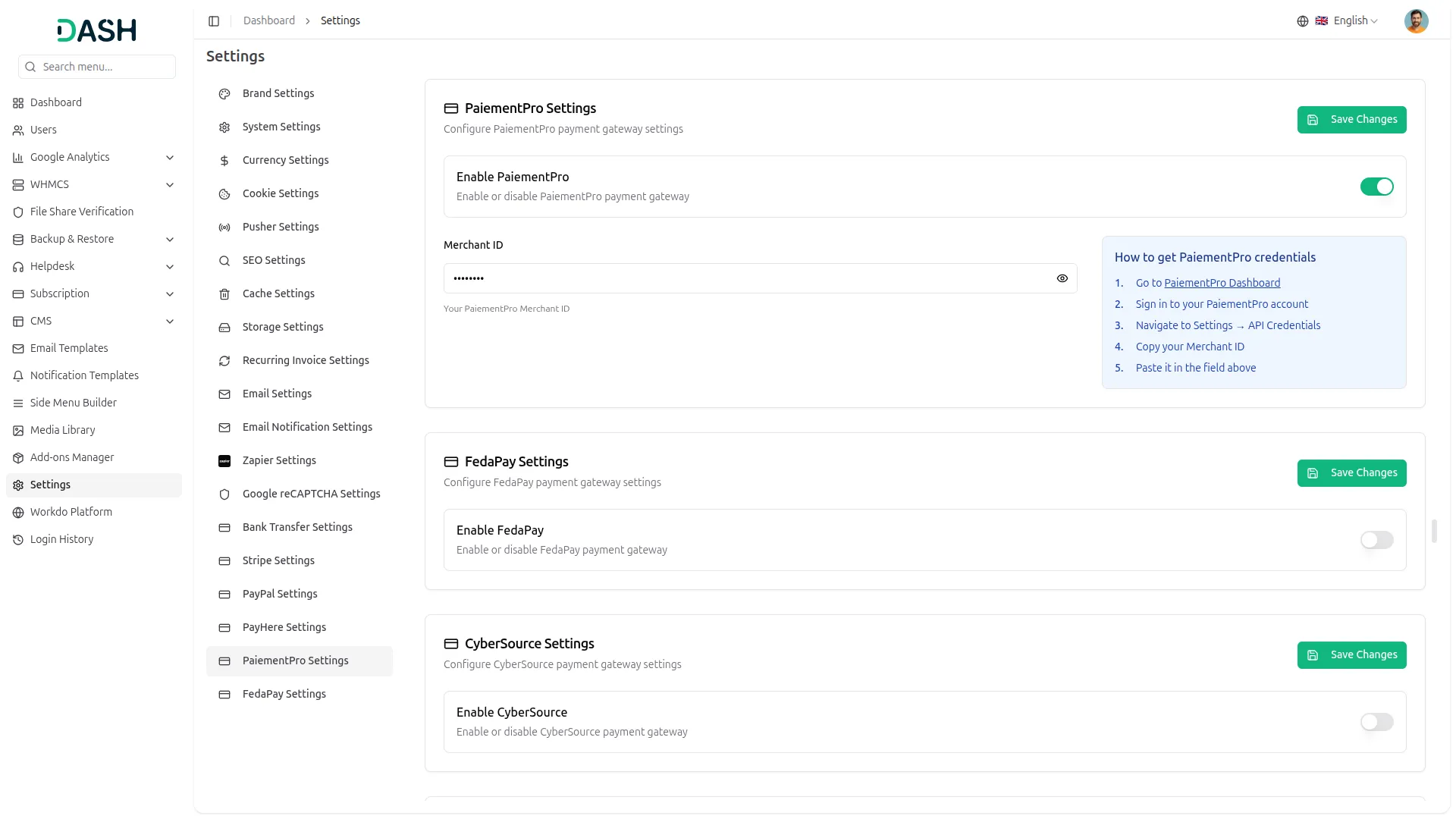
- Log in to your Paiement PRO space and navigate to Account Settings, Profile, or API/access keys. Many payment platforms display your Merchant ID right there
2. Configure Paiement PRO Gateway in (Product Name):
- Log in to your (Product Name) account with administrator credentials.
- Navigate to the settings page.
3. Access Payment Settings
- Within the settings page, locate and select the “Paiement PRO” option.
4. Set Up Paiement PRO Gateway:
- Scroll down the page until you find the Paiement PRO Gateway option.
- Click on the Paiement PRO Gateway to access its configuration settings.
5. Enter Required Details:
In the settings, provide the following essential details:
- Merchant ID
6. Save Your Settings:
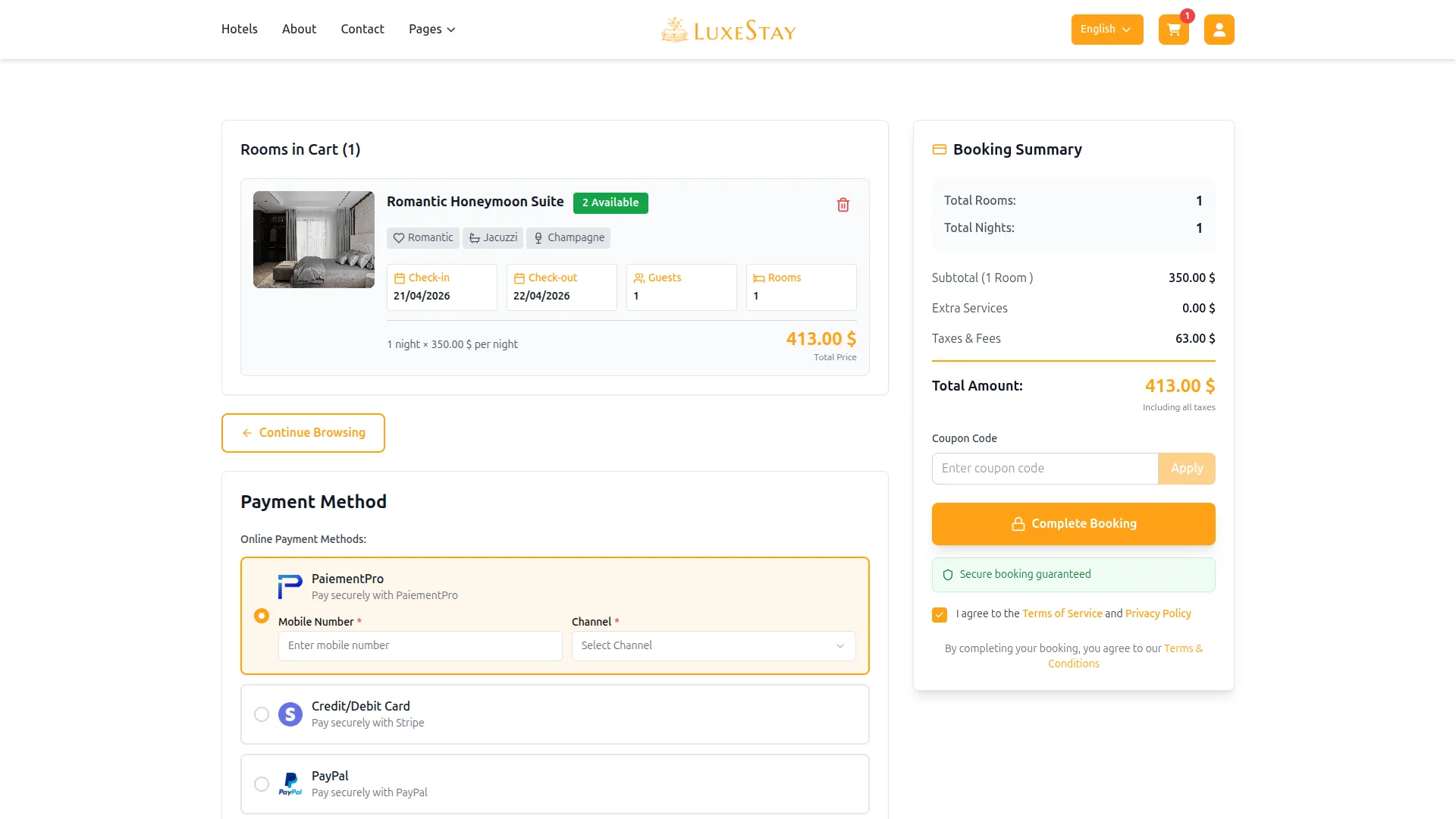
- After entering the necessary details, save the settings to activate the Paiement PRO Payment Gateway within your (Product Name) platform.
By following these steps, you can seamlessly integrate Paiement PRO into your Dash SaaS platform, providing a secure and reliable payment gateway for online transactions. The Paiement PRO Integration Add-On is a valuable feature, offering enhanced payment processing capabilities for Dash SaaS users. For further assistance, refer to the provided documentation or reach out to Paiement PRO’s support team.
Note: The Paiement PRO Add-On is a paid feature and can be accessed by users who have purchased it. By integrating the Paiement PRO Add-On into your WorkDo Dash SaaS account, you’ll provide a reliable and user-friendly payment gateway that supports global transactions.
Categories
Related articles
- Paytm – BookingGo SaaS Add-On Guide
- Sign in with Outlook – WorkDo Dash SaaS Add-On Guide
- Facebook Post – WorkDo Dash SaaS Add-On Guide
- Suggestion Box – WorkDo Dash SaaS Add-On Guide
- Pabbly Connect – WorkDo Dash SaaS Add-On Guide
- Innovation Center – WorkDo Dash SaaS Add-On Guide
- Zoom Meeting – BookingGo SaaS Add-On Guide
- Bulk Appointments – BookingGo SaaS Add-On Guide
- Team Workload – WorkDo Dash SaaS Add-On Guide
- Microsoft To Do – WorkDo Dash SaaS Add-On Guide
- Xendit – BookingGo SaaS Add-On Guide
- Recent Orders – eCommerceGo SaaS Add-On Guide
We're Here to Help - Let's Talk
Have questions about our solutions, customization services, or business tools? Our team is here to help you. let's talk.