
Repair Management Integration in Dash SaaS
Improve repair order processes and simplify invoicing with the Repair Management Integration module in Dash SaaS. Optimize your operations now.
Introduction
The Repair Management Add-On is designed to simplify and centralize the entire repair workflow, from creating service requests to tracking repair progress, managing technicians, generating invoices, and maintaining warranty records. It enables businesses to handle repair operations in a structured and efficient manner while keeping all relevant information organized and accessible. Whether you’re coordinating in-house repairs or managing service tasks through a team, this Add-On provides a complete set of tools to support your process. Navigate the interface, manage repair orders, assign tasks, and maintain accurate records throughout the repair lifecycle.
How To Install The Repair Management Add-On?
To Set Up the Repair Management Add-On you can follow this link: Setup Add-On
How to use the Repair Management Add-On?
- After purchasing the Repair Management Add-On, go to the sidebar and use the search bar to find “Repair Management.” You will find four sub-pages under this section: Order Requests, Repair Invoices, Technicians, and Warranties, each designed to help you manage different stages of the repair workflow.
Repair Order Requests Page
- This page allows you to create, track, and manage all repair orders. To create a new repair order request, click on the Create button and enter key information such as product name, quantity, customer’s name, email, mobile number, date, expiry date, and assign a technician from the dropdown.
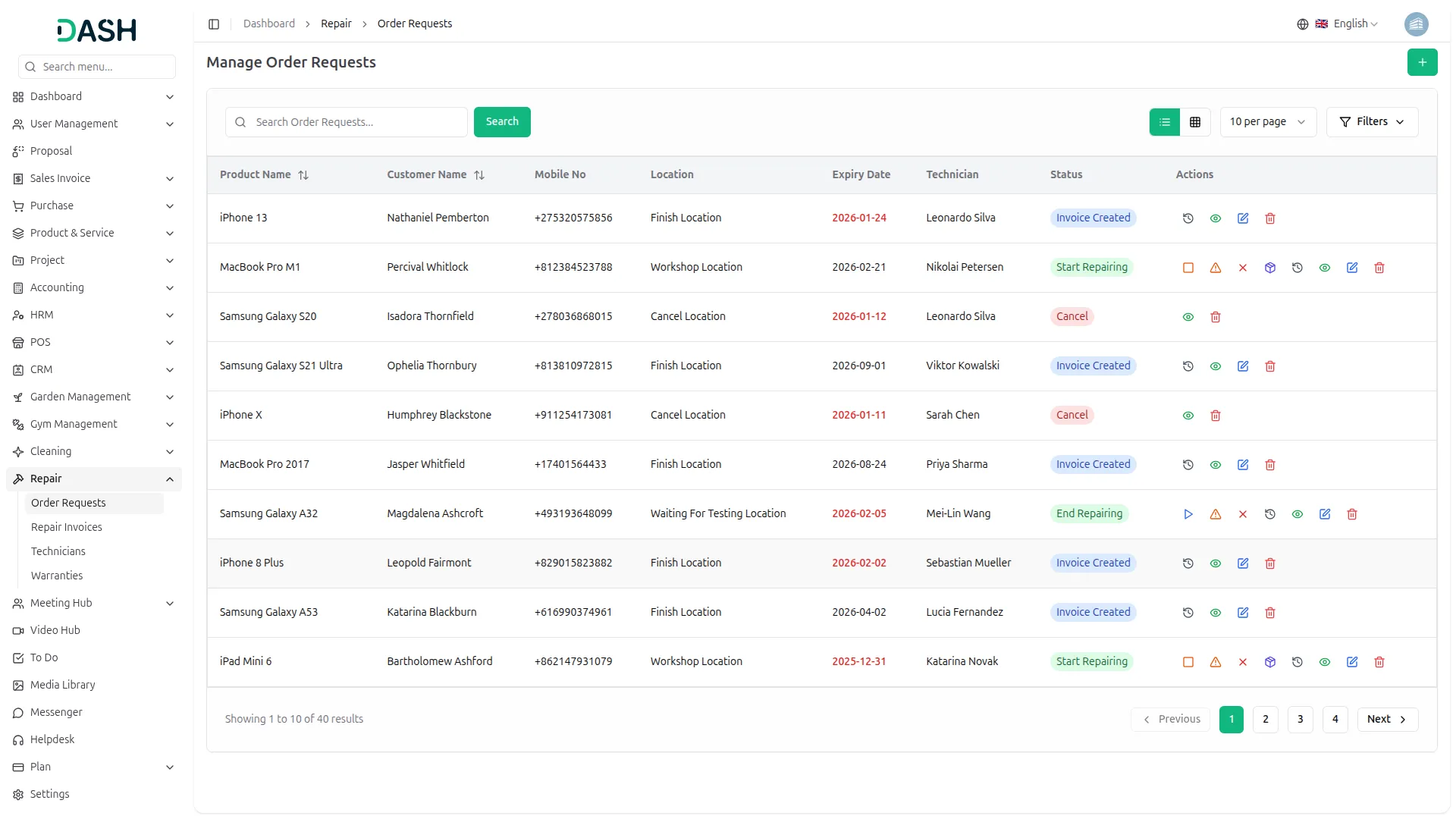
- Once created, each order appears in a list view with details like product name, customer information, location, expiry dates, assigned technician, and status.
- The Action column includes buttons that let you perform actions like view and edit request, starting or ending the repair process, starting or ending testing, viewing the movement history, editing product parts, marking the product as irreparable, canceling the order, add parts, viewing movement logs, and deleting the request if needed.
Repair Invoices
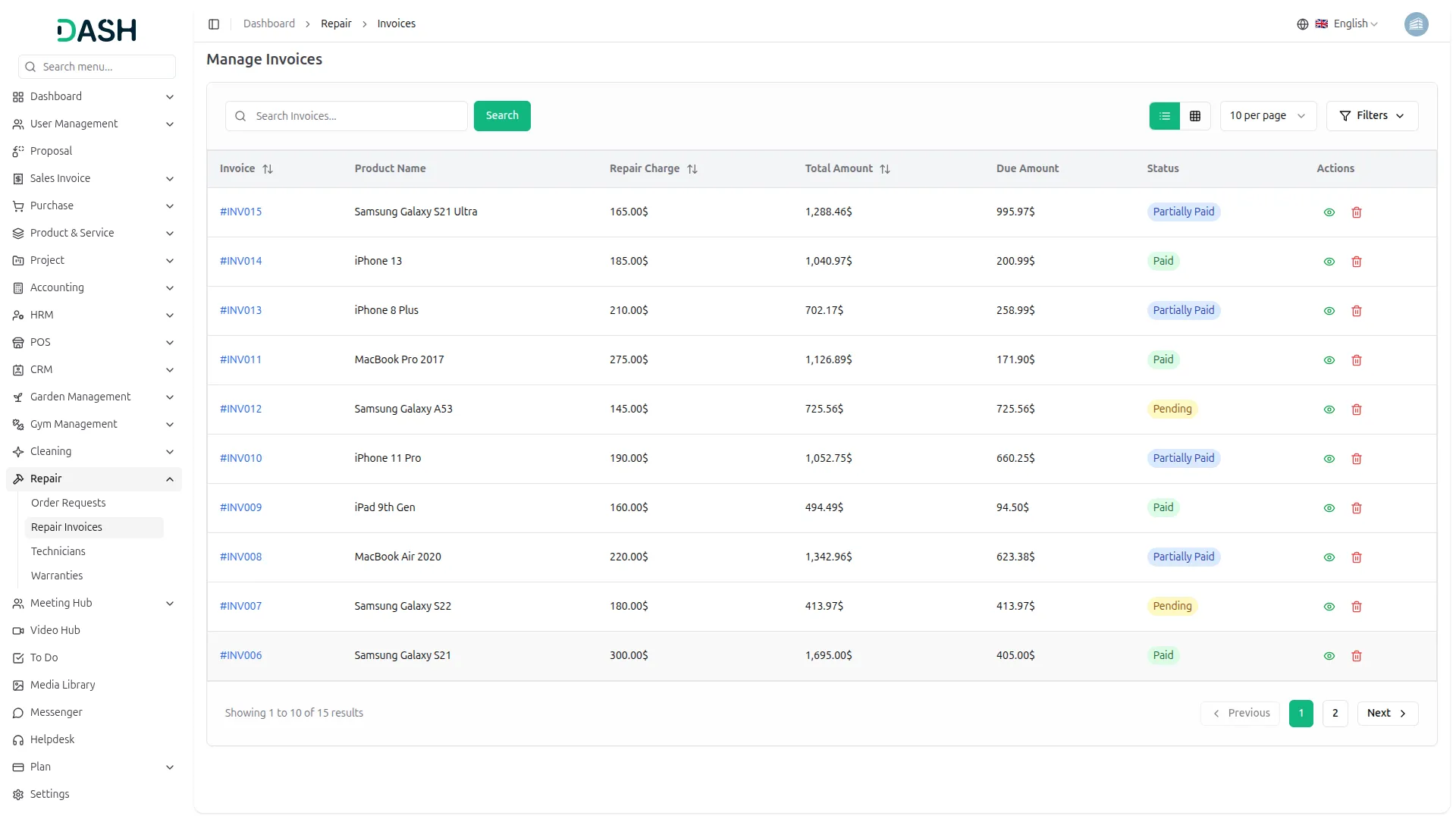
- This page lists all invoices generated from repair orders and displays essential information such as invoice ID, product name, repair charges, total amount, due amount, and payment status.
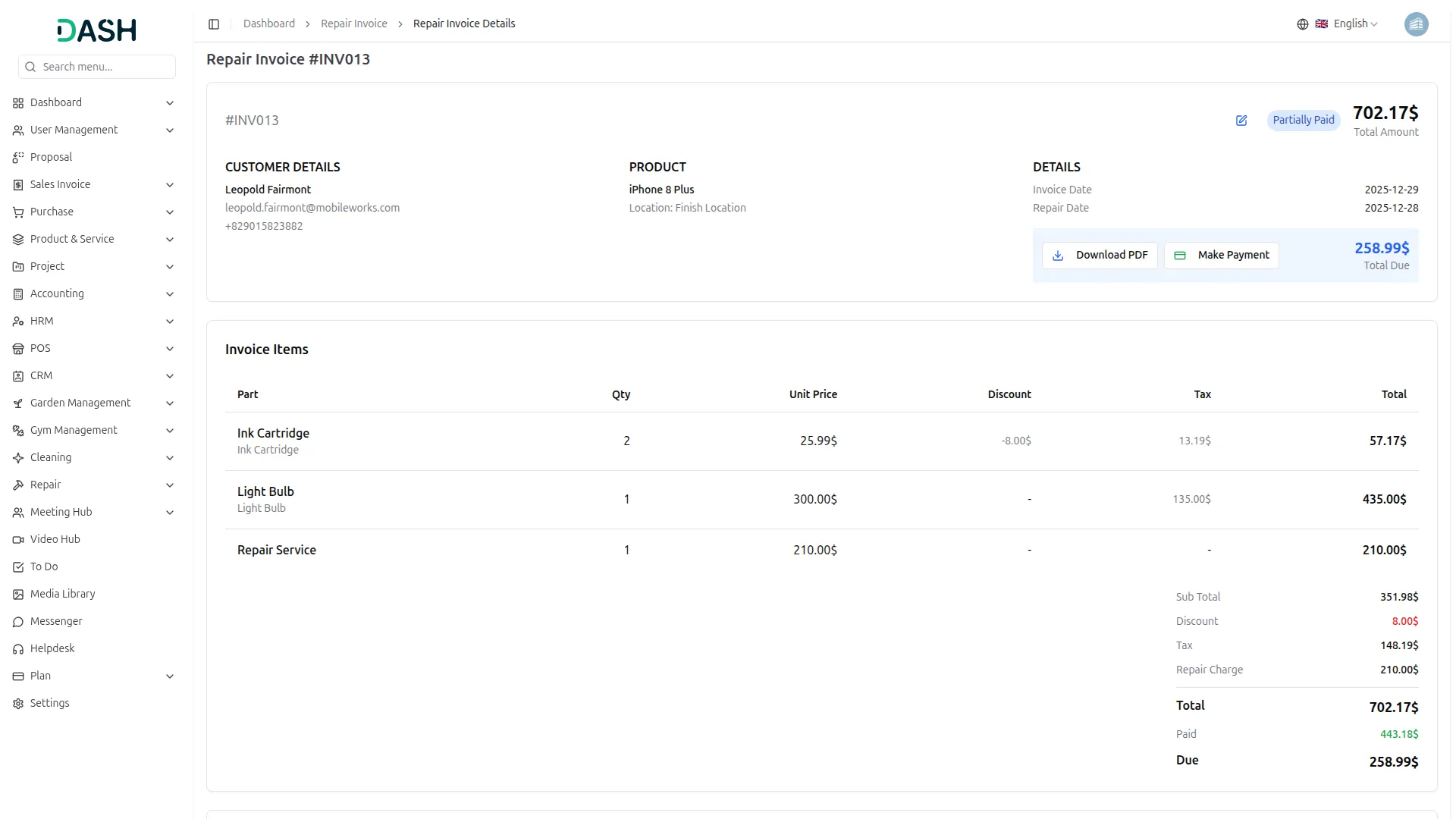
- You can click the View button to access full invoice details, make changes, process payments, download the invoice, and view the complete payment summary all in one place.
Technicians
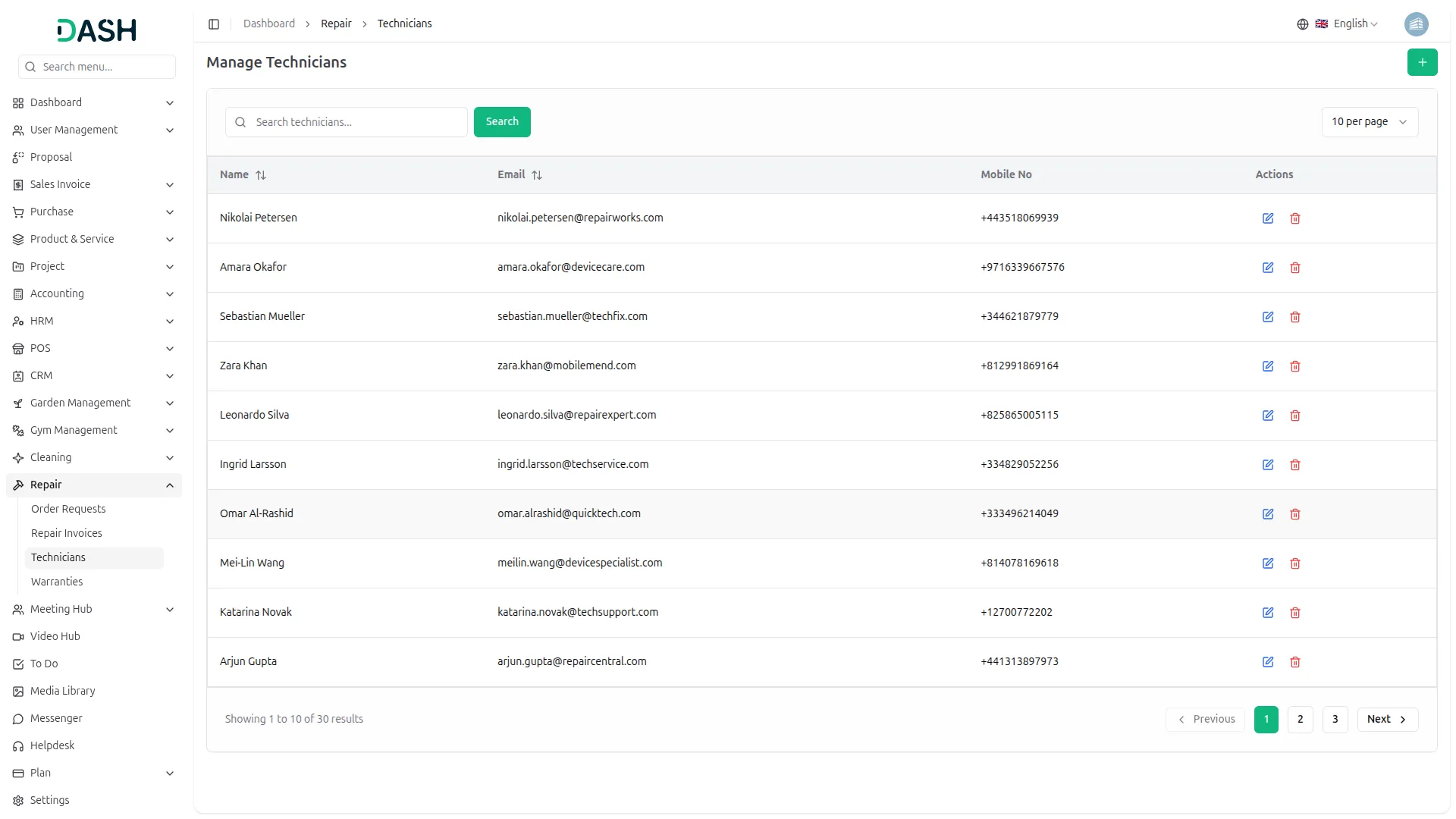
- This page allows you to manage technicians involved in the repair process. To add a new technician, click the Create button and enter their name, email, and mobile number.
- All added technicians appear in a list, and you can easily edit or delete their details whenever needed.
Warranties
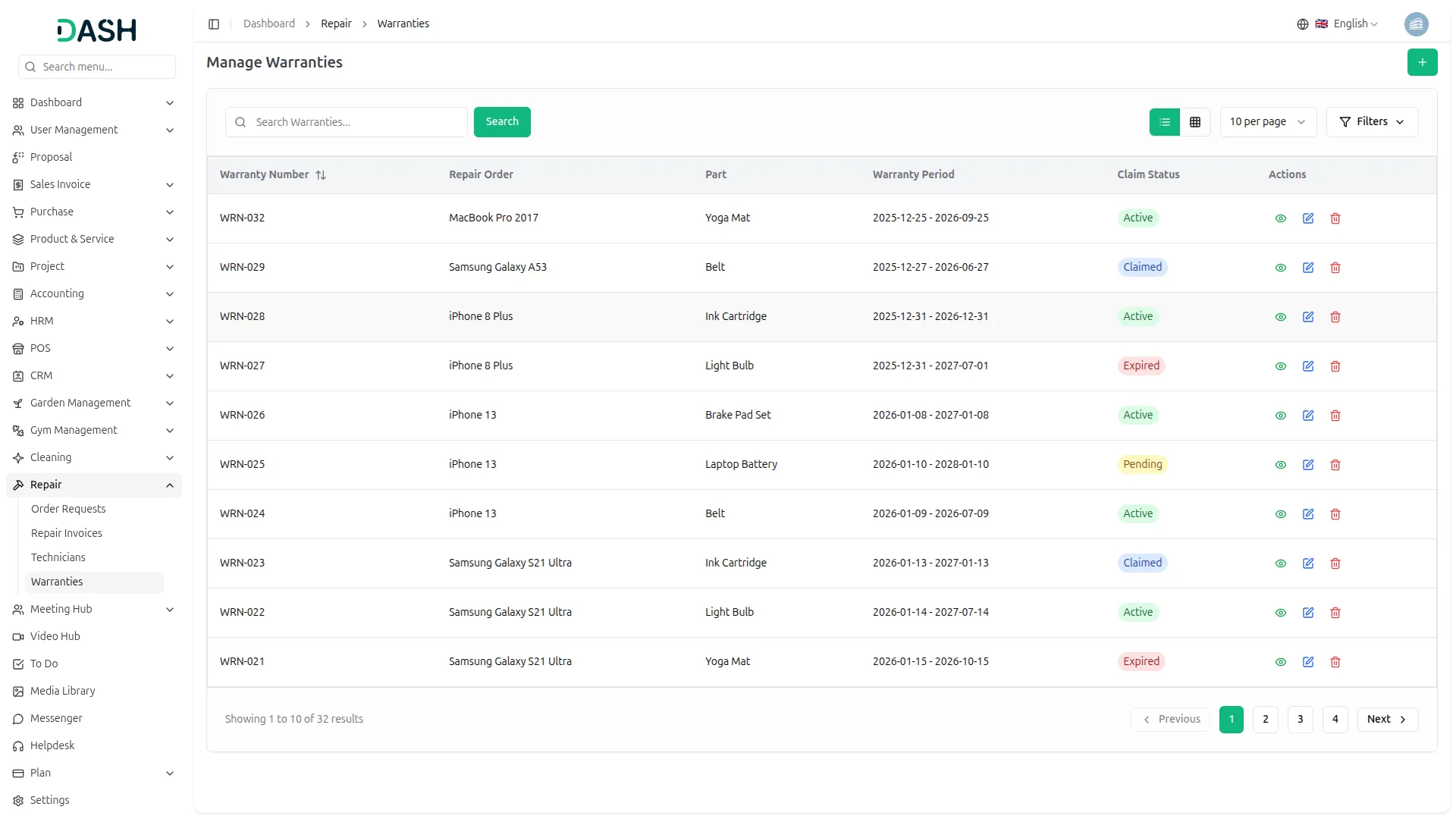
- The warranties section lets you link warranty details to specific repair orders. Click the Create button to get started, then select a repair order and product part, and enter the warranty number, Warranty Period, warranty terms, and claim status.
- Once added, warranties are listed with all relevant details, and you can view, edit, or delete them as required.
Categories
Related articles
- PayNow Payment Gateway Integration in Dash SaaS
- Rocket Chat Add-On Documentation
- Reminder Module Integration in Dash SaaS
- Facebook Post Integration in Dash SaaS
- Google Meet Integration in Dash SaaS
- Performance Indicator Integration in Dash SaaS
- SinchSMS Integration in Detailed Documentation
- Wizzchat Messenger Module Detailed Documentation
- User Manual – WorkDo Dash SaaS
- Twilio Integration in Dash SaaS
- Nepalste Integration in Dash SaaS
- Sports Club & Academy Management in Dash SaaS
Reach Out to Us
Have questions or need assistance? We're here to help! Reach out to our team for support, inquiries, or feedback. Your needs are important to us, and we’re ready to assist you!


Need more help?
If you’re still uncertain or need professional guidance, don’t hesitate to contact us. You can contact us via email or submit a ticket with a description of your issue. Our team of experts is always available to help you with any questions. Rest assured that we’ll respond to your inquiry promptly.
Love what you see?
Do you like the quality of our products, themes, and applications, or perhaps the design of our website caught your eye? You can have similarly outstanding designs for your website or apps. Contact us, and we’ll bring your ideas to life.