
Easebuzz – WorkDo Dash SaaS Add-On Guide
Learn how to configure and manage Easebuzz integration in WorkDo Dash SaaS easily.
Supported Country: India
Supported Currencies: INR, USD, EUR, GBP, CAD, AUD, More+
Benefits of EaseBuzz Payment Gateway:
Enhanced Security and Fraud Prevention:
EaseBuzz boasts robust fraud management tools like Decision Manager, which analyzes transactions in real time to identify and block fraudulent activity. This protects you from chargebacks and financial losses.
Global Reach and Payment Flexibility:
EaseBuzz supports a wide range of payment methods across the globe. This allows you to accept payments from customers worldwide, catering to their preferred methods and increasing your sales potential.
Streamlined PCI Compliance:
EaseBuzz handles sensitive payment data on its secure servers, significantly reducing your PCI compliance burden. This saves you time, resources, and potential fines associated with non-compliance.
Improved Customer Experience:
A seamless checkout process is crucial. EaseBuzz offers features like tokenization for secure storage of customer payment information, leading to faster and more convenient checkouts for your customers. This translates to higher customer satisfaction and potentially, increased sales.
How To Access EaseBuzz Add-On?
- Visit the Dash website:
Go to https://workdo.io/ to access the Dash platform. - Navigate to Dash Add-Ons:
Explore the “Dash Add-Ons” section on the website to discover available Add-Ons. - Discover EaseBuzz:
Browse the list of available Add-Ons and find the “EaseBuzz Add-On”. - Activate the Add-On:
Click on the “Activate” button next to the EaseBuzz Add-On to enable it for your Dash account.
How Does EaseBuzz Work?
EaseBuzz Payment Gateway works by integrating with a business’s website or mobile application, enabling customers to make payments using debit cards. It securely processes these transactions, ensuring data protection and efficient payment processing. This seamless system enhances payment acceptance and contributes to a smoother payment experience for both businesses and customers.
Super Admin Settings
(Plan Purchase by the Company)
The Super Admin Settings are accessible only to the highest-level administrator. These settings allow the Super Admin to manage company-level subscriptions and payment configurations.
Key Capabilities:
- Purchase or upgrade company subscription plans
- Configure EaseBuzz API credentials for plan payments
- Enable or disable EaseBuzz as a payment gateway
Configuration Path:
Super Admin Login → Settings → EaseBuzz Settings
Company Settings
(Bookings, Beauty Spa, LMS & Other Payments)
Company Settings allow organizations to configure EaseBuzz for receiving payments from customers across multiple modules.
Supported Modules Include:
Configuration Path:
Company Login → Settings → EaseBuzz Settings
Company-Level Capabilities:
- Configure EaseBuzz API credentials
- Enable EaseBuzz for selected modules
- Accept online payments from customers
- Manage Bookings, Beauty Spa, and service
- Handle tax, coupon, and discount calculations
How To Generate a Key?
1. Generate API Key
- Create an EaseBuzz Merchant Account: Go to easebuzz.in and register for a business account.
- Access API Credentials: After logging into your dashboard, navigate to the Settings > API Keys section.
- Generate the Keys: Create and copy your Merchant Key and Salt Key.
2. Configure EaseBuzz Gateway In (Product Name)
- Log in to your (Product Name) account with administrator credentials.
- Navigate to the settings page.
3. Access Payment Settings
- Within the settings page, locate and select the “Payment Settings” option.
4. Set Up EaseBuzz Gateway
- Scroll down the page until you find the EaseBuzz Gateway option.
- Click on the EaseBuzz Gateway to access its configuration settings.
5. Enter Required Details
In the EaseBuzz settings, provide the following essential details
- Merchant Key
- Salt Key
- Easebuzz Environment Name
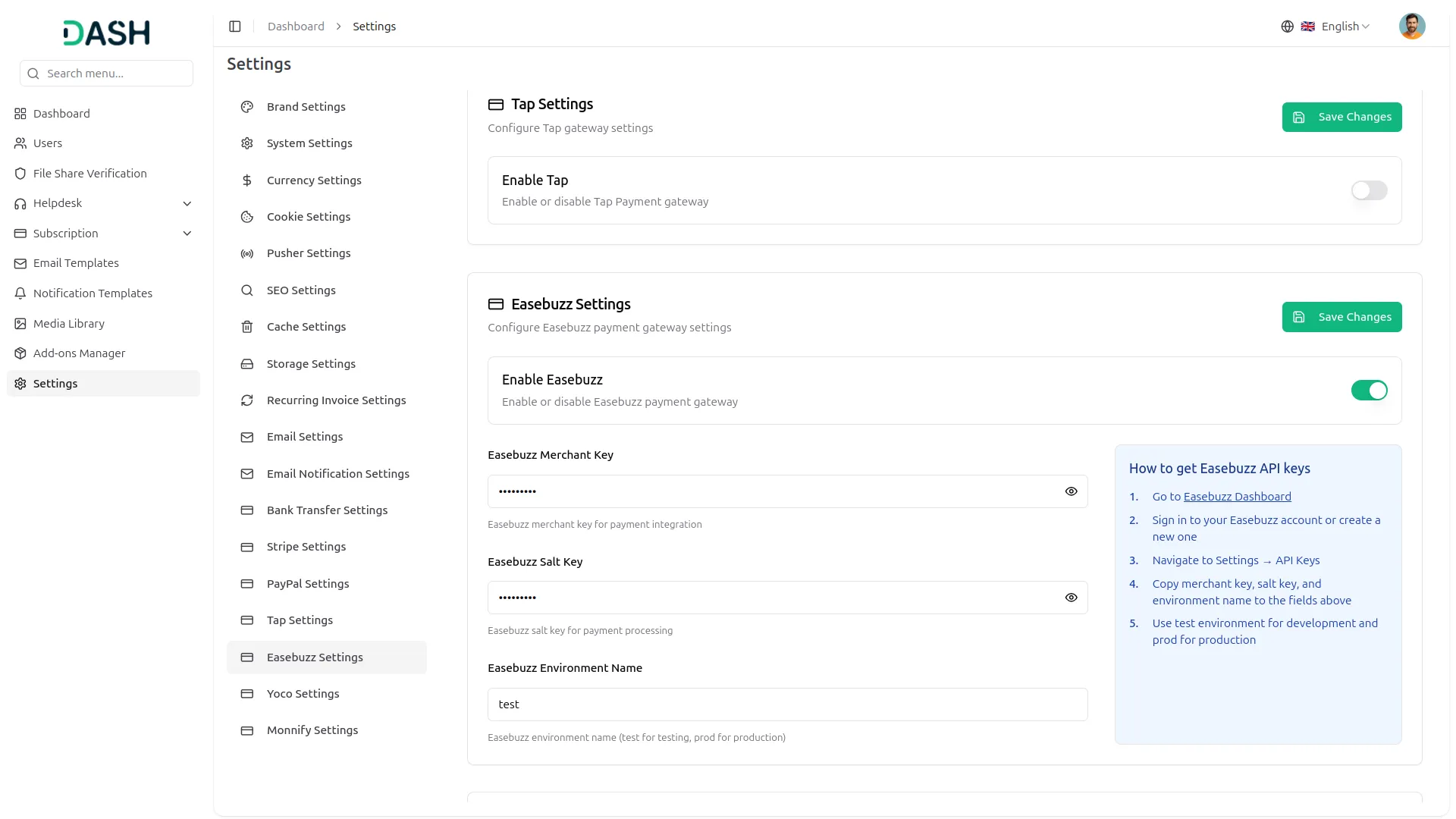
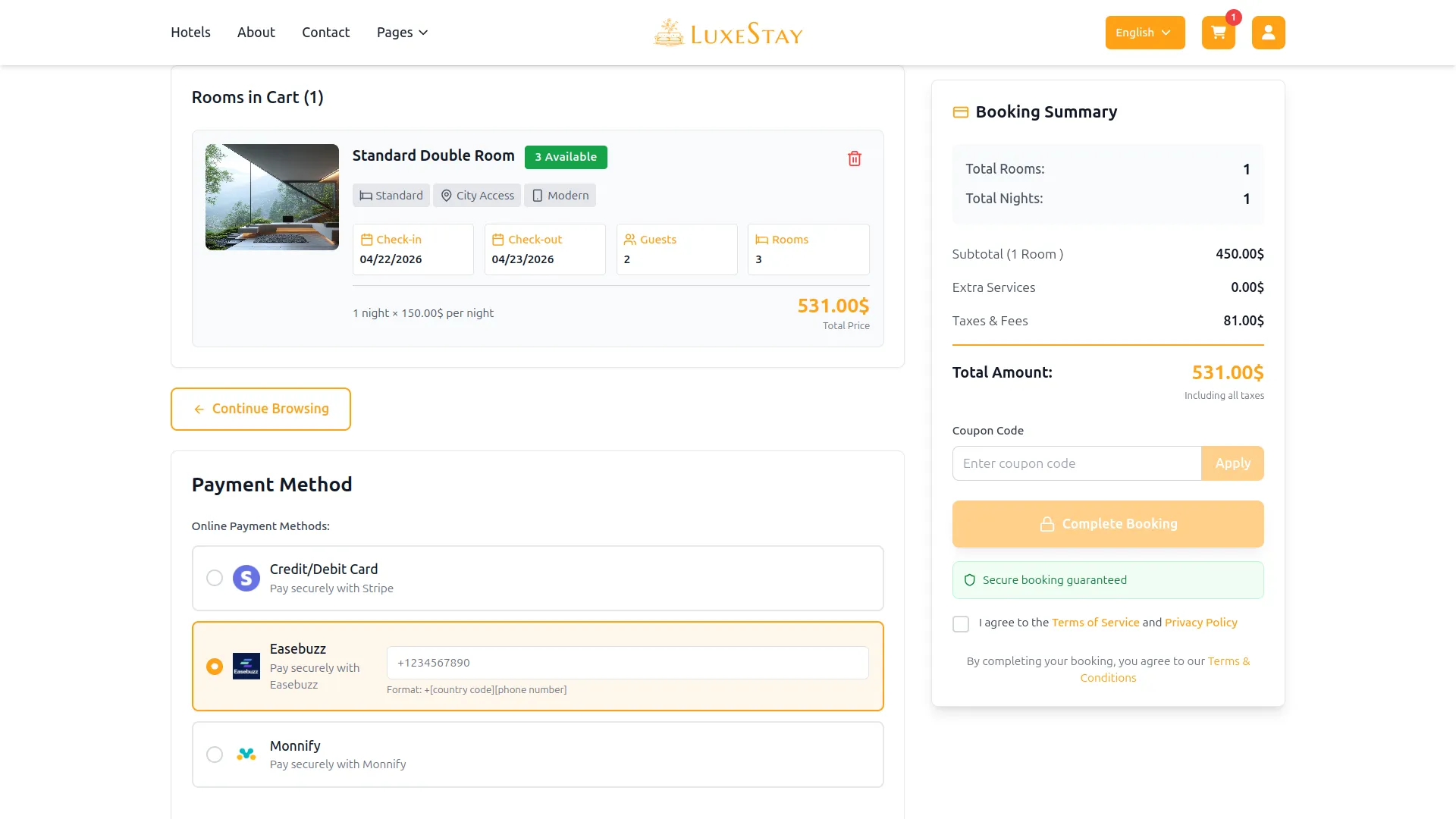
6. Save Your Settings
- After entering the necessary details, save the settings to activate the EaseBuzz Payment Gateway within your (Product Name) platform.
This detailed documentation provides an overview of the EaseBuzz Payment Gateway Add-On, its EaseBuzzs, and the Add-On process. By integrating EaseBuzz Payment Gateway, businesses in Bahrain can offer their customers a secure and efficient payment experience while streamlining their payment processes
Note: The EaseBuzz Add-On is a paid feature and can be accessed by users who have purchased it. By integrating the EaseBuzz Add-On into your Dash SaaS account, you’ll provide a reliable and user-friendly payment gateway that supports global transactions.
Categories
Related articles
- WhatsApp API Permanent Access Token Generation Guide
- Product Barcode – eCommerceGo SaaS Add-On Guide
- HRM – WorkDo Dash SaaS Add-On Guide
- Auction Product – eCommerceGo SaaS Add-On Guide
- Mailchimp – TicketGo Add-On Guide
- Music Institute – WorkDo Dash SaaS Add-On Guide
- Notes – WorkDo Dash SaaS Add-On Guide
- CoinPayments – BookingGo SaaS Add-On Guide
- Internal Knowledge – WorkDo Dash SaaS Add-On Guide
- PayU – BookingGo SaaS Add-On Guide
- Slack – WorkDo Dash SaaS Add-On Guide
- Consultancy – WorkDo Dash SaaS Add-On Guide
We're Here to Help - Let's Talk
Have questions about our solutions, customization services, or business tools? Our team is here to help you. let's talk.