
BlueSnap – WorkDo Dash SaaS Add-On Guide
Learn how to configure and manage BlueSnap integration in WorkDo Dash SaaS easily.
Supported Country: Albania, Algeria, Andorra, Angola, Antigua and Barbuda, Argentina, Armenia, Australia, Austria, Azerbaijan, Bahamas, Bahrain, Bangladesh, Barbados, and more.
Supported Currency: AUD, CAD, EUR, GBP, USD, INR, ILS, and more.
Benefits of BlueSnap Payment Gateway
Truly Global Payment Acceptance
BlueSnap empowers businesses to accept payments from customers across more than 200 countries in over 100 currencies, removing geographical barriers and making it significantly easier to serve a diverse international customer base.
Unified Transaction Management
BlueSnap brings transactions, subscription billing, and fraud protection together within a single centralized platform, simplifying financial operations and giving businesses a comprehensive and well-organized view of all payment activity.
Higher Approval Rates Through Local Acquiring
By leveraging its extensive global acquiring network, BlueSnap helps businesses achieve better payment approval rates and lower processing fees, directly improving revenue potential and reducing unnecessary transaction losses.
Developer-Friendly Integration Tools
BlueSnap offers flexible APIs and SDKs that make it straightforward for development teams to customize and implement tailored payment solutions that align with their specific platform requirements and business workflows.
Robust Security & Regulatory Compliance
BlueSnap adheres to PCI-DSS and GDPR compliance standards, ensuring that all payment data is handled with the highest level of security and that businesses remain protected against legal and regulatory risks.
How to Access BlueSnap Add-On?
Ready to enhance your online payment capabilities with BlueSnap? Follow these simple steps to get started:
- Visit WorkDo Website: Head over to https://workdo.io/ and explore the extensive range of Dash SaaS Add-Ons.
- Discover BlueSnap:Navigate to the “Dash SaaS Add-Ons” section and locate the “BlueSnap Add-On”.
- Activate the Add-On: Click the “Activate” button next to the BlueSnap Add-On to enable it for your WorkDo Dash account.
How Does BlueSnap Work?
BlueSnap integration enables users to accept cryptocurrency payments directly through a self-hosted, secure, and open-source payment gateway. This integration allows businesses to process Bitcoin and other supported cryptocurrencies without relying on third-party intermediaries, giving full control over transactions and funds. Users can manage wallet settings, monitor payment statuses in real-time, and customize payment options to suit their needs. The setup is designed to be straightforward, enabling quick deployment and seamless handling of crypto payments within the platform. Key features include enhanced privacy, zero transaction fees, and support for multiple cryptocurrencies.
Super Admin Settings
(Plan Purchase by the Company)
The Super Admin Settings are accessible only to the highest-level administrator. These settings allow the Super Admin to manage company-level subscriptions and payment configurations.
Key Capabilities:
- Purchase or upgrade company subscription plans
- Configure BlueSnap API credentials for plan payments
- Enable or disable BlueSnap as a payment gateway
Configuration Path:
Super Admin Login → Settings → BlueSnap Settings
Company Settings
(Bookings, Beauty Spa, LMS & Other Payments)
Company Settings allow organizations to configure BlueSnap for receiving payments from customers across multiple modules.
Supported Modules Include:
Configuration Path:
Company Login → Settings → BlueSnap Settings
Company-Level Capabilities:
- Configure BlueSnap API credentials
- Enable BlueSnap for selected modules
- Accept online payments from customers
- Manage Bookings, Beauty Spa, and service
- Handle tax, coupon, and discount calculations
How to Generate BlueSnap API Keys?
Generate API Key:
To integrate BlueSnap with WorkDo Dash, obtain API credentials from your BlueSnap Merchant Portal:
1. Register a Developer Account
- Visit the official BlueSnap site: https://www.bluesnap.com
- Sign up for a merchant account.
2. Access Your API Credentials
- After logging in, navigate to Settings → API Settings.
- Define your API password by entering it in the Password and Verify your password fields.
- Click Request API credentials. Your API Username will be displayed.
- Store your API credentials securely for later use.
- https://support.bluesnap.com/docs/setup#step-1-configure-bluesnap-account-settings
3. Security and Verification
All BlueSnap payments are processed via secure redirection and API verification. It’s essential to:
- Notify URL: Ensure that the Notify URL is properly configured in your BlueSnap merchant dashboard to receive payment confirmations.
- Return URL: Set up the Return URL to redirect users after payment completion.
- Transaction Verification: The system will verify the transaction status by calling BlueSnap’s API using the API Username and Password.
Note: For detailed information on setting up notification URLs and signature validation, refer to the BlueSnap Developer Documentation:https://developers.bluesnap.com/
Configure BlueSnap Payment Gateway:
- Log in to your account with administrator credentials.
- Navigate to the settings page.
Access Payment Settings:
- Within the settings page, locate and select the “Payment Settings” option.
Set Up BlueSnap Payment Gateway:
- Scroll down the page until you find the BlueSnap Payment Gateway option.
- Click on the BlueSnap Payment Gateway to access its configuration settings.
Enter Required Details:
- In the settings, provide the following essential details:
- Mode, Auth Key, Password.
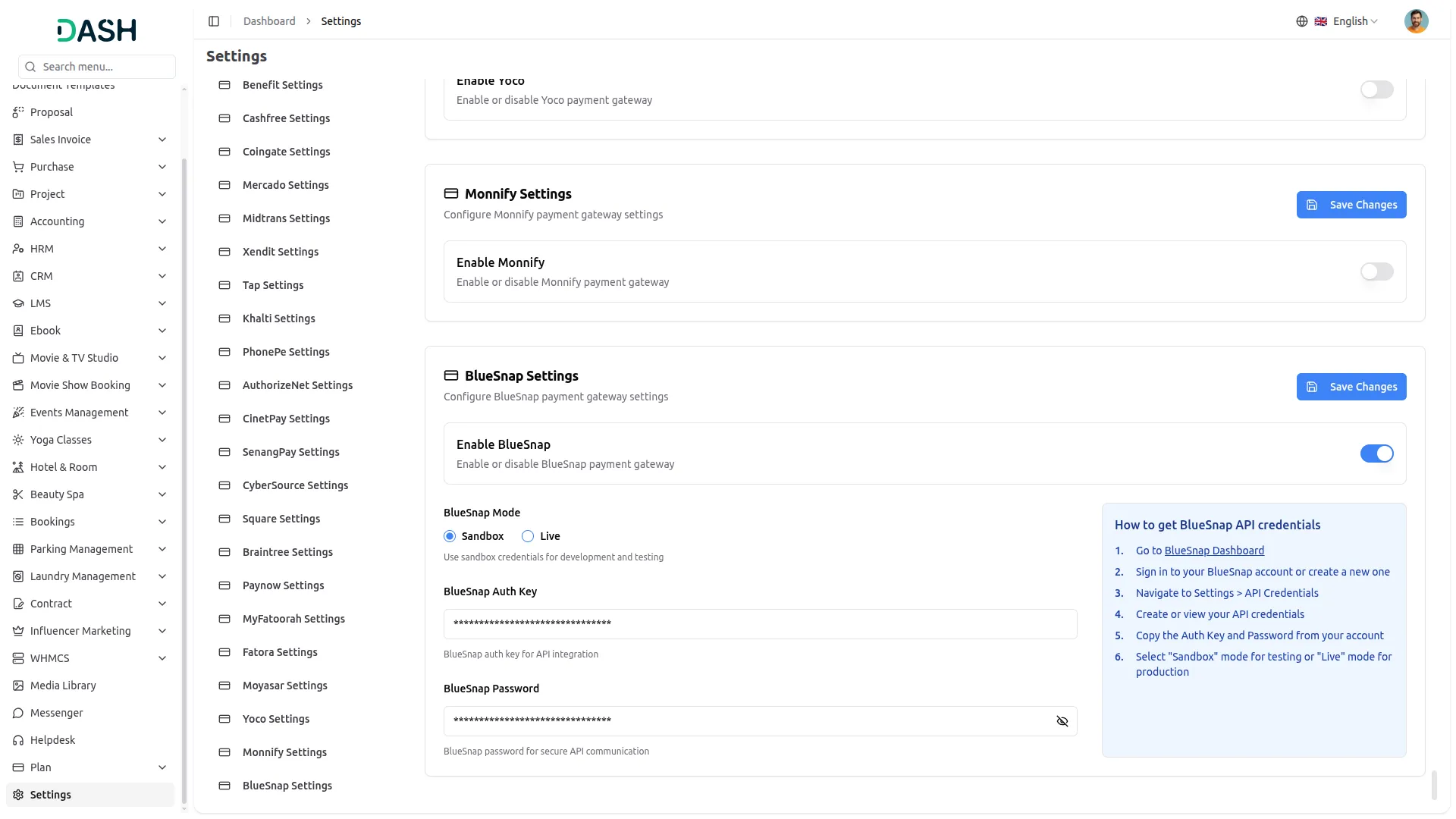
Save Your Settings:
- After entering the necessary details, save the settings to activate the BlueSnap Payment Gateway within your platform.
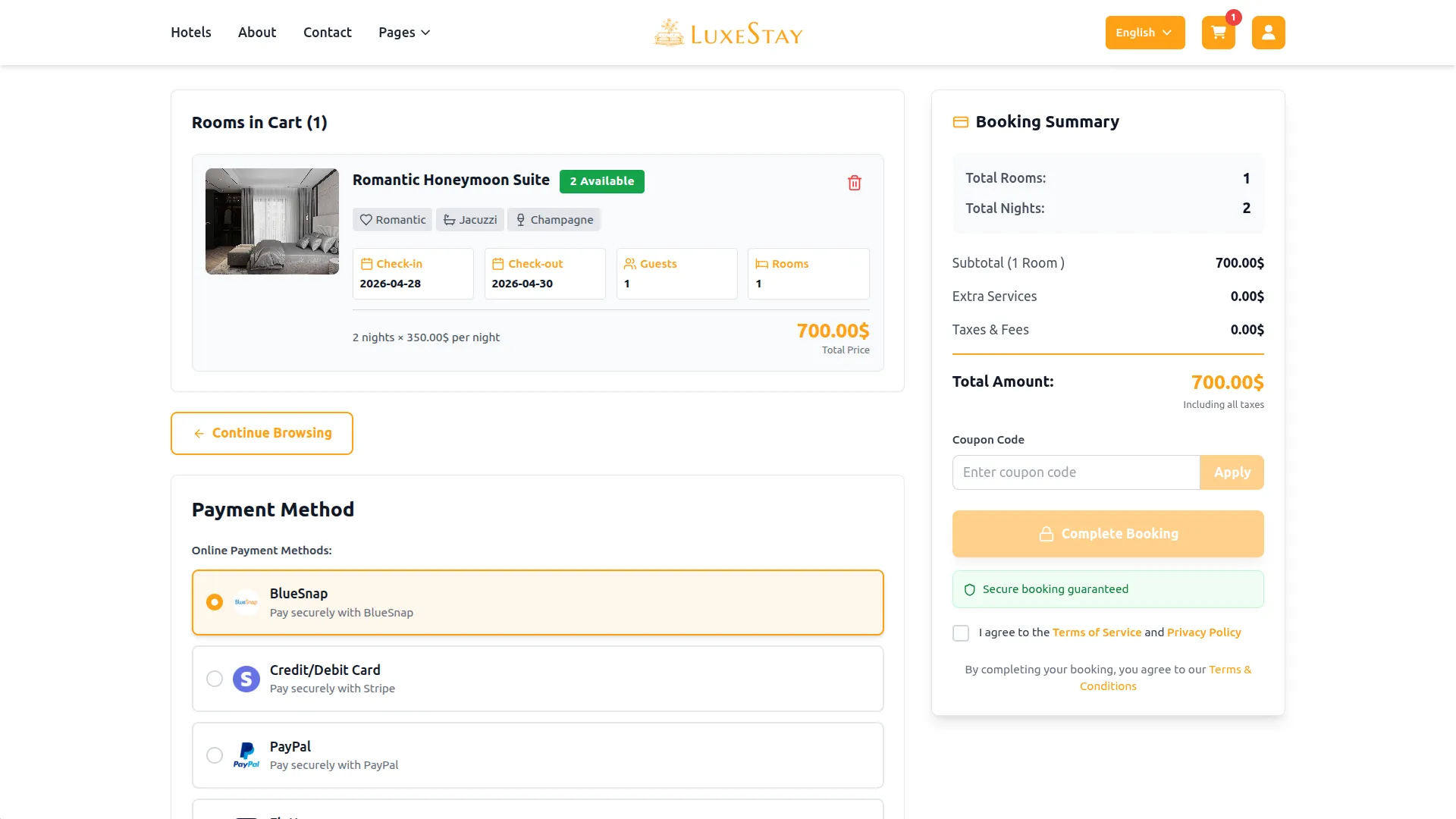
This process will enable you to seamlessly integrate BlueSnap as a Payment Gateway, allowing your users to make secure and efficient online payments in various cryptocurrencies.
Note: The BlueSnap Add-On is a paid feature and can be accessed by users who have purchased it. By integrating the BlueSnap Add-On into your Dash SaaS account, you’ll provide a reliable and user-friendly payment Gateway that supports global transactions
Categories
Related articles
- Plivo SMS – WorkDo Dash SaaS Add-On Guide
- BTCPay – BookingGo SaaS Add-On Guide
- Branding & White Label Settings Guide
- Facebook Post – WorkDo Dash SaaS Add-On Guide
- FedaPay – BookingGo SaaS Add-On Guide
- Chat Pin – TicketGo Add-On Guide
- PowerTranz – WorkDo Dash SaaS Add-On Guide
- Innovation Center – WorkDo Dash SaaS Add-On Guide
- CoinGate – BookingGo SaaS Add-On Guide
- Instamojo – WorkDo Dash SaaS Add-On Guide
- Auction Product – eCommerceGo SaaS Add-On Guide
- Benefit – WorkDo Dash SaaS Add-On Guide
We're Here to Help - Let's Talk
Have questions about our solutions, customization services, or business tools? Our team is here to help you. let's talk.