
Telesign SMS – WorkDo Dash SaaS Add-On Guide
Learn how to configure and manage Telesign SMS integration in WorkDo Dash SaaS easily.
Introduction
The Telesign SMS Add-On is a powerful messaging solution that enables businesses to send instant and reliable SMS notifications. Designed for seamless communication, this Add-On ensures timely updates for customers and team members, enhancing engagement and operational efficiency. Whether it’s transactional alerts, appointment reminders, promotional messages, or verification codes, Telesign SMS provides a fast and cost-effective way to reach users. With easy integration and high deliverability, businesses can streamline their communication processes while maintaining full control over their messaging needs.
How To Install The Add-On?
To set up the Telesign SMS Add-On, follow this link: Setup Add-On.
Note: You need to add your phone number while creating the user to have access to the Telesign SMS Add-On.
How To Use The Telesign SMS Add-On?
- Once you purchase the Add-On, navigate to the settings page, click on system settings, and find Telesign SMS.
- On that page, you have to enter the Telesign customer ID and Telesign API Key, with the help of which you can send messages via Telesign SMS.
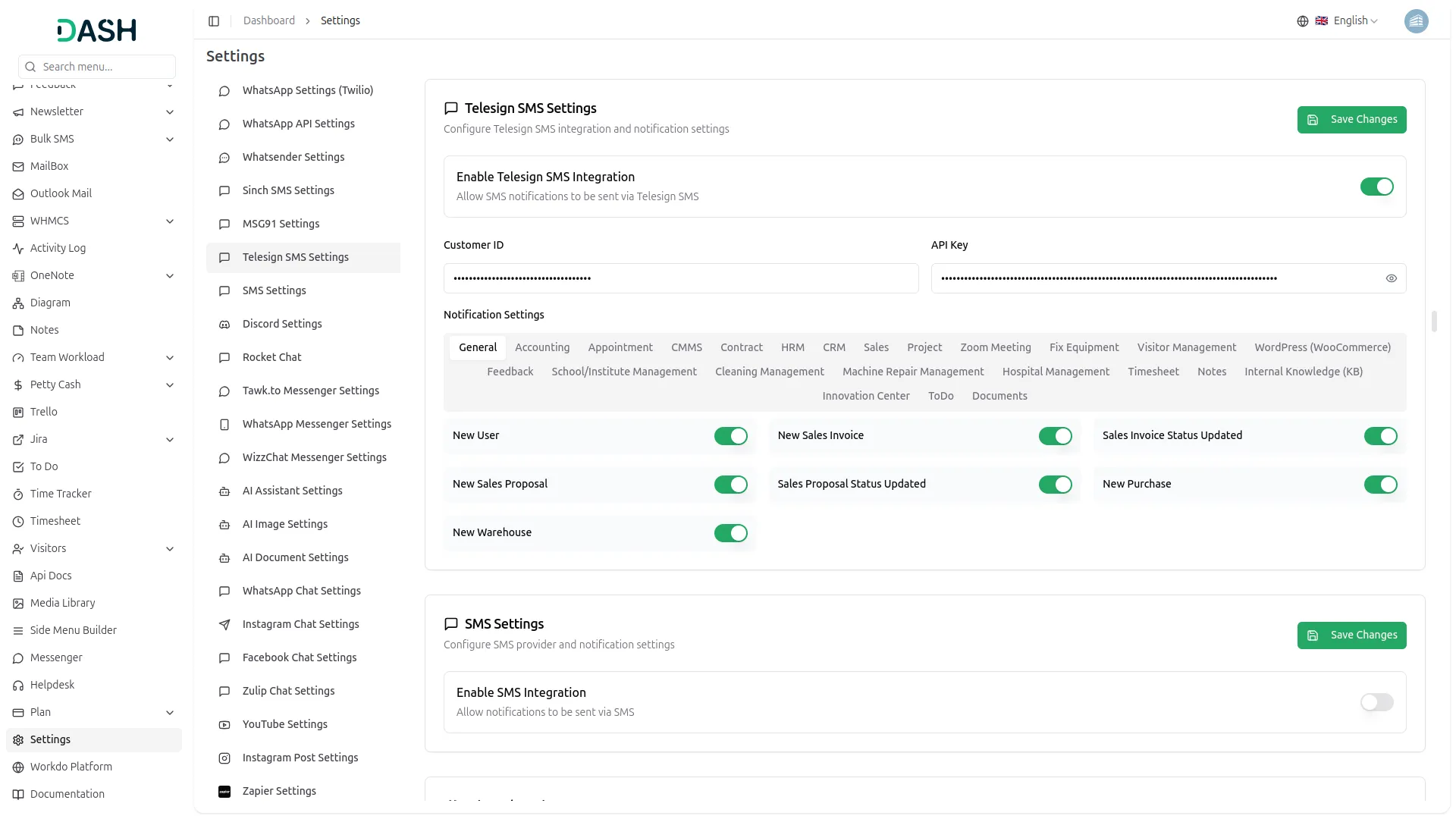
- You will need to create an account in Telesign SMS before you generate the API Key. Once you create an account, you can easily get it.
- To find the Telesign Customer ID and API key, you can follow this link: https://support.telesign.com/s/article/Find-Customer-ID-and-API-Key
- After you do this, you get a chance to choose the notification settings. Here is the way you can enable or disable the notifications of the various Add-Ons.
- You can customize notification messages language-wise. For example, if you want to change the message for new user notifications, you can do it here.
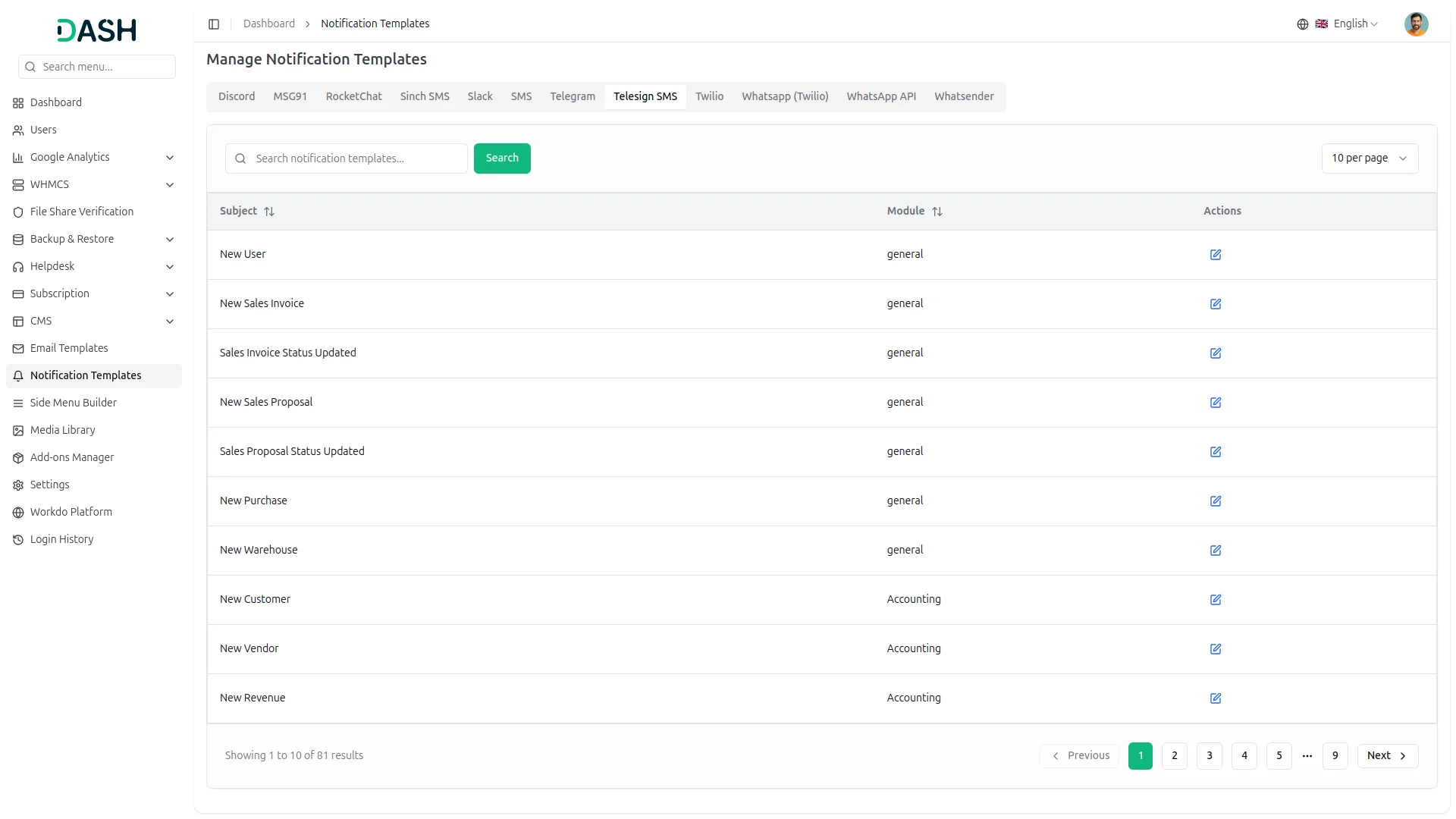
-
For example: If you enable the create user setting from General, then the notification via Telesign will be sent to that particular user when the user is created.
General
- New User
- New Sales Invoice
- Sales Invoice Status Updated
- New Sales Proposal
- Proposal Status Updated
- New Purchase
- New Warehouse
Accounting
- New Customer
- New Revenue
- New Vendor
- Bank Transfer Payment Status Updated
Appointment
- New Appointment
- Appointment Status
CMMS
- Work Order Request
- New Supplier
- New POs
- Work Order Assigned
- New Component
- New Location
- New Pms
Contract
- New Contract
HRM
- New Monthly Payslip
- New Award
- New Event
- Leave Approve/Reject
- New Announcement
- New Holidays
CRM
- New Lead
- Lead to Deal Conversion
- New Deal
- Lead Moved
- Deal Moved
Sales
- New Quote
- New Sales Order
- Meeting Assigned
Project
- New Project
- New Task
- New Bug
- New Milestone
- Task Stage Updated
- New Task Comment
Zoom Meeting
- New Zoom Meeting
Fix Equipment
- New Accessories
- New Asset
- New Audit
- New Fix Equipment Component
- New Consumables
- New Licence
- New Fix Equipment Location
- New Maintenance
Visitor Management
- New Visitor
- New Visit Purposes
WordPress Woocommerce
- New Product
Feedback
- New Template
- New Feedback Rating
School / Institute Management
- New Teacher
- New Admissions
- New Parents
- New Students
- New Homework
- New Time Table
Cleaning Management
- New Cleaning Team
- New Cleaning Booking
- New Cleaning Invoice
Machine Repair Management
- New Machine
- New Repair Request
Hospital Management
- New Doctor
- New Patient
- New Hospital Appointment
- New Hospital Medicine
Timesheet
- New Timesheet
Notes
- New Note
Internal knowledge
- New Article
- New Book
Innovation Center
- New Creativity
- New Challenge
- New Category
ToDo
- New To Do
- Complete To Do
Documents
- New Document
So, this is how you can use the Telesign SMS Add-On very easily.
Categories
Related articles
- CoinPayments – BookingGo SaaS Add-On Guide
- Mobile Service Management – WorkDo Dash SaaS Add-On Guide
- Medical Lab Management – WorkDo Dash SaaS Add-On Guide
- Blood Bank – WorkDo Dash SaaS Add-On Guide
- Scholarship – WorkDo Dash SaaS Add-On Guide
- Checkout – WorkDo Dash SaaS Add-On Guide
- Sign in with LinkedIn – WorkDo Dash SaaS Add-On Guide
- User Manual – ERPGo SaaS
- NepalSTE – BookingGo SaaS Add-On Guide
- Job Search – WorkDo Dash SaaS Add-On Guide
- Google Login – eCommerceGo SaaS Add-On Guide
- Rocket.Chat Credentials Generation Guide
We're Here to Help - Let's Talk
Have questions about our solutions, customization services, or business tools? Our team is here to help you. let's talk.