
Reports – TicketGo Add-On Guide
Learn how to configure and manage the Reports Add-On in TicketGo easily.
Introduction
The Reports Add-On for TicketGo provides comprehensive analytics and insights into your support operations. Track ticket trends, monitor agent performance, analyze customer behavior, and measure satisfaction levels with detailed charts and customizable filters to make data-driven decisions for your support team.
How to Install the Report Add-On?
Follow these steps for Installation: Setup Reports.
How to Use the Reports Add-On?
- Once you purchase the Reports Add-On, go to the sidebar and find the Reports Add-On in your TicketGo.
- You will see pages for various reports including Ticket Reports, Agent Reports, User Reports, Tag Reports (if Tags Add-On is active), and Rating Reports (if Ratings Add-On is active).
- You can generate various reports whenever you need them and select the time period for better clarity using filters like last 7 days, this month, last month, this year, or custom date range.
Ticket Reports
- Navigate to the Ticket Reports section to access comprehensive ticket analytics.
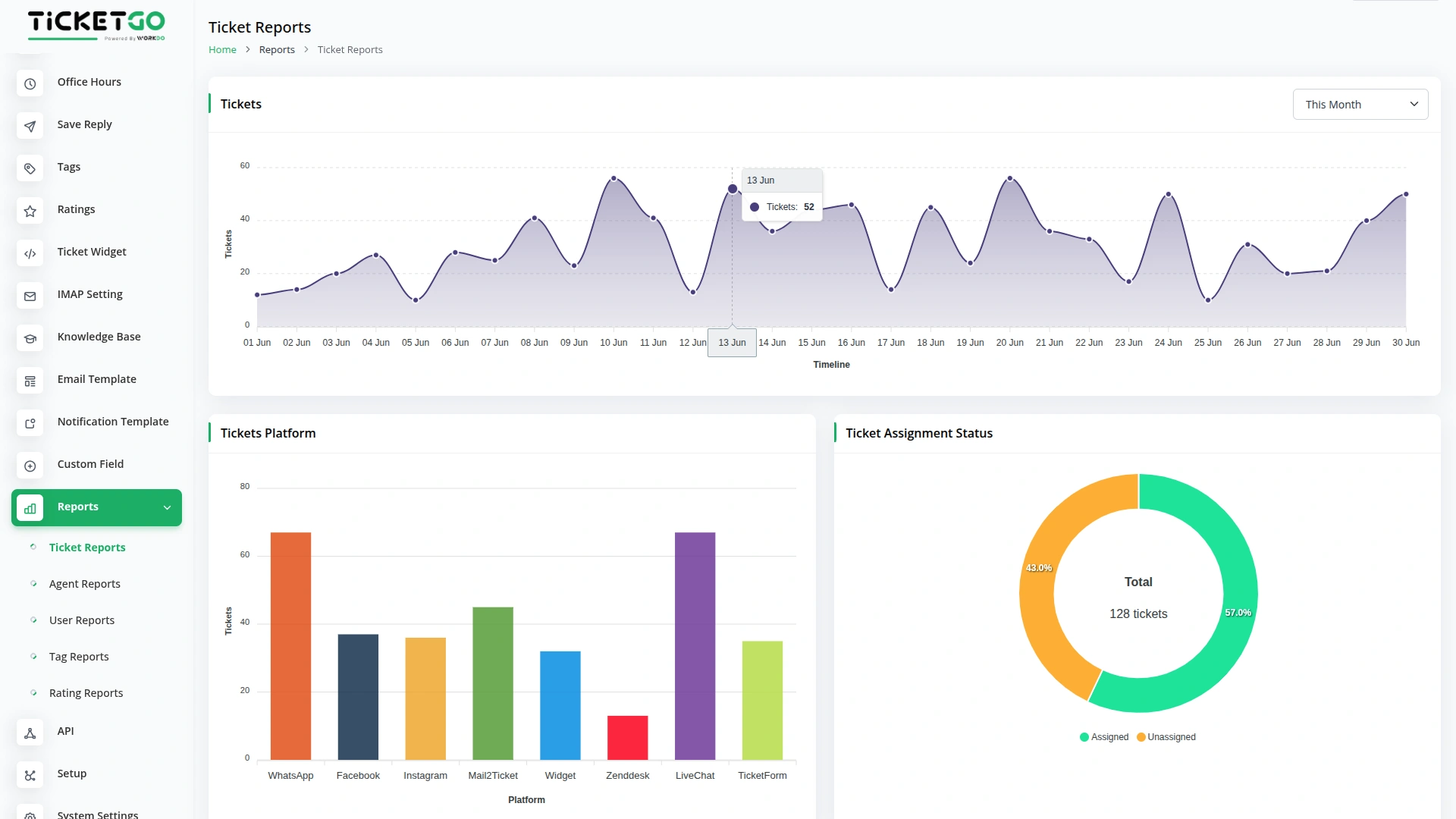
- The Tickets Chart shows how many tickets were created over time with filtering options by last 7 days, this month, last month, this year, or custom date range to identify peak support periods.
- The Tickets Platform Chart displays the total number of tickets generated from each platform to understand which channels bring the most support requests (WhatsAppChatBot, Facebook Chat, Instagram Chat, Mail2Ticket, Widget, Zendesk, LiveChat, TicketForm).
- The Ticket Assignment Status Chart monitors how many tickets are assigned to agents versus unassigned tickets to ensure proper workload distribution.
-
Agent Reports
- Go to the Agent Reports section to track individual and team performance metrics.
- The Rating Performance Dashboard provides agent-specific ratings received from assigned tickets with filtering options by the last 7 days, this month, last month, this year, or custom date range.
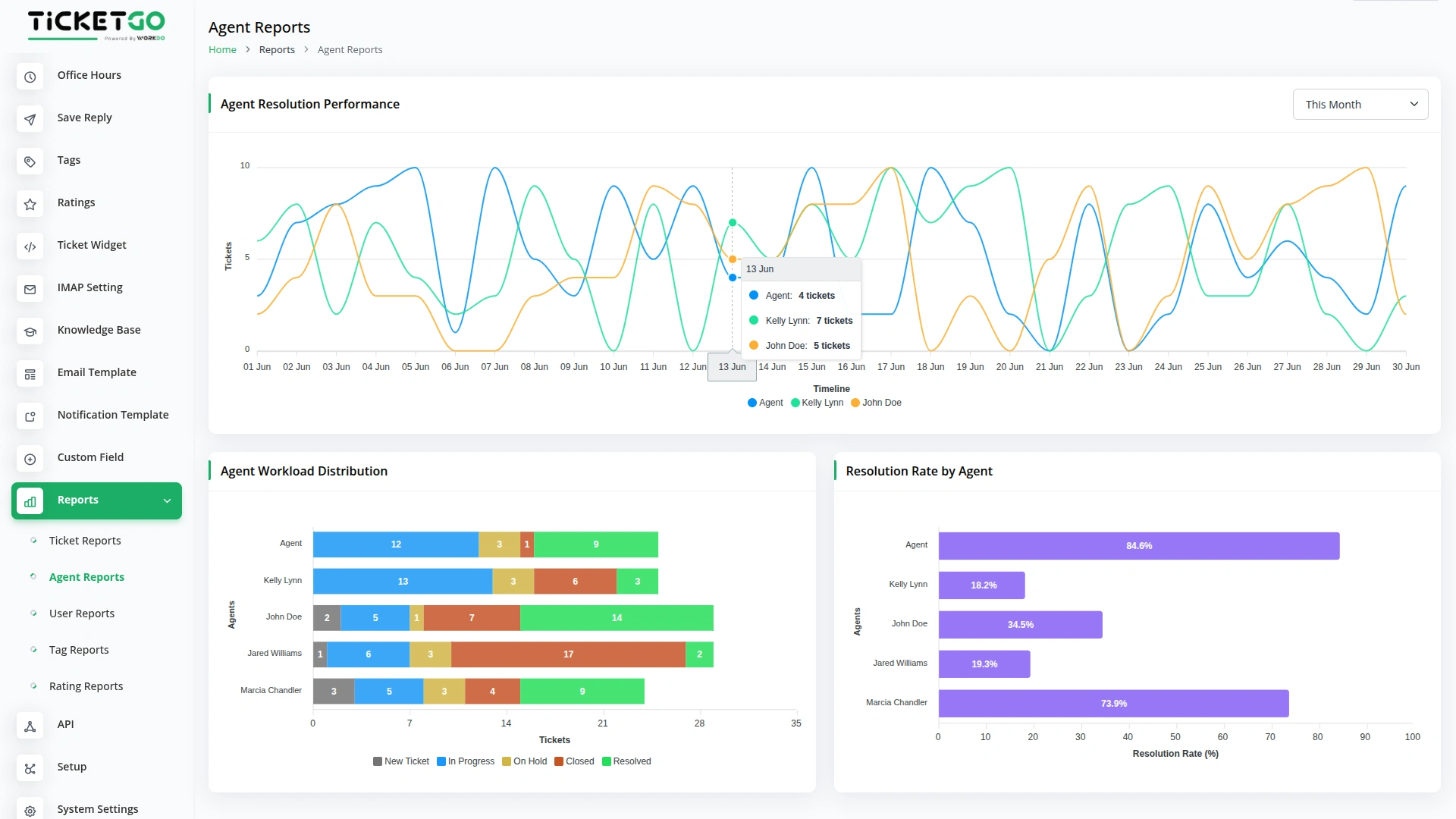
- The Agent Resolution Performance Chart tracks how many tickets each agent resolves over time with flexible date filtering by the last 7 days, this month, last month, this year, or custom date range.
- The Agent Workload Distribution shows total tickets assigned to each agent with status-wise breakdown to ensure balanced work distribution.
- The Resolution Rate by Agent displays percentage-based performance showing how many tickets each agent resolves from their total assigned tickets.
-
User Reports
- Access the User Reports section to analyze customer behavior and activity patterns.
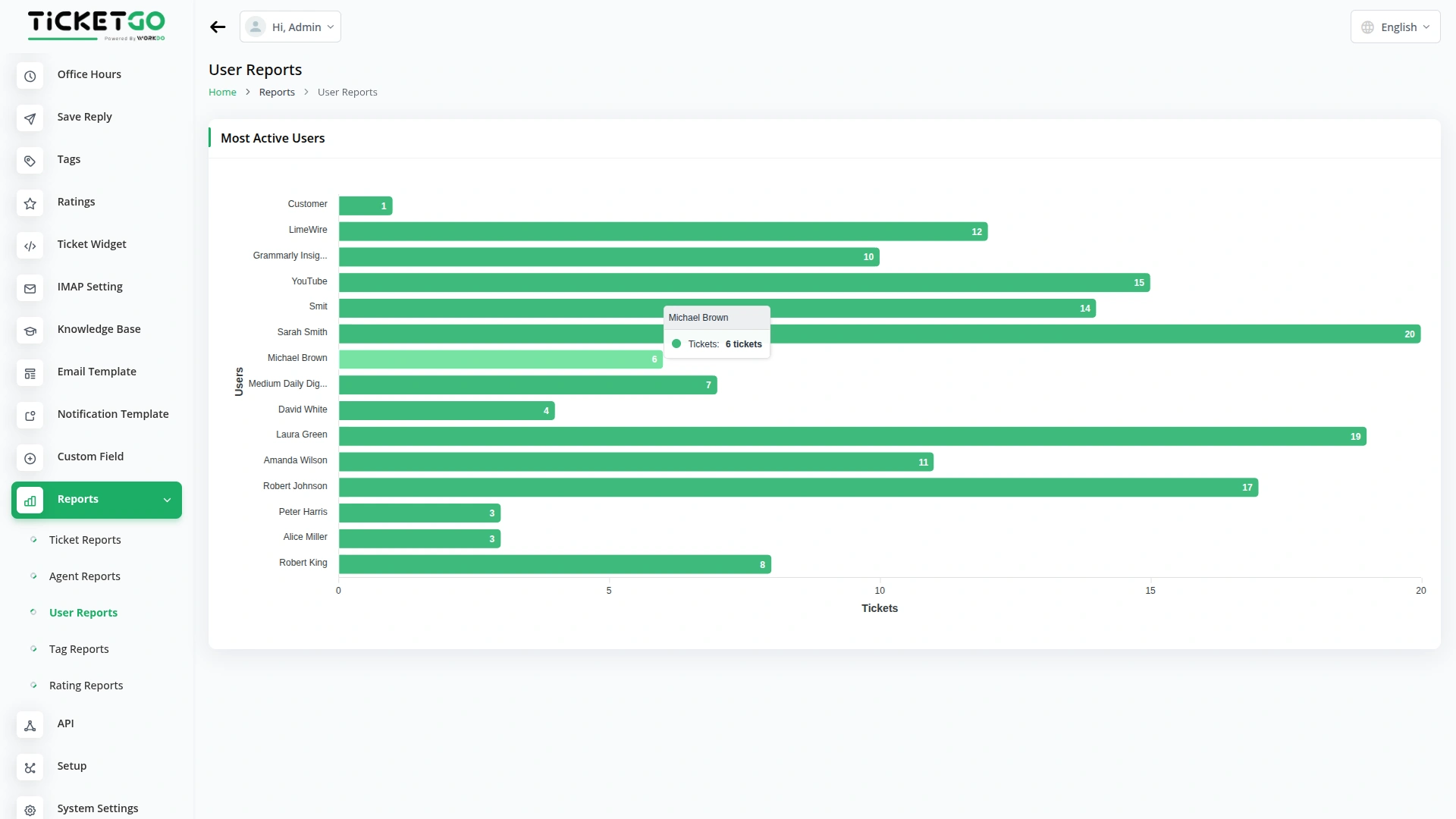
- The Most Active Users Chart identifies which users create the most tickets based on email address count to understand your most frequent support requesters.
-
Tag Reports (Available with Tags Add-On)
- Navigate to Tag Reports when you have the Tags Add-On activated for enhanced categorization insights.
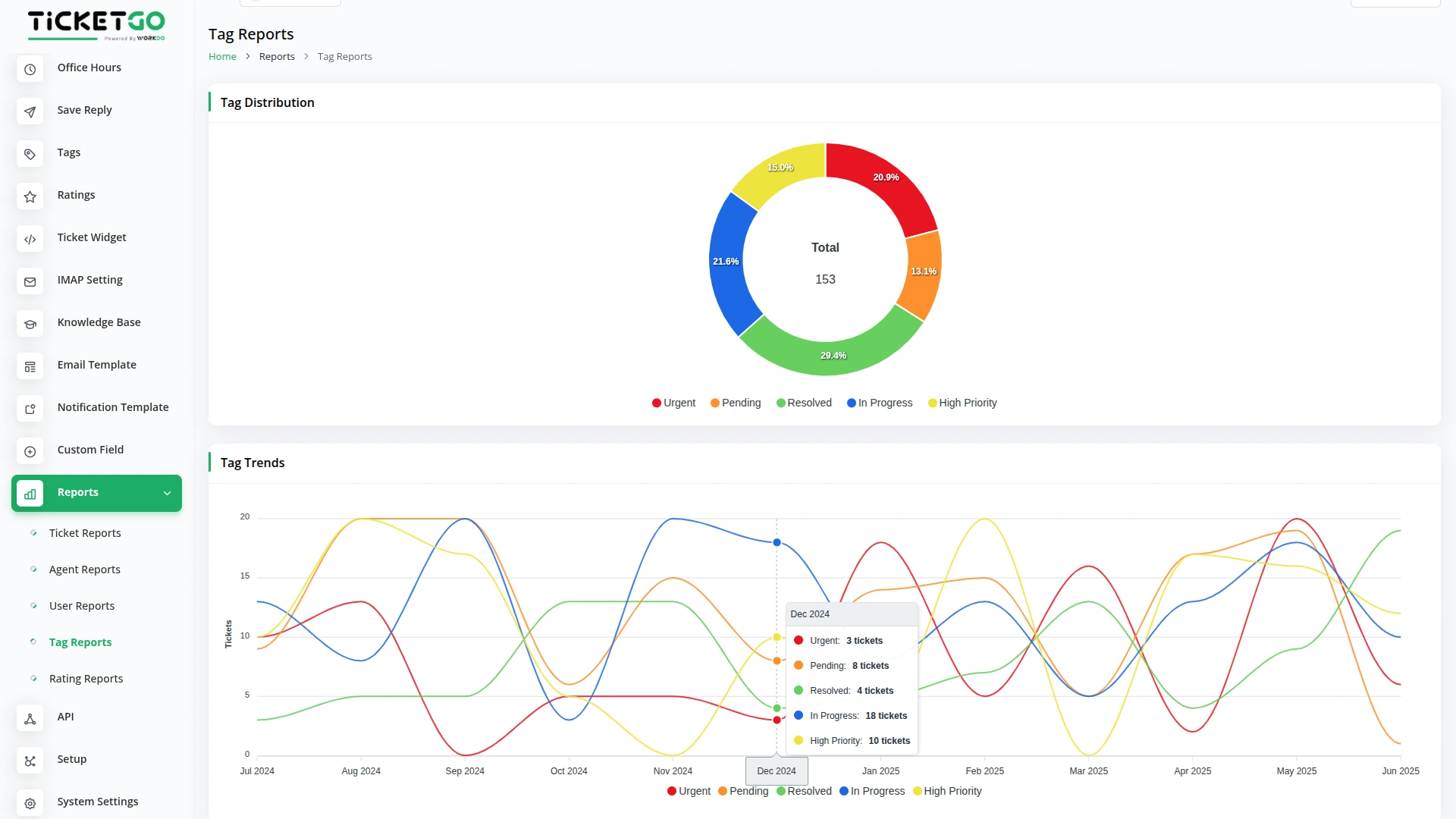
- The Tag Distribution Chart shows how many tickets use each tag to identify common support categories and recurring issues.
- The Tag Trends Chart tracks tag usage patterns year-over-year to identify emerging trends in support requests.
-
Rating Reports (Available with Ratings Add-On)
- Go to Rating Reports when you have the Ratings Add-On activated for customer satisfaction analytics.
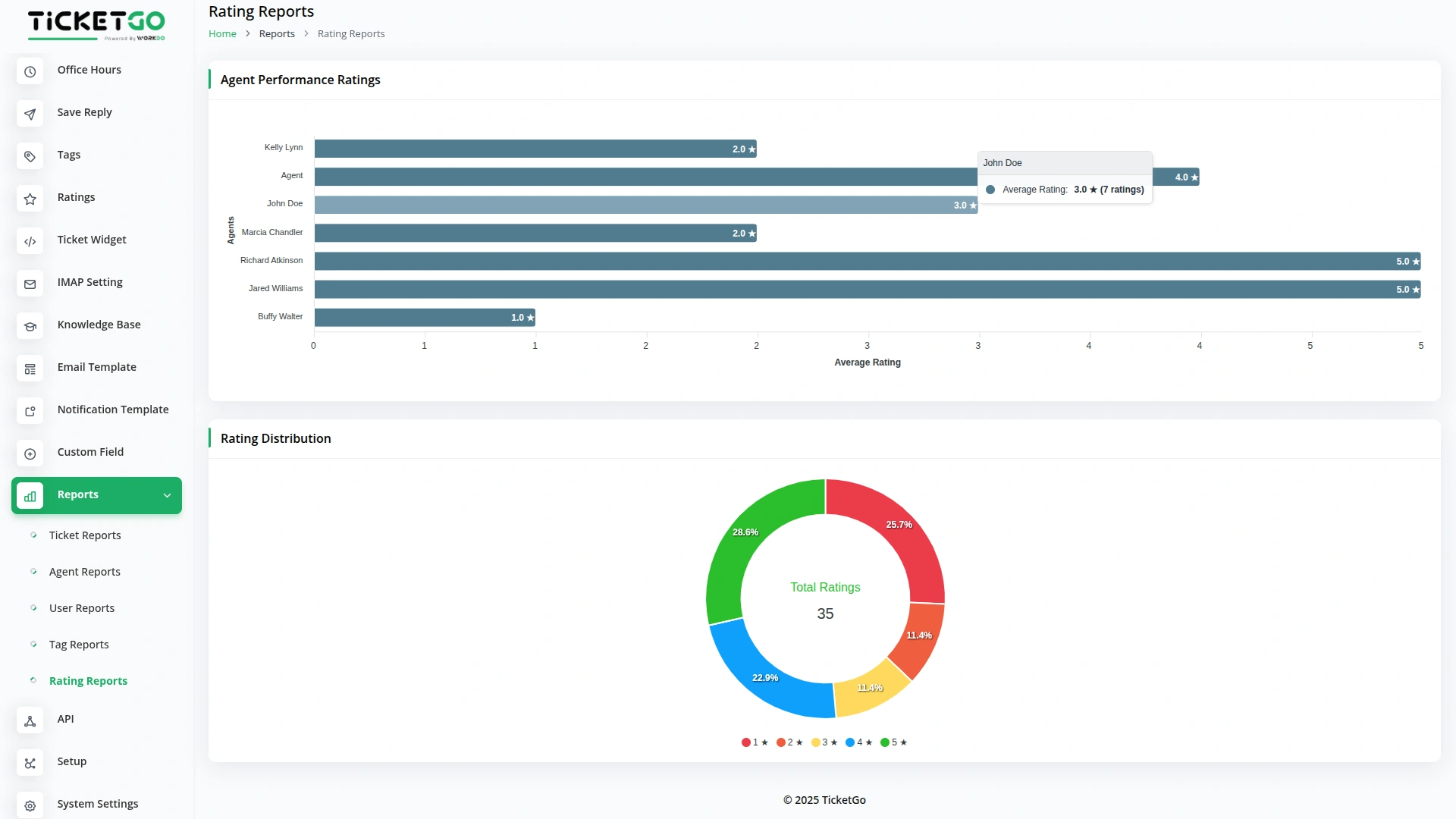
- The Agent Performance Ratings section displays average ratings for each agent based on customer feedback from their assigned tickets.
- The Rating Distribution Chart shows the count of tickets by star rating (1-5 stars) to provide an overall view of customer satisfaction levels.
-
Categories
Related articles
- Product Badge Management – eCommerceGo SaaS Add-On Guide
- Product Barcode – eCommerceGo SaaS Add-On Guide
- Art Showcase – WorkDo Dash SaaS Add-On Guide
- Roadmap Central – WorkDo Dash SaaS Add-On Guide
- Budget Planner – WorkDo Dash SaaS Add-On Guide
- Razorpay – BookingGo SaaS Add-On Guide
- Tawk.to Messenger – eCommerceGo SaaS Add-On Guide
- WhatsApp API – TicketGo Add-On Guide
- Sign in with Bitbucket – WorkDo Dash SaaS Add-On Guide
- Beauty & Spa – WorkDo Dash SaaS Add-On Guide
- Vehicle Booking Management – WorkDo Dash SaaS Add-On Guide
- LinePay – WorkDo Dash SaaS Add-On Guide
Get in Touch
We're Here to Help - Let's Talk
Have questions about our solutions, customization services, or business tools? Our team is here to help you. let's talk.