
Moyasar – WorkDo Dash SaaS Add-On Guide
Learn how to configure and manage Moyasar integration in WorkDo Dash SaaS easily.
Supported Countries: Saudi Arabia, Kuwait, United States, and More
Supported Currencies: SAR (Saudi Riyal), KWD (Kuwaiti Dinar), USD (United States Dollar), and More
Benefits of Moyasar Payment Gateway
Advanced Payment Security
Moyasar protects every transaction with robust encryption and security protocols, ensuring that all payments processed within the platform remain safe, reliable, and fully secured against unauthorized access.
Flexible Payment Options
Customers can choose from a variety of payment methods including cards and bank transfers, giving businesses the ability to cater to different preferences and deliver a more convenient checkout experience.
Global Payment Reach
With support across Saudi Arabia, Kuwait, the United States, and beyond, Moyasar enables businesses to accept payments from a wide international customer base without geographical limitations.
Frictionless User Experience
Moyasar’s seamless integration ensures a smooth and intuitive payment journey for customers, minimizing drop-offs at checkout and contributing to higher satisfaction and improved transaction success rates.
Dependable Operational Reliability
Moyasar offers consistent uptime and responsive support, ensuring that payment operations run without interruption and businesses can always rely on a stable and efficient gateway experience.
How to Access Moyasar Add-On?
- Visit the WorkDo Dash website:
Go to https://workdo.io/ to access the WorkDo Dash platform. - Navigate to Dash SaaS Add-Ons:
Explore the “Dash SaaS Add-Ons” section on the website to discover available Add-Ons. - Discover Moyasar Add-On:
Browse the list of available Add-Ons and find the “Moyasar Payment Gateway.” - Activate the Add-On:
Click the “Activate” button next to the Moyasar Add-On to enable it for your WorkDo Dash account.
Super Admin Settings
(Plan Purchase by the Company)
The Super Admin Settings are accessible only to the highest-level administrator. These settings allow the Super Admin to manage company-level subscriptions and payment configurations.
Key Capabilities:
- Purchase or upgrade company subscription plans
- Configure Moyasar API keys for plan payments
- Enable or disable Moyasar as a payment gateway
Configuration Path:
Super Admin Login → Settings → Moyasar Settings
Company Settings
(Invoices, Retainer & Other Payments)
Company Settings allow organizations to configure Moyasar for receiving payments from customers across multiple modules.
Supported Modules Include:
Configuration Path:
Company Login → Settings → Moyasar Settings
Company-Level Capabilities:
- Configure Moyasar API keys
- Enable Moyasar for selected modules
- Accept online payments from customers
- Manage invoice, retainer, and service payments
- Handle tax, coupon, and discount calculations
How to Generate Moyasar API Keys?
To integrate Moyasar into your (Product Name), follow the steps below:
1. Register a Developer Account
Visit the Moyasar Portal: https://dashboard.moyasar.com/login/new Sign up or log in to your existing Moyasar account.
2. Access Your API Credentials
After logging in, navigate to your account settings and locate the API Keys section. Copy your credentials for use in the configuration.
You will receive:
- API Key – Used for authenticating payment requests
- Secret Key – Used for secure server-side verification
3. Configure Moyasar Gateway in (Product Name)
1. Login to Admin Panel
Log in to your (Product Name) account using administrator credentials.
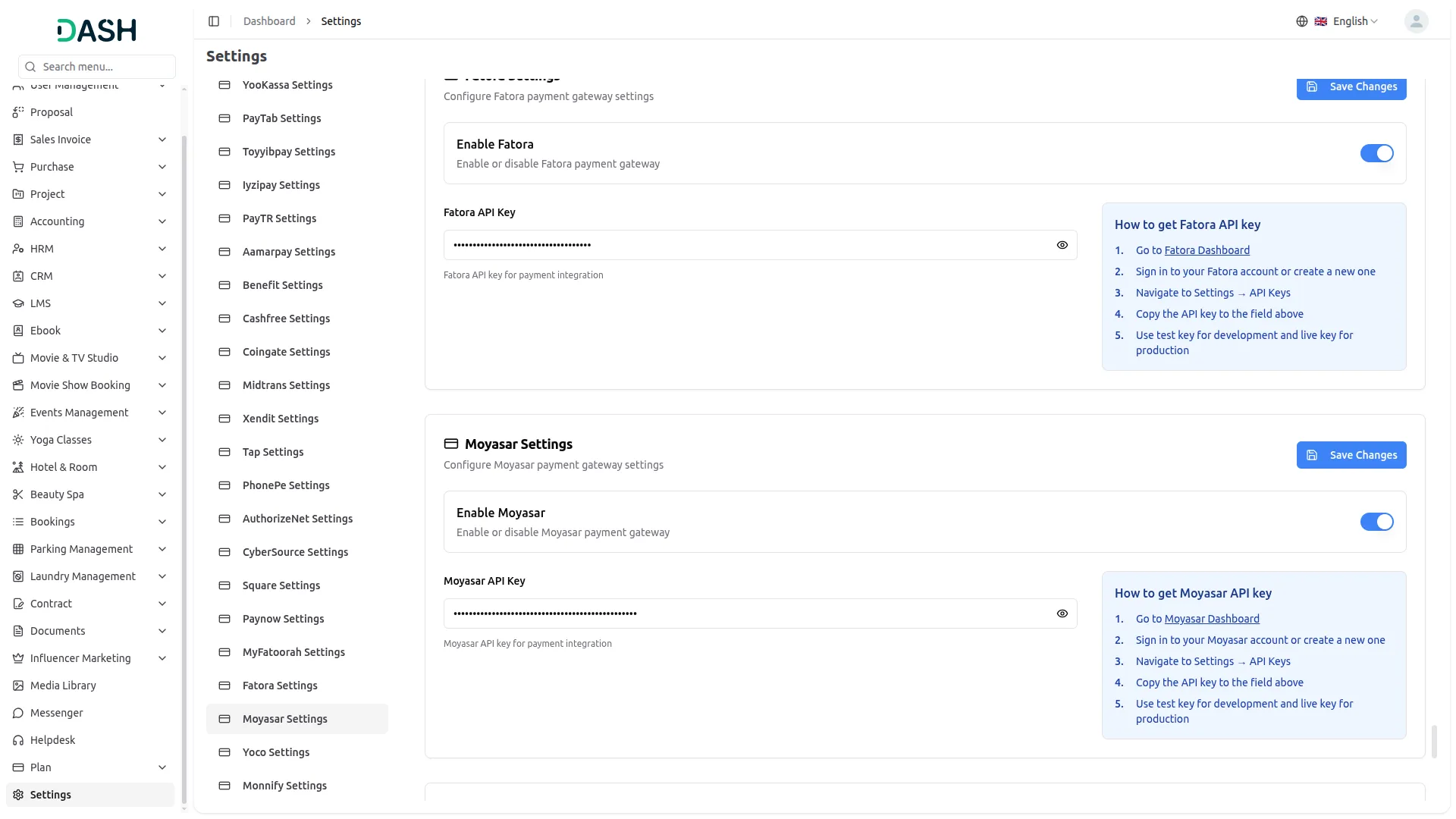
2. Access Moyasar Settings
Navigate to the Settings section and select Moyasar Settings.
3. Enter Required Details
Provide the following details carefully:
- Enable Moyasar – Toggle to activate the gateway
- API Key – Enter your Moyasar API Key
- Secret Key – Enter your Moyasar Secret Key
4. Save Settings
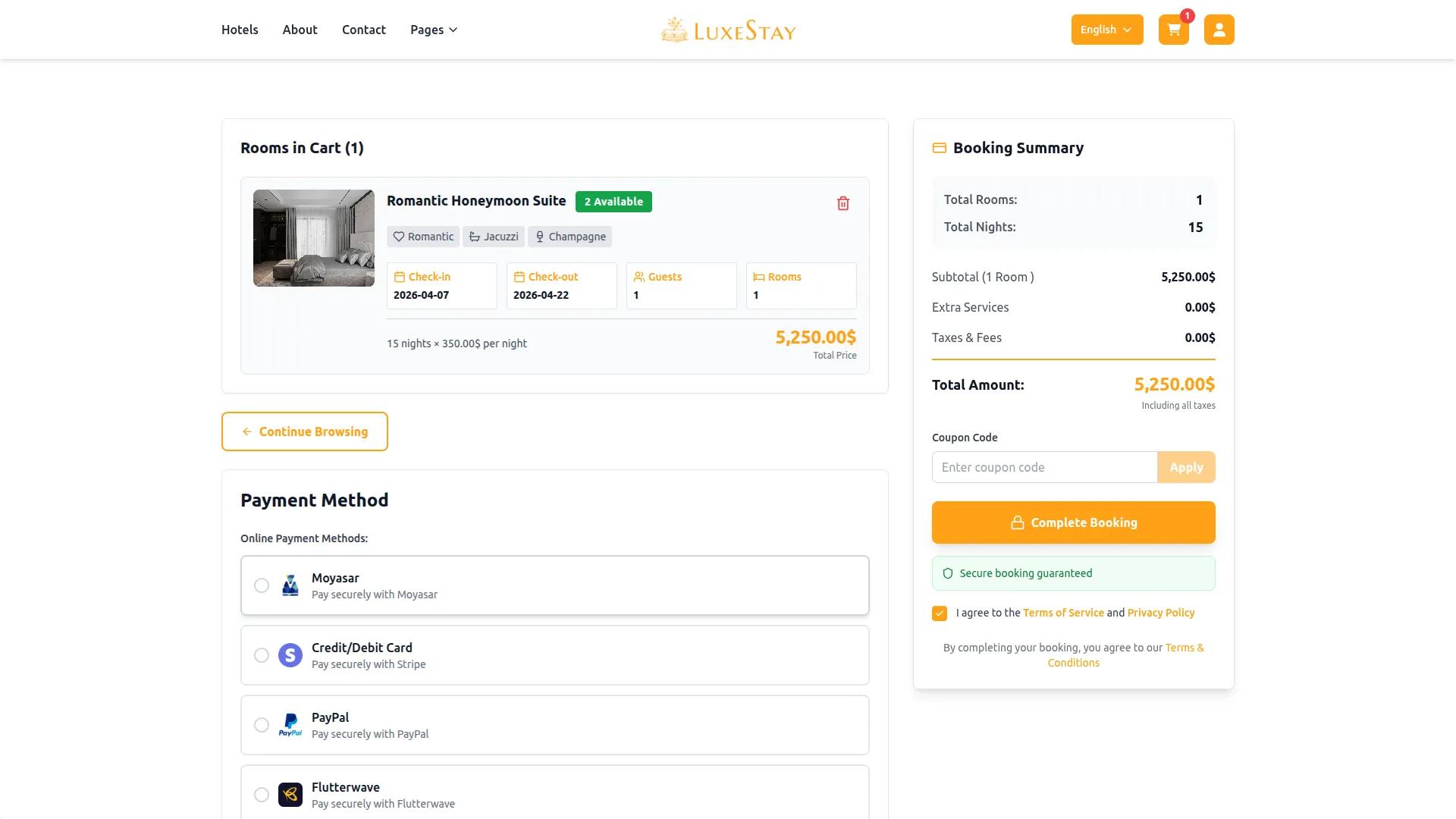
Click Save to apply the configuration. Moyasar will now be active across all enabled modules.
This documentation provides a complete overview of the Moyasar Payment Gateway integration, covering its key benefits and step-by-step setup process. By integrating Moyasar, businesses operating across the Middle East and beyond can offer customers a secure, flexible, and locally relevant payment experience while keeping their financial workflows efficient and well-organized.
Note: The information provided in this documentation is intended for guidance purposes. Please ensure your Moyasar account and API credentials are handled securely to guarantee smooth and proper payment processing.
Categories
Related articles
- HubSpot – WorkDo Dash SaaS Add-On Guide
- WhatsApp API Permanent Access Token Generation Guide
- Moneris – BookingGo SaaS Add-On Guide
- Boost Sales – eCommerceGo SaaS Add-On Guide
- Tap – BookingGo SaaS Add-On Guide
- Service Slot Scheduler – BookingGo SaaS Add-On Guide
- Store Locator – eCommerceGo SaaS Add-On Guide
- BitPay – WorkDo Dash SaaS Add-On Guide
- Marketplace List – eCommerceGo SaaS Add-On Guide
- Solar Hub – WorkDo Dash SaaS Add-On Guide
- Campaign – eCommerceGo SaaS Add-On Guide
- Menu – vCard SaaS Add-On Guide
We're Here to Help - Let's Talk
Have questions about our solutions, customization services, or business tools? Our team is here to help you. let's talk.