


Payroll Software India | HR & Payroll Solution for Indian Businesses
Automate payroll software in India with PF, ESIC & TDS compliance. Manage salaries, payslips & taxes easily with our all-in-one HRMS.
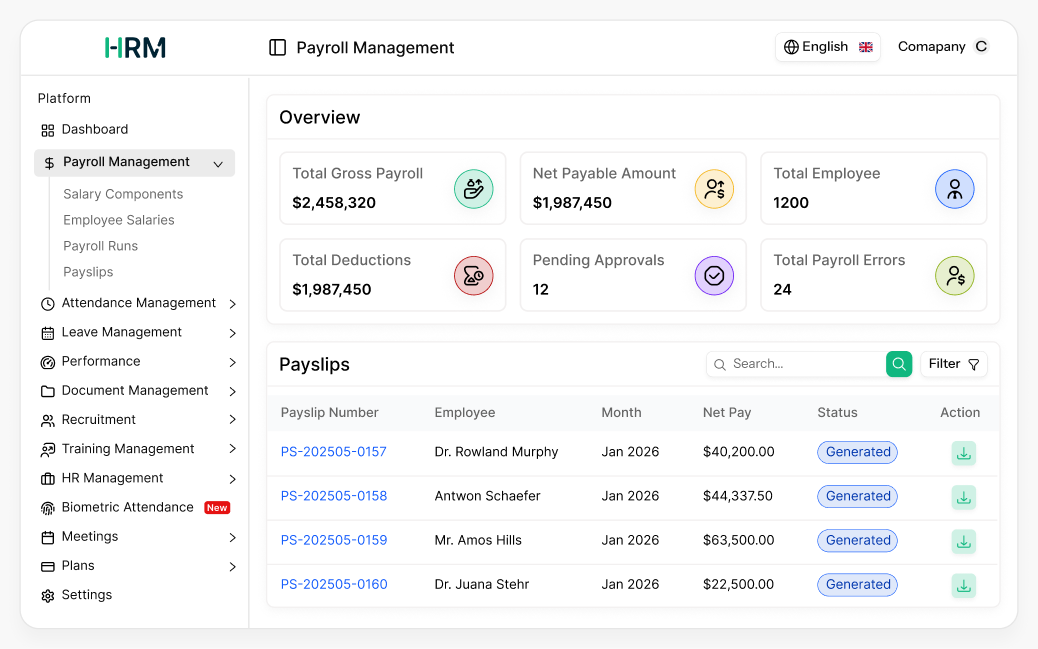
Automated Payroll Software Built for Indian Businesses
Streamline payroll from attendance to salary, ensuring accuracy, compliance, and employee satisfaction.
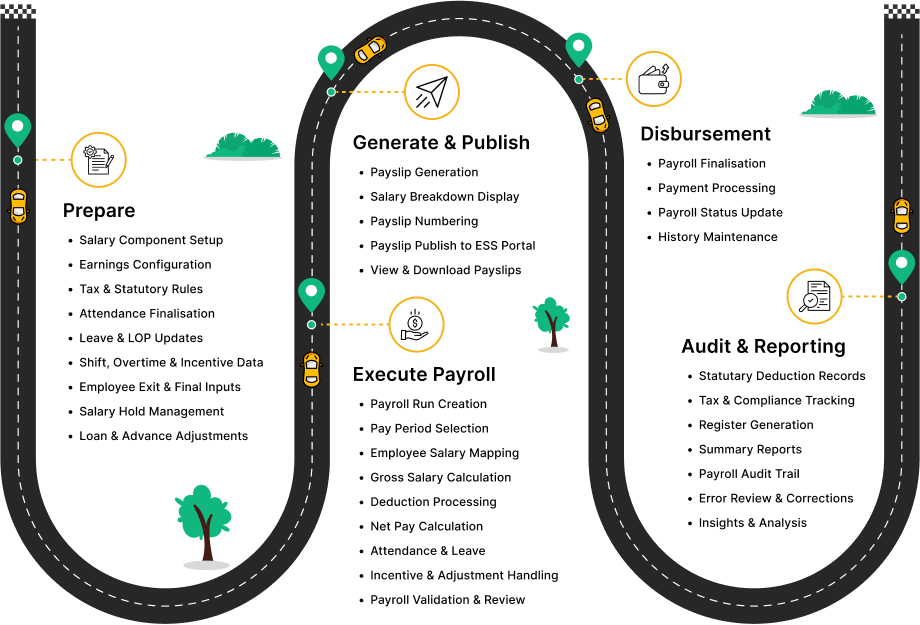

Core Payroll Features for Indian SMEs
Streamline salary processing, ensure compliance, and keep employees happy—all in one platform.
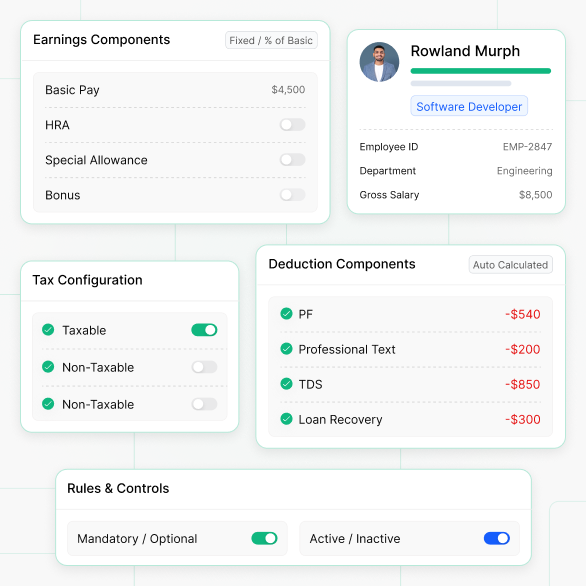
Optimized Salary Structure for Consistent Compensation to Employees
This section helps you define and manage all salary building blocks (earnings and deductions) so payroll calculates salaries accurately and consistently.
- Purpose: Build consistent salary structures across all employees to streamline payroll processes.
- Earnings: Define components of salary that increase salary (e.g. Basic, HRA, Special Allowance, Bonus).
- Deductions: Mention the items that will reduce the salary like a PF, Professional Tax, TDS, Loan Recovery etc.
- Calculation Method: The calculation can be flexibly performed by setting each component as Fixed Amount or as a Percentage of Basic.
- Tax Settings: Flag components as Taxable or Tax-Free to enable accurate tax calculation.
- Mandatory Rules: Indicate whether a component is mandatory for all employees or per salary structure.
- Active/Inactive Control: Turn components on or off, without deleting them, to maintain history and flexibility.
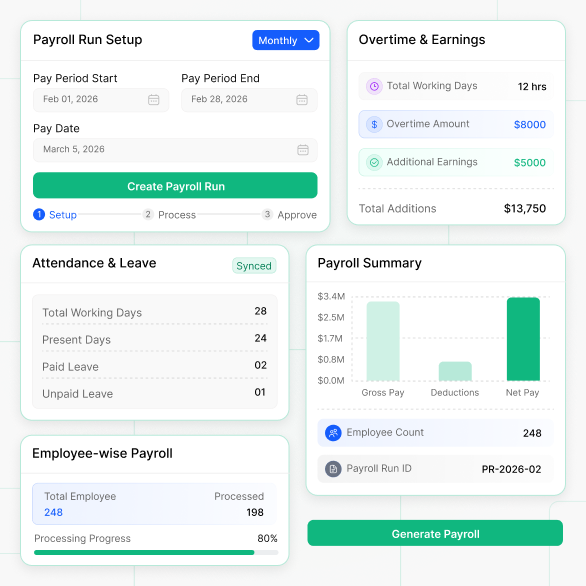
Manage Employee Compensation and Payroll
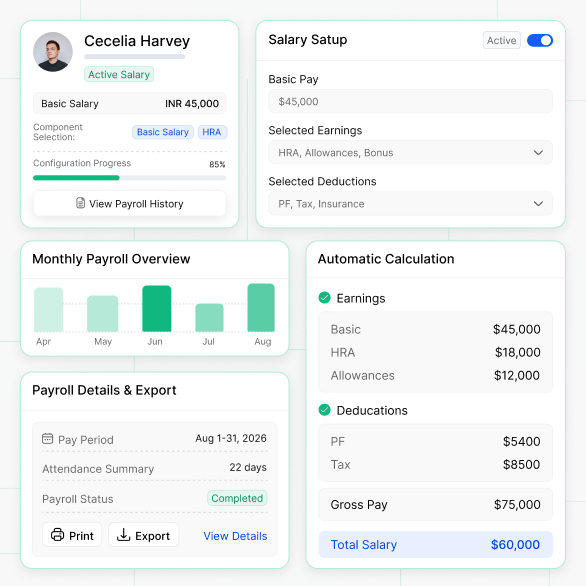
This section will cover the setup and viewing of salaries for each employee, making sure that the salary for each person is correctly set up and the correct breakdowns are generated.
- Salary Setup: Create your own salary package with basic salary and components of your choice.
- Add Employee Salary: Create a new salary configuration from Payroll Management → Employee Salaries
- Basic Salary: The base salary of the employee on which the percentage based components are calculated.
- Component Selection: Select the earning and deduction components that apply to build the employee’s salary structure.
- Active Salary Tracking: Only one active salary configuration per employee, with the ability to keep historical ones.
- Automatic Calculation: After saving, the system does the full calculation (earnings, deductions, gross, net).
- Payroll Show: Employees can see month wise history and can review the detailed records.
- Monthly Breakdown & Status: View pay period dates, payroll status (Draft/Completed/Approved), attendance summary, and net pay, with print/export options.
Manage Workers Payroll and Compensation
This section will cover how to set up and view salaries for each employee, ensuring that the salary for each person is set up correctly and the correct breakdowns are generated.
- Salary Structure: You can create your own salary structure with basic salary and components of your choice.
- Add Employee Salary: Create new salary configuration Payroll Management → Employee Salaries
- Basic Salary: The employee’s basic pay on which the percentage based components are computed.
- Component Selection: Select the applicable earning and deduction components to build the employee's salary structure.
- Current SalaryTracking: You can only have one active salary configuration per employee, but you can keep the old ones.
- Automatic Calculation: After saving, the system does the full calculation (earnings, deductions, gross, net).
- Payroll Show: Employees can see month wise history and can review the detailed records.
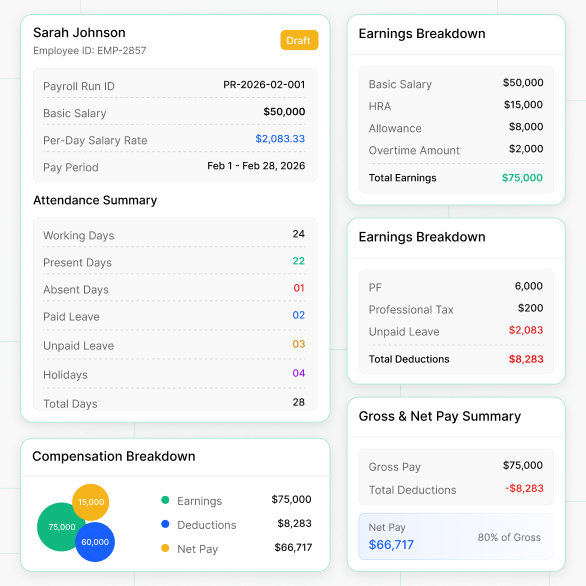
Payroll Entries Generated with Full Transparency of Employee
This section outlines how each employee is recorded on an individual basis for each payroll run to guarantee that you're calculating all of the earnings, deductions, attendance and leave time and overtime for each employee accurately.
- Automatic Generation: Payroll entries will be generated automatically during the Payroll Process (one entry per employee per Payroll Process).
- Employee Data: This entry will have the Employee ID and Base Salary.
- Earnings Calculation: The total earnings consist of the basic salary, the amount received for the different elements of earnings and any overtime payments (if applicable).
- Calculating Deductions: All deductions and unpaid leave/absences are always included in the total number of deductions.
- Gross & Net Pay: Total income will be calculated and the net pay is determined after taking out total deductions.
- Attendance and Leave Integration: ll holidays/working days, paid/unpaid, and present/absent half day records become part of the calculation.
- Per day Salary Rate: Salary per day is calculated so that accurate deductions can be taken for any unpaid leave/absences.
- Detailed Breakdown: Earnings and deductions are shown component-wise for payroll transparency.
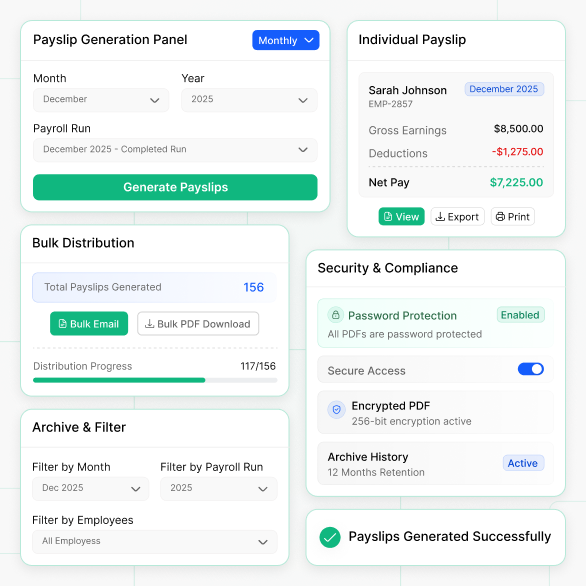
Professional Payslips with Bulk Distribution and Security
This guide covers; Employee Salary statement Creation/distribution and the secure record keeping of monthly Payslips.
- Automatic Creation: Payslips are generated automatically after payroll entries are processed (one payslip per employee per payroll run).
- Generate Flow: Enter Payroll Management → Payroll Runs → Choose a completed Payroll Run → Click Generate Payslips. This will generate Payslips for all employees who received payments in the PayRun.
- Location to Access the Interface: Payroll Management → Pay slips to access via filters by employee, month, and Payroll Run.
- Content Includes Employee Details, Pay Period (Performed Month/Year), Earnings, Deductions, Attendance Summary, and Final Net Pay.
- PDF Generation: Create professional PDF pay slips for printing and downloading.
- Available Actions: An individual can view, download to a PDF file, email to themselves, and print a pay slip for an employee.
- Bulk Actions: For mass processing of employee pay slips, use bulk generation of pay slips, bulk emailing to employees, and bulk downloading of pay slips for HR documentation.
- Security & Archive: Support secure access (e.g., password protection) and maintain month-wise payslip history for records.
Why Indian Businesses Choose WorkDo Payroll
Our online payroll solution enables faster, more accurate processing with fewer corrections and better control—without adding complexity.
Real-Time Payroll Analytics with Indian Reports
Gain insights into payroll expenses, taxes, and workforce trends with dashboards and detailed reports.
Secure Payroll Processing
Ensure secure, compliant payroll with role-based access, approvals, and audit-ready HRMS workflows.
Attendance-to-Payroll Automation for Indian Workforce
Automatically sync attendance, overtime, and leave for accurate, faster payroll with fewer errors.
Scales from 10 to 5,000+ Employees Across India
Easily scale payroll as your workforce grows, supporting more employees, policies, and locations seamlessly
Seamless Global Payroll Across 103+ Currencies for Modern Businesses
Run global payroll seamlessly across regions with multi-currency support, ensuring accurate payments, compliance, and smooth operations for modern businesses.
Note: We support many more currencies. The above list shows only a selection of available options.
Transform How You Manage Payroll: Fast, Secure, and Hassle-Free
Eliminate manual errors, save time, and ensure compliance with an intelligent payroll system designed for speed, accuracy, and peace of mind.
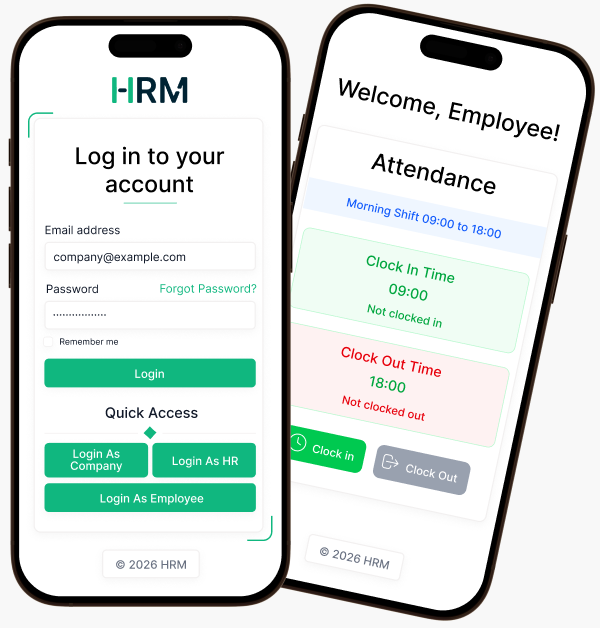
Mobile Access: What Actually Belongs on a Phone
Mobile-friendly payroll is useful for the right tasks and a poor fit for the wrong ones. The split below isn't arbitrary - it reflects where mistakes are expensive.
Mobile devices do well for simple low risk tasks like employees to view and download their payslips, apply for leave, check balances, and for managers to do leave approvals, attendance corrections, and expense claims which also include receiving push notifications for updates. On the other hand desktops are better for in depth and detailed tasks like setting up salary structures, running full period payrolls, going over payroll entries before they are approved, and producing large scale payslip and statutory reports.
Approving a leave on a phone is low-stakes. Running a 200-employee payroll on a phone is one fat-finger away from a costly mistake. The module supports both surfaces; use each for what it's good at.
Payroll Software in India for SMEs — PF, ESIC, TDS & Professional Tax Compliant
The 28th of the Month Problem
It's the 28th. Your payroll executive has 312 employees to process by the 1st. Three people joined mid-month, two left on the 19th, one is on unpaid leave for 11 days, four had salary revisions backdated to April, and the Maharashtra PT slabs changed in July's gazette. The CFO wants the variance report by EOD.
This is what payroll actually looks like in an Indian SME. Not "calculating salaries" — but reconciling exceptions. Every month, the work isn't running payroll for the 290 employees whose data is clean. It's the 22 edge cases that take 80% of the time, and any one of them can produce a wrong PF deduction, a missed ESIC contribution, or a TDS shortfall that surfaces in Q4 as a ₹18,000 gap per employee.
Manual payroll doesn't fail at scale. It fails at exceptions.
How Payroll Software Actually Works (Underneath the Dashboard)
Most payroll tools look the same on the surface. The differences sit in how they model three things: salary structure, payroll runs, and calculation order.
Salary structure is a template, not a number. A well-built payroll system separates the structure (Basic = 50% of CTC, HRA = 40% of Basic, PF = 12% of Basic capped at ₹1,800) from the instance (Priya's salary applies that template to her CTC of ₹9 lakh). When an employee's CTC changes, the system re-derives every component instead of asking HR to recalculate twelve fields. This is also what makes bulk revisions possible — a 7% hike for the engineering team applies the same percentage shift across 60 different salary instances without touching the underlying template.
A payroll run is a job, not a button. When you "run payroll" for September, the system creates an immutable run record — pay period, pay date, eligible employees, attendance cutoff, and statutory rules in force on that date. Every employee processed under that run is locked to those parameters. If the PT slab changes on October 5th, your September run still calculates using the September rules. This is non-negotiable for audit. A payroll run that can be silently re-calculated after disbursement is a liability, not a feature.
Calculation order matters more than calculation accuracy. The system has to compute in this sequence: payable days from attendance → per-day rate → earnings (gross) → statutory deductions (PF, ESI, PT) → projected annual income → TDS slab → other deductions (loans, advances) → net pay. Skip a step or flip the order — say, calculate TDS before applying LOP — and you over-deduct tax that you'll refund in March.
The dashboard hides all this. The audit trail exposes whether the system actually got it right.
Real-World Scenarios Most Payroll Pages Don't Talk About
Mid-month joiner
Rohan joined on the 14th. Payable days = 17 of 30. Per-day rate = monthly gross ÷ 30 (not ÷ 17 — that's a common error). PF starts from his join date, but the wage ceiling of ₹15,000 is applied to the full month's PF wages, not pro-rated. ESIC contribution begins from day one if his gross is under ₹21,000. His TDS for the year now has 11.5 months of projected income, not 12 — the system has to recompute the slab.
Salary revision with arrears
April hike approved in July, effective April 1. Three months of arrears on Basic, HRA, and Special Allowance. The system has to:
- Recalculate PF for April–June (additional 12% on the Basic delta)
- Recompute ESIC if the employee was below the ceiling earlier and now crosses it
- Regenerate three past payslips marked "Revised"
- Add the arrear amount as a separate line in July's payslip — taxed in the month of payout, not the month of accrual
Most spreadsheet-based teams get the PF arrears wrong because they forget the employer-share contribution also needs a back-deposit.
Loss of pay (LOP) interactions
6 days of LOP in a 30-day month means salary for 24 days. But PF is calculated on the LOP-adjusted Basic, not the full Basic. ESIC is on the actually paid wages. PT is on the actual gross — which means an employee in the ₹200 PT slab might drop to a lower slab that month. Three statutory components, three different bases. Manual payroll teams routinely deduct PF on the full Basic during LOP months and over-pay by 8–15%.
Tax regime switch mid-year
Employee declared Old Regime in April, wants to move to New Regime in October. Most companies lock the regime at the start of the financial year, but the Income Tax Act allows the change at the time of filing returns. Your payroll system should let HR project both scenarios, let the employee choose, then recompute YTD TDS for April–September under the new slab — spreading any over-deduction as a refund or under-deduction as a Q3/Q4 bump.
Q4 investment proof shortfall
Aarav declared ₹1.5 lakh under 80C in April. In January, when actual proofs come in, he submits ₹60,000. The system has to recalculate his projected tax against the actual proofs, then concentrate the shortfall TDS into February and March payslips. If you've seen a colleague's net pay drop by 40% in February — this is why. Good payroll software flags the gap in November so the employee can either submit more proofs or plan for the deduction.
Multi-state Professional Tax
A Mumbai-headquartered company with a Bangalore engineering team and a Kolkata sales office runs three different PT regimes simultaneously. Maharashtra's slabs differ from Karnataka's; West Bengal has its own. PT applies based on the work location of the employee, not the registered office of the company. Get this wrong and you're filing PT returns in the wrong state.
Capabilities That Matter (And Why)
Component-level taxability flags
Every earning component carries a flag: taxable, partially taxable, or exempt. HRA is partially taxable based on rent paid, metro/non-metro classification, and Basic. LTA is exempt twice in a four-year block, on actual travel, with conditions. Conveyance for the differently-abled has a separate exemption ceiling. A payroll system that doesn't model taxability at the component level pushes the exemption math into spreadsheets — which means errors that surface in Form 16.
ECR generation the EPFO portal accepts on the first try
Every PF return needs an Electronic Challan-cum-Return file in a specific format. Wage type codes, member IDs, contribution splits between EPF (3.67%) and EPS (8.33%), the wage-ceiling logic for EPS — get any field wrong and the EPFO portal rejects the file with cryptic error codes. A payroll system worth using generates the ECR with validation built in, not as a CSV export you "fix" before upload.
Form 24Q with FVU-validated output
Quarterly TDS returns need the File Validation Utility to clear the file before the Income Tax department accepts it. Generating Form 24Q without FVU validation just means regenerating it three times before submission goes through.
An audit trail that survives an inspector's visit
When a PF inspector asks why an employee's contribution dropped from ₹1,800 to ₹900 in November, you need a record showing the LOP days, the revised PF wages, the calculation logic, and the user who approved that payroll run. Audit trails aren't a "nice to have" — they're the difference between a 30-minute inspection and a 3-week investigation.
Salary hold without breaking the run
An employee on notice with a pending recovery dispute. You can't pay them — but you also can't exclude them from the run, because they're still employed, still accruing PF, still in the attendance roster. Salary hold lets the run process them, generate the entry, hold disbursement, and release the payment when the dispute closes.
Where Payroll Software Genuinely Struggles
Honest section, because every payroll vendor pretends their product handles everything.
Retrospective statutory rate changes
When the government revises the PF wage ceiling or ESIC rates with retrospective effect (it has happened — 2014, 2017, 2019), no payroll system can magically reprocess a year of payslips. You're going to do a manual exercise of identifying affected employees, computing the delta, and depositing the differential. The software helps with the math; it doesn't make the problem disappear.
Complex union or CBA-driven structures
Manufacturing units with Collective Bargaining Agreements often have shift-differential allowances, attendance bonuses with specific qualifying conditions, and union dues at negotiated rates. Most off-the-shelf payroll systems handle these as custom components — but the rules engine often can't model "pay this allowance only if attendance is above 95% AND the employee is in shift B AND has 6+ years of service." You'll need either a heavily customised setup or an additional rules layer outside payroll.
Expatriate and DTAA cases
Employees on assignment to or from India under Double Taxation Avoidance Agreements have parallel tax obligations in two countries, hypothetical tax equalisation, and complex residency-status calculations. Most India-focused payroll software treats these as out-of-scope. You'll need a dedicated global mobility provider or a manual override.
Reimbursement substantiation
The system can calculate that an employee is eligible for ₹30,000 in fuel reimbursement, but it can't tell you whether the petrol bill they uploaded is genuine. Document verification is a human task — payroll software gives you the workflow, not the judgment.
Knowing where a system stops is part of using it well.
What Changes When Payroll Stops Being a Monthly Crisis
Specific shifts, not generic claims:
- Q4 TDS reconciliation: From a 3-day spreadsheet exercise to a 2-hour review. The software has been computing projected tax monthly; March is just the final settlement.
- PF and ESIC inspections: Document pull time drops from two days to twenty minutes. Every contribution traces back to a run, an employee, an approver, and the rules in force that month.
- Form 16 issuance: From late June (after multiple back-and-forths) to mid-May. Once 24Q Q4 is filed and FVU-acknowledged, Form 16 generation is a single bulk action.
- Mid-month joiner processing: From 35 minutes of per-employee math to 90 seconds. The pro-rata, statutory eligibility, and TDS recomputation happen on save.
- Payroll team headcount: Companies routinely run payroll for 500+ employees with 1.5 FTEs once the system is configured, against 4–5 FTEs on spreadsheets.
- Compliance penalties: Late PF deposits, missed ESIC challans, and incorrect 24Q filings carry interest and penalty exposure that adds up to lakhs annually for a 200-person company. Automated deadline tracking takes that risk to near-zero.
The shift that matters most isn't on this list, because it's hard to quantify: payroll stops being the thing that ruins the last week of every month.
If You're Evaluating Payroll Software
The right way to evaluate isn't a feature checklist. It's three questions:
- Run a tricky scenario in the demo. Ask the vendor to process a mid-month joiner who also gets a salary revision in their second month, with two days of LOP. If the demo team needs to "get back to you," that's your answer.
- Ask to see the audit trail. Pull up any random employee's payslip from six months ago and trace it back to the original run, the approver, the attendance source, and the statutory rules in force that month.
- Check the ECR and 24Q output against your CA's checklist. A vendor that makes you fix files before upload is shipping unfinished work.
WorkDo is built for the Indian SME stack — PF, ESIC, TDS, state-wise PT, multi-location workforces, and the operational reality of mid-month exceptions. Salary structure is modelled as inheritable templates, payroll runs are locked immutably once approved, statutory components calculate in the correct order, and ECR and Form 24Q files generate in EPFO and IT-accepted formats.
We won't claim it solves union-driven CBAs or expat DTAA cases. But for the 90% of Indian SME payroll work — PF, ESIC, TDS, PT, attendance integration, and audit-ready records — it removes the monthly crisis.
What Our Clients Say About Us
See what our customers are saying about their experience with our products.

infinitiedip09
Great code quality of HRM SaaS. The structure is well designed and the implementation feels solid, stable, and reliable for real development usage.
akhrot-1989
Latest software with an easy-to-manage admin panel. The support team is very friendly and responsive, and they quickly resolve issues whenever they appear. They also helped me fix AWS storage integration smoothly and efficiently, which made the overall setup experience much better. Highly recommended.
luiseduardo_galindo
It’s an easy-to-customize website that perfectly fits my development project needs. The flexibility allows me to modify and adapt features without difficulty, making it very useful for practical implementation.
aoxoex
Not good experience because the installation process is not working properly and caused multiple issues during setup, making it difficult to use the system effectively.
fairuzajaff
This script is one of the best HRM systems I have used so far. It is practical, useful, and covers most essential requirements needed for managing HR-related tasks efficiently. Recommended for anyone looking for a reliable HRM solution.
kenyalifestyle
The code quality is good, clean, and structured in a way that makes it easy to understand and use for development purposes without unnecessary complexity.
Mr0Human
The script works well and is easy to use for generating monthly payslips. However, it currently lacks a bi-weekly payment option, which could be useful for some businesses depending on their payroll structure and needs.
DevUSA
Thanks for the support provided during usage, everything was handled professionally and the assistance helped resolve my queries in a simple and clear manner.
NisvetReiz
Great system overall with very helpful support. The experience has been smooth, and the support team is always responsive and ready to assist whenever required, making it reliable for long-term use.
eximanshu
Loved the product and I am fully satisfied with both the support and the script. Everything works as expected and the overall experience has been very smooth and reliable from start to finish.
Start Simplifying Indian Payroll Today
Automate salary processing, ensure compliance, and pay employees accurately—every time.