
eSewa – WorkDo Dash SaaS Add-On Guide
Learn how to configure and manage eSewa payment integration in Dash SaaS.
Supported County: Nepal
Supported Currency: Nepalese Rupee (NPR)
Benefits of eSewa Payment Gateway
Greater Accessibility for Nepali Users
By integrating eSewa into WorkDo Dash, businesses can directly cater to users in Nepal who prefer transacting through their trusted local payment method. This not only improves the experience for existing customers but also helps businesses tap into new markets and expand their reach within the region.
Safe & Trustworthy Transactions
eSewa is built with strong encryption and multi-layered security protocols that protect sensitive financial data throughout every transaction. Customers can complete payments with full confidence, knowing their information is secure, which in turn builds long-term trust and loyalty toward the platform.
How to Access eSewa Add-On?
- Visit WorkDo Website Head over to https://workdo.io/ and explore the extensive range of Dash SaaS Add-Ons.
- Discover eSewa Navigate to the “Dash SaaS Add-Ons” section and locate the “eSewa Add-On.”
- Activate the Add-On Click the “Activate” button next to the eSewa Add-On to enable it for your WorkDo Dash account. Once activated, eSewa becomes available across supported modules based on permissions and settings.
Super Admin Settings
(Plan Purchase by the Company)
The Super Admin Settings are accessible only to the highest-level administrator. These settings allow the Super Admin to manage company-level subscriptions and payment configurations.
Key Capabilities:
- Purchase or upgrade company subscription plans
- Configure eSewa API credentials for plan payments
- Enable or disable eSewa as a payment gateway
Configuration Path:
Super Admin Login → Settings → eSewa Settings
Company Settings
(Bookings, Beauty Spa, LMS & Other Payments)
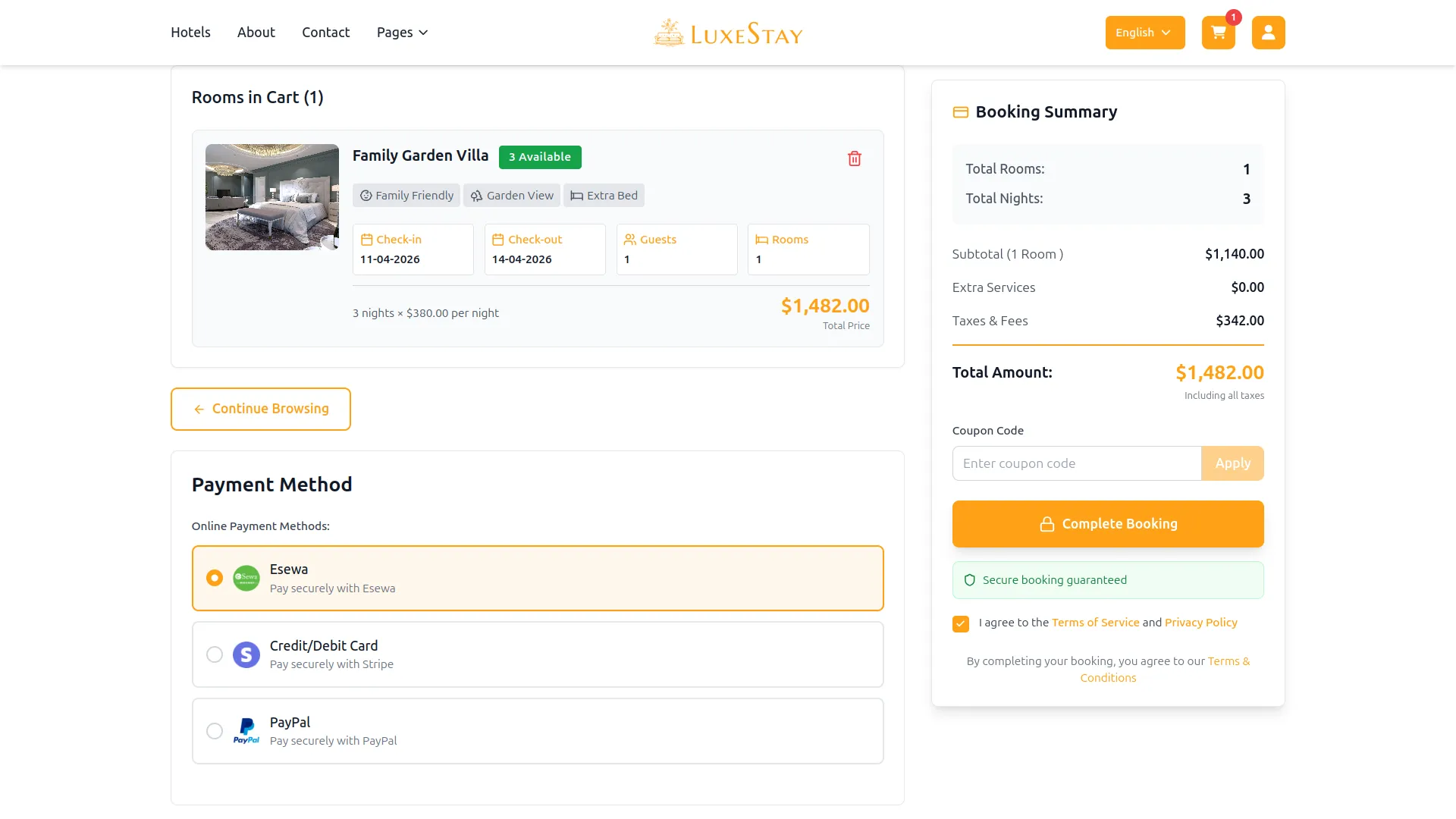
Company Settings allow organizations to configure eSewa for receiving payments from customers across multiple modules.
Supported Modules Include:
Configuration Path:
Company Login → Settings → System Settings → eSewa Settings
Company-Level Capabilities:
- Configure eSewa API credentials
- Enable eSewa for selected modules
- Accept online payments from customers
- Manage Bookings, Beauty Spa, and service
- Handle tax, coupon, and discount calculations
How to Generate eSewa API Keys?
To integrate eSewa seamlessly into your (Product Name), follow the steps below:
1. Generate API Key:
- Generate your API key by visiting the eSewa API documentation: https://esewa.com.np/
2. Configure eSewa Gateway in Dash SaaS :
- Log in to your Dash Saas account with administrator credentials.
- Navigate to the settings page.
3. Access Payment Settings:
- Within the settings page, locate and select the “Payment Settings” option.
4. Set Up eSewa Gateway:
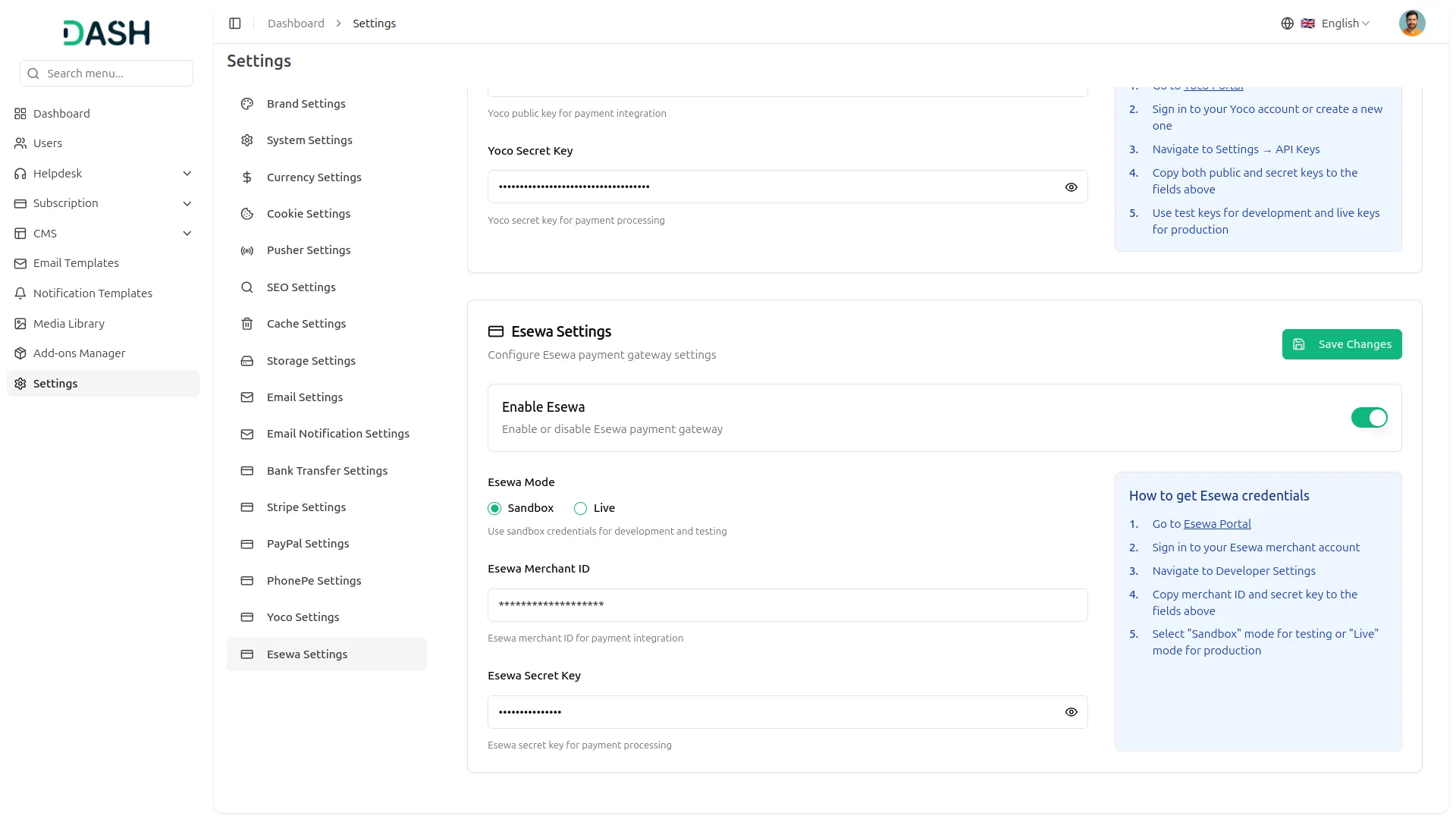
- Scroll down the page until you find the eSewa Gateway option.
- Click on the eSewa Gateway to access its configuration settings.
5. Enter Required Details:
In the settings, provide the following essential details:
- Merchant ID: Enter your eSewa Merchant ID.
- Secret Key: Enter your eSewa Secret key.
6. Save Your Settings:
- After entering the necessary details, save the settings to activate the eSewa Payment Gateway within your Dash Saas platform.
This detailed documentation provides an overview of eSewa Payment Integration, its benefits, and the integration process. By integrating eSewa, businesses and organizations can offer their customers a secure and flexible payment experience while streamlining their payment processes.
Note: The eSewa Add-On is a paid feature and can be accessed by users who have purchased it. By integrating the eSewa Add-On into your WorkDo Dash SaaS account, you’ll provide a reliable and user-friendly payment gateway that supports global transactions.
Categories
Related articles
- Appointment – WorkDo Dash SaaS Add-On Guide
- Adyen – WorkDo Dash SaaS Add-On Guide
- Checkout – WorkDo Dash SaaS Add-On Guide
- Ratings – TicketGo Add-On Guide
- Google Captcha – WorkDo Dash SaaS Add-On Guide
- Twilio – TicketGo Add-On Guide
- Internal Knowledge – WorkDo Dash SaaS Add-On Guide
- Slack Integration – TicketGo Add-On Guide
- Africa’s Talking – WorkDo Dash SaaS Add-On Guide
- Pipedrive – WorkDo Dash SaaS Add-On Guide
- WorkDo Products Installation Guide
- Franchise Management – WorkDo Dash SaaS Add-On Guide
We're Here to Help - Let's Talk
Have questions about our solutions, customization services, or business tools? Our team is here to help you. let's talk.