
What is Case Management? Complete Guide & Examples
Case management is a systematic approach to coordinating services and workflows. In legal contexts, it organizes case information, tracks deadlines, manages documents from intake to resolution. Modern systems automate these processes.
The Evolution of Case Management in Modern Workflows
Case management is the process of coordinating services, providing assistance, allocating resources, and rendering support to a person or an organization systematically through defined workflows. It is true in all scenarios, whether you are a legal practitioner dealing with intricate litigation, a healthcare practitioner managing a patient, or a social services organization managing a client. Effective case management achieves appropriate navigation of services and supports while sustaining compliance, optimizing outcomes in the process.
In the contemporary professional world, the evolution of case management has progressed from basic filing systems to intricate digital workflows that automate repetitive tasks, monitor important deadlines, and provide up-to-the-minute insight into the status of cases. Modern case management systems consolidate and integrate multiple workflows- from intake and documentation to billing and reporting- into a single, self-contained system that improves collaboration and decision-making.
This comprehensive guide explores what case management truly means, how it works in practice, and why organizations across industries are investing in digital case management solutions to streamline operations and deliver better client service.
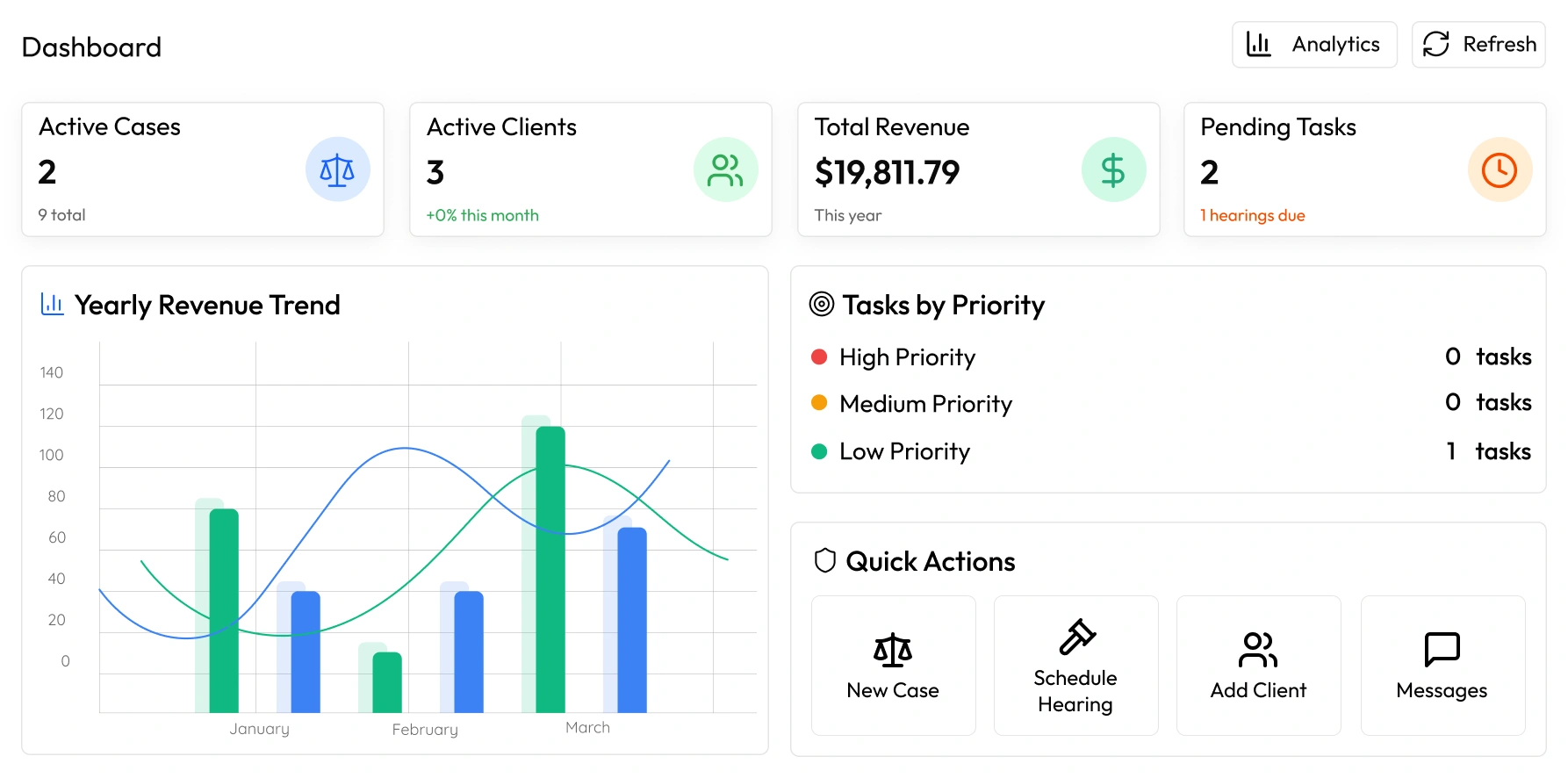
Understanding the Case Management Definition and Core Concepts
What is Case Management?
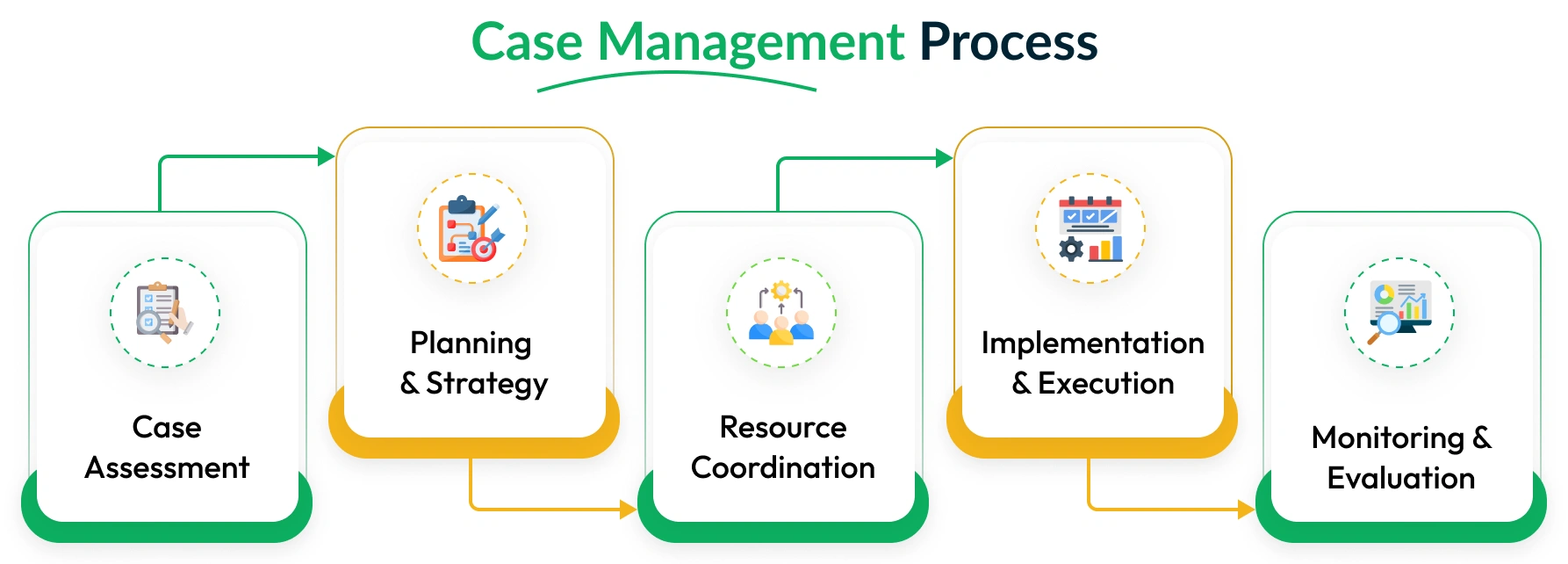
Case management definition encompasses the systematic coordination of services, resources, and activities to achieve specific outcomes for individuals, families, or organizations. At its core, case management involves assessing needs, developing action plans, coordinating services, monitoring progress, and evaluating outcomes throughout the entire lifecycle of a case.
The case management process typically includes several key components:
- Assessment and Intake: Gathering comprehensive information about the case, including background details, requirements, and stakeholders involved.
- Planning and Goal Setting: Developing specific, measurable objectives and creating structured action plans to achieve desired outcomes.
- Resource Coordination: Identifying and securing necessary resources, whether they’re legal documents, medical records, financial information, or expert consultations.
- Implementation and Monitoring: Executing planned activities while continuously tracking progress, deadlines, and milestones.
- Evaluation and Closure: Assessing outcomes, documenting lessons learned, and formally closing cases when objectives are met.
Modern case management extends beyond traditional manual processes by incorporating digital tools that automate workflows, enforce compliance requirements, and provide analytics for continuous improvement. This evolution has transformed case management from a reactive administrative function to a proactive strategic capability that drives operational excellence.
Why Is Case Management So Important for Legal Practices?
Efficiency and Productivity
By implementing a comprehensive case management system, legal professionals can automate repetitive tasks, streamline workflows, and significantly improve productivity. Tools like legal task management software help assign and track tasks within a team, ensuring no critical step is missed in the case handling process.
Better Case Tracking
Case tracking systems allow legal teams to monitor the progress of cases in real-time. By using case tracking software, law firms can ensure that deadlines are met, documents are updated, and no task falls through the cracks.
Enhanced Client Management
With legal client management software, law firms can manage client relationships more effectively. This type of software helps maintain detailed records of client communications, meetings, and case history, ensuring a smooth and transparent client experience.
Legal Compliance and Security
A secure case management system helps law firms stay compliant with legal and ethical requirements. These systems offer features like secure document management, automatic compliance tracking, and audit trails, reducing the risk of compliance violations.
Types of Case Management Systems and Solutions
Standalone vs. Integrated Case Management Software
Organizations have multiple options when selecting Workdo’s case management systems, each offering different capabilities and integration levels. Understanding these distinctions helps organizations choose solutions that align with their specific requirements and technical infrastructure.
Standalone Case Management Systems
Standalone solutions put all their focus into case management which at the same time does not integrate with other business apps. These solutions may include basic case tracking, document storage, calendar management, and simple reporting features. Standalone solutions do well for small organizations which have simple requirements and low tech needs.
We see that stand alone systems’ benefits are in the form of lower implementation costs, faster deployment, and simplified training. At the same time they tend to create data silos and require manual data entry which in turn leads to errors and inefficiencies.
Integrated Case Management Platforms
Workdo’s Advocate SaaS Case Management System integrated with billing, accounting, CRM, and document management systems form integrated platforms. Such integrated systems provide a comprehensive solution to an information system by eliminating data silos and sharing information across modules. An integrated workflow is created that spans entire organizational processes.
More sophisticated integrated platforms offer automated workflow routing, role-based access control, advanced analytics, option for custom-built integrations through APIs with specialized systems, and others. Despite the more complex implementation, integrated platforms provide greater long-term value through improved organizational efficiency and better data consistency.
Cloud-Based SaaS Case Management Solutions
The implementation of Software-as-a-Service (SaaS) case management solutions has become widespread due to their ease of use, ease of scaling, and their relative affordability. Access to the system via the cloud from any device enhances convenience, providing automatic software updates and security features that exceed what most organizations could reasonably sustain for internal applications.
Growing organizations also find SaaS solutions appealing as they usually come with a subscription-based pricing model that scales with usage. Cost-effective business continuity, without additional infrastructure investments, is also available as built-in backup and disaster recovery capabilities come standard.
Industry-Specific Case Management Systems
Many vendors offer specialized case management solutions designed for specific industries such as legal, healthcare, social services, or insurance. These systems include pre-configured workflows, compliance templates, and industry-standard reporting features that reduce customization requirements.
Industry-specific solutions often integrate with specialized tools and databases commonly used within particular sectors, providing seamless connectivity that enhances productivity and accuracy.
Key Benefits of Effective Case Management
Transforming Operations Through Better Case Management
Implementing effective case management delivers measurable benefits that improve operational efficiency, client satisfaction, and organizational performance. These advantages extend beyond simple organization to create competitive advantages and sustainable growth opportunities.
Enhanced Operational Efficiency
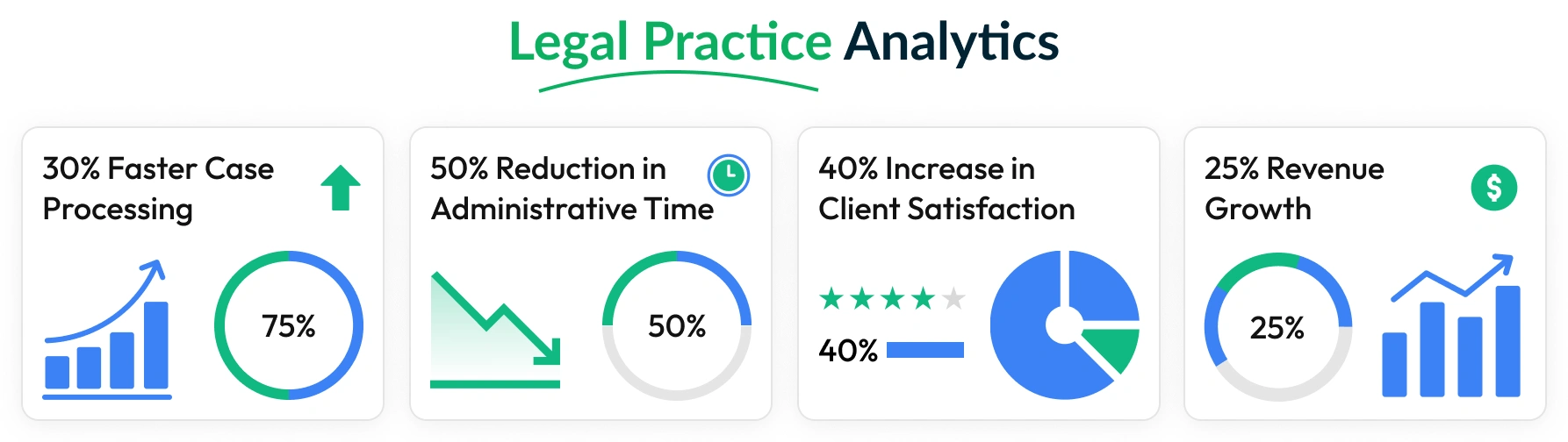
Case management systems eliminate redundant tasks, automate routine processes, and standardize workflows across teams. By centralizing information and automating administrative functions, organizations typically reduce case processing time by 30-50% while improving accuracy and consistency.
Automated deadline tracking prevents missed appointments and filing deadlines, while intelligent task routing ensures work reaches the right people at the right time. These efficiencies free up staff to focus on high-value activities that directly impact case outcomes.
Improved Client Communication and Satisfaction
Modern case management systems include client portals that provide 24/7 access to case status, documents, and communication history. This transparency builds trust while reducing the volume of status inquiry calls and emails that consume staff time.
Automated client notifications keep stakeholders informed about important developments, hearing dates, and required actions. Proactive communication demonstrates professionalism and helps prevent misunderstandings that could damage client relationships.
Better Compliance and Risk Management
Case management systems maintain detailed audit trails that document all activities, decisions, and communications. These comprehensive records support compliance reporting, regulatory audits, and legal discovery requirements while reducing liability risks.
Built-in compliance templates and automated reminders help organizations meet industry-specific requirements such as HIPAA in healthcare, attorney-client privilege in legal services, or confidentiality standards in social work.
Data-Driven Decision Making
Comprehensive reporting and analytics capabilities provide insights into case patterns, resource utilization, and performance trends. Organizations use this data to optimize staffing levels, identify training needs, and improve service delivery processes.
Performance metrics such as case resolution times, client satisfaction scores, and revenue per case help management make informed decisions about resource allocation and strategic planning.
Scalability and Growth Support
Digital case management systems scale easily to accommodate organizational growth without proportional increases in administrative overhead. Standardized processes and automated workflows ensure consistent quality regardless of case volume or team size.
Cloud-based solutions provide particular advantages for growing organizations, offering unlimited storage capacity and user scalability without requiring additional infrastructure investments.
Cost Reduction and ROI
Organizations typically achieve positive return on investment within 12-18 months through reduced administrative costs, improved billable hour capture, faster case resolution, and decreased error rates. The combination of efficiency gains and improved client satisfaction creates sustainable competitive advantages that support long-term profitability.
Real-World Case Management Examples Across Industries
Legal Case Management Example
A mid-size law firm specializing in personal injury cases implemented comprehensive legal case management software to handle their growing caseload of 500+ active matters. Previously, attorneys spent 40% of their time on administrative tasks, tracking deadlines manually, and searching through physical files.
After implementing digital case management, the firm achieved remarkable results:
- 50% reduction in case processing time through automated document generation and workflow routing
- 90% improvement in deadline compliance with automated calendar reminders and task assignments
- 35% increase in billable hour capture through integrated time tracking and mobile access
- 60% reduction in client inquiry calls due to transparent client portal access
The system’s integrated billing module eliminated duplicate data entry, reduced billing errors by 80%, and accelerated payment collection through automated invoice generation and online payment processing.
Social Services Case Management Example
A state social services agency managing child welfare cases deployed case management software to track family services, court requirements, and safety assessments. The system ensures compliance with federal reporting requirements while improving case worker efficiency.
Outcomes achieved:
- 60% reduction in case documentation time through automated forms and templates
- 100% compliance with federal reporting requirements via built-in compliance tracking
- 45% improvement in case resolution times through better resource coordination and workflow management
How to Choose the Right Case Management System
Essential Selection Criteria
Selecting the right case management system requires careful evaluation of organizational needs, technical requirements, and long-term strategic objectives. A structured approach to vendor evaluation ensures organizations choose solutions that deliver maximum value and support sustainable growth.
Scalability and Flexibility Requirements
Evaluate systems based on their ability to accommodate current case volumes while scaling to support future growth. Consider factors such as user capacity, storage limitations, and performance under increased workloads. Flexible systems allow customization of fields, workflows, and reporting without requiring extensive technical expertise.
Security and Compliance Capabilities
Case management systems must protect sensitive information while meeting industry-specific compliance requirements. Essential security features include data encryption, role-based access controls, audit logging, and regular security updates. Verify that vendors maintain relevant certifications such as SOC 2, HIPAA compliance, or ISO 27001.
Integration and Interoperability
Modern organizations use multiple software applications that must work together seamlessly. Evaluate integration capabilities including pre-built connectors, API availability, and data import/export features. Strong integration capabilities prevent data silos and reduce manual data entry requirements.
User Experience and Adoption Factors
The best case management system is only effective if staff actually use it consistently. Prioritize solutions with intuitive interfaces, mobile accessibility, and minimal training requirements. Request user references and conduct pilot testing to validate ease of use claims.
Vendor Support and Training Resources
Comprehensive vendor support ensures successful implementation and ongoing optimization. Evaluate training programs, documentation quality, response times, and customer support availability. Consider the vendor’s financial stability and track record of product innovation.
Total Cost of Ownership Analysis
Look beyond initial software costs to understand the complete financial impact including implementation services, training, ongoing support, and potential customization needs. Factor in productivity gains and cost savings when calculating return on investment.
Implementation Timeline and Resource Requirements
Realistic implementation planning prevents project delays and budget overruns. Understand data migration requirements, integration complexity, and training schedules. Establish clear success metrics and milestone checkpoints to monitor progress throughout implementation.
Future-Proofing Considerations
Technology evolves rapidly, so choose vendors committed to ongoing innovation and product development. Evaluate their roadmap for new features, mobile capabilities, and emerging technology integration such as artificial intelligence and automation.
Implementation Tips and Best Practices
Step-by-Step Implementation Guide
Successfully implementing case management software requires careful planning, stakeholder engagement, and systematic execution. Organizations that follow proven implementation methodologies achieve faster adoption rates and better long-term outcomes.
Phase 1: Pre-Implementation Planning
Begin with comprehensive requirements gathering involving all stakeholders who will use the system. Document current workflows, identify pain points, and establish success metrics. Form an implementation team with representatives from each department and designate a project manager to coordinate activities.
Phase 2: Data Migration and System Configuration
Clean and organize existing data before migration to ensure accuracy and completeness. Configure system settings including user roles, permissions, custom fields, and workflow rules. Test all configurations thoroughly before proceeding to user training.
Phase 3: User Training and Change Management
Develop role-specific training programs that focus on daily tasks and common scenarios. Use hands-on training sessions with real case examples to build confidence and competence. Create user guides and reference materials for ongoing support.
Phase 4: Pilot Testing and Refinement
Begin with a limited pilot group using real cases to identify issues and optimize workflows. Gather feedback regularly and make necessary adjustments before full deployment. Use pilot results to refine training materials and documentation.
Phase 5: Full Deployment and Ongoing Support
Roll out the system to all users with continued support and monitoring. Establish regular check-ins to address questions and identify optimization opportunities. Plan for ongoing training as staff turnover occurs and new features are released.
Best Practices for Success:
- Maintain executive sponsorship throughout the implementation process
- Communicate benefits clearly and address concerns proactively
- Celebrate early wins and success stories to build momentum
- Establish user champions in each department to provide peer support
- Monitor adoption metrics and intervene when usage lags
- Continuously gather feedback and implement improvements
Organizations following these best practices typically achieve 90%+ user adoption within 90 days while realizing productivity benefits within the first month of full deployment.

Conclusion and Next Steps
Effective case management transforms organizational operations by streamlining workflows, improving compliance, and enhancing client service delivery. Whether you’re managing legal cases, healthcare patients, or social services clients, the right case management system provides the foundation for sustainable growth and competitive advantage.
The key to successful case management implementation lies in understanding your specific requirements, selecting appropriate technology solutions, and following proven implementation methodologies. Organizations that invest time in proper planning and change management achieve significantly better outcomes and faster return on investment.
Ready to explore case management solutions for your organization?
- Download our Case Management Selection Checklist to evaluate vendors systematically
- Schedule a personalized demo to see how case management software works with your specific workflows
- Request a consultation with our case management experts to discuss your unique requirements
Don’t let inefficient processes hold your organization back. Take the first step toward streamlined operations and improved client service with modern case management solutions designed for your industry.
📌 Frequently Asked Questions (FAQs)
Reach Out to Us
Have questions or need assistance? We're here to help! Reach out to our team for support, inquiries, or feedback. Your needs are important to us, and we’re ready to assist you!


Need more help?
If you’re still uncertain or need professional guidance, don’t hesitate to contact us. You can contact us via email or submit a ticket with a description of your issue. Our team of experts is always available to help you with any questions. Rest assured that we’ll respond to your inquiry promptly.
Love what you see?
Do you like the quality of our products, themes, and applications, or perhaps the design of our website caught your eye? You can have similarly outstanding designs for your website or apps. Contact us, and we’ll bring your ideas to life.