
UddoktaPay – WorkDo Dash SaaS Add-On Guide
Learn how to configure and manage UddoktaPay integration in WorkDo Dash SaaS easily.
Supported Countries: United States, European Union Countries, United Kingdom, Australia, Canada, Bangladesh, India, and more
Supported Currencies: BDT, USD, INR, GBP, EUR, AUD, CAD, and more
Benefits of UddoktaPay Payment Gateway
Flexible Payment Acceptance
UddoktaPay makes it simple for businesses to collect payments through a variety of channels, including mobile banking and online payment methods, ensuring every customer has a convenient way to complete their transaction.
Automated Payment Confirmations
With built-in webhook support and real-time transaction updates, UddoktaPay automatically handles payment confirmations, reducing manual intervention and minimizing the chances of errors in financial records.
Safe & Secure Transactions
UddoktaPay is built with strong encryption and fraud prevention mechanisms, ensuring that every payment made through the platform is protected and processed in a completely secure environment.
Multi-Currency Flexibility
UddoktaPay supports a wide range of currencies, making it an ideal choice for businesses serving international customers and enabling seamless cross-border transactions without added complexity.
How to Access UddoktaPay Add-On?
- Visit the WorkDo Dash Website Go to workdo.io to access the WorkDo Dash platform.
- Navigate to Dash SaaS Add-Ons Explore the “Dash SaaS Add-Ons” section on the website to discover available Add-Ons.
- Discover UddoktaPay Add-On Browse the list of available Add-Ons and find the “UddoktaPay Payment Gateway.”
- Activate the Add-On Click the “Activate” button next to the UddoktaPay Add-On to enable it for your WorkDo Dash account.
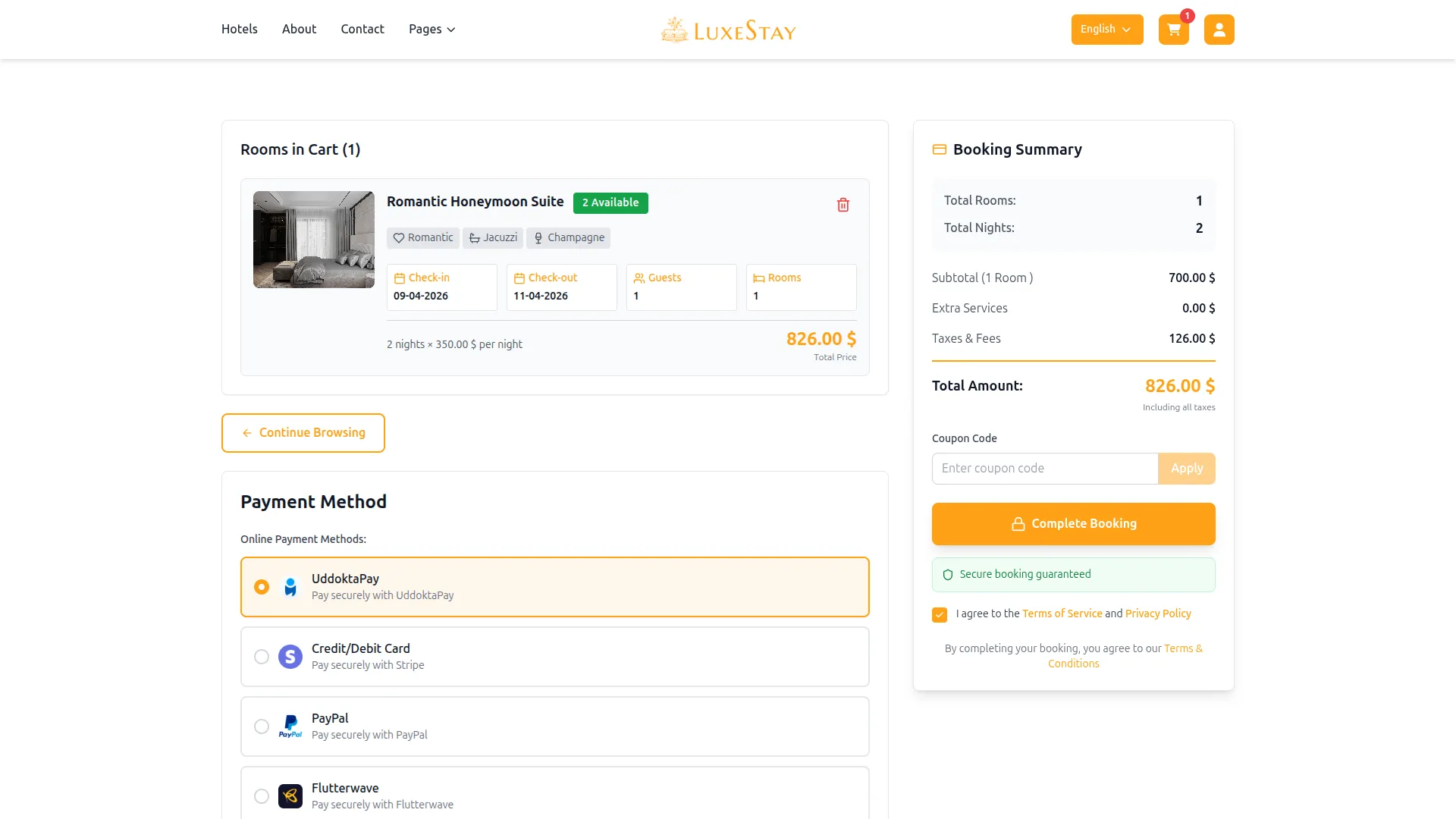
Once activated, UddoktaPay becomes available across supported modules based on permissions and settings.
Super Admin Settings
(Plan Purchase by the Company)
The Super Admin Settings are accessible only to the highest-level administrator. These settings allow the Super Admin to manage company-level subscriptions and payment configurations.
Key Capabilities:
- Purchase or upgrade company subscription plans
- Configure UddoktaPay API credentials for plan payments
- Enable or disable UddoktaPay as a payment gateway
Configuration Path:
Super Admin Login → Settings → UddoktaPay Settings
Company Settings
(Bookings, Beauty Spa, LMS & Other Payments)
Company Settings allow organizations to configure UddoktaPay for receiving payments from customers across multiple modules.
Supported Modules Include:
Configuration Path:
Company Login → Settings → System Settings → UddoktaPay Settings
Company-Level Capabilities:
- Configure UddoktaPay API credentials
- Enable UddoktaPay for selected modules
- Accept online payments from customers
- Manage Bookings, Beauty Spa, and service
- Handle tax, coupon, and discount calculations
How to Generate UddoktaPay API Keys?
To integrate UddoktaPay seamlessly into your (Product Name), follow the steps below:
1. Generate API Key
- Access the UddoktaPay admin portal by clicking this link: https://my.uddoktapay.com
- Log in to your UddoktaPay account or create one if you don’t have an account yet.
- Obtain comprehensive information about UddoktaPay.
2. Configure UddoktaPay Gateway In (Product Name)
- Log in to your Dash SaaS account with administrator credentials.
- Navigate to the settings page.
3. Access Payment Settings
- Within the settings page, locate and select the “Payment Settings” option.
4. Set Up UddoktaPay Gateway
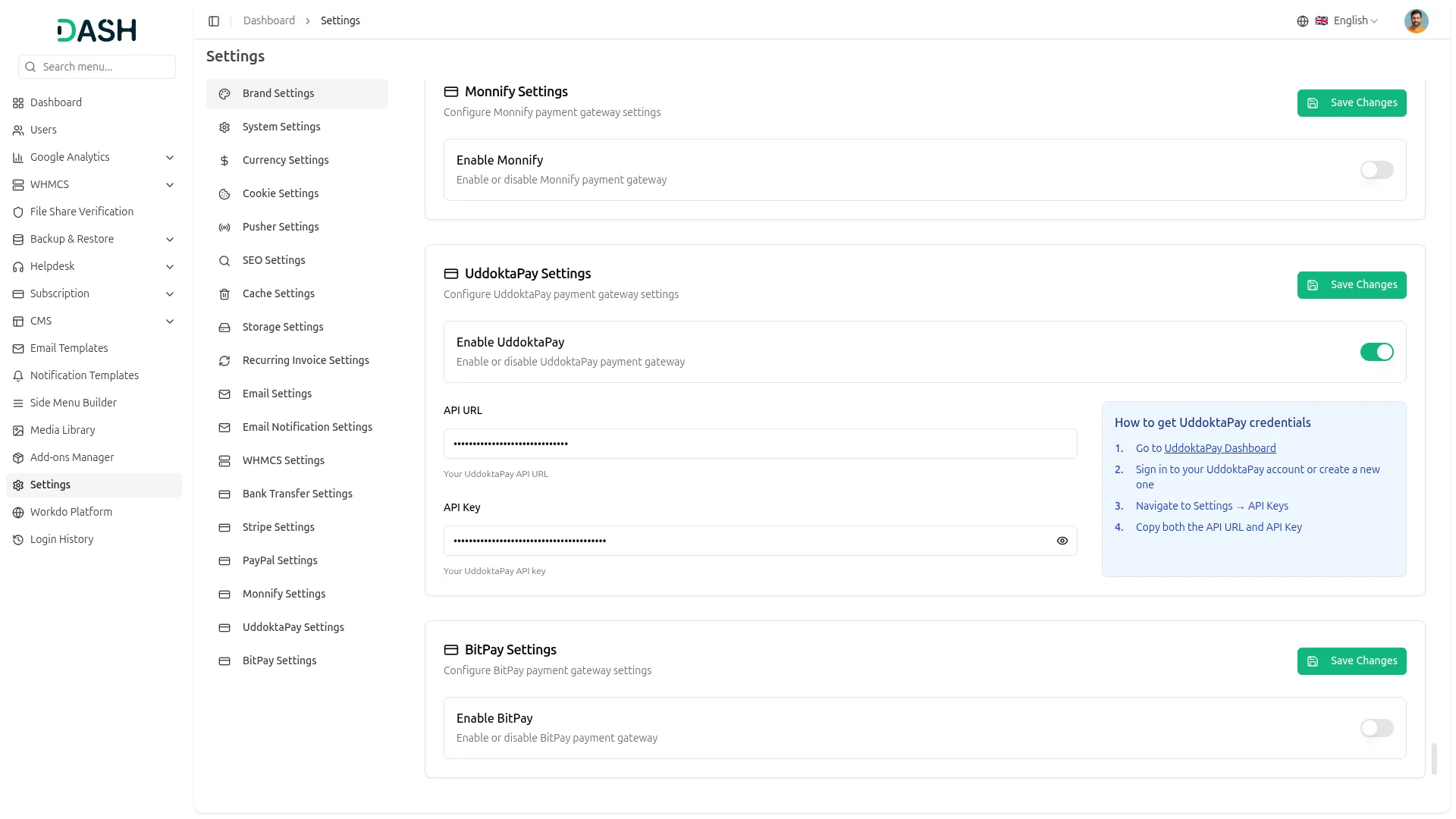
- Scroll down the page until you find the UddoktaPay Gateway option.
- Click on the UddoktaPay Gateway to access its configuration settings.
5. Enter Required Details
In the UddoktaPay settings, provide the following essential details
- UddoktaPay URL
- UddoktaPay API Key
6. Save Your Settings
- After entering the necessary details, save the settings to activate the UddoktaPay Payment Gateway within your Dash SaaS platform.
By following this detailed documentation, you’ll seamlessly integrate UddoktaPay’s powerful payment gateway into your WorkDo Dash SaaS platform. Unlock the benefits of efficient payment processing, automation of financial tasks, and enhanced user experience. Should you encounter any issues or require assistance, feel free to contact our dedicated support team for prompt assistance.
Note: The information provided in this documentation is intended for guidance purposes. It’s important to ensure that your UddoktaPay account and API keys are used correctly and securely to ensure proper integration and payment processing.
Categories
Related articles
- eSewa – BookingGo SaaS Add-On Guide
- Return & Refund Guide – eCommerceGo SaaS
- Medical Lab Management – WorkDo Dash SaaS Add-On Guide
- Inventory – WorkDo Dash SaaS Add-On Guide
- Paytm – WorkDo Dash SaaS Add-On Guide
- Reward Club Point – eCommerceGo SaaS Add-On Guide
- Business Process Mapping – WorkDo Dash SaaS Add-On Guide
- User Management, Roles & Permissions Guide
- Storage Settings Guide
- Internal Knowledge – WorkDo Dash SaaS Add-On Guide
- SenangPay – WorkDo Dash SaaS Add-On Guide
- Quiz Management – WorkDo Dash SaaS Add-On Guide
We're Here to Help - Let's Talk
Have questions about our solutions, customization services, or business tools? Our team is here to help you. let's talk.