
Best CRM Software in 2026: Find the Right Platform for Your Team
Compare the best CRM software in 2026 – features, pricing, types, and which platform fits your business today.

CRM Software in 2026: A Practical Guide to Choosing the Right Platform
There are over 900 CRM platforms available today.
That number is not a sign of progress. For most business owners and sales managers, it is a genuine problem. You already know why your business needs a CRM: tracking relationships, organizing pipelines, and closing deals consistently. If you want a primer on that, our complete guide to What Is CRM covers it in full.
What this guide is about is the harder question: which CRM software is actually worth your time and budget in 2026?
Because picking the wrong one is more expensive than people realize. The average business spends 3 to 6 months onboarding a CRM before realizing it does not fit its workflow. Then come the migration, the retraining, the lost data, and the wasted subscription fees.
This guide skips the definitions and gets straight to the evaluation, types, crm key feature criteria, pricing mechanics, how to compare Software honestly, and which use cases each tool actually handles well.
Best CRM Software: The 2026 Market Landscape
The right CRM helps businesses manage customers, streamline sales, and improve productivity. Here’s a comparison of the top CRM software solutions in 2026.
WorkDo’s Dash SaaS
WorkDo’s Dash SaaS takes a fundamentally different approach from the other four: instead of a per-user subscription to a hosted platform, it’s a self-hosted, white-label SaaS/ERP starter kit sold as a one-time codebase purchase. CRM is one of its built-in modules, alongside Sales, HRM, Project Management, and others, running inside a multi-workspace architecture the buyer installs and operates themselves.
Key Features
- Multi-workspace CRM with company-level data scoping
- Built-in modules alongside CRM: Sales, HRM, Project Management, Accounting, POS, and more
- White-label branding: custom logo, theme, and landing pages
- Role-based permissions across Super Admin, Company Admin, and Company User tiers
- Extendable via a paid add-on catalog (workflow automation, custom fields, integrations)
Pros
- One-time purchase ($49 Regular license) instead of ongoing per-user fees
- Full white-label control, install it as your own branded product
- CRM ships alongside other business modules, useful for agencies bundling services
Cons
- Requires self-hosting and technical setup, not a plug-and-play SaaS signup
- Lacks enterprise CRM depth (no built-in lead scoring, email sequences, or call recording out of the box)
- No dedicated vendor customer support line the way subscription CRMs offer, support is community/ticket-based
- Best suited to technical buyers comfortable managing their own server and updates
Salesforce
Salesforce is the CRM most businesses have heard of, and for good reason, it holds a leading share of the global CRM market. It’s built around modular “Clouds” for sales, service, and marketing, with its AI layer (Agentforce) increasingly central to the newer, pricier plans.
Key Features
- Advanced pipeline and opportunity management
- Agentforce AI agents for sales and service automation
- Deep customization via custom objects and workflows
- Extensive AppExchange marketplace for Add-Ons
- Territory management and advanced forecasting
Pros
- Best-in-class customization and scalability for large teams
- Massive integration ecosystem through AppExchange
- Strong reporting and forecasting tools at higher tiers
Cons
- Pricing climbs quickly; realistic functionality often starts at Enterprise ($175/user/mo), not the $25 entry tier
- Requires annual contracts; no month-to-month option
- Steep learning curve; often needs consultants for full implementation
- Implementation costs can add $25,000+ on top of licensing
HubSpot
HubSpot built its reputation on a genuinely usable free CRM, then expanded into a full platform of “Hubs” covering marketing, sales, service, and content. It’s the go-to choice for businesses whose growth depends on inbound marketing as much as sales follow-up.
Key Features
- Genuinely free forever CRM with unlimited users and up to 1 million contacts
- Marketing automation, landing pages, and email campaigns
- Sales sequences, meeting scheduling, and deal pipelines
- Shared inbox and live chat for customer service
- Reporting dashboards across the full customer lifecycle
Pros
- Free plan is a real product, not a stripped-down trial
- Unified platform reduces the need for separate marketing tools
- Easiest onboarding of the major CRMs, minimal training needed
Cons
- Costs scale fast once you need automation, Professional tiers run $90–100+/seat/month
- Marketing Hub pricing is contact-based, so your bill grows with your list size
- Professional and Enterprise plans carry mandatory onboarding fees ($1,500–$6,000+)
- Free plan carries HubSpot branding on customer-facing assets
Zoho CRM
Zoho CRM has built its position as the value leader in the category, a genuinely capable CRM at a fraction of Salesforce’s or HubSpot’s pricing, backed by Zoho’s much larger ecosystem of business apps.
Key Features
- Blueprint process automation for standardizing sales workflows
- Zia, Zoho’s AI assistant, for lead scoring and next-best-action suggestions
- Multiple pipelines and territory management (Enterprise tier)
- Deep integration with the broader Zoho One ecosystem
- Inventory management and CPQ on Professional and above
Pros
- Strongest feature-to-price ratio in this comparison
- Free tier is real software (up to 3 users), not just a demo
- Scales from solo freelancer to enterprise without changing platforms
Cons
- Interface feels more cluttered and dated than HubSpot or Pipedrive
- Steeper learning curve for a platform this affordable
- Support response times are inconsistent on lower tiers
Pipedrive
Pipedrive was built specifically around the sales pipeline, a visual, drag-and-drop deal board rather than a broad platform trying to cover marketing, service, and CRM all at once. That focus is its biggest strength and its clearest limitation.
Key Features
- Visual, customizable sales pipeline with drag-and-drop deal stages
- AI-powered sales reporting and activity reminders
- Workflow automation (from the Growth tier up)
- 400+ integrations, including Zoom, Slack, and Google Workspace
- Optional Add-Ons: LeadBooster, Campaigns, Smart Docs
Pros
- Cleanest, most intuitive interface among the CRMs reviewed here
- Fast to set up, teams are often productive within days
- Strong reporting on deal velocity and conversion at every stage
Cons
- No permanent free plan, only a 14-day trial
- Real-world cost climbs once you add necessary Add-Ons (lead capture, e-signatures, campaigns)
- Marketing automation is limited compared to HubSpot; it is not a substitute for a full marketing platform
- Automation on lower tiers is capped (workflow run limits)
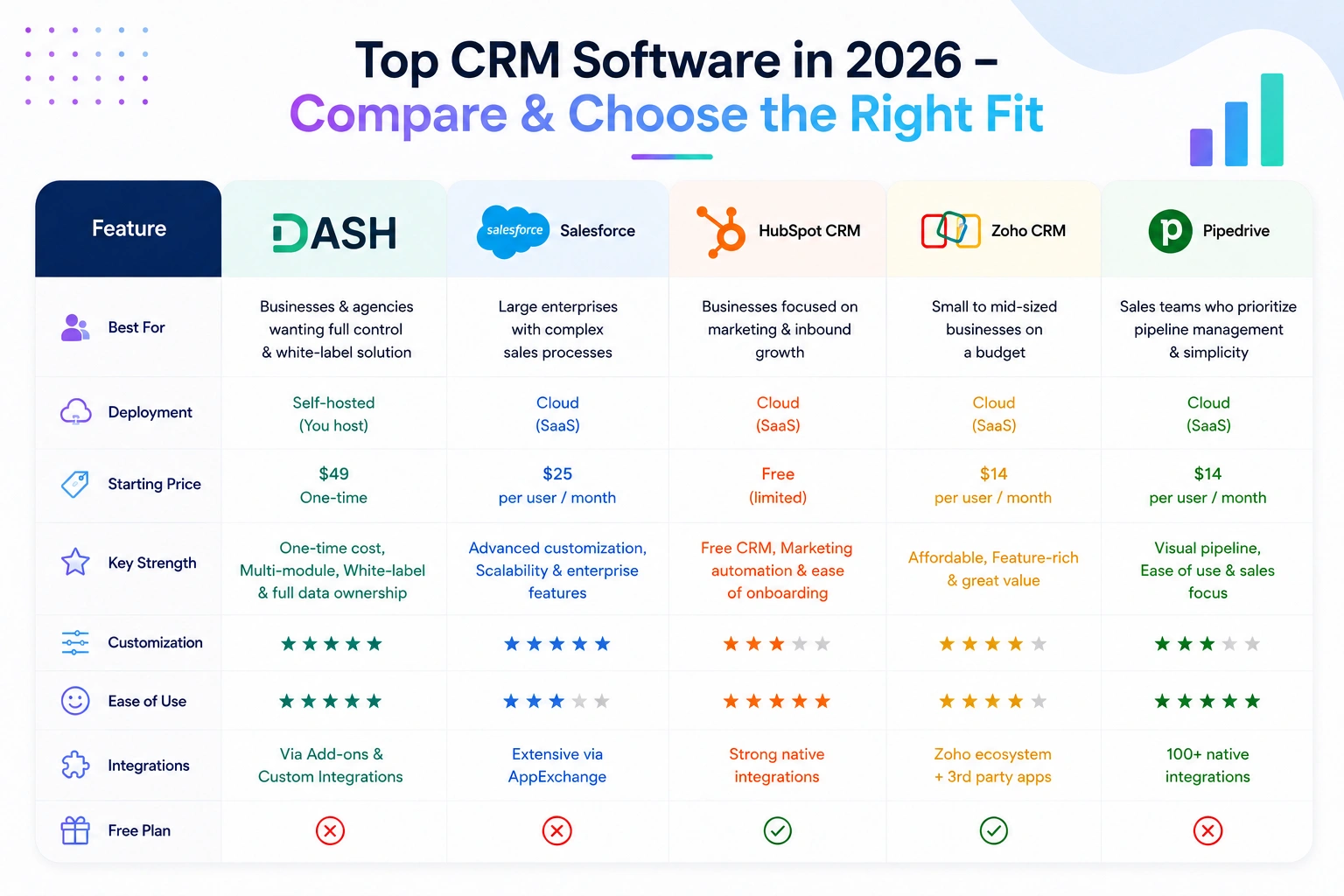
CRM Software Comparison Chart
| Evaluation Criteria | Pipedrive | Zoho CRM / HubSpot | Salesforce | WorkDo’s Dash SaaS |
|---|---|---|---|---|
| Custom Pipeline Stages | ❌ Limited | ✅ | ✅ | ✅ Per pipeline |
| Multiple Pipelines | ❌ | ✅ Paid tier | ✅ | ✅ Built-in |
| Kanban + List View | ✅ | ✅ | ✅ | ✅ |
| Lead-to-Deal Conversion | ❌ | ✅ Basic | ✅ | ✅ With full data carry-over |
| Call Logging (with result) | ❌ | ✅ Limited | ✅ | ✅ Type + Duration + Result |
| Role-Based Permissions | ❌ | ✅ Limited | ✅ | ✅ Granular per role |
| Staff Performance Reports | ❌ | ✅ Paid tier | ✅ | ✅ Built-in |
| Client Login Portal | ❌ | ❌ | ❌ | ✅ Built-in |
| Pipeline-Level Reporting | ❌ | ✅ Paid tier | ✅ | ✅ Built-in |
| Native ERP Integration | ❌ | ❌ | ✅ (expensive) | ✅ Same platform |
| White-Label / Custom Brand | ❌ | ❌ | ❌ | ✅ |
| Pricing Model | Per seat/mo | Per seat/mo | Per seat/mo + setup | One-time license |
| 50-User 3-Year Cost (est.) | Low → Medium | $28,800–$144,000 | $270,000+ | One-time purchase |
📌 Estimates are directional. Actual pricing varies by plan, contract terms, and Add-Ons. Enterprise costs include typical CRM implementation and admin overhead.
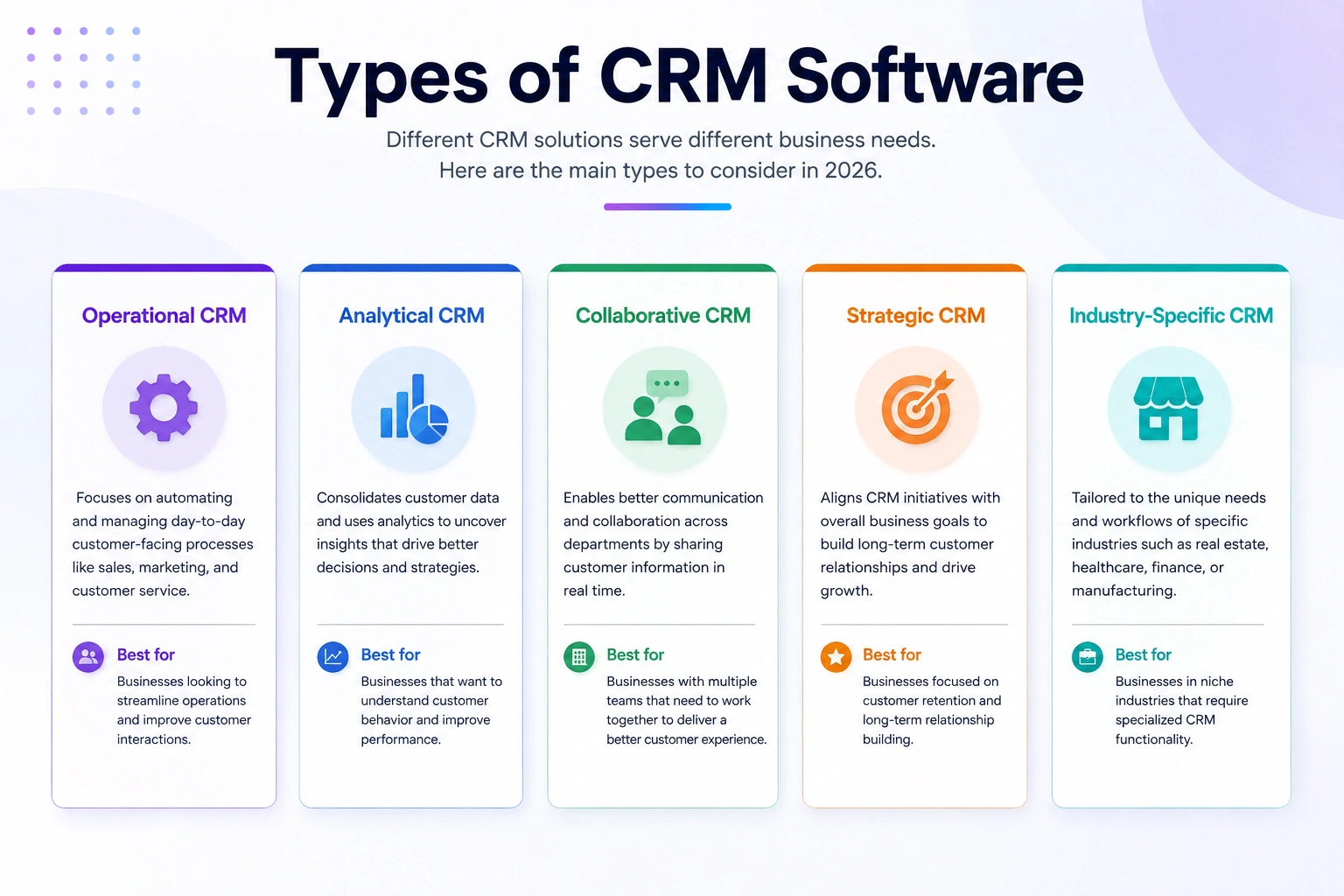
The Types of CRM Software (And Which One Fits You)
Before comparing any software, you need to know which category of CRM fits your business model. Buying the wrong type is the most common mistake, and it usually becomes clear only after go-live.
1. Operational CRM
This is the most widely used type. An operational CRM focuses on execution: capturing leads, moving deals through a pipeline, assigning tasks, logging calls, and keeping every rep accountable. The emphasis is on workflow, not analysis.
- What it does well: Day-to-day sales activity management, task automation, and contact tracking.
- Who it fits: Sales teams, agencies, service businesses, and any operation where the sales process happens in stages and needs a shared view.
- Watch out for: Many operational CRMs limit reporting depth. If you need serious analytics, you will often need an integration or a plan upgrade.
2. Analytical CRM
Analytical CRMs are built for businesses that run on data. The pipeline is there, but the real value is in the reporting layer, cohort analysis, lead source attribution, deal velocity tracking, rep performance benchmarking, and revenue forecasting at the segment level.
- What it does well: Strategic decision-making, sales leadership reporting, identifying patterns in what converts.
- Who it fits: Sales operations managers, revenue leaders, and businesses that track revenue KPIs closely.
- Watch out for: Analytical CRMs are often overkill for small teams. If your team is under 10 people, you will not use 60% of what you are paying for.
3. Collaborative CRM
A collaborative CRM solves a specific problem: information silos between departments. Sales, marketing, and customer support teams often work on the same customer from different systems, with no shared visibility. Collaborative CRMs give everyone the same record, calls, emails, tickets, purchase history, and notes, regardless of which team handled the interaction.
- What it does well: Cross-team visibility, shared customer timelines, and reducing duplicated outreach.
- Who it fits: B2B companies with complex customer relationships and businesses where handoffs between departments are frequent.
- Watch out for: These platforms can feel heavy for smaller teams that just need a clean sales pipeline.
Need more details? Click Types of CRM Software to learn about each CRM type and find the best fit for your business.
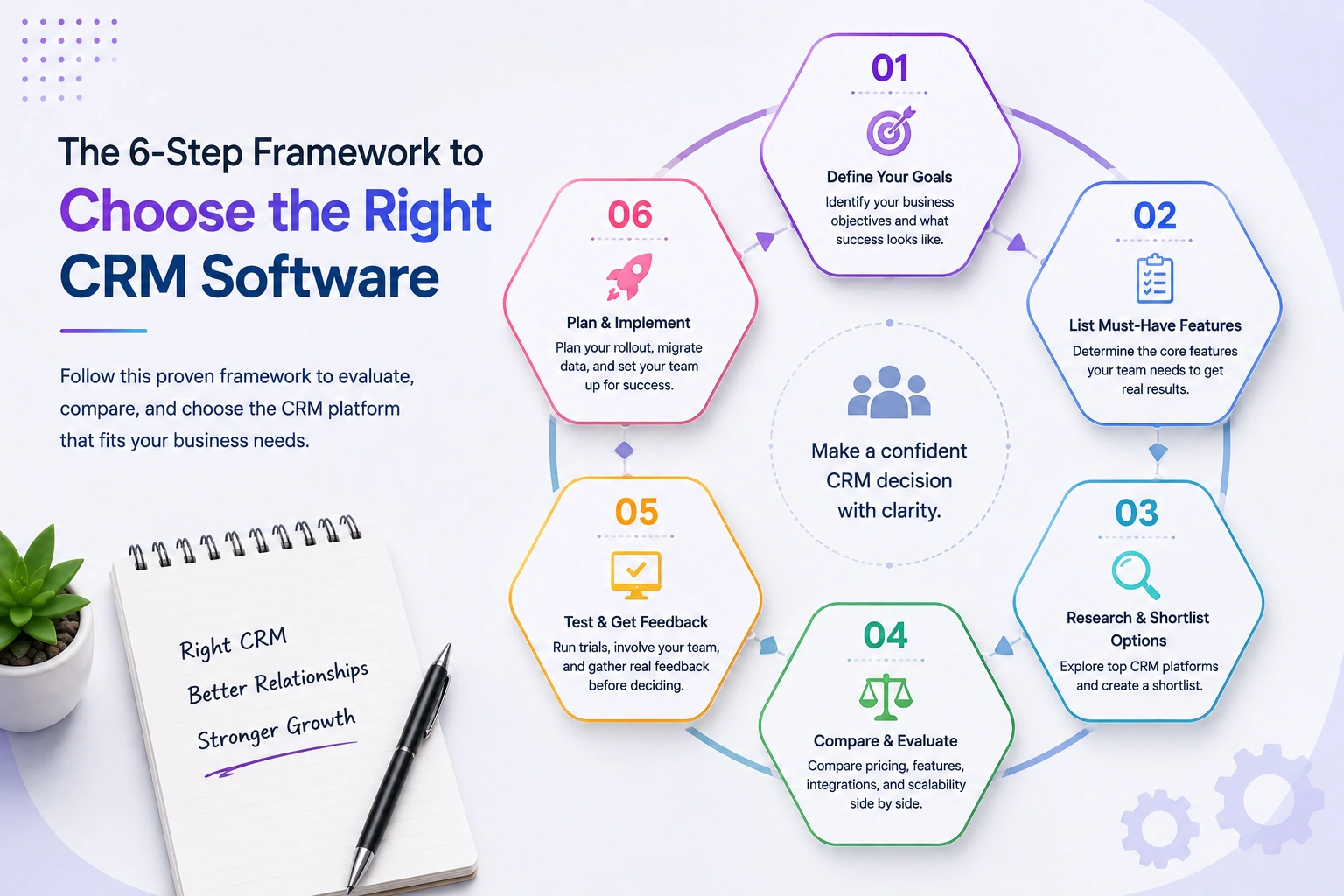
How to Choose CRM Software: A 6-Step Framework
Most CRM selection guides tell you to “make a list of your requirements”. That is generic advice. Here is a more useful process:
Step 1: Define Your Pipeline Before You Open a Demo
Before you evaluate any CRM, write down your actual sales stages, the specific steps a lead goes through from first contact to signed contract or closed deal. Then, in every demo, ask: “Can I configure those exact stages?” If the platform requires you to adapt your process to its template, that is a compatibility problem, not a feature gap.
Step 2: Identify the Real Decision-Makers (Not Just the Buyer)
The person who evaluates the CRM is often not the person who uses it daily. Your sales reps will reject a platform that slows them down, regardless of what leadership paid for it. Get rep input early. Their main criteria are usually speed of data entry, mobile usability, and clarity of “what do I do next?”
Step 3: Test Reporting at Your Actual Use Case
Do not evaluate reporting in a demo environment with clean seed data. Ask vendors to show you reporting on a messy pipeline, multiple pipelines, some stale deals, and gaps in data. The reports that look great on clean data often fall apart in real conditions.
Step 4: Price the 3-Year Total Cost, Not the Monthly Fee
CRM software pricing is rarely what the landing page shows. Add per-user fees at your projected team size in year 2, integration costs, implementation or setup, customer support tier, and any add-ons needed for automation, reporting, or custom fields. A $20/user/month tool costs $24,000/year for a 100-person team — before any Add-Ons.
Self-hosted, one-time licence tools often look expensive upfront and cheap at the 3-year mark. Cloud SaaS tools look cheap upfront and expensive at the 3-year mark.
Step 5: Test Data Migration Before You Commit
If you are moving from spreadsheets, a previous CRM, or an email inbox, ask specifically: “How does the import process work, and what fields does it map?” Data migration is where most CRM switches fail. Test it with a real subset of your data before signing anything.
Step 6: Evaluate Integration Fit — Not Integration Count
Every CRM will list 300+ integrations. What matters is whether the two or three tools your team uses daily have native, maintained integrations, not a Zapier workaround that breaks when either platform updates. CRM software that integrates with Gmail and Outlook natively, for example, means email logs are automatic. ‘Via Zapier’ means someone configured it six months ago, and no one is certain it still works.
Want to learn more? Click How to Choose a CRM for a detailed guide to choosing the best CRM software for your business.
CRM Software by Industry — What Each Vertical Actually Needs
The industry section in most CRM guides is marketing copy. This one is about specific feature requirements by vertical.
Real Estate CRM Software
Real estate pipelines are property-linked, not just contact-linked. An agent managing 30 active buyer inquiries needs each lead tied to property type, price range, location preference, and viewing history. Stages need to reflect the transaction lifecycle: Inquiry → Qualification → Viewing Scheduled → Offer Made → Under Contract → Closed.
The critical feature: file management within each deal record. Contracts, inspection reports, and appraisals need to live in the deal, not in a separate Drive folder that no one links back when a deal closes two months later.
What real estate CRM software needs: Custom pipeline stages, document storage per deal, activity calendar for showings and follow-ups, lead source tracking by property channel.
Medical and Hospital CRM Software
Healthcare CRM operates under data sensitivity requirements that most general-purpose CRMs are not designed for. The CRM here is less about aggressive follow-up and more about patient journey management — appointment reminders, referral tracking, specialist coordination.
What medical CRM software needs: Role-based data access (not every staff member should see every patient record), communication logging for referral relationships, and clean separation between patient-facing and internal-facing data.
Hotel and Hospitality CRM Software
Hotels deal with a compressed sales cycle (booking to stay can be 48 hours) and a repeat-visit relationship dynamic that requires memory. A guest who complained about noise in Room 412 two stays ago should not be placed there again.
What hotel CRM software needs: Stay history-linked to client records, group booking pipeline management, fast communication logging (most guest interactions are brief), and integration with reservation systems.
E-Commerce CRM Software
E-commerce CRM is distinct because the volume is high and the relationship is largely asynchronous. Most customer interactions are email, chat, or support tickets — not sales calls. The CRM needs to surface order history, return behaviour, and lifetime value automatically, not require manual data entry for each touchpoint.
What e-commerce CRM software needs: Purchase history integration, segmentation by LTV or purchase frequency, support ticket linking, and automated re-engagement workflows.
Freelancers and Agency CRM Software
Freelancers and agencies need a CRM that handles the full client lifecycle — from the proposal stage through active project through invoice and renewal. The pipeline doubles as a project intake system. Most purpose-built freelancer CRMs are too lightweight. Most enterprise CRMs are too heavy.
What agency CRM software needs: Custom pipeline stages that match a typical engagement lifecycle (Prospect → Proposal Sent → Scope Confirmed → Project Active → Invoice Sent → Renewal), file storage per deal, and client-facing visibility so clients can check status without requiring rep availability.
B2B CRM Software
B2B sales cycles are long, involve multiple stakeholders, and require detailed documentation of what was promised at each stage. A deal might involve six months of calls, three proposals, and two pricing revisions before it closes or dies.
What B2B CRM software needs: Multi-contact deal records (multiple people at the same company involved in the decision), granular call logging with outcome tracking, internal discussion threads per deal, and pipeline reports that show average time-in-stage so managers can spot where deals get stuck.
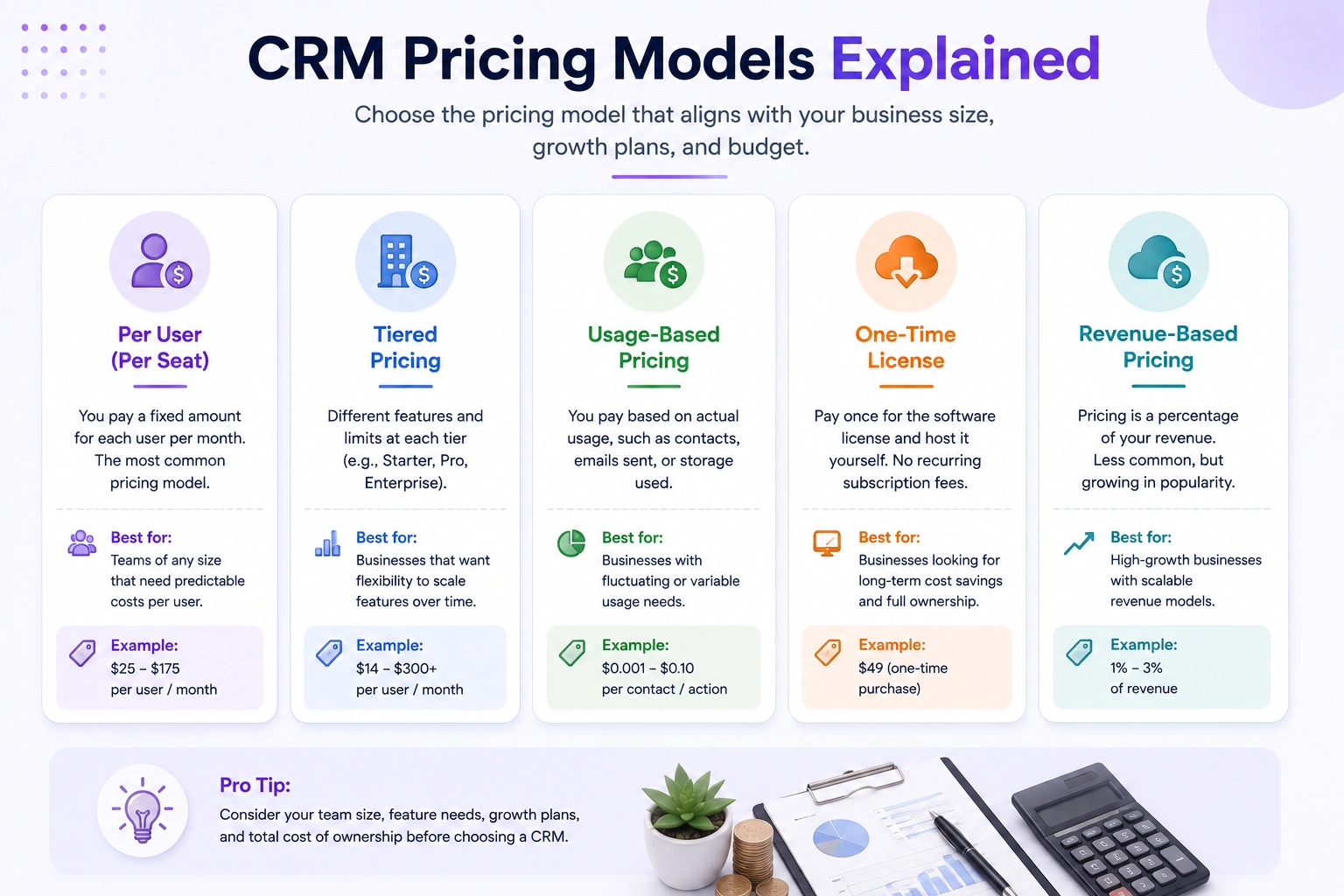
CRM Software Pricing: What You Are Actually Paying For
The CRM software cost is one of the most misread line items in any software budget. Here is a more honest breakdown of how pricing tiers actually work across the market.
Per-Seat Subscription Pricing
This is the dominant model for cloud CRMs. You pay monthly or annually per user. The advertised rate is almost always the entry tier — the one with limited automation, basic reporting, and no custom fields. The tier you actually need for a functioning sales operation is typically 2–3x higher.
| Team Size | Low-End CRM (per seat) | Mid-Market CRM (per seat) | Enterprise CRM (per seat) |
|---|---|---|---|
| 5 users | $75–$150/mo | $200–$400/mo | $750–$1,500/mo |
| 20 users | $300–$600/mo | $800–$1,600/mo | $3,000–$6,000/mo |
| 50 users | $750–$1,500/mo | $2,000–$4,000/mo | $7,500–$15,000/mo |
| 100 users | $1,500–$3,000/mo | $4,000–$8,000/mo | $15,000–$30,000/mo |
Estimates based on mid-tier plan pricing across major platforms. Enterprise pricing is typically custom and negotiated.
The math changes significantly at 20+ users. That is where cheap CRM software per-seat rates stop feeling cheap.
Free CRM Software — What “Free” Actually Means
Free CRM software for small business options (HubSpot’s free tier, Zoho’s free plan) are genuine starting points. They are also conversion funnels. The feature gates are designed so that as your business grows- more users, more automation, and more reporting, you migrate to paid tiers naturally. That is not a criticism; it is a business model. Just budget for it.
A free trial tells you more than a free plan. A CRM software free trial with access to the paid-tier features gives you a real sense of what the platform can do and whether your team will adopt it.
One-Time License / Self-Hosted Pricing
Some platforms, particularly those targeting businesses that want ownership and control, offer a one-time licence model. You pay once, receive the source code or installer, host it on your own server, and pay nothing ongoing beyond hosting costs.
The upfront cost is higher. The 3-year total cost is almost always lower for teams above 15–20 users. You also own your data and can customize the platform to your workflow rather than adapting your workflow to the platform.
CRM software with no setup fee and a one-time pricing model can represent the most cost-effective path for businesses that have the technical infrastructure to self-host.
Why Dash SaaS CRM Module Is Worth Looking At
The CRM Module inside WorkDo’s Dash SaaS is a self-hosted, one-time purchase platform built on Laravel and React. No per-seat fees and no recurring costs as your team grows. It covers everything a growing sales team needs, and because it lives inside a broader ERP, your CRM data connects directly to Accounting, Projects, HRM, and more- no middleware, no sync delays, no duplicate entry.
- Flexible pipelines: Create multiple pipelines with custom lead and deal stages. Both Kanban and list views are available, so every team member can work how they prefer.
- Smart lead-to-deal conversion: Notes, files, call logs, emails, and discussion threads carry over on conversion. Converted leads are clearly marked so no rep accidentally revisits a closed record.
- Detailed call logging: Every log captures direction, duration, assignee, description, and outcome. Useful when you need to understand why a deal stalled, not just whether contact was made.
- Built-in reporting: Lead and deal reports broken down by staff, client, and pipeline, updated in real time, with no CSV exports or third-party tools needed.
- Role-based permissions out of the box: Reps see their leads, clients see their records, and admins control everything. It is part of the core architecture, not a paid add-on.
- One-time pricing: Your CRM cost stays the same whether you have 10 users or 100. For teams doing the 3-year math, that is usually a straightforward decision.
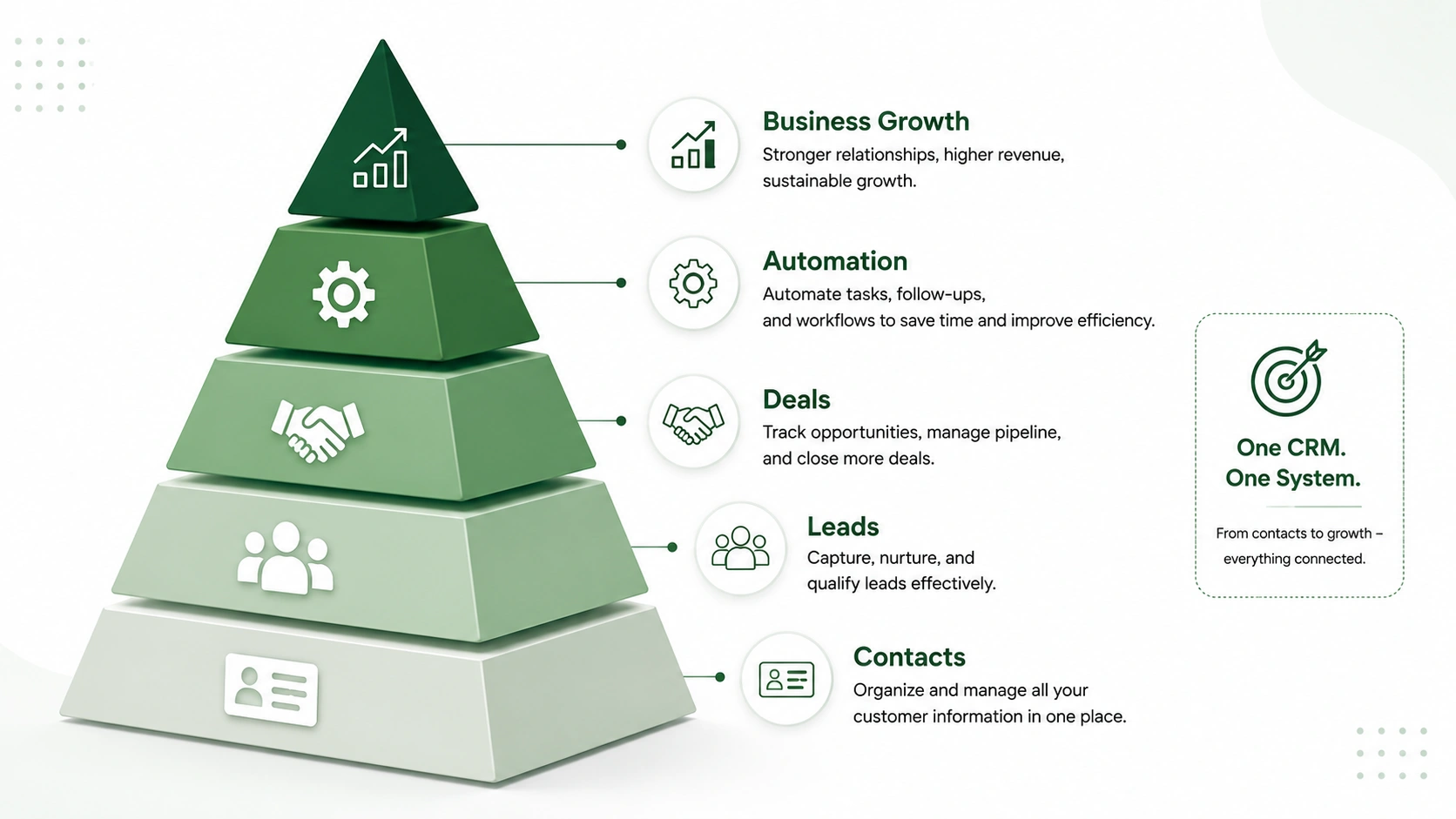
Final Thoughts
Choosing the best CRM software for your business is not about picking the most popular name or the lowest monthly price. It is about matching a platform to the way your team actually sells, your pipeline stages, your reporting needs, your team size at scale, and the integrations your workflow depends on.
The 900+ platforms on the market are not all competing for the same buyer. Enterprise teams with Salesforce administrators are not choosing between HubSpot and a spreadsheet. Freelancers with 20 clients are not evaluating Dynamics 365. The framework in this guide exists to help you identify which tier and type of CRM is actually built for your situation.
If your business is growing, your team is expanding, and you are tired of paying more per user every time you hire, WorkDo’s Dash CRM is worth evaluating seriously. Configurable pipelines, real reporting, one-time pricing, and native ERP integration put it in a category that most subscription CRMs simply do not reach.
 Frequently Asked Questions (FAQs)
We're Here to Help - Let's Talk
Have questions about our solutions, customization services, or business tools? Our team is here to help you. let's talk.