
Choose Right CRM for Small Business (Without Wasting Money)
Compare the best CRM for small business — free, affordable, and simple options, plus how to choose and set up the right CRM.

Why Small Businesses Need CRM Software Today
Let’s be direct: Most small businesses don’t break out in failure due to a bad product. They do, however, because of broken customer relationships.
Leads fall into the void. Follow-ups are delayed or don’t happen at all. The team is in the dark as to who last spoke to a client or what was offered. Sales pipelines are in someone’s head, which works until that person has a bad week.
This is exactly what a small business CRM is for. It gives you one central place for all contacts, all conversations, all deals, and the next steps. No more guesswork. No more “I thought you were to follow up on that.
The Hidden Cost of Not Having a CRM:
Before you think we’re too small for this issue, look at the numbers.
We see that if your average deal value is out at ₹50,000 and you are losing two leads a month to poor follow-up, that’s ₹12 lakh in lost revenue for the year. A good CRM, which may even be free, still costs less than that.
The issue isn’t if you can afford a CRM. It’s that you can afford not to have one.
Benefits of Using a Small Business CRM
CRM (Customer Relationship Management) software offers several key benefits for businesses:
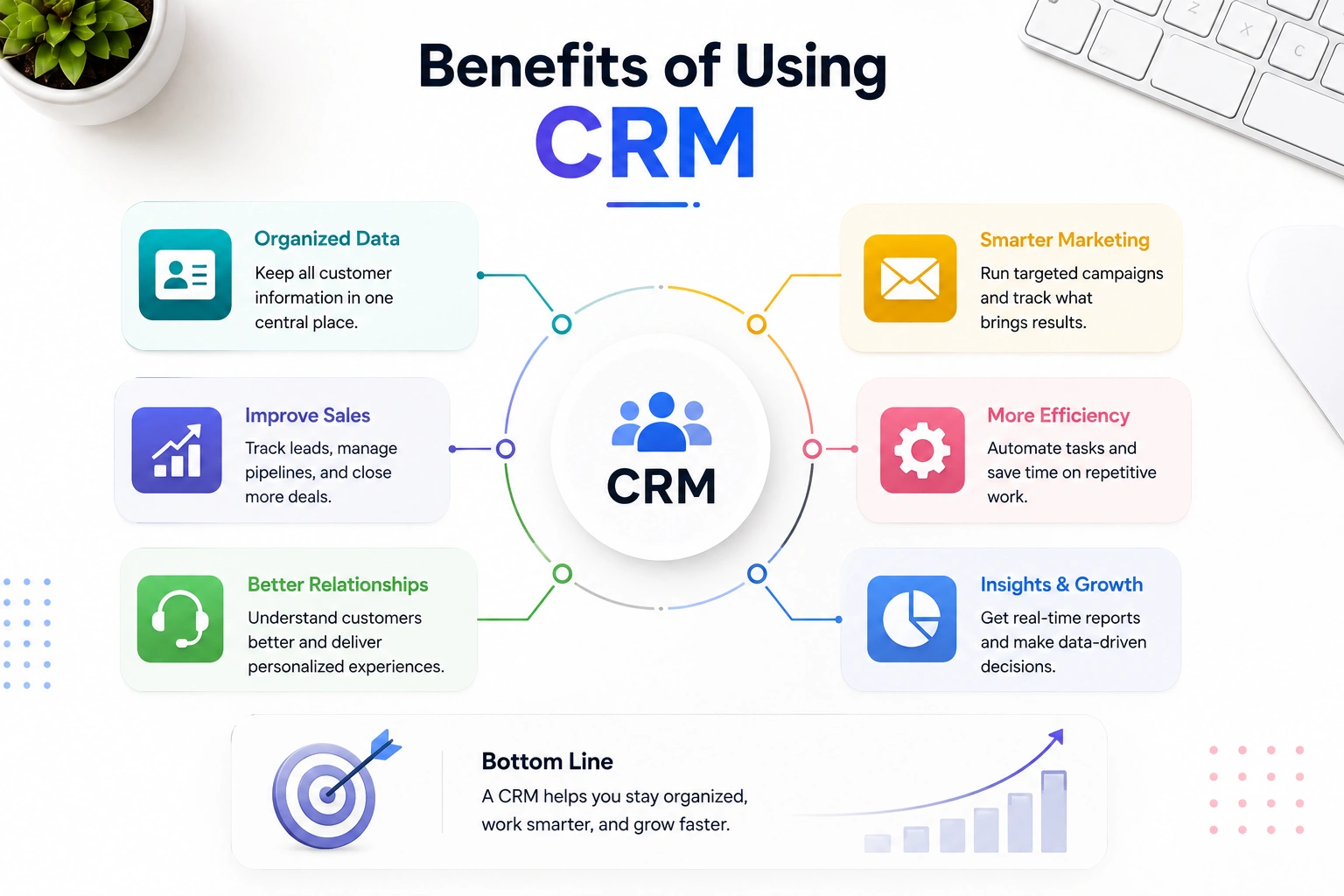
- Organization & Data Management: Centralizes all customer info (contact details, history, preferences) in one place. Eliminates scattered spreadsheets and sticky notes. Gives every team member the same up-to-date view of a customer.
- Sales Improvements: Tracks leads through the sales pipeline so nothing falls through the cracks. Helps prioritize hot leads based on engagement or score. Provides visibility into deal stages, forecasts, and team performance. Automates follow-up reminders so prospects don’t go cold.
- Better Customer Relationships: Lets you see full interaction history before every call or email. Enables more personalized communication by remembering past issues and preferences. Speeds up response times for support tickets or inquiries.
- Marketing Benefits: Segments customers for targeted campaigns. Tracks which campaigns actually drive sales. Integrates with email marketing tools for automated nurture sequences.
- Efficiency & Automation: Automates repetitive tasks like data entry, follow-up emails, and task assignment. Reduces manual errors. Frees up staff time for higher-value work.
- Reporting & Insights: Dashboards show sales trends, conversion rates, and team performance. Helps spot bottlenecks in the sales process. Supports data-driven decisions rather than guesswork.
- Collaboration: Sales, marketing, and support teams work off the same data. Reduces miscommunication, like sales promising something that support doesn’t know about. Useful for handoffs between team members or departments.
- Scalability: Grows with your business, making it easier to manage thousands of customers than with spreadsheets. Most CRMs offer tiered plans as your needs grow.
- Customer Retention: Identifies at-risk customers, like those with declining engagement, so you can act before they churn. Tracks satisfaction and support history to catch recurring problems.
If you let me know your business size, industry, or what specific problem you’re trying to solve (sales tracking, customer support, marketing automation, etc.), I can point you toward which type of CRM features matter most for your situation.
👉 Want a deeper look at each of these? Read our full guide on CRM benefits for small businesses →
CRM vs Spreadsheet: Which One Should You Actually Use?
A lot of small business owners start with a spreadsheet. That’s totally fine — until it isn’t.
Here’s a straight comparison so you can decide where you actually stand right now:
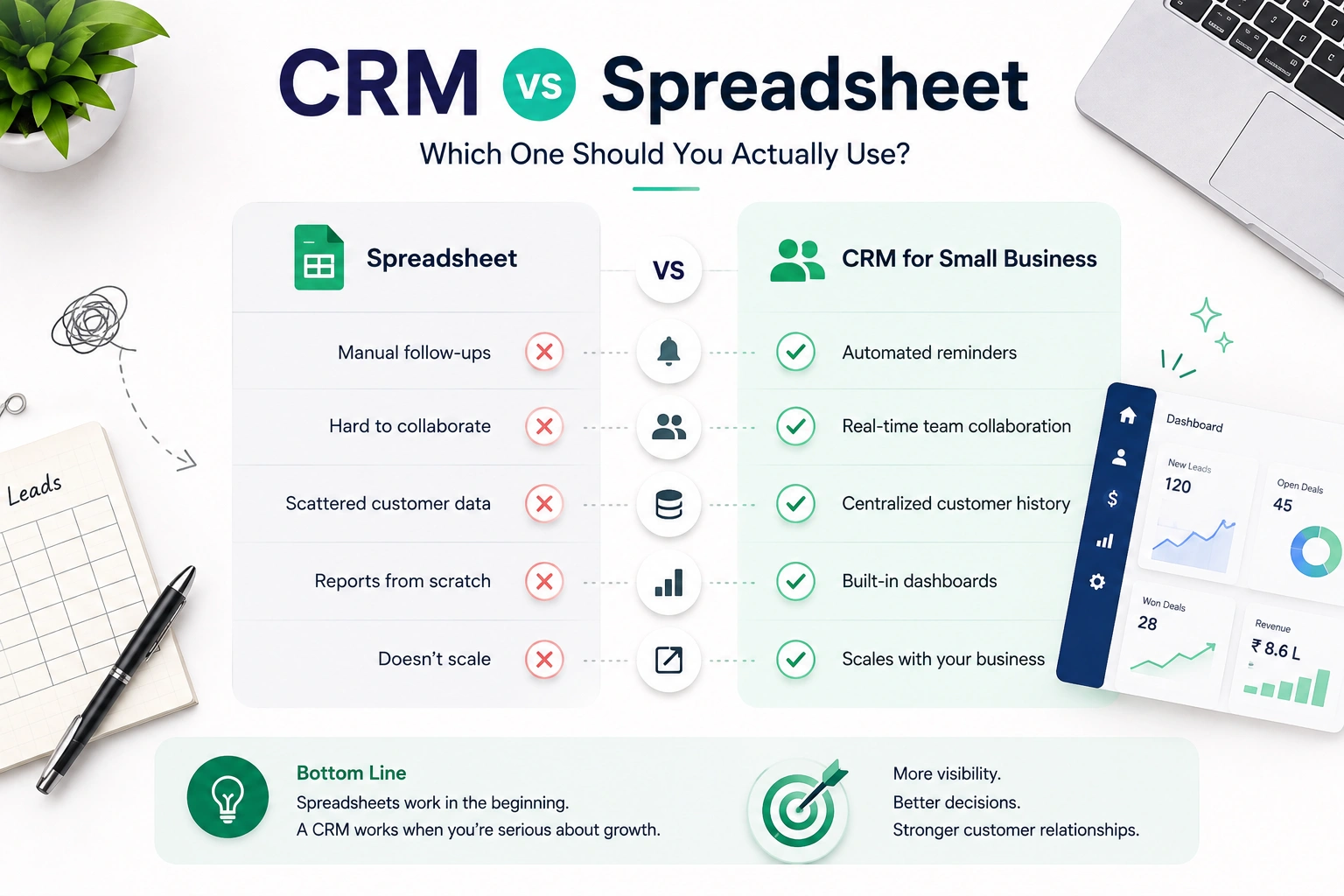
| Factor | Spreadsheet | CRM for Small Business |
|---|---|---|
| Setup time | Minutes | A few hours |
| Follow-up reminders | Manual / none | Automated alerts |
| Team collaboration | Clunky (version control nightmares) | Real-time, built for teams |
| Customer history | Scattered across files | Centralised per contact |
| Reporting | You build it yourself | Built-in dashboards |
| Scalability | Falls apart after ~200 contacts | Scales with your business |
The honest answer: If you are a small business with less than 50 contacts and a one-person team, a spreadsheet is fine. But at the point your team, which is growing beyond two people, is taking on lead management, a CRM is not a nice-to-have; it is a must.
For a simple CRM in a small business, complexity and price don’t matter. What it does is that it does one thing very well, which is to not let anything important fall through.
What Makes a Good Small Business CRM? (6 Things That Actually Matter)
Not all CRM software is built the same. Enterprise tools like Salesforce are powerful, but they’re built for 500-person companies with dedicated IT teams. You don’t need that.
Here’s what a small business CRM actually needs to do well:
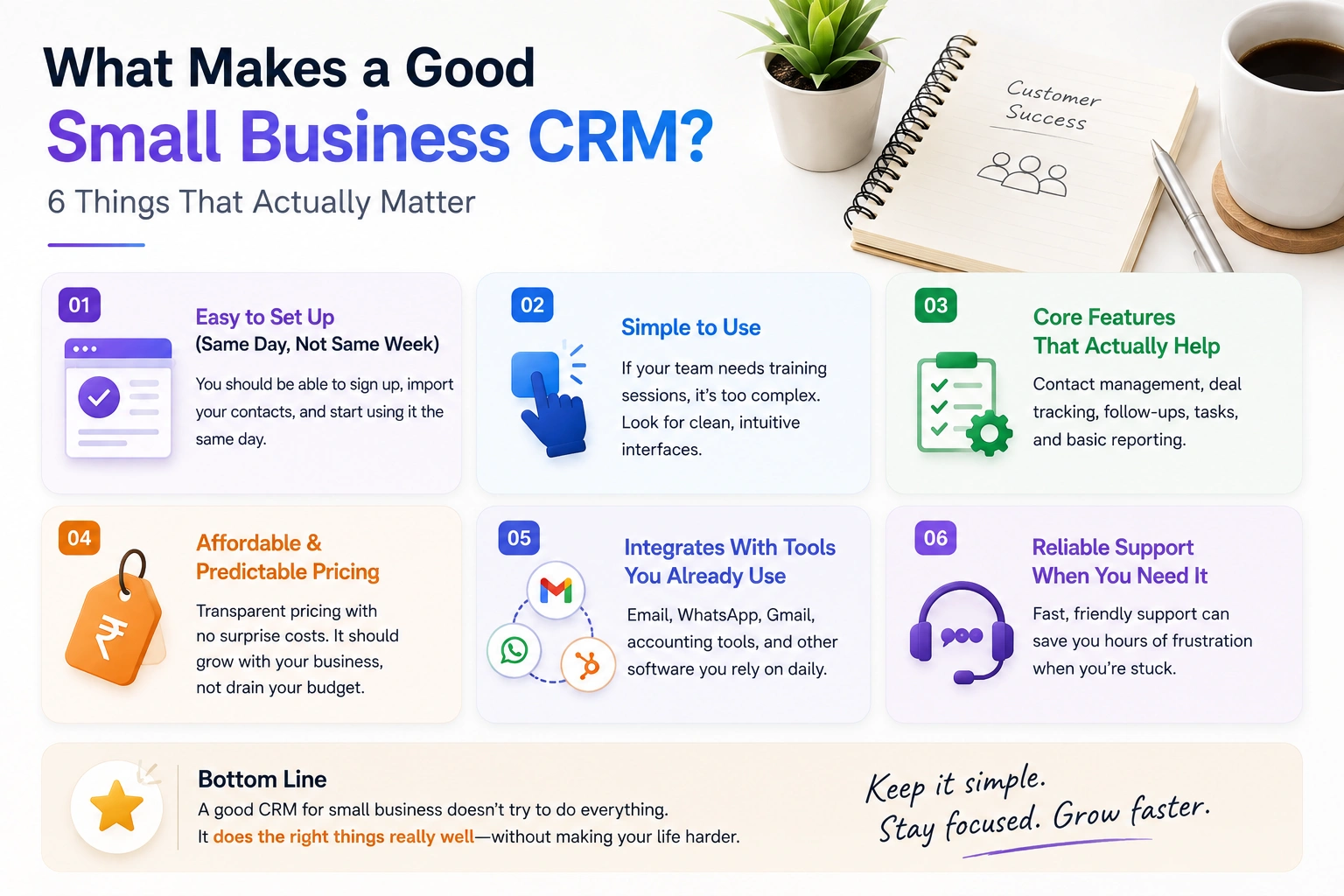
1. Easy to Set Up (Same Day, Not Same Week)
If you need a consultant to configure it, you’re buying the wrong tool. The best CRM for small teams gets you live in under two hours, with contacts imported, a pipeline set up, and the team onboarded.
2. Transparent Pricing With No Traps
Many CRMs advertise a low per-user cost, then charge extra for automation, integrations, reporting, and storage. Always check what’s included at each tier before you commit.
Look for affordable CRM for small business options that include core features in their base plan, not locked behind a “Pro” tier you’ll eventually be forced into.
3. Pipeline Visibility
You need to see where every deal sits — at a glance. A good CRM shows you a visual pipeline with stages: New Lead → Contacted → Demo Scheduled → Proposal Sent → Won/Lost.
This alone transforms how a small team manages its sales process.
4. Automated Follow-Ups and Reminders
The system should nudge you when a lead has gone quiet for three days. It shouldn’t require you to manually check.
Automation is no longer a premium feature. Even entry-level CRMs now include basic follow-up workflows.
5. Email and Communication Integration
Your CRM should sync with Gmail or Outlook. Every email you send or receive should log automatically against the contact. If your team has to manually paste emails into the system, they won’t bother.
6. Mobile Access
Your sales team isn’t always at a desk. A CRM with a solid mobile app means deal updates happen in real time, not “when I get back to the office”.
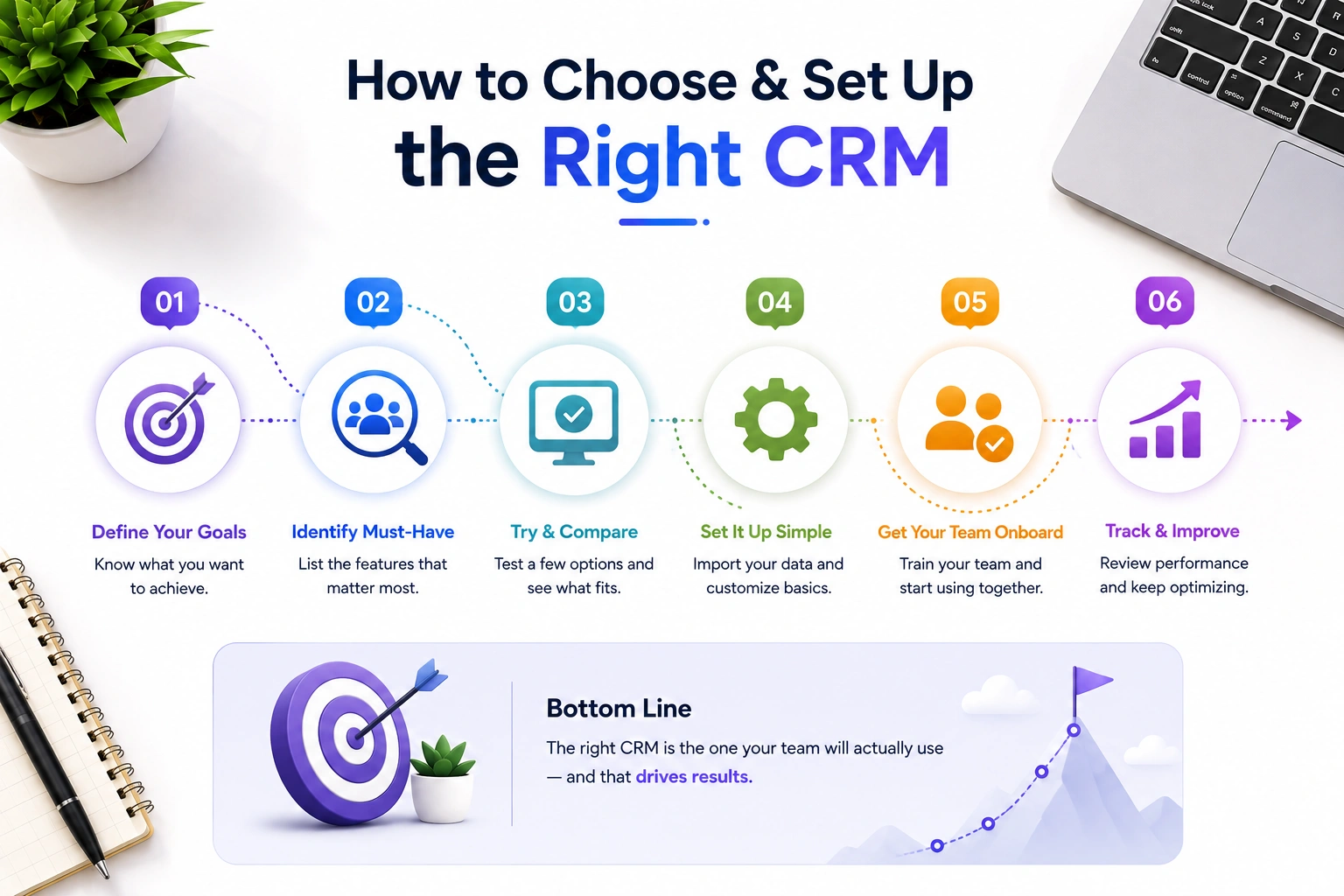
How to Choose CRM Software for Small Business: A Step-by-Step Framework
Most businesses pick a CRM based on a recommendation or a Google search and end up switching within a year. Here’s how to do it properly the first time.
Step 1: Define Your Actual Problem First
Before you look at any tool, answer these three questions:
- What’s breaking right now? Lost leads? Slow follow-ups? No sales visibility? Messy contact data?
- Who will use this daily? Sales reps only? Your whole team? Just you?
- What does success look like in 90 days? More booked calls? Faster response times? Fewer missed deals?
Your problem defines your requirements. Don’t start with features, start with pain.
Step 2: Set a Realistic Budget (Including Hidden Costs)
The price you see on a CRM’s pricing page is rarely the price you end up paying. Factor in:
- Per-user monthly fees
- Onboarding or setup charges
- Integration costs (third-party tools, API access)
- Storage limits
- Support tier (is live support included or paid?)
A rule of thumb: budget 20–30% above the advertised price to account for add-ons and overages. Many small teams find the sweet spot around ₹500–₹1,200/user/month for a capable, full-featured CRM.
Step 3: Map Your Sales Process Before You Configure Anything
This step gets skipped constantly, and it’s why CRMs fail.
Before you log in and start clicking, write down your actual sales stages on paper. Something like:
- Lead captured
- Initial outreach sent
- Call/demo booked
- Proposal sent
- Follow-up in progress
- Deal closed (won or lost)
Your CRM’s pipeline should mirror this exactly. If you build your CRM around how your business works, not around how the software’s demo looks, adoption rates go through the roof.
Step 4: Shortlist 2–3 Tools and Actually Test Them
Don’t rely on review sites alone. Sign up for the free trial, import 20 real contacts, and run a fake deal through your pipeline.
Pay attention to:
- How long did the setup actually took
- Whether your team could figure it out without training
- How the mobile app behaved
- Whether email sync worked out of the box
Most importantly: ask your team. The best CRM is the one your people will actually use.
Step 5: Run a Two-Week Pilot With Real Data
Pick one deal type or one segment of your leads and run them entirely through the CRM for two weeks. Track how often team members log in, whether reminders are working, and whether your pipeline is more visible than before.
If it’s working, you’ll know. If the team is still going back to spreadsheets or WhatsApp, you need to understand why, and either fix the setup or reconsider the tool.
Click here to learn how to choose CRM software so you can compare your needs and find the right tool for your business growth.
Free vs Affordable vs Enterprise CRM: What’s Right for You?
Best Free CRM for Small Business
Free CRMs are a real option — not a compromise. The catch is that most caps you on contacts, users, or features after a point.
Best free CRM for small business use cases:
- Solopreneurs and 1–3 person teams
- Early-stage startups managing fewer than 500 contacts
- Businesses that need basic pipeline tracking with no automations
Free tiers from tools like HubSpot (unlimited contacts, basic pipeline), Zoho CRM (3 users), and Bitrix24 are genuinely usable. The growth ceiling is just lower.
One important caveat: free CRM software for small businesses with invoicing is rare. Most free plans exclude billing and invoicing features, which are typically part of a paid tier or a separate Add-On.
Affordable CRM for Small Business
This is the sweet spot for most small and growing businesses. In the ₹400–₹1,500/user/month range, you typically get:
- Full pipeline management
- Email and calendar sync
- Workflow automation
- Reporting dashboards
- Mobile apps
- Integrations with tools you already use
The goal is to find the most capable tool at a price where the cost is clearly justified by the revenue you’ll protect and recover.
CRM with Built-in Invoicing for Small Business
If you want fewer tools to manage, look specifically for a CRM with built-in invoicing for small business. These platforms combine deal tracking with quote generation, invoice creation, and payment status, all in one place.
This is especially valuable for service businesses (agencies, consultants, freelancers, contractors) where every closed deal immediately becomes a billing workflow.
Key things to verify before buying:
- Can invoices be sent directly from the CRM?
- Does it track payment status per deal?
- Can it generate PDF invoices with your branding?
- Does it connect with accounting tools like Tally or QuickBooks?
Top Affordable CRM Solutions for Small Businesses in 2026
Here’s a quick comparison of well-known options to give you a benchmark:
| CRM Tool | Starting Price | Best For | Free Plan? |
|---|---|---|---|
| Dash SaaS CRM | From $49 (self-hosted) | Teams wanting full control + white-label | ✅ Built-in |
| HubSpot CRM | Free / $20/user (Starter) | Startups, marketing-heavy teams | ✅ Yes |
| Zoho CRM | $14/user/month | Budget-conscious, feature-rich needs | ✅ (3 users) |
Note: Pricing shown in USD. Most tools offer annual billing discounts of 15–30%.
Make smarter decisions for your small business with expert recommendations. Read this guide to find the best CRM solution for your business needs.
Common CRM Mistakes Small Businesses Make (And How to Avoid Them)
Even with the right tool, poor implementation kills CRM projects. Here are the mistakes that come up again and again.
Mistake 1: Buying More Than You Need
It’s tempting to buy an enterprise-grade CRM because it “has everything.” But if your team of six doesn’t use 70% of the features, you’re paying for complexity that slows you down.
Fix: Start with the most basic tool that addresses your primary issue. Add complexity as you go along when you actually do need it.
Mistake 2: Importing Dirty Data
Many businesses dump every contact they’ve ever collected into a new CRM on day one — including duplicates, outdated emails, and contacts from five years ago who never responded.
Fix: Clean up your data before you import. Pay attention to active leads, current clients, and warm prospects first. A clean CRM is a usable CRM.
Mistake 3: Skipping Team Buy-In
The most common reason CRM projects fail isn’t the software. It’s that the team doesn’t use it.
If your sales reps don’t see how the CRM helps them personally, faster follow-ups, fewer missed deals, clearer priorities, they’ll resist it. Or worse, they’ll log in grudgingly while keeping their own spreadsheet on the side.
Fix: Involve your team in the selection process. Let them test two or three options. Show them how it reduces their admin work, not adds to it.
Mistake 4: Treating It as a Reporting Tool, Not a Working Tool
Some managers implement a CRM so they can see pipeline reports — but the team sees it as surveillance, not support.
Fix: Build the CRM around team workflows first. The reporting is a byproduct. If the team finds the tool genuinely useful, the data quality will take care of itself.
Mistake 5: No Owner for the CRM
If nobody is responsible for keeping the CRM clean, configured, and evolving with the business, it becomes stale within months.
Fix: Assign one person (even part-time) as the CRM admin. Their job is to ensure stages are accurate, data is tidy, and automation keeps working.
WorkDo’s Dash SaaS CRM — The Best Affordable CRM for Small Businesses
If you’re a small business looking for a CRM that’s genuinely built for how you work, without a subscription that scales against you, WorkDo’s Dash SaaS CRM is worth serious consideration.
It’s not a stripped-down free plan with paywalled features. It’s not an enterprise tool that overwhelms a 10-person team. It’s a complete, self-hosted CRM module built specifically to help small and growing businesses manage their entire sales pipeline from lead to closed deal at a price that makes long-term sense.
| Block | What it explains |
|---|---|
| 📊 Dashboard | Real-time overview, no digging required |
| 🎯 Lead Management | List vs Kanban, overdue flags, filters |
| 🔄 Lead-to-Deal | One-click, selective data carry-over |
| 🗂️ Pipelines & Stages | Custom stages, labels, source tracking |
| 👥 Team Visibility | Tasks, calls, files, discussion, Activity Timeline |
| 📈 Reports | 4 views per report type, filterable by date |
| 🔐 Role-Based Access | Staff vs client login separation |
| 💰 Pricing | One-time $49 vs $2,400/year math, no lock-in |
Want to see exactly how each feature works? Read the Full CRM Documentation →’
CRM Features for Small Businesses
Most owners only notice CRM features after something breaks, a deal slips, or two people call the same lead in the same week. The features that matter are the ones that quietly stop those moments. The most important, and the one all the others depend on, is improved organization.
Improved Organization: The Feature Everything Else Is Built On
Without a CRM, a single customer’s details live across an inbox, a spreadsheet, a WhatsApp thread, and one person’s memory. When that person leaves, the knowledge goes with them. A CRM pulls it all into one contact record, who they are, every email and call logged, what was quoted, and the next step.
That’s the difference between having customer data and being able to use it. It turns a ten-minute pre-call scramble into a thirty-second check, and it’s the foundation that automation, reporting, and pipeline tracking all sit on.
One honest caveat: a CRM won’t clean years of duplicate contacts for you. Import clean data and keep records tidy from day one, and everything else compounds on top.
👉 Want the full breakdown of which features matter most? Read our complete guide on CRM Features for Small Businesses→
The Bottom Line
Picking out the best CRM for a small business is not about which is the most popular or the least expensive. It is about finding the system that fits how your team operates and then fully integrating it into your workflow.
Start with what pain points you want to see addressed. Map out your process. Set a realistic budget. Do your due diligence before making a purchase. Also, get your team behind it.
A great CRM is not an extra piece of software to add to the list, which is one more thing to manage. It is the solution that puts an end to lost leads and enables your small business to grow without relying on someone’s memory.
 Frequently Asked Questions (FAQs)
We're Here to Help - Let's Talk
Have questions about our solutions, customization services, or business tools? Our team is here to help you. let's talk.