

PhonePe – WorkDo Dash SaaS Add-On Guide
Learn how to accept and manage PhonePe payments in WorkDo Dash SaaS.
Supported Country: India, United Arab Emirates, Singapore, Sri Lanka
Supported Currencies: INR, AED, SGD, LKR
Benefits of PhonePe Payment Gateway
- Seamless Checkout Experience: By integrating PhonePe’s secure payment gateway, we offer users a seamless checkout experience, reducing friction in the payment process and improving overall user satisfaction.
- Reliability and Security: PhonePe’s robust security measures ensure that transactions are safe and secure, providing peace of mind to both businesses and customers. This reliability helps build trust and credibility in our platform.
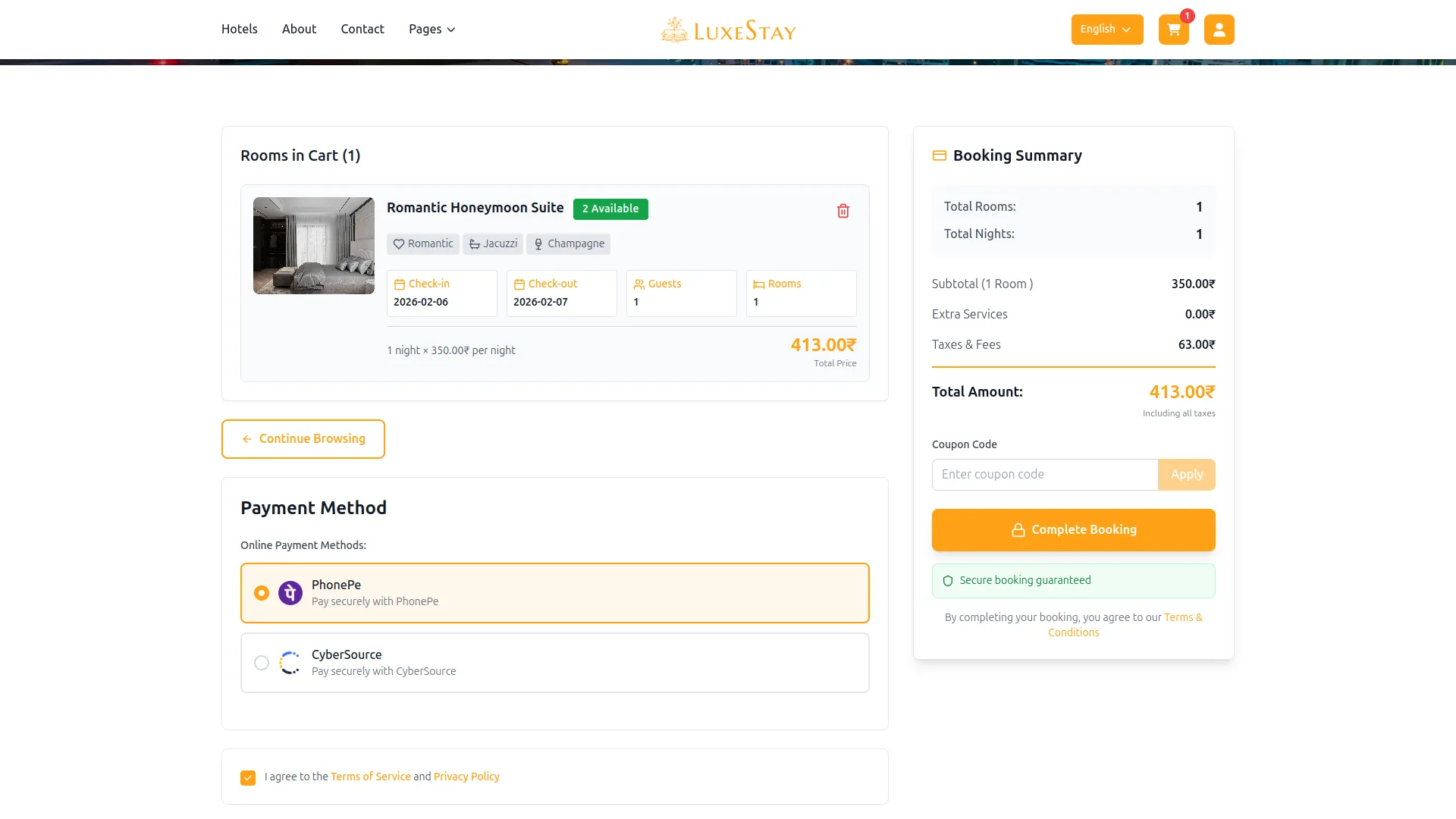
- Convenience: With PhonePe integration, users can make payments directly on our website, eliminating the need for third-party platforms or redirects. This convenience enhances user experience and encourages repeat transactions.
- Multiple Payment Options: PhonePe supports a wide range of payment methods including UPI, credit/debit cards, wallets, and net banking. This flexibility allows users to choose their preferred payment mode, improving conversion rates and customer satisfaction.
- Real-Time Transaction Updates: PhonePe provides instant payment confirmations and real-time transaction status updates. This helps streamline backend processes like order fulfillment, reduces delays, and enhances operational efficiency.
How to Access the PhonePe Add-on?
Visit the WorkDo Dash website: Go to https://workdo.io/ to access the WorkDo Dash platform.
Navigate to Dash SaaS Add-ons: Explore the “Dash SaaS Add-ons” section on the website to discover available Add-ons.
Discover PhonePe Add-on: Browse the list of available Add-ons and find the “PhonePe Payment Gateway”
Activate the Add-on: Click the “Activate” button next to the PhonePe Add-on to enable it for your WorkDo Dash account.
How does PhonePe Work?
PhonePe serves as a versatile payment gateway by seamlessly integrating with your online platform. Customers are empowered to select their preferred payment method, and PhonePe handles the payment transaction with a strong emphasis on security and reliability. The platform features a user-friendly interface and is supported by a responsive customer service team, delivering a dependable and hassle-free payment experience, which makes it a trusted choice for merchants and customers alike.
Super Admin Settings
(Plan Purchase by the Company)
The “Super Admin Settings” are typically accessible to the highest-level administrator or super administrator within a software platform or system. These settings allow the super admin to manage various aspects of the company’s usage and subscription plans. This may include:
- Purchasing or upgrading subscription plans for the entire company.
Company Settings
(Bookings, Beauty Spa, LMS & Other Payments)
“Company Settings” in the context of retainers, and payments refers to the configuration options available to a company or organization for managing financial transactions. These settings may include:
- Setting up payment gateways for accepting payments from clients or customers.
- Defining retainer or deposit policies for services or products.
- Managing tax settings and compliance.
- Setting payment terms and conditions
Supported Modules Include:
How to Generate the API Key?
1. Generate API Key
- To integrate PhonePe, follow these steps to get the credentials:
- Register on https://business.phonepe.com/login
After approval:
- Get your Merchant ID (MID).
- Get Salt Key.
- Get test/production API endpoint URLs.
2. Configure PhonePe Gateway:
- Log in to your account with administrator credentials.
- Navigate to the settings page.
3. Set Up PhonePe Gateway:
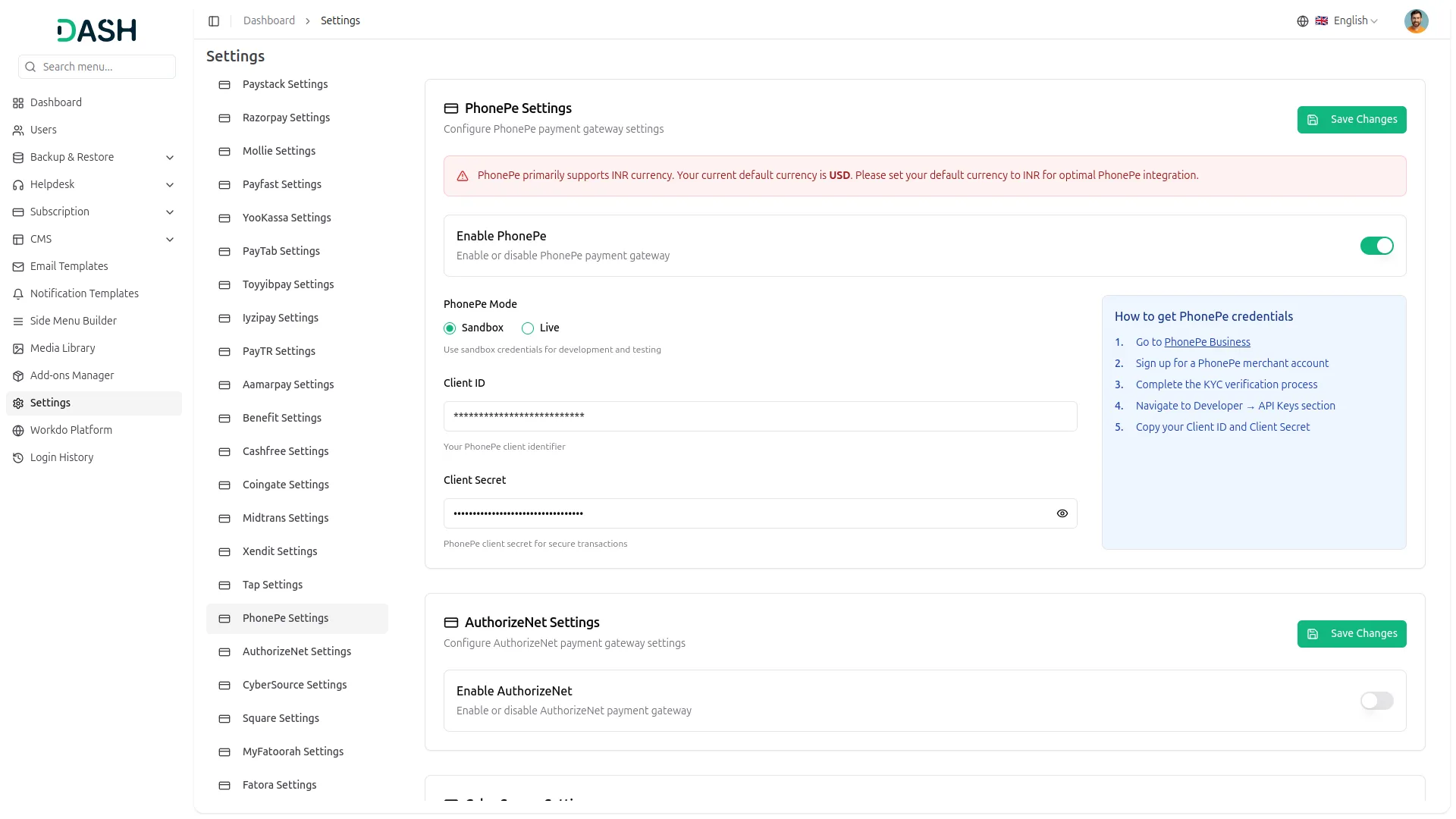
- Scroll down the page until you find the PhonePe Gateway option.
- Click on the PhonePe Gateway to access its configuration settings.
4. Enter Required Details:
In the settings, provide the following essential details:
- PhonePe Mode (Sandbox or Live)
- Client ID
- Client Secret
5. Save Your Settings:
- After entering the necessary details, save the settings to activate the PhonePe Payment Gateway within your platform.
- This detailed documentation overviews PhonePe Payment Integration, its benefits, and the integration process. By integrating PhonePe, businesses and organizations can offer their customers a secure and flexible payment experience while streamlining their payment processes.
Note: The PhonePe Add-On is a paid feature and can be accessed by users who have purchased it. By integrating the PhonePe Add-On into your WorkDo Dash SaaS account, you’ll provide a reliable and user-friendly payment gateway that supports global transactions.
Categories
Related articles
- eCommerceGo SaaS Add-On Setup Guide
- Additional Custom Field – BookingGo SaaS Add-On Guide
- Ozow – WorkDo Dash SaaS Add-On Guide
- Bulk Appointments – BookingGo SaaS Add-On Guide
- Gym Management – WorkDo Dash SaaS Add-On Guide
- Attendance Management in WorkDo HRM
- Products PDF – eCommerceGo SaaS Add-On Guide
- Project – WorkDo Dash SaaS Add-On Guide
- Shopping Cart – BookingGo SaaS Add-On Guide
- CMMS – WorkDo Dash SaaS Add-On Guide
- WizzChat – BookingGo SaaS Add-On Guide
- Internal Knowledge – WorkDo Dash SaaS Add-On Guide
We're Here to Help - Let's Talk
Have questions about our solutions, customization services, or business tools? Our team is here to help you. let's talk.