

BTCPay – WorkDo Dash SaaS Add-On Guide
Learn how to configure and manage BTCPay integration in WorkDo Dash SaaS easily.
Supported Country: United States, Germany, France, Italy, Spain, Netherlands, United Kingdom, Australia, Canada, Brazil, Hong Kong, and all other countries (no geographical restrictions)
Supported Currency: USD, EUR, GBP, JPY, CAD, AUD, and more.
Benefits of BTCPay Payment Gateway
Unrestricted Global Accessibility
As a self-hosted and open-source payment gateway, BTCPay Server can be deployed and used in any country worldwide without dependence on third-party services or compliance with specific regional payment regulations.
Complete Privacy & Security Control
BTCPay gives merchants full ownership of their private keys and transaction data, eliminating exposure to external security vulnerabilities and ensuring a highly private and self-sovereign payment environment.
Zero Fees & Cost Efficiency
BTCPay Server operates without any transaction fees or subscription costs, making it one of the most cost-effective solutions available for businesses looking to accept cryptocurrency payments without ongoing overhead.
Multi-Cryptocurrency Flexibility
BTCPay supports a range of cryptocurrencies, including Bitcoin, Litecoin, and Dash, and integrates smoothly with popular e-commerce platforms and point-of-sale systems, giving businesses exceptional payment flexibility.
Community-Driven Continuous Development
As an actively maintained open-source project, BTCPay benefits from contributions by a global developer community, ensuring the platform evolves consistently with regular improvements, security updates, and reliable long-term support.
How to Access BTCPay Add-On?
- Visit the WorkDo Dash Website:
Go to https://workdo.io/ to access the WorkDo Dash platform. - Navigate to Dash SaaS Add-Ons:
Explore the “Dash SaaS Add-Ons” section to view all available integrations. - Discover BTCPay Add-On:
Browse the Add-Ons list and locate “BTCPay Payment Gateway.” - Activate the Add-On:
Click on the Activate button to enable BTCPay for your WorkDo Dash account.
Once activated, BTCPay becomes available across supported modules based on permissions and settings.
How Does BTCPay Work?
BTCPay integration enables users to accept cryptocurrency payments directly through a self-hosted, secure, and open-source payment gateway. This integration allows businesses to process Bitcoin and other supported cryptocurrencies without relying on third-party intermediaries, giving full control over transactions and funds. Users can manage wallet settings, monitor payment statuses in real-time, and customize payment options to suit their needs. The setup is designed to be straightforward, enabling quick deployment and seamless handling of crypto payments within the platform. Key features include enhanced privacy, zero transaction fees, and support for multiple cryptocurrencies.
Super Admin Settings
(Plan Purchase by the Company)
The Super Admin Settings are accessible only to the highest-level administrator. These settings allow the Super Admin to manage company-level subscriptions and payment configurations.
Key Capabilities:
- Purchase or upgrade company subscription plans
- Configure BTCPay API credentials for plan payments
- Enable or disable BTCPay as a payment gateway
Configuration Path:
Super Admin Login → Settings → BTCPay Settings
Company Settings
(Bookings, Beauty Spa, LMS & Other Payments)
Company Settings allow organizations to configure BTCPay for receiving payments from customers across multiple modules.
Supported Modules Include:
Configuration Path:
Company Login → Settings → BTCPay Settings
Company-Level Capabilities:
- Configure BTCPay API credentials
- Enable BTCPay for selected modules
- Accept cryptocurrency payments from customers
- Manage Bookings, Beauty Spa, and service
- Handle tax, coupon, and discount calculations
How to Generate BTCPay API Keys?
Generate API Key:
To integrate BTCPay with WorkDo Dash, obtain your credentials from your BTCPay Server:
1. Register or Access Your BTCPay Server
- Set up your own BTCPay server or use a third-party hosted server.
- Visit: https://btcpayserver.org/
2. Create a Store
- Navigate to the dashboard and create a store that will handle payments.
3. Generate an API Key
- Go to Account → Manage API Keys.
- Click Create New API Key.
- Choose appropriate permissions such as CanCreateInvoice and CanViewInvoice.
- Associate the API Key with your store.
4. Copy and Save
- Copy your API Key as the Public Key.
- Copy your Store ID from the store details page.
- The BTCPay Server URL is the base domain of your instance.
Note: BTCPay uses secure token-based authentication with granular API permissions.
Security and Verification
All BTCPay payments are processed via secure, crypto-native workflows and API verification. It’s essential to:
- Notify URL: Optionally configure Webhooks in your BTCPay store to notify your application about payment events.
- Return URL: After completing a transaction, the user is redirected to a return URL configured in the WorkDo Dash system.
- Transaction Verification: The system verifies the transaction status by calling BTCPay’s API using the Server URL, API Key, and Store ID.
Note: For detailed information on invoice creation, payment detection, and callback setup, refer to the official BTCPay Developer Docs: https://docs.btcpayserver.org/Development/
Configure BTCPay Payment Gateway:
- Log in to your account with administrator credentials.
- Navigate to the settings page.
Access Payment Settings:
- Within the settings page, locate and select the “Payment Settings” option.
Set Up BTCPay Payment Gateway:
- Scroll down the page until you find the BTCPay Payment Gateway option.
- Click on the BTCPay Payment Gateway to access its configuration settings.
Enter Required Details:
- In the settings, provide the following essential details:
- Public Key, Store ID, Server URL.
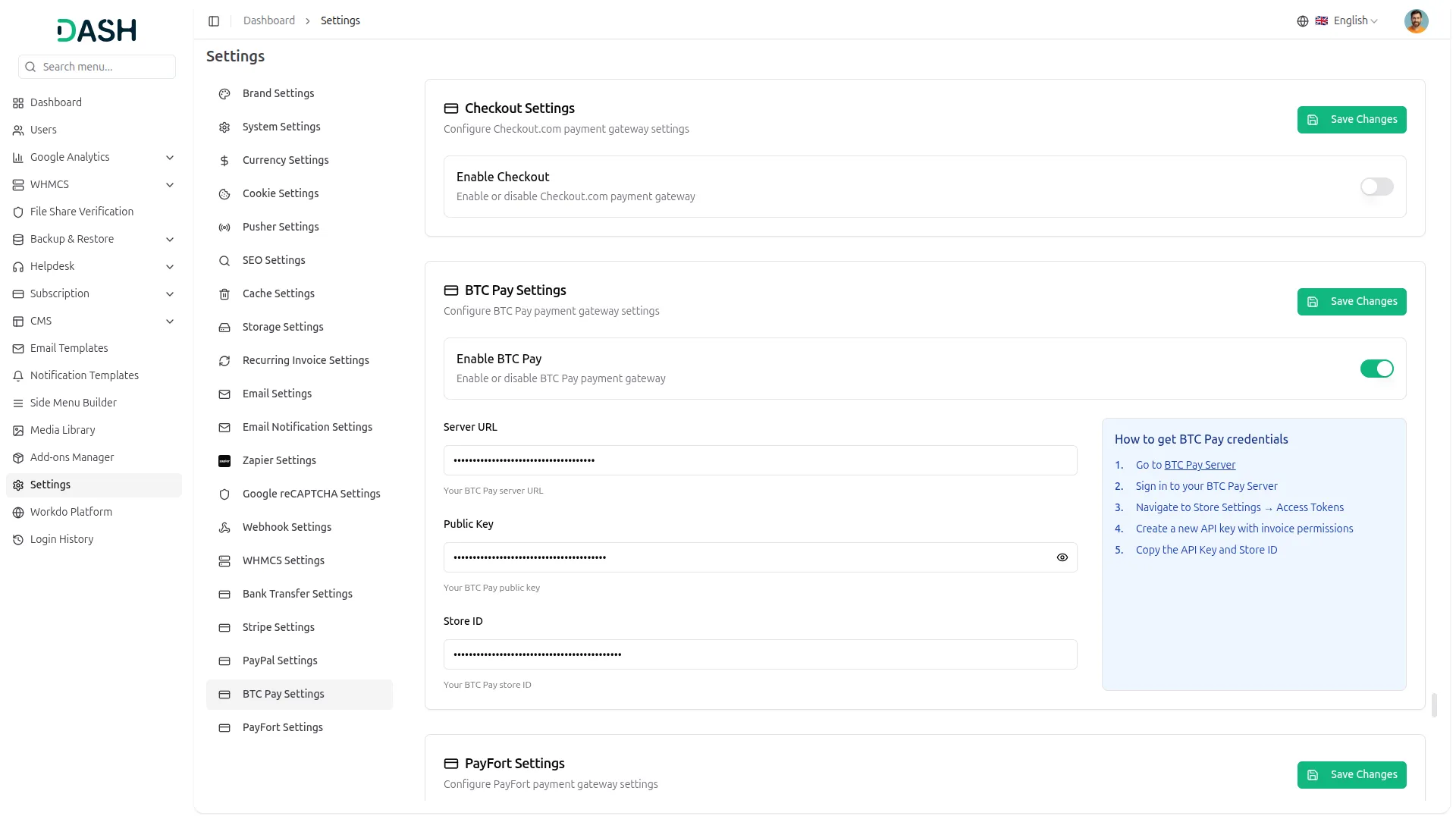
Save Your Settings:
- After entering the necessary details, save the settings to activate the BTCPay Payment Gateway within your platform.
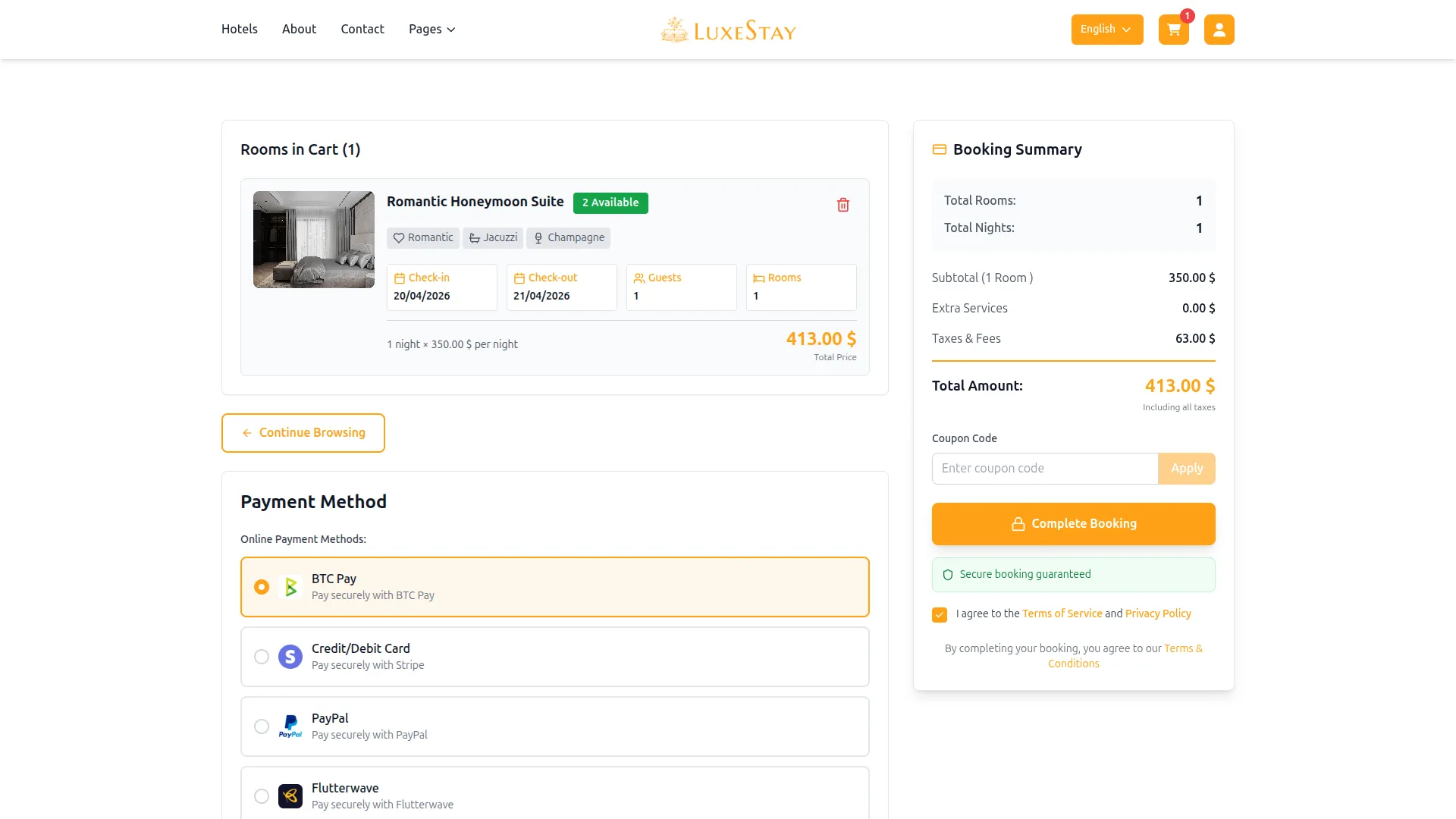
This process will enable you to seamlessly integrate BTCPay as a Payment Gateway, allowing your users to make secure and efficient online payments in various cryptocurrencies.
Note: The BTCPay Add-On is a paid feature and can be accessed by users who have purchased it. By integrating the BTCPay Add-On into your Dash SaaS account, you’ll provide a reliable and user-friendly payment Gateway that supports global transactions.
Categories
Related articles
- Influence Marketing – WorkDo Dash SaaS Add-On Guide
- SMS – eCommerceGo SaaS Add-On Guide
- Music Institute – WorkDo Dash SaaS Add-On Guide
- Crisp Chatbot – BookingGo SaaS Add-On Guide
- MyFatoorah – BookingGo SaaS Add-On Guide
- Bulk SMS – TicketGo Add-On Guide
- Google Wallet Settings – vCard SaaS Guide
- Microsoft To Do – WorkDo Dash SaaS Add-On Guide
- ToyyibPay – WorkDo Dash SaaS Add-On Guide
- WizzChat Messenger – WorkDo Dash SaaS Add-On Guide
- Backup & Restore – eCommerceGo SaaS Add-On Guide
- CoinGate – BookingGo SaaS Add-On Guide
We're Here to Help - Let's Talk
Have questions about our solutions, customization services, or business tools? Our team is here to help you. let's talk.