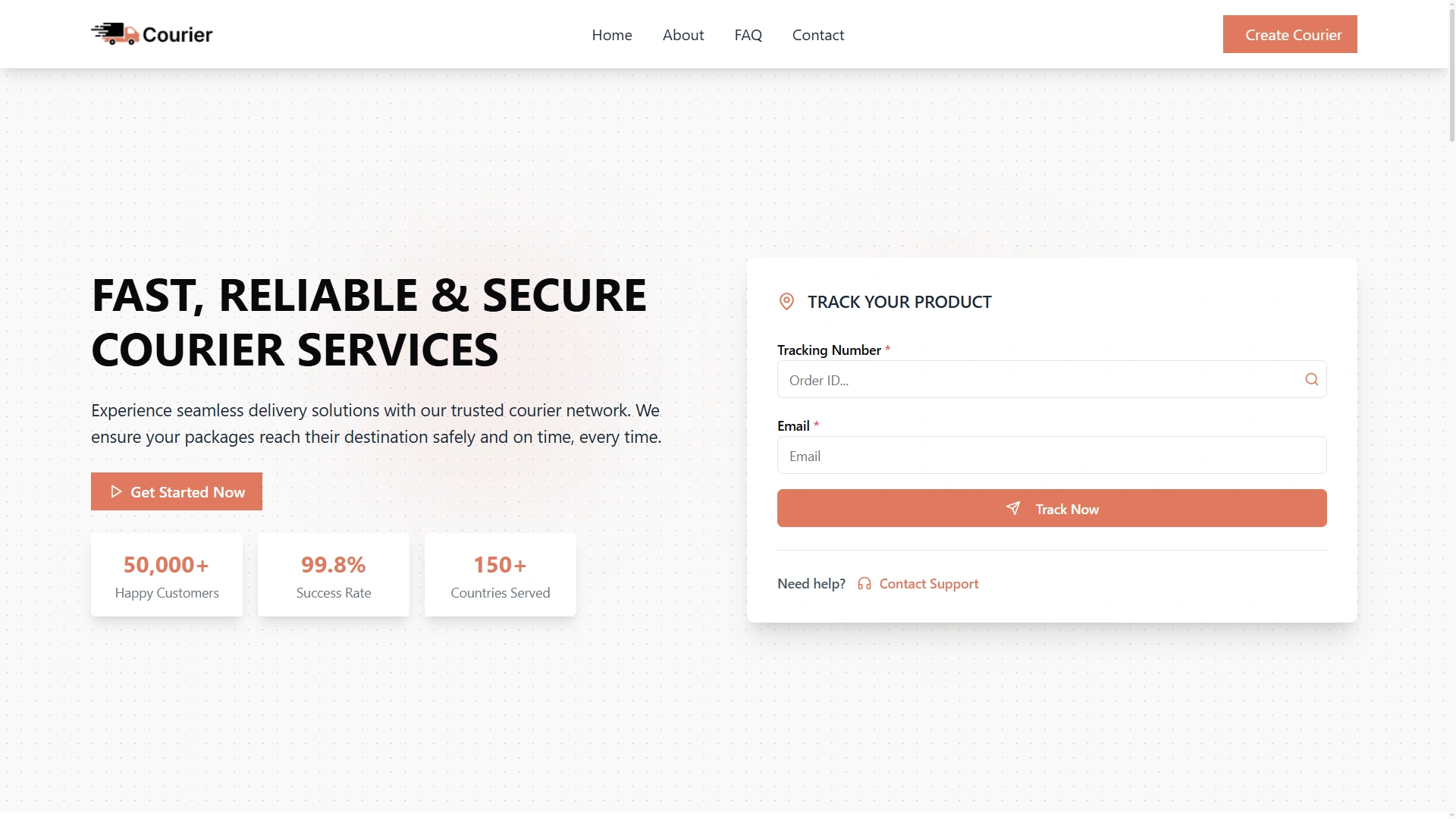
Home page with the tracking form
Where a returning customer types the tracking number.
WorkDo's delivery tracking software gives every customer a tracking page on your own branded website. They enter a tracking number and follow their package stage by stage, with the time of every step. Behind that page, the same system takes your bookings, logs payments and runs freight, fleet and staff tools, so you book, track, collect and report from one place. Pay $199 once and own it. Below is the full tour, one job at a time.
Delivery tracking software records where each delivery stands and shows that status to the people who need it: your team and your customers. Every delivery gets a tracking number, and every change of stage is written to the record with a time.
WorkDo's version tracks by stage on your own branded courier website. It is one part of a complete courier management software system that also handles bookings, payments and fleet.
Four people read the same tracking record: the customer checking on a package, the counter clerk answering a call, the dispatcher planning the afternoon and the owner reviewing the day. A delivery tracking system earns its keep when all four see the same thing.
A useful tracking record answers four questions without anyone having to dig: what is this delivery, where does it stand, when did it get there and has it been paid? The rest of this page shows how WorkDo answers each one.
Take a sample parcel: tracking number #1770282188, booked as Express Air, traveling from Boston, MA to New York, NY. When a customer looks it up, the status reads In Transit and every step so far is listed with its time. That is courier delivery tracking software seen from the customer's side, and it is driven by what your team does at the counter and in the back office.
| Element | What the customer sees | Sample parcel | What your team does |
|---|---|---|---|
| Tracking number | The number they were given at booking | #1770282188 | Nothing extra: the ID is assigned when the booking is entered |
| Service | The service they booked | Express Air | Records it with the booking |
| Origin and destination | Where it started and where it is going | Boston, MA to New York, NY | Enters the sender and receiver details at booking |
| Current status | The stage the package has reached | In Transit | Moves the delivery to its next stage |
| Step history | Every completed step, with its time | Pending 8:30 AM, Approved 9:15 AM, and so on | Nothing extra: each stage change is recorded with its time |
There is no phone call and no waiting for a reply. The customer opens your courier website, types the tracking number into the tracking form and sees where the package stands. The form sits on your home page, so it is the first thing a returning customer finds. Because the page is yours, it carries your name, not a third party's.
Every delivery moves through the same six stages. The sample parcel shows what each one records:
Order confirmed and package registered.
Weight verified and barcode assigned.
Packed and sorted at the Boston central hub.
Received at the Manhattan regional depot.
Driver on route, van dispatched to the destination.
Delivery closed and payment marked received.
Each stage answers a question customers would otherwise phone in. Did you get my order? Has it been checked? Is it packed? Is it close to me? Is the driver out? Has it arrived? Your own hubs, depots and times appear in place of the sample ones.
"Real time" can mean different things to different buyers. In WorkDo's delivery tracking software it means real-time status: the moment your team moves a delivery to its next stage, the customer's timeline shows the new stage and the time it was recorded.
The sample parcel shows how that reads. The on-the-way step is marked live while the package is in transit, and every earlier step keeps its own time. The timeline tells a story: registered at 8:30, approved by 9:15, on the road at 2:00.
The times matter more than they look. "It should be there soon" is an opinion; "ready for delivery at 1:20 PM" is a fact. A counter clerk who takes a call can read the same timeline aloud, so the customer and the clerk are looking at one record, not two versions of the story.
It should be there soon
Ready for delivery at 1:20 PM
That is what delivery real time tracking software should give a customer: the current stage of their package, and exactly when it got there.
Your customers should meet your brand when they check a package, not ours. The courier website that comes with the system has four parts:
Where a returning customer types the tracking number.
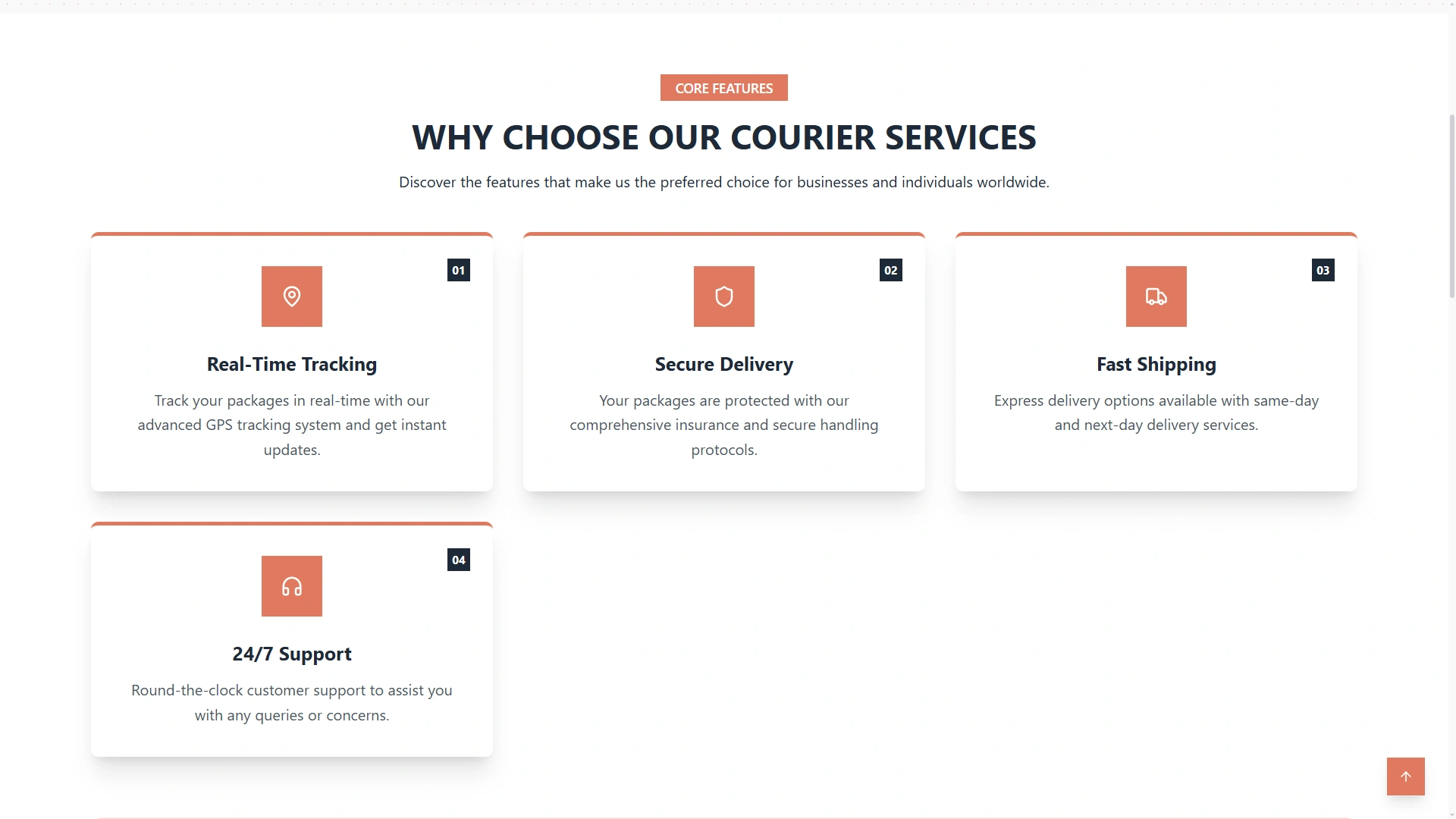
A section that shows what you deliver.
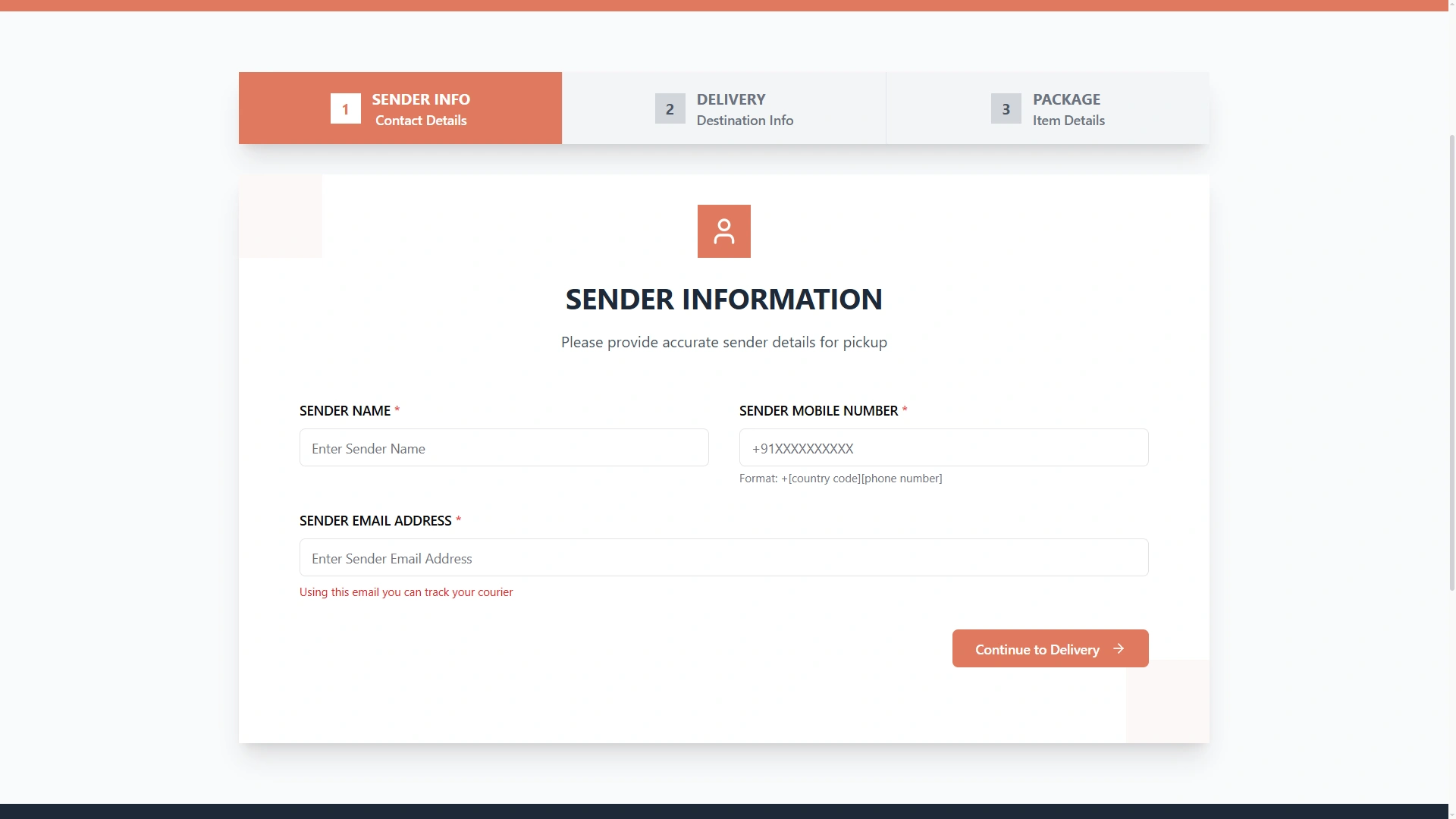
Where senders book a shipment, as described in the booking section below.
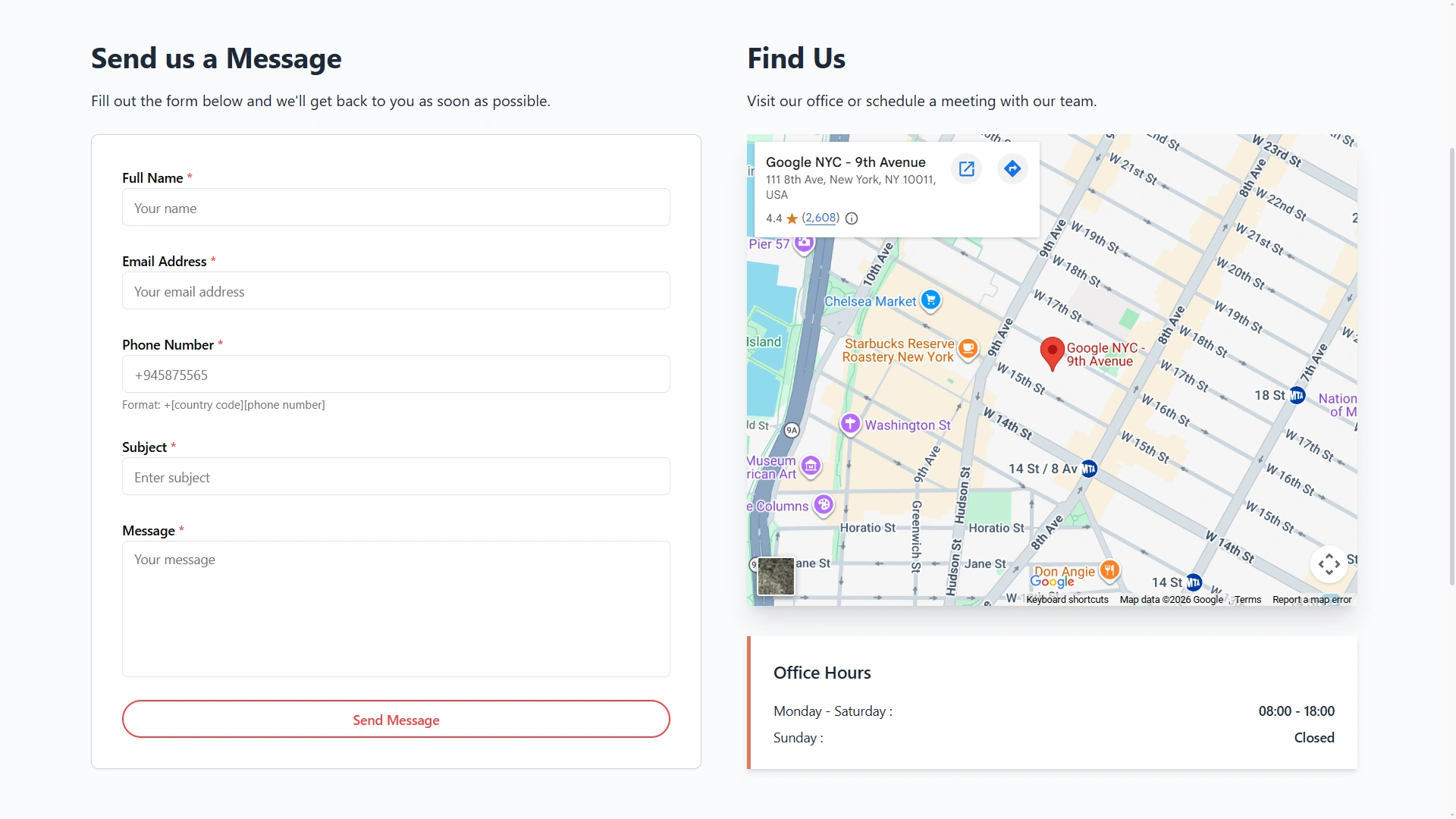
So customers can find and reach you.
The system is white label ready, so your name and logo are what customers see. The delivery tracking system software behind the site is the same system your team works in: when they update a delivery, the tracking page shows it. Nobody has to re-enter anything into a separate portal.
A customer who comes to check a package also lands on a site that shows what you deliver and how to reach you. The tracking form gives people a reason to visit your website again, and every visit shows your services and your office details. For a courier, that makes the tracking page more than a lookup tool: it doubles as a shop window.
Bookings arrive three ways: over the counter, by phone and online. However one comes in, courier booking software should end in the same place, a courier record with its own tracking ID. Good delivery tracking software starts with a good booking, because a tracking page is only as accurate as the record behind it.
Three ways in, one courier record with one tracking ID
Counter staff and phone operators enter the sender, the receiver and the package details. The tracking ID is assigned as soon as the booking is entered, so the customer leaves the counter, or ends the call, with a number they can look up straight away. A booking that starts as a phone call becomes a proper record, not a note on the back of an envelope.
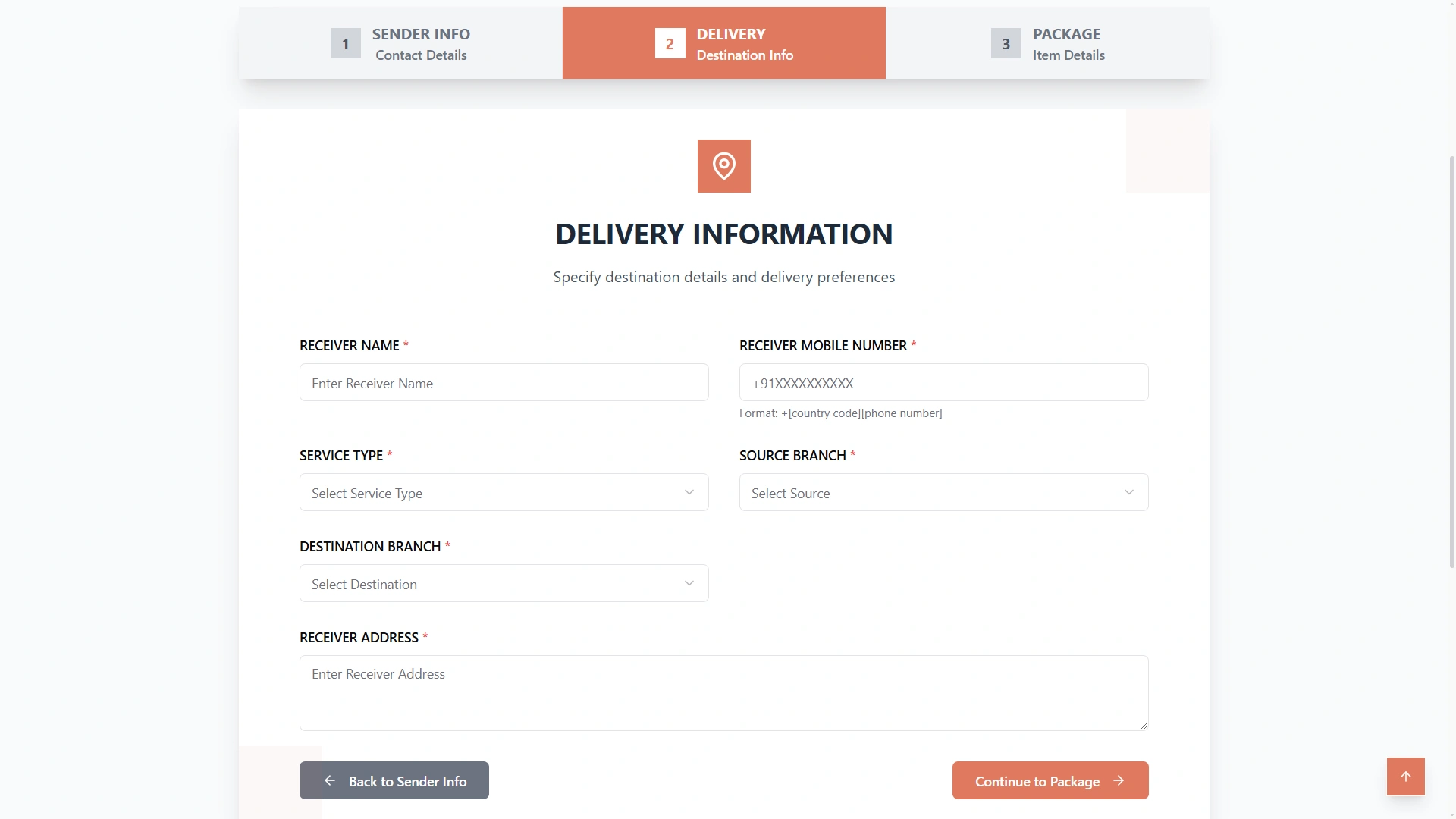
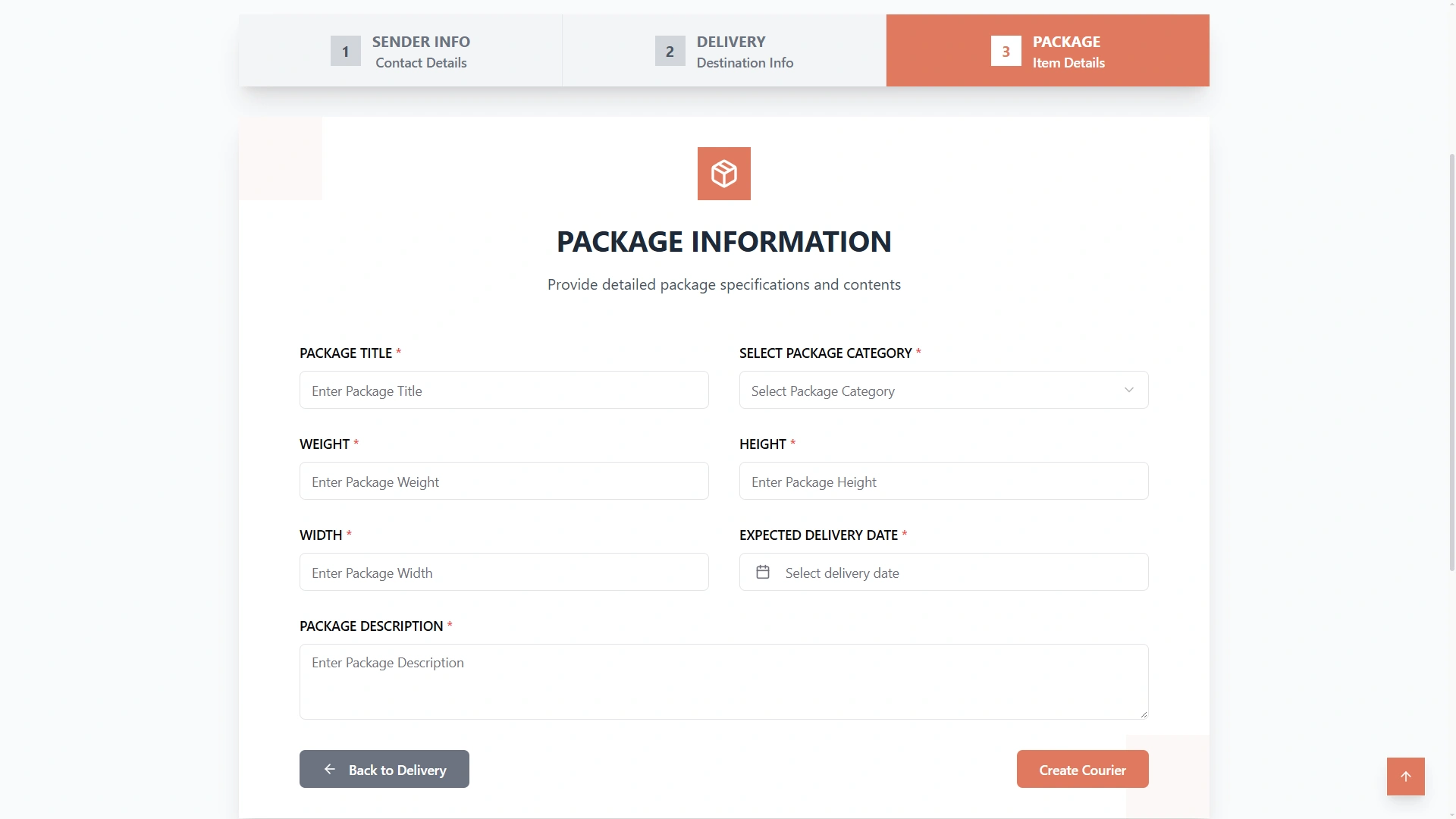
Senders can also book without calling anyone. The online booking pages on your courier website are mobile-friendly and carry your brand. A sender works through three steps, shown below. Each online booking lands in the same list as counter and phone bookings, so your team works from one queue, not two.
Whatever the channel, aim to capture the same things at every booking: who is sending, who is receiving, what is in the package and which branch will handle it. Records that start with the same details are easier to approve and to follow later.
Sender information. Who is sending the package.
Delivery and branch. Where it is going and which branch handles it.
Package details. What is being sent.
A delivery order management system is only as good as the record at its center. In WorkDo every order is one courier record, and everything the business needs to know about the order sits on it:
One courier record
That is what makes it dependable delivery order software: nothing about an order lives anywhere else.
Two screens give you the working view. Manage Pending Couriers lists the bookings that are still pending. Manage Couriers lists the parcels already in the system with the stage each has reached. Between them they answer the two questions an order desk hears all day: what is new, and where is everything else?
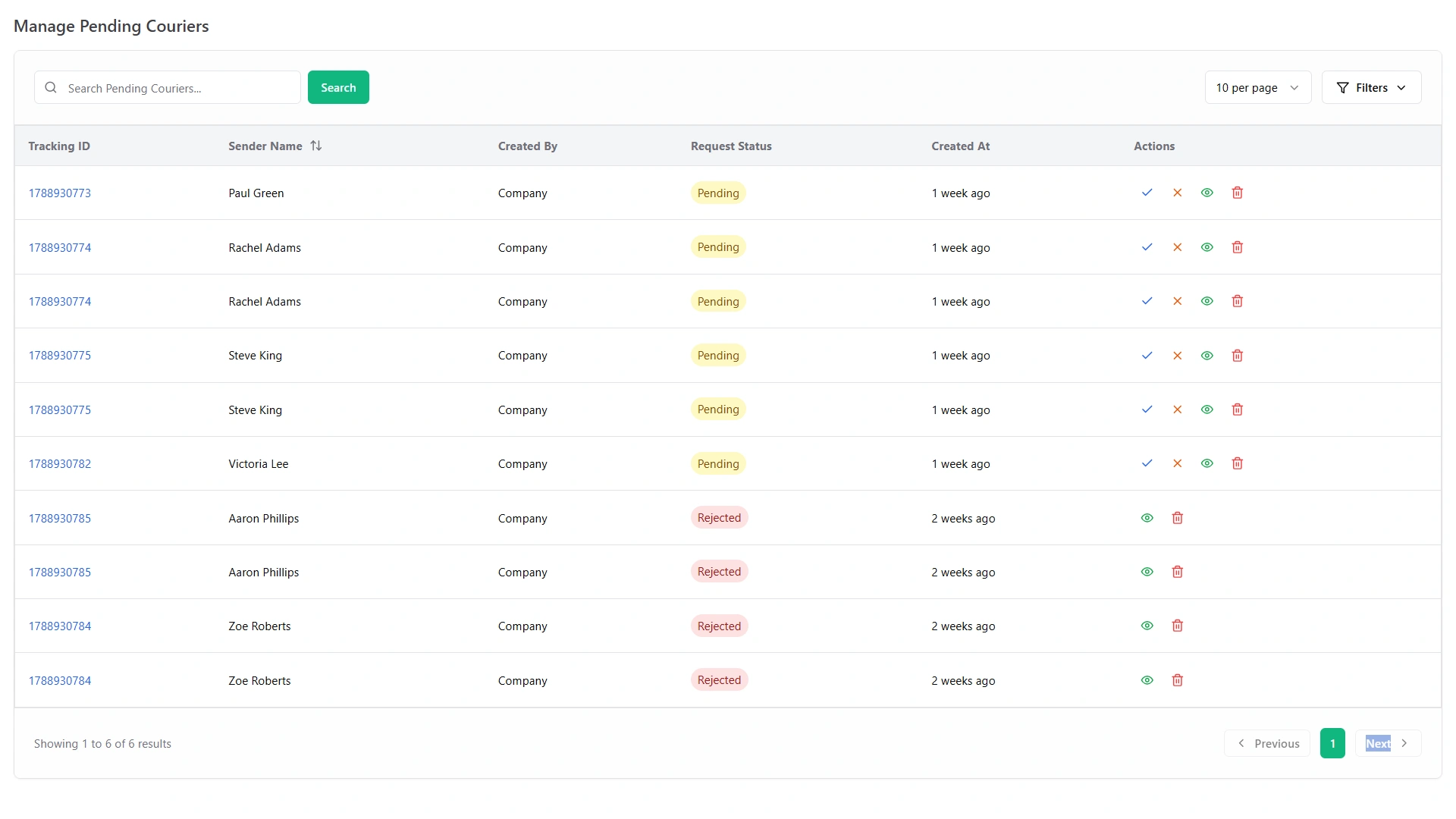
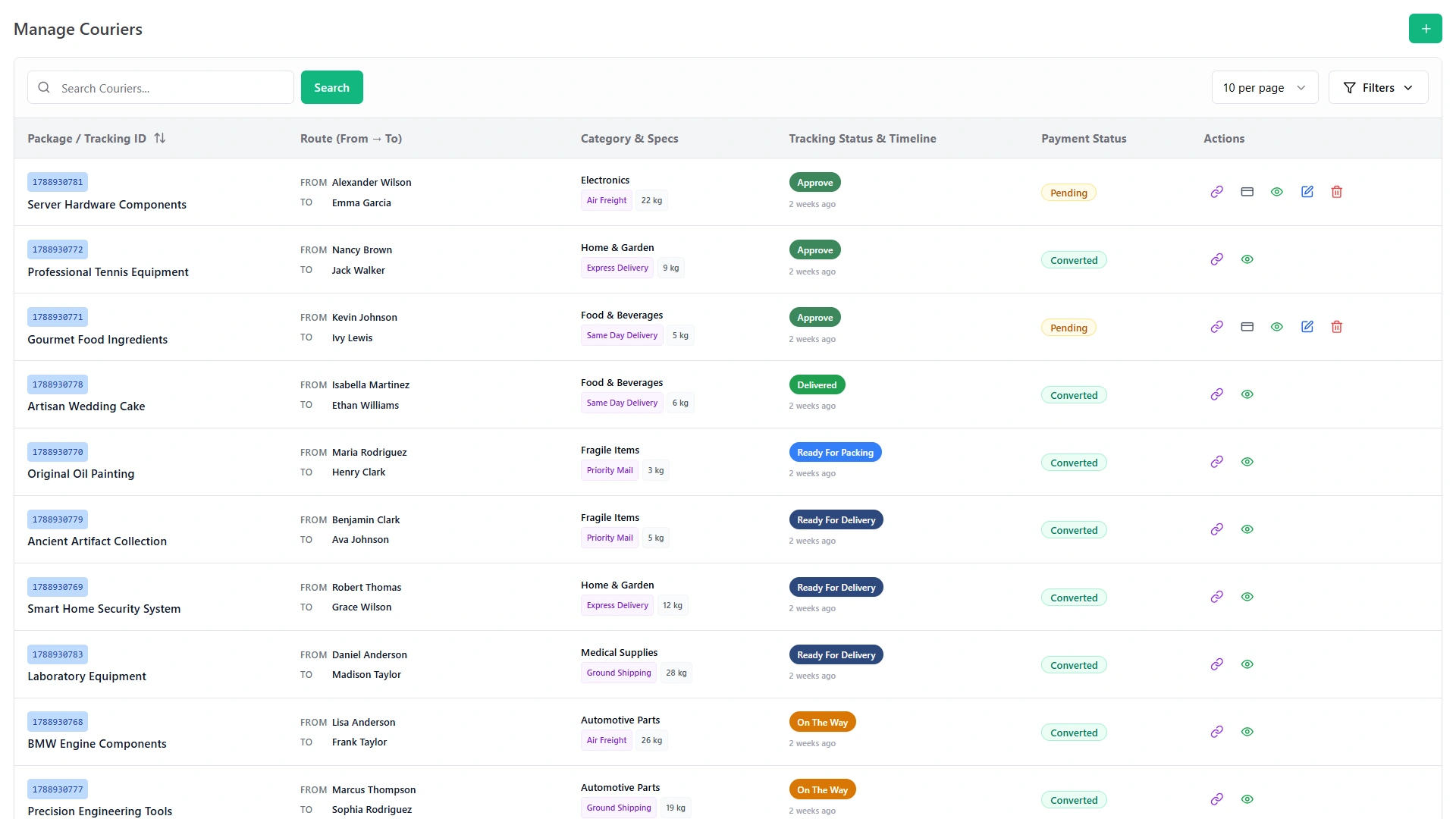
Here is a simple test for any order system. Open one order and see whether everything about it is there. If you have to open a second screen to find the payment, or a spreadsheet to find the driver, it is not really one record. In WorkDo the answer is a single courier record. For how orders fit into the wider operation, see our delivery management software page.
Different people need to hear about a delivery for different reasons. This is how WorkDo's delivery notification software splits the job.
Every stage of their delivery with its time, and a chat button to reach your team
Your branded tracking page and WhatsApp chat
Instant WhatsApp alerts for the workspace events you switch on, such as new sales invoices or new feedback
Announcements, route updates and shift rosters
The notice board
You choose which events trigger a WhatsApp alert in the settings, so the messages your team receives are the ones worth acting on, not every event in the system. A sensible way to start is with the events your team acts on every day. New sales invoices and new feedback are two examples, and others can be switched on as the team gets used to the alerts.
Customers do not have to wait for a message to find out what is happening. The tracking page shows the current stage whenever they look, and the chat is there the moment they want to ask something.
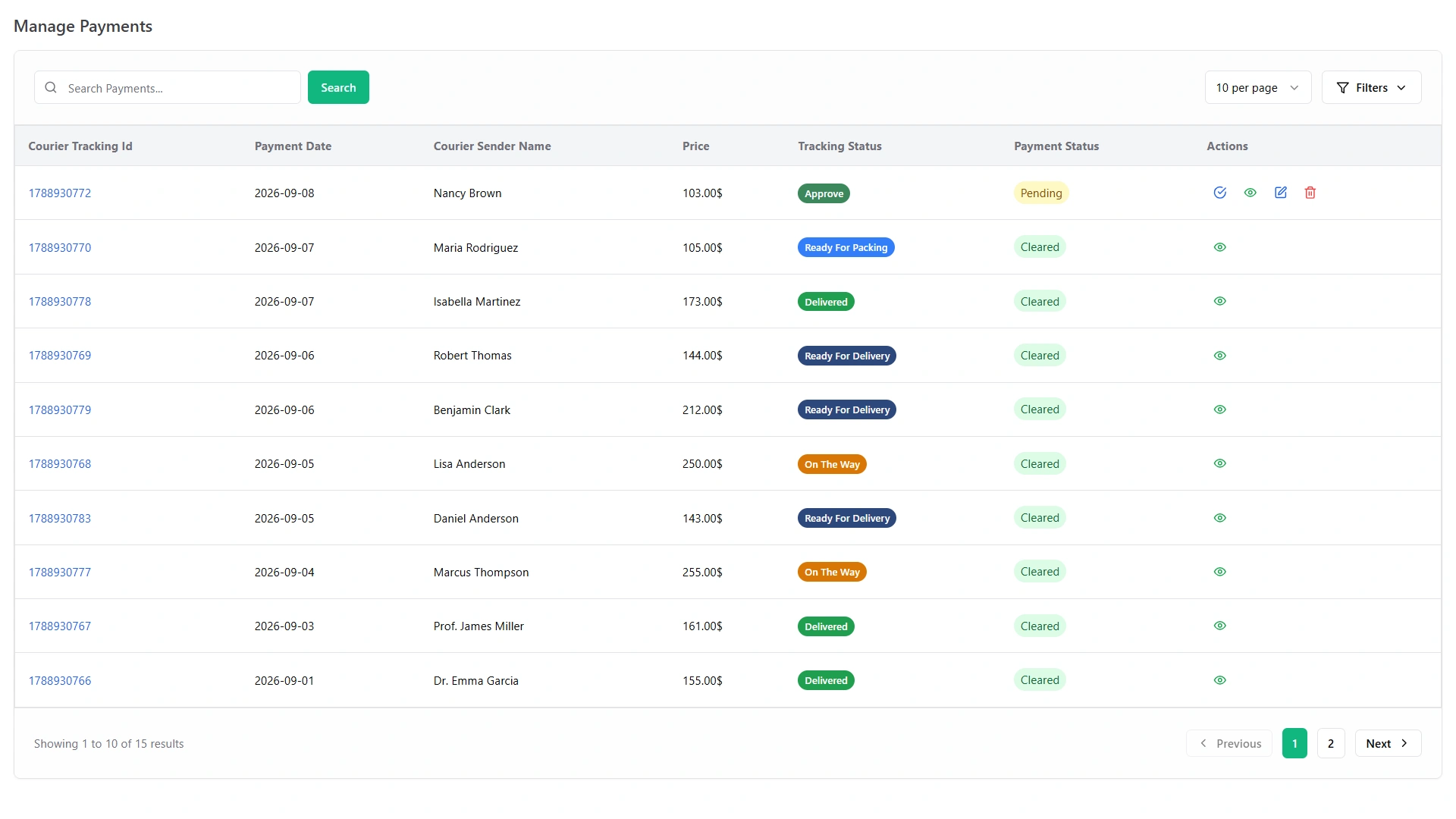
"Courier billing software" and "courier accounting software" mean different things to different couriers. In WorkDo the money side of the business covers three things: payments recorded against each delivery, contracts kept on record and reports that show revenue and expenses. If you are wondering where to look, the list below is the short answer.
Every payment is logged against the tracking ID of the delivery it belongs to. The payment management screen lists them, so what has been paid and what is still pending are easy to tell apart. When a delivery is closed, the payment is marked received on the same record, so the last step of the timeline and the payment list tell the same story. That link runs both ways: a payment can always be traced to a specific delivery, and a delivery can always be traced to its payment. At the end of the day, a manager can look down the payment list and see which deliveries are settled.
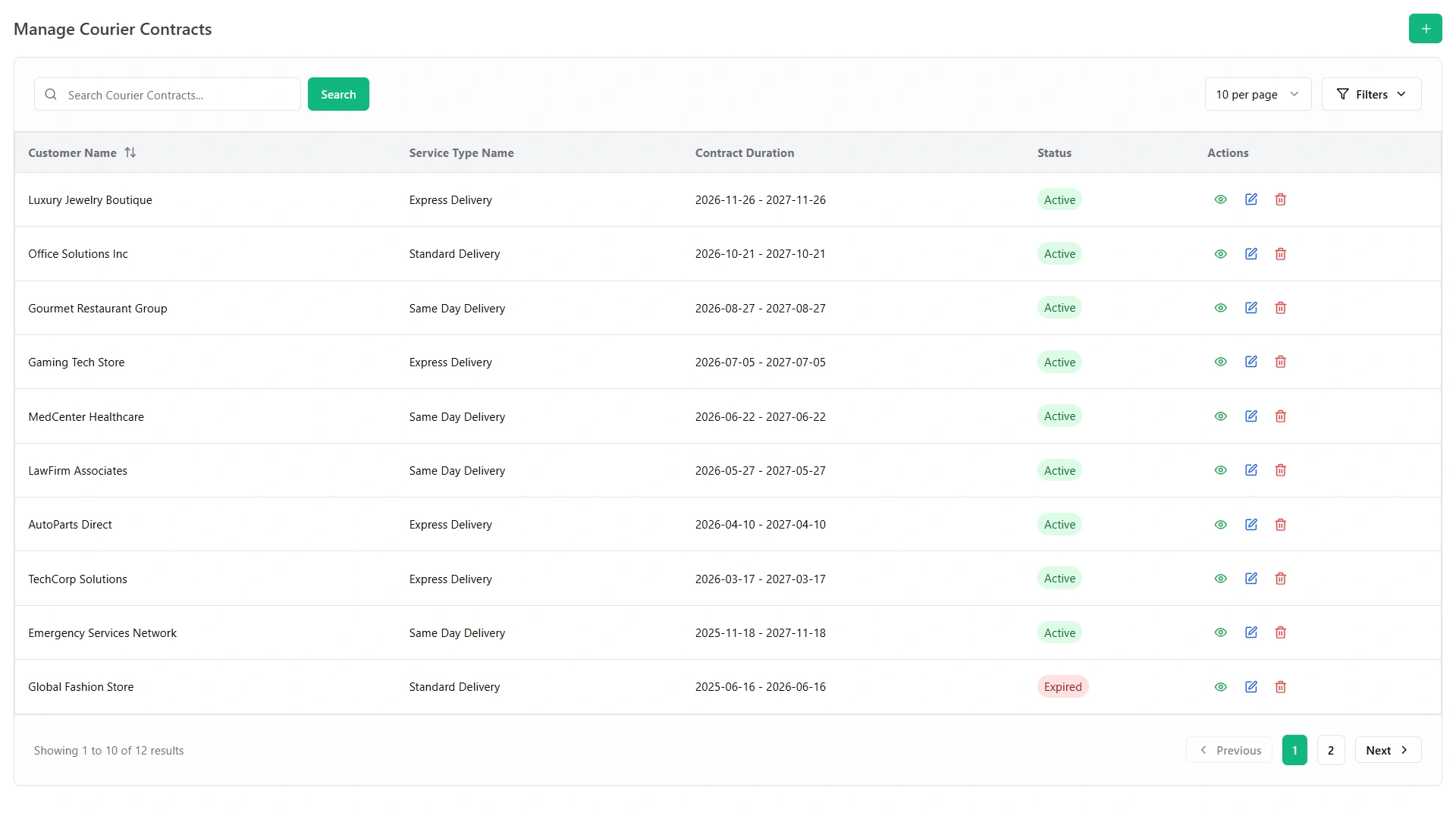
Business customers come with paperwork. Service agreements and courier contracts are kept on record in the system, each on its own screen (Service Agreement Management and Courier Contract Management), so the terms you agreed with a client can be found by anyone in your office who needs them: the person on the phone, the manager approving a job and the owner reviewing accounts.
Smart Reports build detailed reports on shipments, payments, expenses and revenue. Smart Dashboard Analytics follows live revenue, sales and business performance. The AI Business Advisor adds recommendations and growth forecasts for your courier business. If you are searching for courier accounting software, this is the part that applies: the numbers a courier owner reviews each week, in one place.
A simple routine: open the shipment report first to see volume, then payments and revenue to see what came in, then expenses to see what went out. The dashboard shows the same picture at a glance. To see what those numbers add up to, read about the benefits of the system.
Some couriers carry pallets and containers as well as parcels. The Freight Management System module handles freight customers, booking and shipping requests by land, air, sea or rail, containers and invoices, and it sits in the same system as your parcel work. Manage Shipping Requests is one of the six core features of the courier system.
A freight request and a parcel booking are different jobs, but the office that handles them is usually the same. Keeping both in one system means one team can answer for both. If you carry only parcels, you may never open the freight screens. If you take on a pallet or a container, the tools are already there, in the same system your team knows.
Freight operators and logistics companies will find more about how this fits their work on the use cases page.
Couriers rarely work from one door. Agents collect parcels, branches take bookings and business customers need a name to call. WorkDo keeps all three on the same records as the parcels themselves.
Managed on the Courier Agent Management screen.
Chosen in the delivery and branch step of a booking, so each shipment is tied to the branch that handles it.
Kept on the Customer Contact Management screen, so the person to call about an account is on record.
Because agents and branches live in the same system as bookings and payments, a manager at head office and a clerk at a pickup point are looking at the same data.
Picture a clerk at a pickup point taking a booking. They choose the branch as part of the booking, and head office sees the same record. When a business customer calls about an account, whoever answers can find the contact on record instead of asking around.
The Fleet module keeps vehicles, drivers, fuel entries, maintenance, insurance records and trip log books in one place. A fleet view can show, for example, 19 vehicles active, 2 in maintenance and 12 active vehicle bookings, with a flag that Van 07 is due for maintenance and a note that a fuel entry was logged for Bike 12. Those are sample figures, but they show the kind of picture you get. A fleet view answers three practical questions before the day starts: which vehicles can take work, which are in the workshop and which need attention soon.
Fuel and maintenance sit with each vehicle, so you can see what a van really costs to run. How a driver and a vehicle get assigned to each delivery is covered on the dispatch page.
A fleet view Sample figures
Take the weekly service review. Support tickets show every complaint with its category, its status and its response time, so you can group complaints by type and see how quickly your team answers. Feedback adds star ratings and comments from customers, staff and guests. Together they give the review both sides: the problems people reported and the scores they gave.
A complaint that becomes a ticket carries a status and a response time, so it is easy to see which ones are still open. A rating that arrives after a delivery is a small piece of evidence about how the service is landing.
A useful weekly review looks at three things:
Clock-ins, clock-outs, late arrivals and overtime sync from your biometric devices. A sample morning shows 38 of 42 staff clocked in: 35 on time, 3 late and 4 not in yet.
Post driver and courier jobs, track candidates, run interviews, send offers and onboard new hires. A sample peak-season pipeline shows 48 applicants, 12 interviews, 5 offers sent and 3 people onboarded.
Company announcements, route updates and shift rosters for your team.
Anonymous staff suggestions to improve daily operations.
Together, these four answer the questions behind every delivery: who is on shift, who can be hired before the peak, what the team has been told and what the team thinks. All of this, and every feature above, is part of the 14 modules that come with the system.
Pay $199 once and get all 14 modules, the full source code and lifetime updates. Your customers get a tracking page. You get a system you own.