workdo sale image

Get 50% off all Add-Ons today! Need more? Check Bulk Discounts!

get 50% off
Hospital Management System

Hospital Billing Software That Keeps Every Payment on Track

From the first charge to the final reconciled entry, one hospital billing software connects patient invoices, insurance claims, and your books - so nothing gets billed twice, and nothing falls through the cracks.

Introduction

An invoice goes out to a patient's insurer. The insurer approves less than what was billed. Nobody updates the patient's file, so the front desk still quotes the original amount when the patient calls to ask why their bill changed. Meanwhile, the accounts team is entering the same payment into a separate ledger by hand, because the billing desk and the finance office aren't looking at the same system.

This is exactly the gap hospital billing software is built to close. Instead of patient charges, insurance claims, and the accounting ledger living in three disconnected places, it pulls them into one connected record - so a charge, a claim, and a journal entry all trace back to the same source.

This page covers exactly what that looks like inside a hospital management system: how a charge becomes an invoice, how insurance claims get tracked, and how everything reconciles with your books without double entry.

Definition

What Is Hospital Billing Software?

Hospital billing software is the layer that turns patient care into an accurate financial record - a charge captured during a visit, an insurance claim tracked to settlement, and a payment posted to the right ledger account, all without re-entering the same numbers three times.

Some vendors call this a hospital billing system, others use billing software for hospitals - the terminology varies, but the goal is the same: one accurate number, visible everywhere it needs to be seen.

Ask most billing desks what they actually need, and it comes down to three questions:

  1. 1Did we bill this correctly?
  2. 2Has the insurer paid what they approved?
  3. 3Does this match what the accounts team has on the books?
Capabilities

Core Capabilities Inside the Hospital Billing Software

Here's the money-related side of the system, department by department. For the full clinical and operational picture, see the complete hospital management system features.

Patient & Visit Billing

Every OPD visit, admission, or procedure generates charges as care is delivered, instead of someone reconstructing them from memory at discharge. Because billing draws on the same record covered on the patient management page, a bill reflects exactly what happened during that visit - no separate spreadsheet to keep in sync.

Insurance Claims & TPA Billing

For patients with insurance, cashless policies get verified up front, and claims move through pre-authorization, settlement tracking, and co-pay billing without leaving the platform. When an insurer approves a different amount than what was billed, that adjustment updates the patient's invoice directly, instead of living in a side note someone has to remember to apply later.

Accounting & Financial Records

Underneath the billing desk sits a full accounting system: Chart of Accounts, Journal Entry, General Ledger, Balance Sheet, and Trial Balance, all updated automatically as invoices are created and payments come in. This is the piece that makes it real hospital accounting software, not just an invoicing tool - every billed amount has a matching entry in the books, without anyone re-typing it.

Payments, Currency & Reporting

Payments come in through multiple gateways, and multi-currency support means a hospital serving international patients doesn't need a separate system for foreign billing. On the reporting side, income and expense summaries, outstanding balances, and cash-flow views pull from the same records as the invoices themselves, so a finance report and a patient bill are never telling two different stories.

Billing Leaks

Where Hospital Billing Actually Leaks

Most billing problems aren't dramatic. They're small, quiet, and they compound.

  • Duplicate entries. A payment collected at the billing desk gets typed into the ledger a second time, because accounts can't see what billing already recorded.
  • Missed charges. A consumable or procedure used during a visit never makes it onto the bill, because nobody captured it at the point of care.
  • Co-pay mismatches. A patient is billed the original amount instead of what the insurer actually approved, and the correction either happens late - or never.
  • Delayed reconciliation. Billing and accounting stay out of sync for days or weeks, so a hospital's real cash position is a guess, not a fact, until someone sits down and reconciles it by hand.
  • Silent write-offs. Small gaps between what was billed and what was collected get quietly ignored, because tracking them down costs more staff time than the amount is worth.

None of these are staffing problems. They're process gaps - and they're exactly what happens when billing, insurance, and accounting live in three different systems instead of one. Connected billing software doesn't just speed things up; it closes the specific gaps where revenue and staff hours quietly disappear.

Fix those five gaps, and the ripple effects show up everywhere: shorter month-end closes, fewer awkward calls from patients about bills that don't match what they were told, and a finance team that trusts the numbers in front of them instead of double-checking everything by hand. See the full benefits of a hospital management system for the wider picture beyond billing alone.


Billing Cycle

From Charge to Cash: The Billing Cycle in 6 Steps

  1. Charge captured. A visit, procedure, or service turns into a charge the moment it happens - not at discharge, not from memory.
  2. Insurance checked. If the patient has cashless coverage, eligibility and pre-authorization are verified before or alongside treatment.
  3. Claim tracked. Where applicable, the claim moves through submission and settlement tracking, with any co-pay calculated automatically.
  4. Invoice generated. The bill reflects what was actually approved - not the original charge, waiting on a manual correction that may or may not happen.
  5. Payment collected. Payment comes in through whichever gateway or currency applies, from the patient, the insurer, or both.
  6. Books close themselves. The ledger, journal entries, and financial reports update automatically - reconciliation isn't a separate task anymore.
Why It Matters

Why Hospitals Need Dedicated Billing Software

  • Fewer mismatched invoices. A charge, a claim, and a ledger entry all trace back to the same record, so nobody is reconciling three different numbers by hand.
  • Faster visibility into what's actually been paid. Settlement and co-pay status update as they happen, instead of surfacing at month-end.
  • No duplicate data entry. Payments posted at the billing desk don't need to be re-entered into a separate accounting system.
  • Cleaner financial reporting. Because invoicing and accounting share the same records, reports reflect what was actually billed and collected.
  • Less back-and-forth between departments. The billing desk and the finance office work from the same numbers, not competing spreadsheets compared at the end of the week.

It's worth asking: how many hours a month does your finance team spend just reconciling billing records against the ledger, rather than actually analyzing them? For most hospitals running billing and accounting as separate systems, that number is higher than expected. See the full benefits of a hospital management system for the wider picture beyond billing alone.
Comparison

Manual or Spreadsheet Billing vs a Real System

Manual / Paper Spreadsheets Hospital Billing Software
Generating an invoice Manual calculation Manual, error-prone Automatic from the visit
Tracking insurance claims Separate paper trail Separate file to maintain Tracked in the same record
Matching billing to accounting Manual reconciliation Manual reconciliation Automatic
Financial reporting Compiled by hand Rebuilt from scratch each time Generated from live records
Risk of duplicate or mismatched entries High Moderate Low
Staff time on admin work High Moderate Low

Pros of moving to a dedicated system: fewer mismatched invoices, automatic reconciliation between billing and accounting, and reports that reflect real-time numbers.

Trade-offs to plan for: staff need a short adjustment period, and existing billing or ledger records need to be migrated in during setup.

Who Uses It

Built for Every Desk That Touches the Bill

  • A multi-specialty hospital with insurance tie-ups leans on it hardest for claims and co-pay tracking - that's where manual processes break down fastest.
  • A diagnostic or specialty clinic mostly needs straightforward patient invoicing, without the full weight of claims management.
  • A hospital finance team works almost entirely from the accounting side - ledger, journal entries, reports - often without touching the billing desk at all.
  • A hospital treating international or out-of-town patients depends on multi-currency and multiple payment gateways to bill correctly the first time.

These are just a few scenarios - see more hospital management system use cases across different facility types.

Rollout

Rolling Out Hospital Billing Software Without Disrupting Billing Day

First 30 Days: What to Turn On First

Start with patient and visit billing before switching on insurance claims workflows or the full accounting side. Get the billing desk comfortable generating accurate invoices first - most hospitals feel that win within the first few billing cycles, long before the rest of the system is fully configured.

Why Finance Never Has to Ask Billing for Numbers Again

Billing in a hospital management system means the invoice, the claim, and the ledger entry are the same record, viewed from three different desks - not three separate files someone has to keep in sync by hand. Once that's true, finance stops chasing billing for numbers, and billing stops fielding questions accounts should already be able to answer themselves. Teams can roll out the billing desk first, then turn on the full accounting and reporting layer once day-to-day invoicing feels routine.

Ready to See It in Action?

Hospital billing software shouldn't mean choosing between accurate patient invoices and clean books - it should give you both from the same record. From the first charge to the final reconciled entry, everything stays connected, accurate, and visible to whoever needs to see it.

Explore the Full Hospital Management System
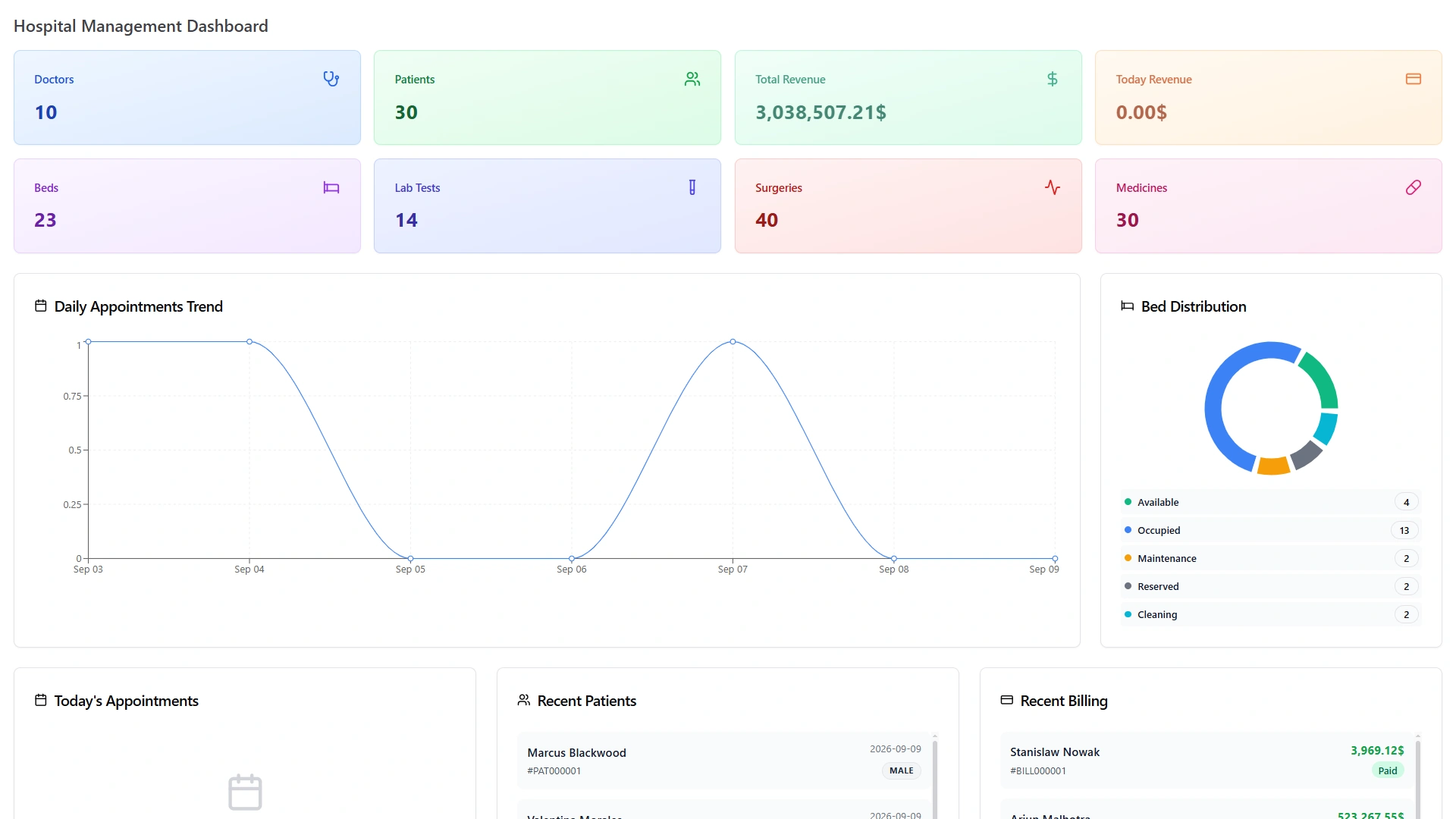
Hospital Management Dashboard with total revenue, today's revenue, recent billing and recent patients
Faq's

Frequently Asked Questions About Hospital Billing Software

Not in this case - the two are built on the same records. Billing covers patient charges and insurance claims; accounting covers the ledger, journal entries, and financial reports; both draw from the same underlying data instead of needing separate systems.
Yes, through supported payment gateways, and in the currency that applies to them if they're being billed internationally.
Yes. A charge is generated from the same visit record covered by patient management, so the invoice reflects what actually happened during that visit.
Yes. Income and expense summaries, outstanding balances, and cash-flow views are built from the same records as the invoices themselves.
The approved amount and any co-pay are calculated and reflected directly on the patient's invoice, rather than requiring a manual adjustment after the fact.
Yes, through multiple payment gateways and multi-currency support, which matters for hospitals serving international or out-of-town patients.