workdo sale image

Get 50% off all Add-Ons today! Need more? Check Bulk Discounts!

get 50% off
Hospital Management System

A Patient Management System for Every Step of the Journey

From the first walk-in to the last follow-up call, one patient management system keeps registration, scheduling, records, and communication moving together - instead of living in five different places.

Introduction

It's 9 a.m. Your OPD waiting room is already full. The receptionist is juggling a ringing phone, a walk-in patient, and a paper register that doesn't say whether Dr. Mehta has a 9:30 slot open. Somewhere in a filing cabinet is last year's file for the patient standing at the counter - if anyone can find it before the queue gets longer.

This is the exact problem a patient management system is built to solve. Instead of registration, scheduling, records, and follow-ups living in separate registers, spreadsheets, and sticky notes, it pulls them into one connected workflow - so your front desk, your doctors, and your patients are always looking at the same, up-to-date information.

This page walks through exactly what that looks like inside a hospital management system: how patients get registered, how they book appointments (online or at the counter), how their records follow them across departments, and how your staff sees all of it from one screen.

Definition

What Is a Patient Management System?

A patient management system is the part of hospital software that handles everything connected to someone's identity and journey - registration, scheduling, medical history, and ongoing communication - rather than the clinical or financial side alone.

Think of it as the layer that answers three questions your front desk asks all day, every day:

  • Who is this patient, and have they visited before?
  • When can they be seen, and by whom?
  • What happened the last time they were here?

Some vendors call this a patient management software, others use patient information system - the terminology varies, but the job is the same: replace scattered paper and spreadsheets with one searchable, always-current record that every authorized department can see.

Capabilities

Core Capabilities Inside the Patient Management System

These are the patient-facing capabilities. For the full clinical and operational picture - labs, radiology, billing, and more - see the complete hospital management system features.

Patient Registration & Digital Records

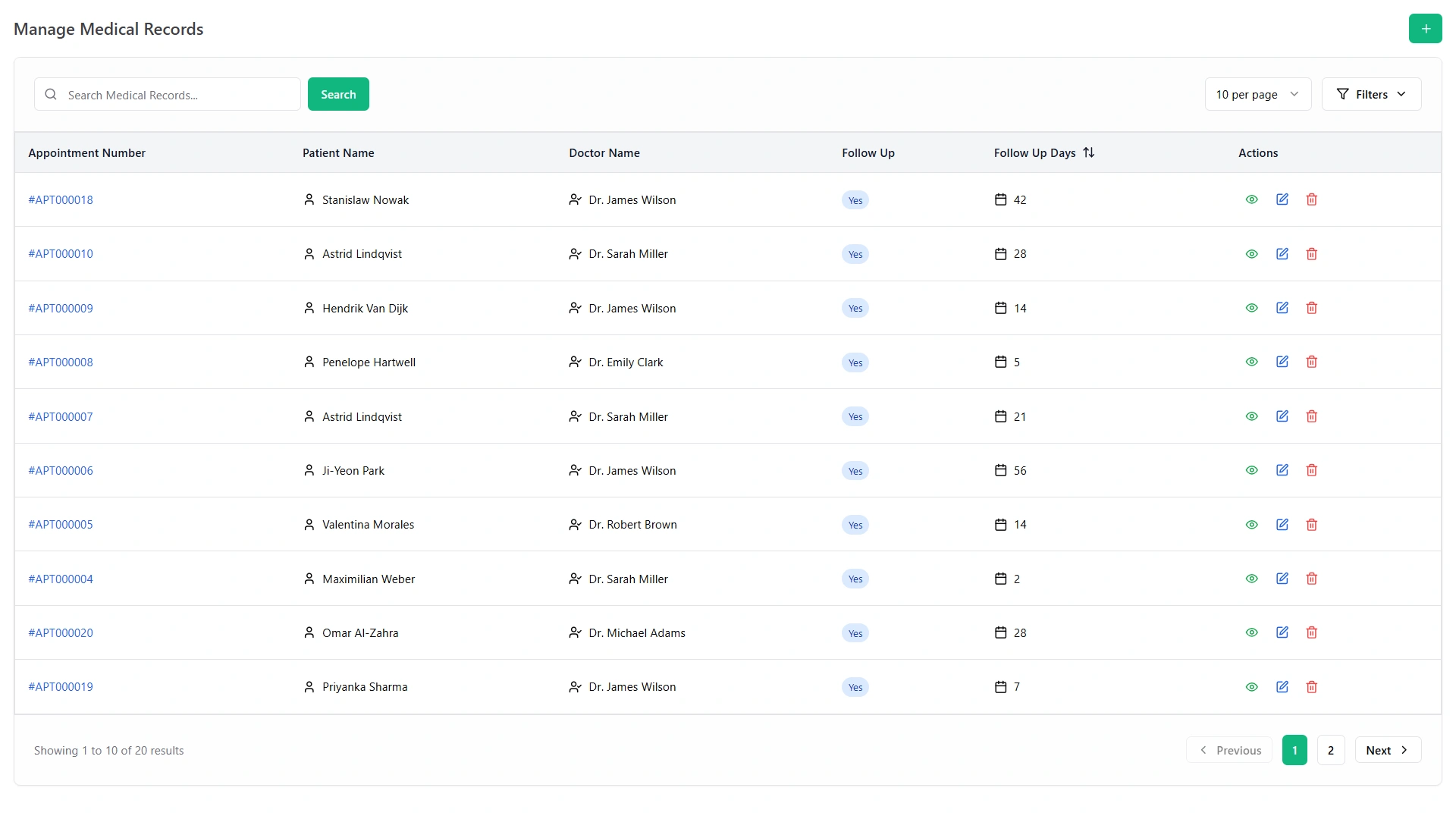
New patients are registered once - name, contact details, date of birth, gender, address, and medical history - and that record follows them for every future visit. No re-entering the same details at the lab desk, the pharmacy counter, and the billing window. As a patient registration software, it also supports quick search, so staff can pull them up in seconds instead of flipping through a register.
Smart Appointment Scheduling

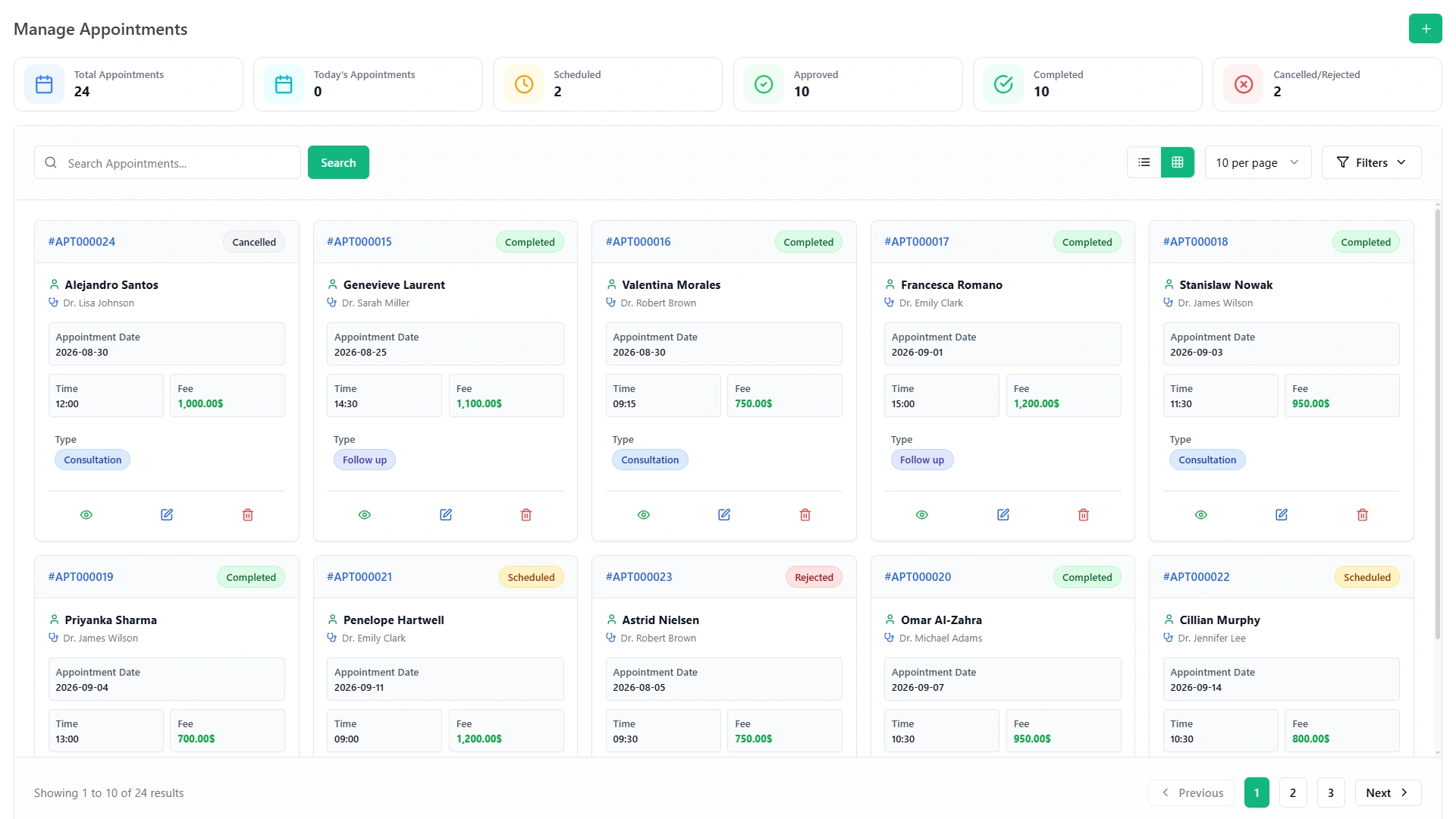
As a patient scheduling software, the system shows doctor availability in real time, so the front desk can book directly into an open slot instead of guessing. Selecting a name automatically shows the assigned doctor, which cuts down on double-bookings and mismatched appointments.

Online Patient Booking & Self-Service

Not every patient wants to call and wait on hold. With online hospital appointment booking, they can pick a date, see available times, and confirm a visit themselves - a small change that noticeably reduces the number of calls your front desk has to answer during peak hours. Appointments can be approved, rejected, or marked complete, with status updates visible to staff and patient alike.

Patient Portal Access

Through patient portal software, they can log in to view their own records, check upcoming appointments, and review bills - without picking up the phone. It shifts a meaningful share of routine "can you check my appointment?" calls away from your staff and gives them a sense of control over their own care.

Patient Flow & Queue Tracking

As patient tracking software, the system tracks where someone is in their visit - registered, waiting, with the doctor, or discharged - so nobody gets lost in the shuffle during a busy morning. This is the piece that functions as true patient flow management software: it's less about any single appointment and more about how smoothly people move through your building from arrival to exit.

Unified Patient History Across Departments

Because registration, appointments, lab requests, and billing all sit on the same platform, a doctor reviewing a patient's file can see their full history - not just what happened in this department. This is what separates a real patient data management software from a simple appointment book: the data travels with them, not with the department.

Step By Step

How Patient Management Works, Step by Step

  1. 1
    Registration.

    A new patient's details are captured once and stored as a searchable digital record. On future visits, that record comes up with a quick search instead of a fresh form.

  2. 2
    Booking.

    The patient - or the front desk on their behalf - selects a doctor and an available time slot, either online or at the counter.

  3. 3
    Confirmation.

    The appointment is approved, and both the patient and the assigned doctor can see it on their schedule.

  4. 4
    Check-in & queue.

    On arrival, the patient's status updates in real time, so staff know exactly who's waiting and who's with a doctor.

  5. 5
    Consultation & records update.

    The doctor adds notes, prescriptions, or test requests directly to the patient's record during the visit.

  6. 6
    Follow-up.

    Feedback forms, follow-up reminders, or the next appointment can be scheduled before the patient leaves - closing the loop instead of leaving it to memory.

Manage Appointments screen with scheduled, approved, completed and cancelled or rejected appointments
Manage Medical Records screen with patient, doctor, follow-up and follow-up days
Why It Matters

Why Hospitals Need a Dedicated Patient Management System

  • Fewer errors. One record per patient means less risk of mixed-up files, missed history, or duplicate entries.
  • Shorter waits. Real-time scheduling and queue visibility mean patients spend less time standing at a counter waiting for someone to check a register.
  • Less phone traffic. Online booking and portal access absorb a meaningful share of routine calls, freeing staff for patients who are actually in front of them.
  • Better continuity of care. Doctors see a patient's full history, not just what happened during today's visit.
  • A calmer front desk. When the same information is visible to every department, staff spend less time cross-checking and more time helping patients.

It's worth asking: how much staff time is currently spent just finding patient information rather than acting on it? For most facilities running on paper or spreadsheets, that answer is higher than anyone expects. See the full benefits of a hospital management system for the wider operational picture beyond patient management alone.

Comparison

Manual Registers vs a Real Patient Management System

Paper Registers Spreadsheets Patient Management System
Finding a patient's history Manual search, slow Manual search, error-prone Instant search
Booking visibility One person, one book Shared but easy to overwrite Real-time, role-based
Online booking for patients Not possible Not possible Built in
Risk of duplicate/lost records High Moderate Low
Cross-department visibility None Limited, manual sharing Automatic
Staff time on admin work High Moderate Low

Pros of moving to a dedicated system: faster registration, fewer duplicate records, self-service booking, and one source of truth across departments.

Trade-offs to plan for: staff need a short adjustment period, and existing paper or spreadsheet records need to be migrated in during setup.

Who Uses It

Who Uses This Patient Management System

Doctor with a tablet talking with a patient

A multi-department hospital uses it to keep OPD registration, specialist scheduling, and inpatient records connected, so a patient referred from general medicine to cardiology doesn't have to repeat their history.

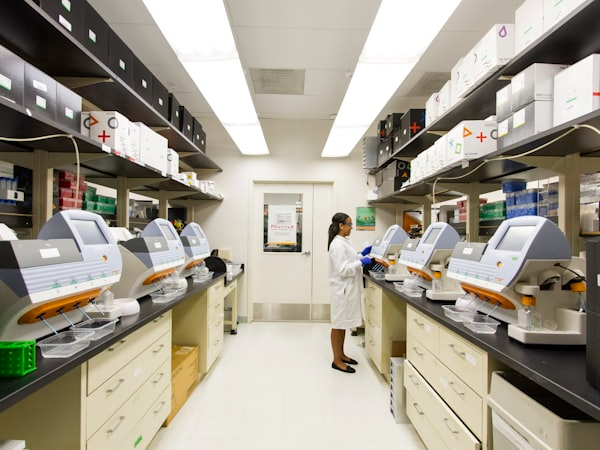
Laboratory with analysers and a technician at work

A diagnostic or specialty clinic relies on it mainly for fast registration and appointment booking, without needing the full weight of inpatient or bed-management features.

Care worker helping two elderly residents at a nursing home

A nursing home or long-term care facility uses the patient tracking and record-keeping side to maintain accurate histories for residents over months or years, not just single visits.

Newborn baby lying on a hospital blanket

A women's or children's hospital leans heavily on online appointment booking and the patient portal, since these visits are often scheduled well in advance by family members.

These are just a few scenarios - see more hospital management system use cases across different facility types.

Rollout

Getting Started

New to Patient Management Software? Start Here

If you're moving off paper registers for the first time, start with just two things: patient registration and appointment scheduling. Get your team comfortable searching records and booking slots before turning on portal access or advanced reporting. Most hospitals see the front-desk benefit - shorter queues, fewer lost files - within the first few weeks.

For Hospital IT & Admin Teams: Deeper Integration

Because this patient management system sits inside a connected hospital management platform, records aren't siloed. The same profile created at registration is the one referenced by lab requests, radiology orders, billing, and insurance claims elsewhere in the system - so there's no separate sync process or duplicate ID to manage between modules. For IT teams planning a rollout, that means registration and scheduling can go live first, with lab, radiology, or billing modules turned on department by department without re-entering data.

Ready to See It in Action?

A patient management system shouldn't feel like one more tool your staff has to juggle - it should be the thing that makes the rest of the day easier. From the moment a patient walks in to the follow-up call weeks later, everything stays connected, searchable, and visible to the people who need it.

Explore the Full Hospital Management System
Hospital administrator working at a desk with several screens of hospital records
Faq's

Frequently Asked Questions About the Patient Management System

A patient management system is software that handles registration, appointment scheduling, and records in one place, so hospitals and clinics don't rely on separate registers, spreadsheets, or phone calls to track each person.
Yes. They can view doctor availability and book, reschedule, or cancel their own appointments online without calling the front desk. Staff can still book on a patient's behalf when needed.
Yes. A patient management system focuses on registration, scheduling, and administrative records, while an EHR stores detailed clinical documentation like diagnoses and treatment notes. Many hospitals use it as the entry point that feeds into a deeper EHR.
A portal is the patient-facing part where people can view records and book visits. The full system also covers staff-side registration, scheduling, and cross-department record-keeping.
It can, mainly by replacing manual queue-checking with real-time visibility of who's registered, waiting, or with a doctor, and by moving routine bookings online instead of through a busy front desk.
Yes. Access is role-based, so only authorized staff can view or edit a given patient's record, and each department only sees the information relevant to its role.