

What Is ERP? A Complete Guide to ERP Software
Learn what ERP software is, its full form, core modules, and how it connects your whole business in one system.

What Is ERP? Understanding the Basics
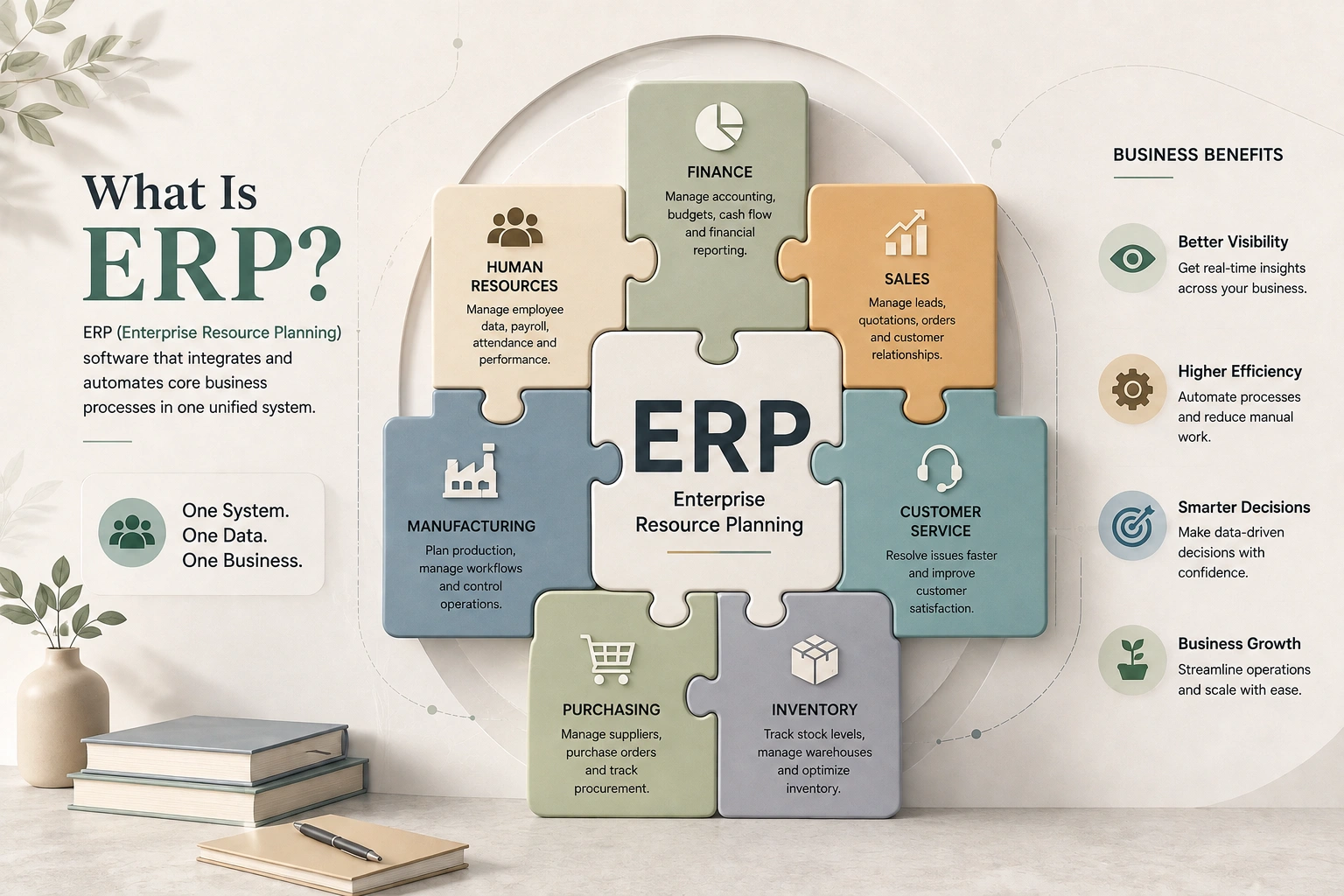
ERP (Enterprise Resource Planning) is a software system that helps businesses manage their important processes in one connected platform. It combines different departments such as finance, sales, inventory, purchasing, HR, and operations, allowing them to work with the same updated information.
Without ERP, businesses often rely on separate tools and spreadsheets that can create confusion, delays, and errors. An ERP system removes these gaps by providing a single source of truth, making it easier for teams to communicate, track data, and manage daily activities efficiently.
ERP helps organizations improve productivity, make faster decisions, and plan resources more effectively. From small businesses to large enterprises, companies use ERP solutions to streamline operations, reduce costs, and support long-term growth.
Why ERP Has Become Important for Modern Businesses
Modern businesses face increasing pressure to improve efficiency, respond quickly to changes, and make smarter decisions. As companies grow, managing complex operations becomes more challenging, making reliable business management solutions essential. ERP has become important because it helps organizations create a more structured approach to handling their processes and information. It supports better visibility, improves coordination, and helps businesses adapt to changing market needs.
Today, ERP is no longer limited to large enterprises. With flexible solutions available for different business sizes, companies use ERP to build stronger foundations for growth, innovation, and long-term success.
ERP Full Form and What It Really Means
The ERP full form is Enterprise Resource Planning. So ERP stands for three ideas worth unpacking, because the name explains the purpose:
- Enterprise — it spans the whole organization, not one department.
- Resource — it manages a business’s resources: money, materials, inventory, people, and time.
- Planning — it doesn’t just record what happened; it helps you plan what should happen next, from purchasing to production to cash flow.
The term has roots in 1990s manufacturing, where it evolved from earlier systems called MRP (Material Requirements Planning) that scheduled raw materials and production. As those systems grew to cover finance, HR, and sales, the industry analyst firm Gartner coined “ERP” to describe the broader, company-wide version. That history matters because it explains why ERP feels so comprehensive: it was designed from the start to coordinate an entire operation, not to solve a single task.
So when someone asks what ERP stands for, the honest answer goes beyond the three words. ERP means running your business on one connected system instead of many disconnected ones.
How ERP Systems Actually Work
This is where most introductory guides stop at the surface. Let’s go a level deeper, because understanding how ERP works is what makes the benefits obvious.
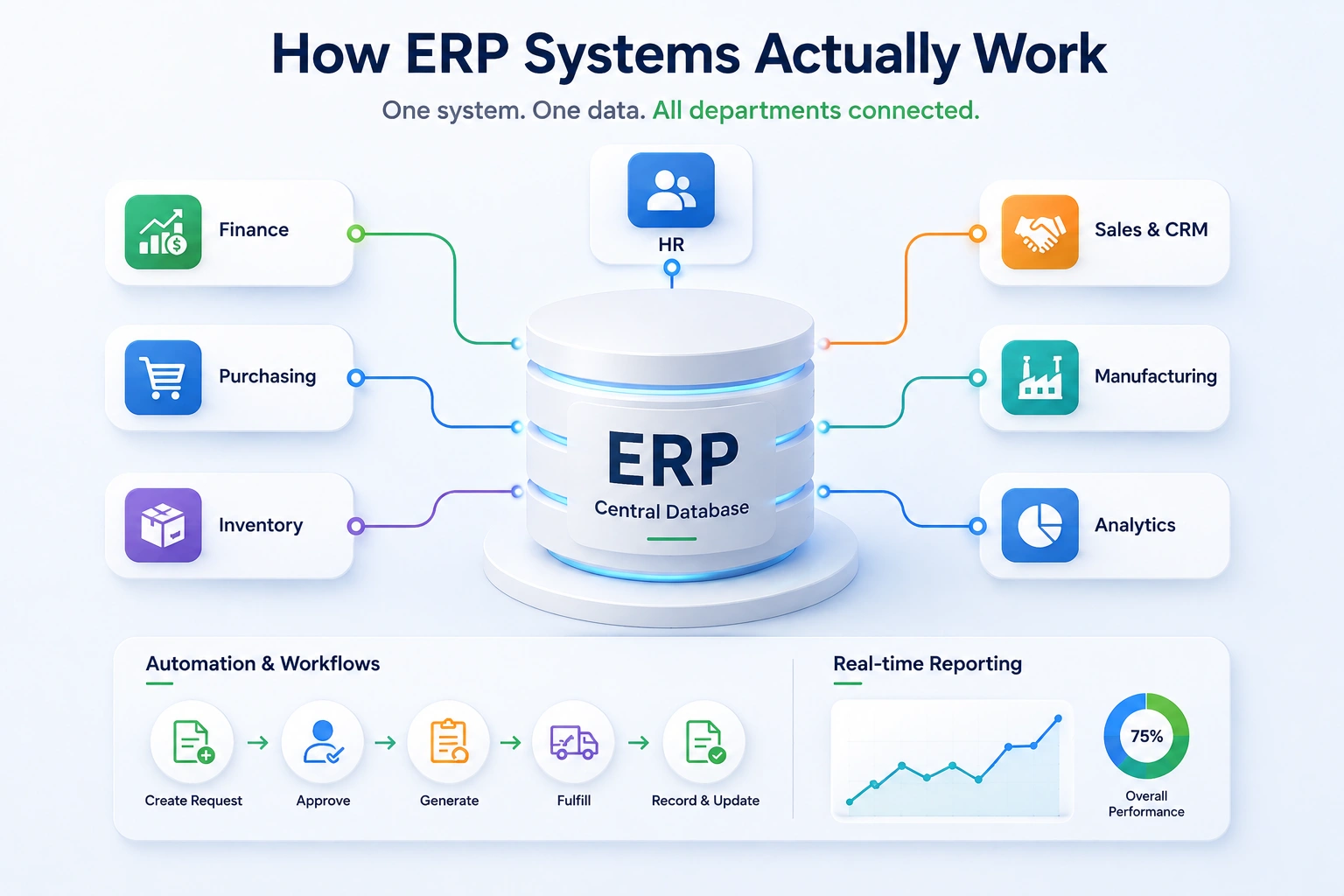
One shared database at the center
The defining feature of an ERP system is a single, centralized database. Every module — accounting, inventory, sales, HR — reads from and writes to that same database. When a salesperson updates an order, the warehouse, the finance team, and the dashboard the CEO checks every morning all see the change instantly. There’s no overnight sync, no exported CSV, no “let me check with accounting and get back to you.”
Compare that to the typical patchwork setup: a CRM for sales, separate accounting software, a spreadsheet for stock, and a payroll tool that nobody fully trusts. Each holds a slightly different version of reality. Reconciling them is somebody’s full-time headache. The ERP model removes that reconciliation problem by design — there’s only ever one version of the data.
Modules that share the same data
An ERP is built from modules — self-contained functional areas like finance, procurement, or human resources — that all plug into the central database. You can think of modules as apps that happen to share one brain. A business can switch on the modules it needs and add more as it grows. (We’ll cover the main modules in the next section, and there’s a dedicated guide on ERP modules for a deeper breakdown.)
Automation and workflows
Because the data is unified, the ERP can automate work that used to bounce between people. A purchase request can route itself for approval, convert into a purchase order, match against a supplier invoice, and update the ledger — with humans stepping in only where judgment is needed. This is the foundation of ERP automation, and it’s where a lot of the real time-savings come from. More advanced platforms now layer AI and predictive analytics on top of this to forecast demand or flag anomalies, a topic worth exploring on its own.
Real-time reporting
Because everything funnels into one database, reporting becomes live rather than retrospective. Instead of waiting for month-end, leadership can see margins, cash position, and inventory turns as they move. This real-time visibility — the ability to trust a single dashboard — is often the single biggest reason businesses say the investment paid off.
Featured-snippet answer: An ERP system works by storing all business data in one central database that connected modules (finance, inventory, sales, HR, and more) share in real time, so a single action automatically updates every related part of the business.
The Core Modules Inside an ERP System
ERP software is modular, which means you adopt the functional areas you need. While every vendor packages things differently, most systems share a recognizable set of ERP core modules.
| ERP Module | What It Handles | Everyday Example |
|---|---|---|
| Finance & Accounting | General ledger, invoicing, payments, financial reporting | Auto-posting a sale to revenue and generating the invoice |
| Inventory Management | Stock levels, warehouses, reorder points, valuation | Reserving stock the instant an order is confirmed |
| Sales & CRM | Quotes, orders, customers, pipeline | Turning a won deal into an order without re-entry |
| Procurement / Purchasing | Purchase orders, vendors, approvals | Routing a PO above a threshold to a manager |
| HR & Payroll (HRMS) | Employees, attendance, payroll, leave | Calculating payroll from logged attendance |
| Manufacturing / Production | Bills of materials, production planning, work orders | Scheduling a production run against real demand |
| Reporting & Analytics | Dashboards, KPIs, business intelligence | A live margin report leadership checks daily |
The power isn’t in any single module; it’s in how they connect. ERP and CRM working together, for instance, means the sales conversation and the financial record are never out of sync. Inventory and finance sharing data means your stock valuation is always reflected in your books. Each of these relationships deserves its own detailed look, and dedicated guides cover ERP accounting, ERP inventory management, ERP CRM, and ERP HRMS individually.
Why Businesses Need ERP Software
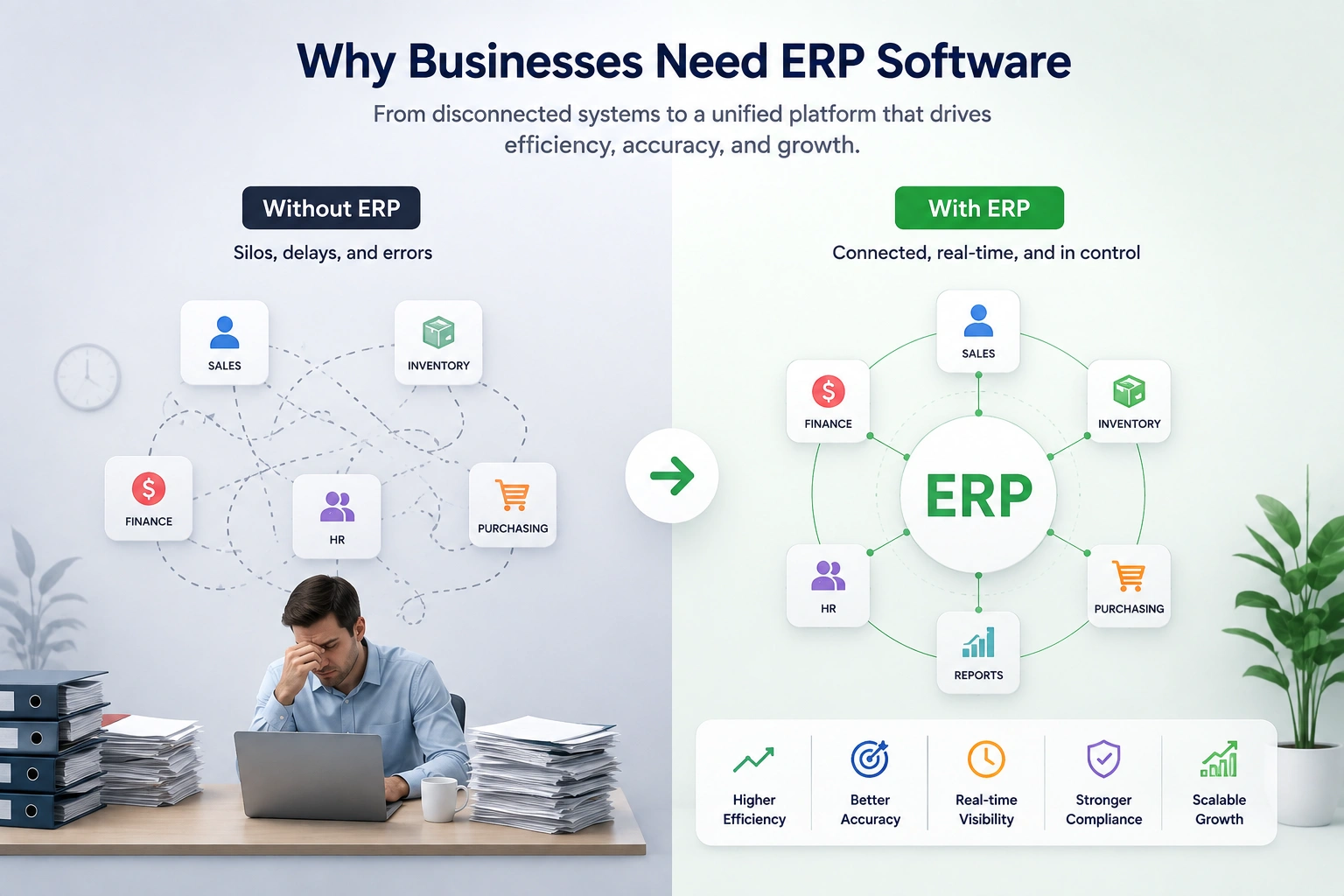
It’s easy to list benefits. It’s more useful to explain why each one happens, because the mechanism is what makes the benefit real rather than marketing.
- A single source of truth. Because all data lives in one database, departments stop arguing over whose numbers are right. This is the root benefit from which most others flow.
- Less manual work and fewer errors. When data flows automatically between modules, nobody re-keys the same order three times — and the typos, missed entries, and version-control nightmares disappear with the duplication.
- Real-time visibility. Leaders make faster decisions because they can see the business as it is now, not as it was at last month’s close.
- Cleaner processes. Implementing ERP forces a business to standardize how things get done, which often surfaces inefficiencies that had been hiding in the gaps between tools.
- Room to scale. A spreadsheet that works for ten orders a day collapses at a thousand. An ERP is built to absorb that growth without the operational seams tearing.
- Stronger compliance and audit trails. Because every transaction is recorded in one place with a clear history, financial reporting and audits become far less painful.
These advantages are the reason ERP adoption keeps climbing across industries. The full picture of ERP benefits, including the softer, harder-to-measure ones — is worth its own discussion, but the core idea is simple: ERP turns a collection of busy departments into a coordinated operation.
Signs Your Business Has Outgrown Spreadsheets
How do you know it’s time? In practice, the need for ERP rarely announces itself with a single dramatic event. It shows up as friction. Watch for these signals:
- You’re re-entering the same data in multiple places. The same order gets typed into the sales tool, the accounting software, and a stock spreadsheet.
- Reports take days to assemble. Month-end means someone manually stitching together exports from five systems.
- Departments don’t trust each other’s numbers. Sales says one thing, finance says another, and both are technically “right” from their own data.
- You can’t answer simple questions quickly. “What’s our real margin on this product line this month?” shouldn’t take a week.
- Growth is creating chaos rather than momentum. More orders mean more errors, not more profit.
- Mistakes are slipping through the cracks between tools. A stock-out, a double-paid invoice, a missed reorder, each traced back to systems that didn’t talk.
If three or more of these sound familiar, the business has likely outgrown its patchwork of standalone tools. That’s the moment ERP software shifts from “nice to have” to a genuine operational necessity.
Types of ERP Systems and Deployment Models
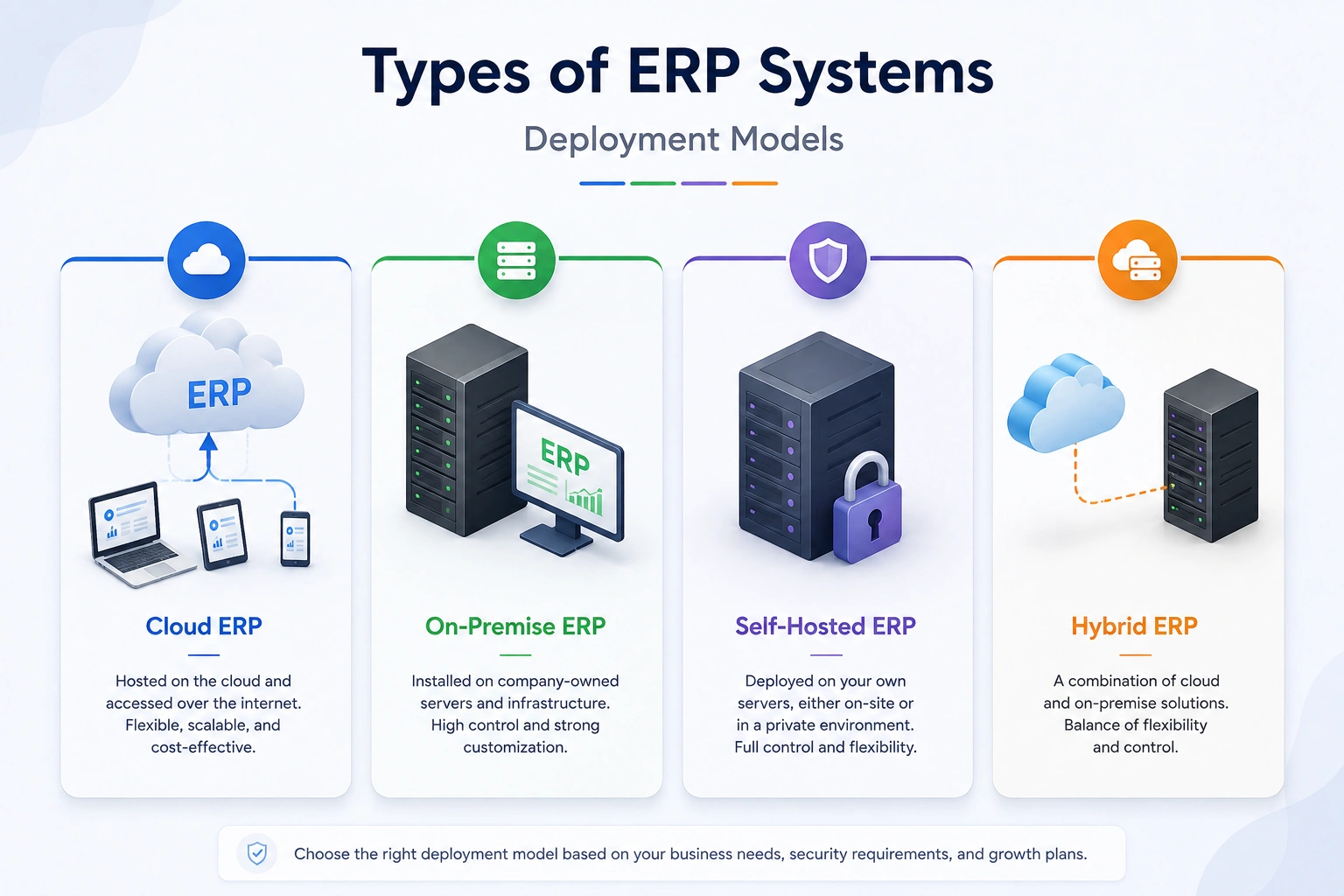
Not all ERP systems are deployed the same way, and the deployment choice has real consequences for cost, control, and flexibility. There’s a dedicated guide on ERP deployment models, but here’s the essential landscape.
| Deployment Type | How It Works | Best Suited For |
|---|---|---|
| Cloud ERP (SaaS) | Vendor hosts the software; you pay a recurring subscription | Teams that want minimal IT overhead and fast setup |
| On-Premise ERP | Installed and run on the company’s own servers | Organizations with strict control or compliance needs |
| Self-Hosted ERP | You host the software on infrastructure you control, often with access to the source code | Businesses that want ownership and customization without per-user fees |
| Hybrid ERP | A mix of cloud and on-premise components | Companies transitioning or balancing different needs |
Beyond where it runs, ERP systems also differ by who they’re built for. There’s industry-specific ERP (manufacturing, retail, construction, healthcare and more, each covered in our solutions guides), generalist ERP that fits most businesses, and modular ERP that lets you assemble only the pieces you need.
A distinction worth flagging here, because it sets up an important decision: some businesses opt for open-source or source-code ERP so they fully own and can customize their system, and some go further with white-label ERP to launch their own branded SaaS platform. Platforms like WorkDo Dash SaaS, for example, ship as self-hosted, open-source source code you can white-label and run as your own — an illustration of just how far the ownership model can go. Whether you should buy a ready-made system or own the code outright is a strategic choice in its own right, and it’s one we explore in depth in the platform and technology guides. The right answer depends entirely on how much control, customization, and long-term cost flexibility your business needs.
ERP System Examples and Common Vendors
When people search for ERP system examples, they usually want two things: real software names, and a sense of where each fits. The ERP market spans everything from heavyweight enterprise suites to nimble systems built for smaller teams.
- WorkDo’s ERP takes the open-source approach a step further with a one-time payment model instead of recurring subscriptions, plus white-label support, a fit for agencies and growing businesses that want to own their ERP outright rather than rent it.
- SAP and Oracle sit at the enterprise end — deeply capable, widely deployed in large corporations, and correspondingly complex and costly to implement.
- Microsoft Dynamics 365 blends ERP and CRM within the Microsoft ecosystem, popular with organizations already invested in that stack.
- NetSuite (an Oracle product) is a well-known cloud ERP favored by fast-growing mid-market companies.
- Infor, Epicor, and Acumatica each have strong followings, often in specific industries like manufacturing and distribution.
- Odoo and ERPNext represent the open-source side, attractive to businesses that want flexibility and lower licensing barriers.
A practical word of caution from the field: the best ERP isn’t the biggest name — it’s the one that fits your size, industry, budget, and appetite for complexity. A small business that buys an enterprise-grade system it can’t fully use often ends up worse off than one that chose a right-sized solution. Choosing well is exactly what our ERP buying guide and ERP comparison resources are built to help with. Analyst firms like Gartner and IDC publish vendor evaluations that are useful reference points during that process.
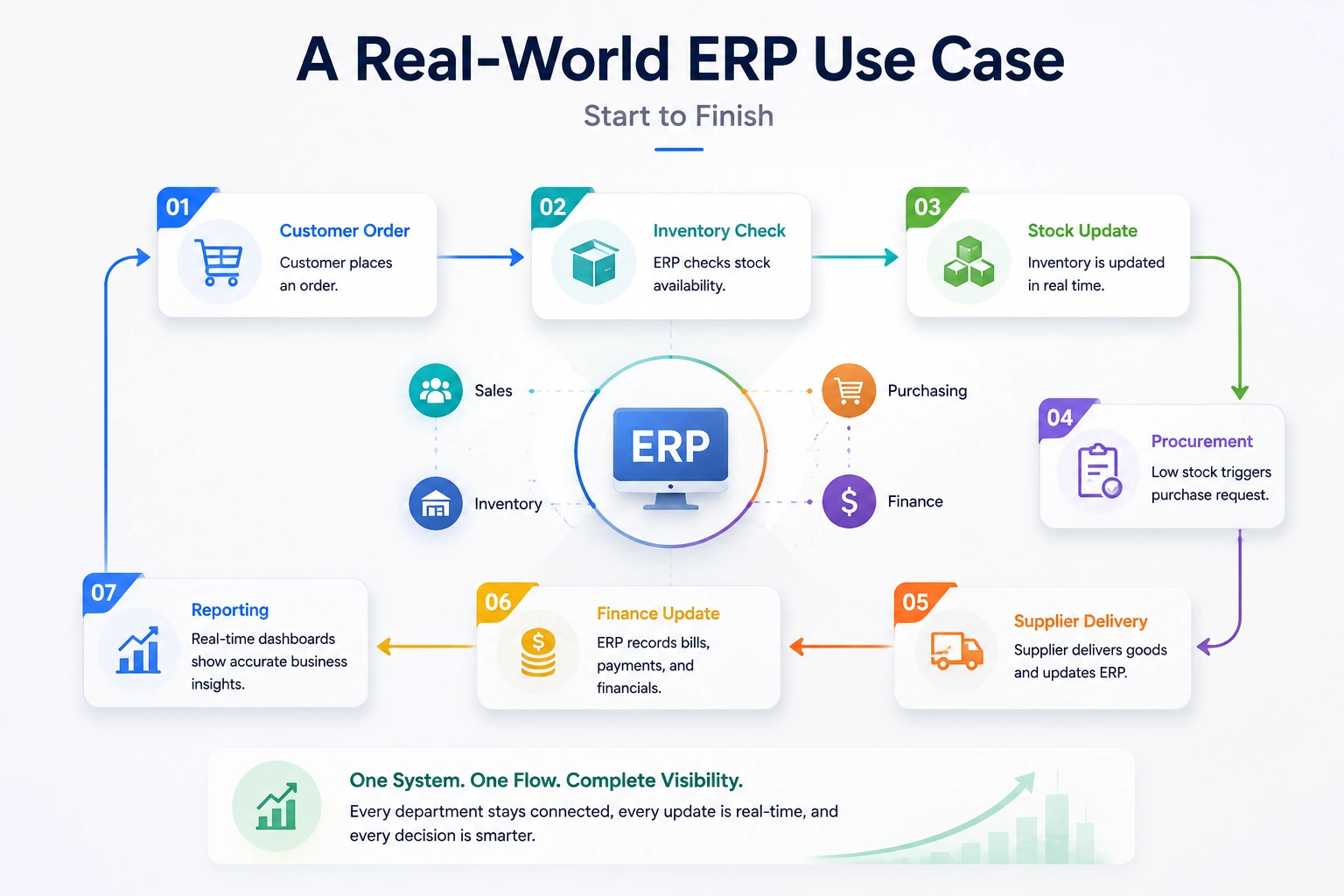
A Real-World ERP Use Case, Start to Finish
Theory only goes so far. Let’s walk through a single order moving through an ERP system, because this is where the value becomes tangible.
Imagine a mid-sized company that sells office furniture. A sales rep closes a deal for 50 desks through the CRM module. The instant the order is confirmed:
- The inventory module checks stock, reserves 30 desks on hand, and flags that 20 need to be produced or reordered.
- The procurement module automatically drafts a purchase order to the supplier for the shortfall and routes it for approval.
- The finance module generates the customer invoice and records the expected revenue — no separate data entry.
- Once the supplier invoice arrives, the system matches it against the purchase order, catching any discrepancy before payment.
- The reporting dashboard updates in real time, so leadership sees the impact on revenue, margin, and stock the same day.
In a disconnected setup, that same order would have meant the rep emailing the warehouse, someone manually checking stock, another person raising a PO, finance re-keying the invoice, and a reconciliation headache at month-end. The ERP collapses all of that into one coordinated flow. That — not the feature list — is what businesses are actually buying.
Key Takeaways
- ERP stands for Enterprise Resource Planning — software that unifies a company’s core operations into one connected system.
- Its defining feature is a single shared database that every module reads from and writes to in real time.
- The real value isn’t any one module; it’s the automated flow of data between finance, inventory, sales, HR, and operations.
- ERP is no longer just for large enterprises — modular and cloud options make it practical for small and mid-sized businesses.
- Deployment matters: cloud, on-premise, self-hosted, and hybrid models offer different balances of cost, control, and flexibility.
- Most ERP failures come from treating it as software rather than a change in how the business works.
Conclusion
So, what is ERP? At its heart, ERP software is the system that lets a business stop running on disconnected tools and start running on one coordinated source of truth. Enterprise resource planning isn’t really about software at all — it’s about removing the friction, duplication, and guesswork that build up as a company grows, and replacing them with a single, reliable view of how the business is actually doing.
For a small team, that might mean finally trusting one dashboard instead of reconciling five spreadsheets. For a larger organization, it might mean coordinating thousands of transactions a day without the seams showing. Either way, the principle is the same, and it’s why ERP has become the operational backbone of modern business.
This guide is the foundation. From here, you can go deeper into the ERP modules that make these systems work, the benefits and ROI worth measuring, the implementation process, the deployment models, and the platform choices that determine how much of your system you truly own. ERP is a big topic — but now you understand the core of it the way a seasoned practitioner does.
 Frequently Asked Questions (FAQs)
We're Here to Help - Let's Talk
Have questions about our solutions, customization services, or business tools? Our team is here to help you. let's talk.