Bundle Sale - Save 72% on the Dash SaaS Complete Bundle Claim Now
Tour & Travel Management Software

Travel Booking Software for Tours, Transfers & Events

Travel booking software keeps every trip you sell in one record: the tour, the traveler, the payment, the transfer and the paperwork. This page shows each feature of our tour and travel management software in detail.

In short: one login covers tour packages, bookings and payments, transfers, event tickets, insurance and traveler documents for your whole team.
Built for: tour operators and travel agencies. See how each one works in the tour and travel management use cases, or read about tour operator software.
Tour Packages

Tour Packages With a Day-by-Day Itinerary Builder

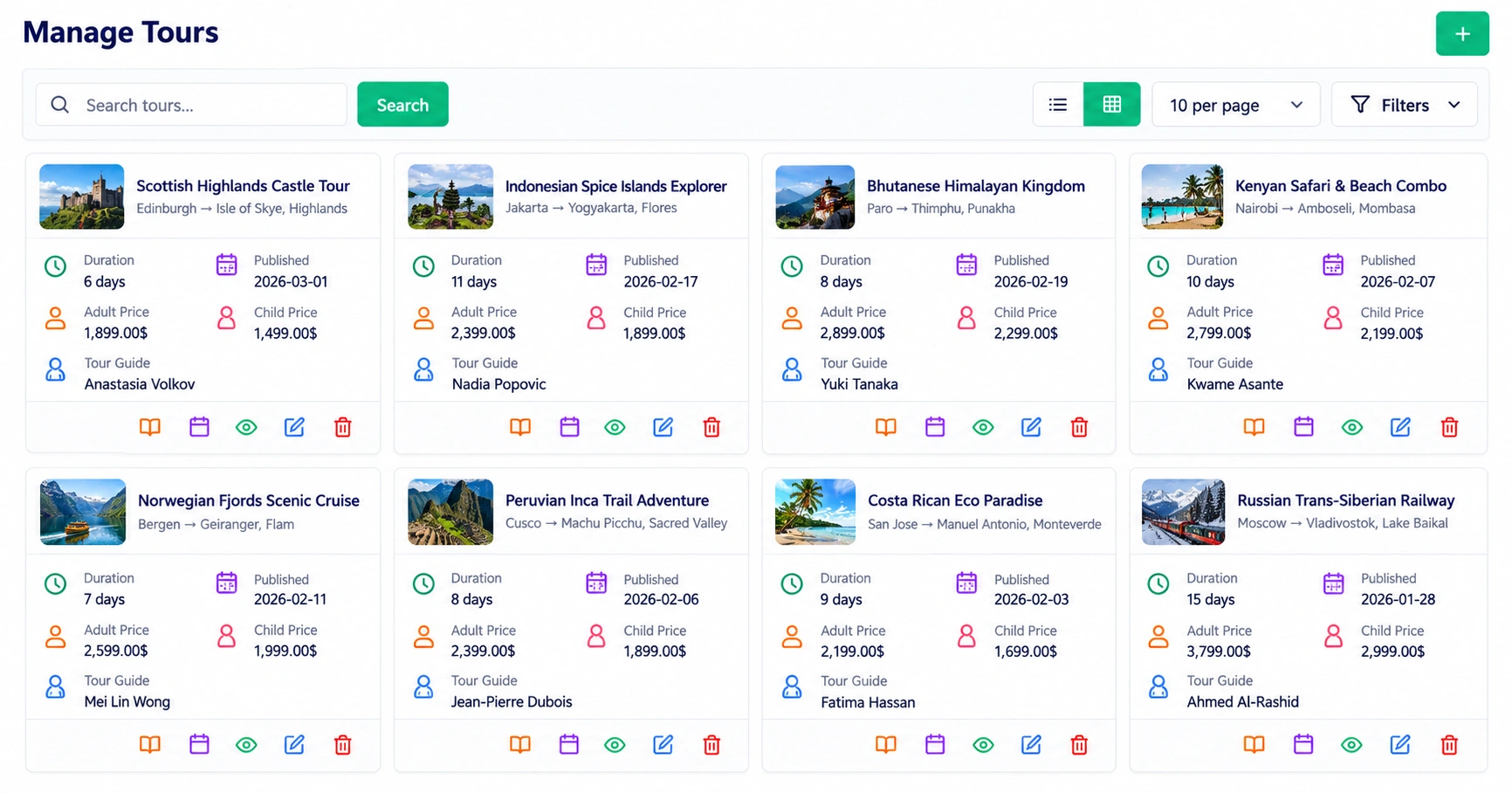
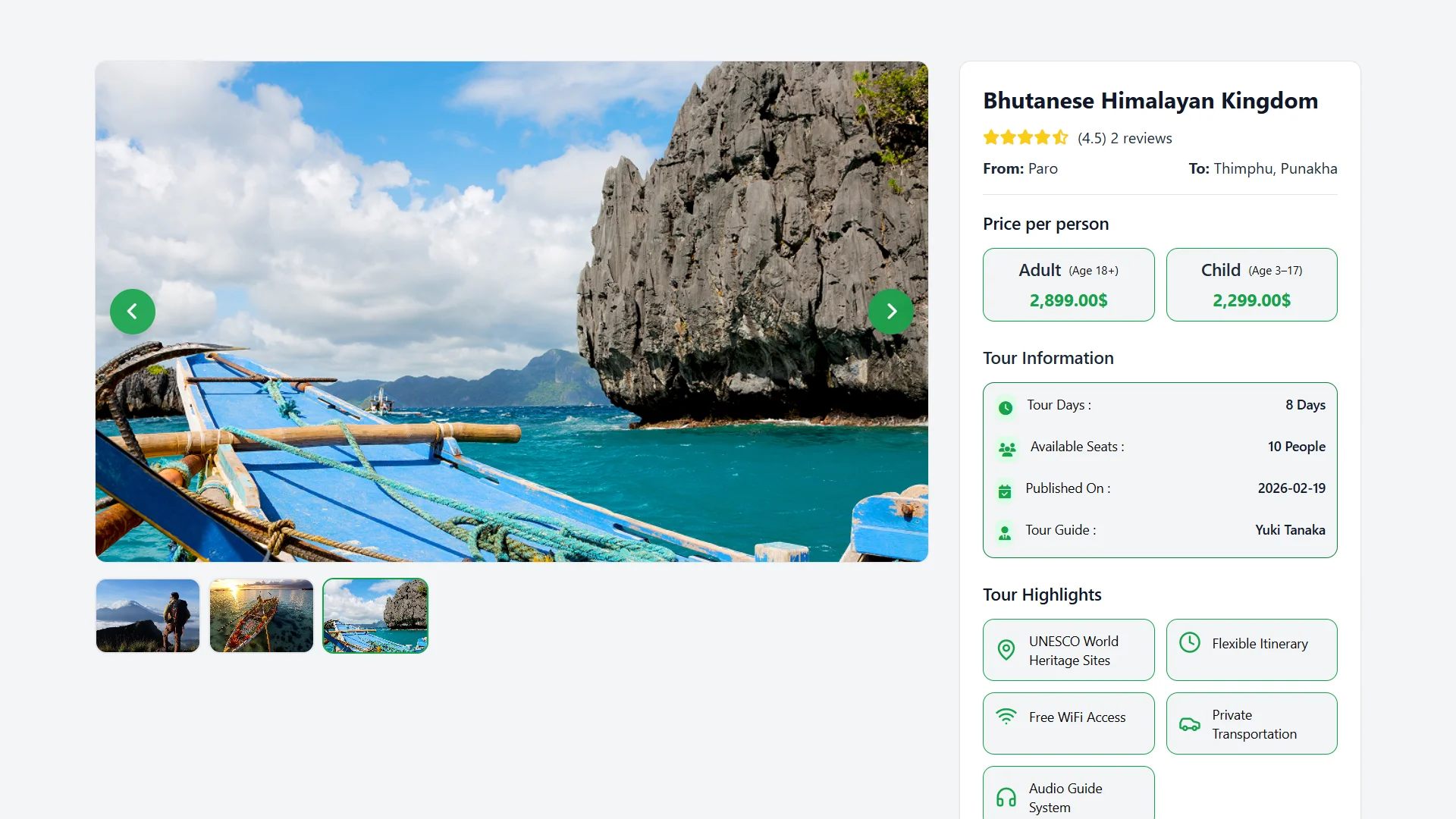
Every tour you publish carries the full plan: dates, destinations, guides, photos and highlights. Fixed departures and custom trips both start from the same tour record.

  • Day by day: give each day a title, date, time and description.
  • Meals: list every meal by date, type, category and items, from breakfast to packed lunches.
  • Transport legs: show each transfer with its route, travel mode, date and duration.
  • Seasons and seats: set seasonal pricing across multiple dates, and seat availability is tracked for you.
  • Emergency contacts: share medical, police and tourist helpline contacts with their hours.
  • Adult and child pricing: set a cost for each, and the booking summary adds up the group total.
  • Guides and gear: assign tour guides and equipment to each tour.
Manage Tours screen with tour cards, days, prices and tour guides

Good to know: supplier availability and automatic markup or commission calculation are not part of the itinerary tools.

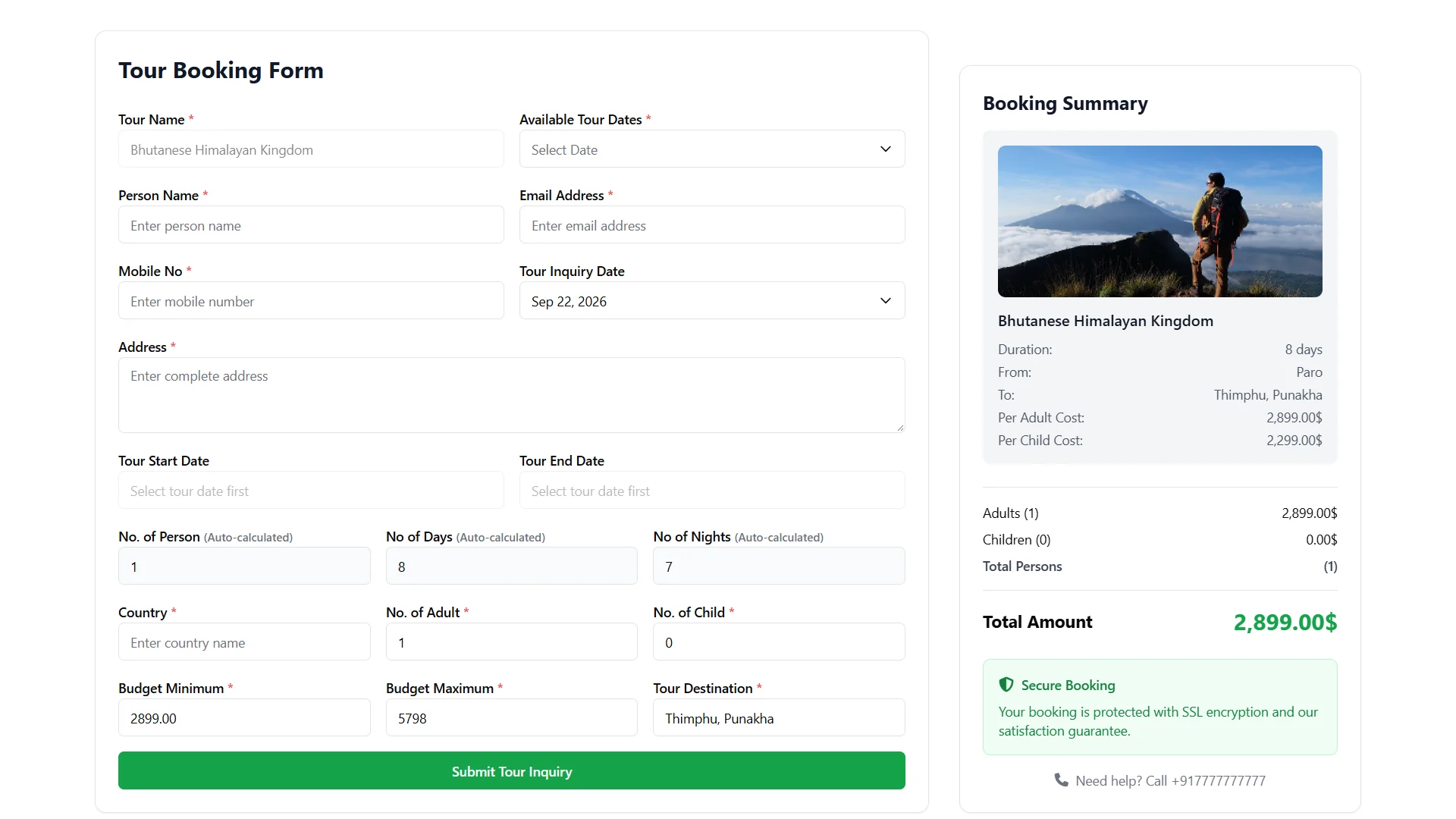
Tour booking form with dates, travelers, budget and a booking summary

A Smart Inquiry Form

Travelers pick dates, adults, children and budget. Group size, days and nights are calculated automatically.

Website inquiries and ones you enter by hand sit in the same list and convert into confirmed bookings.

Booking Website

An Online Tour Booking Website With Your Brand

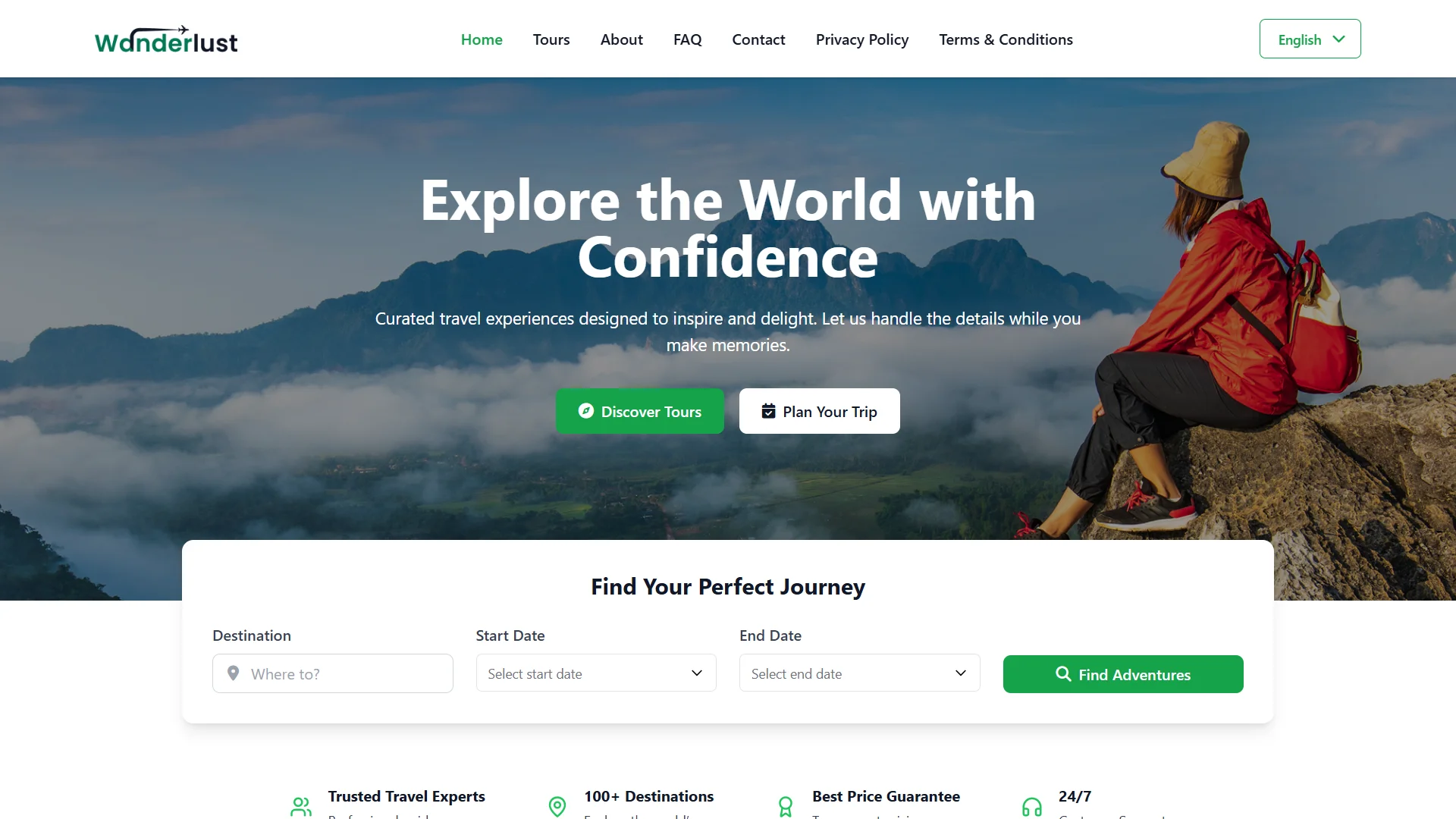
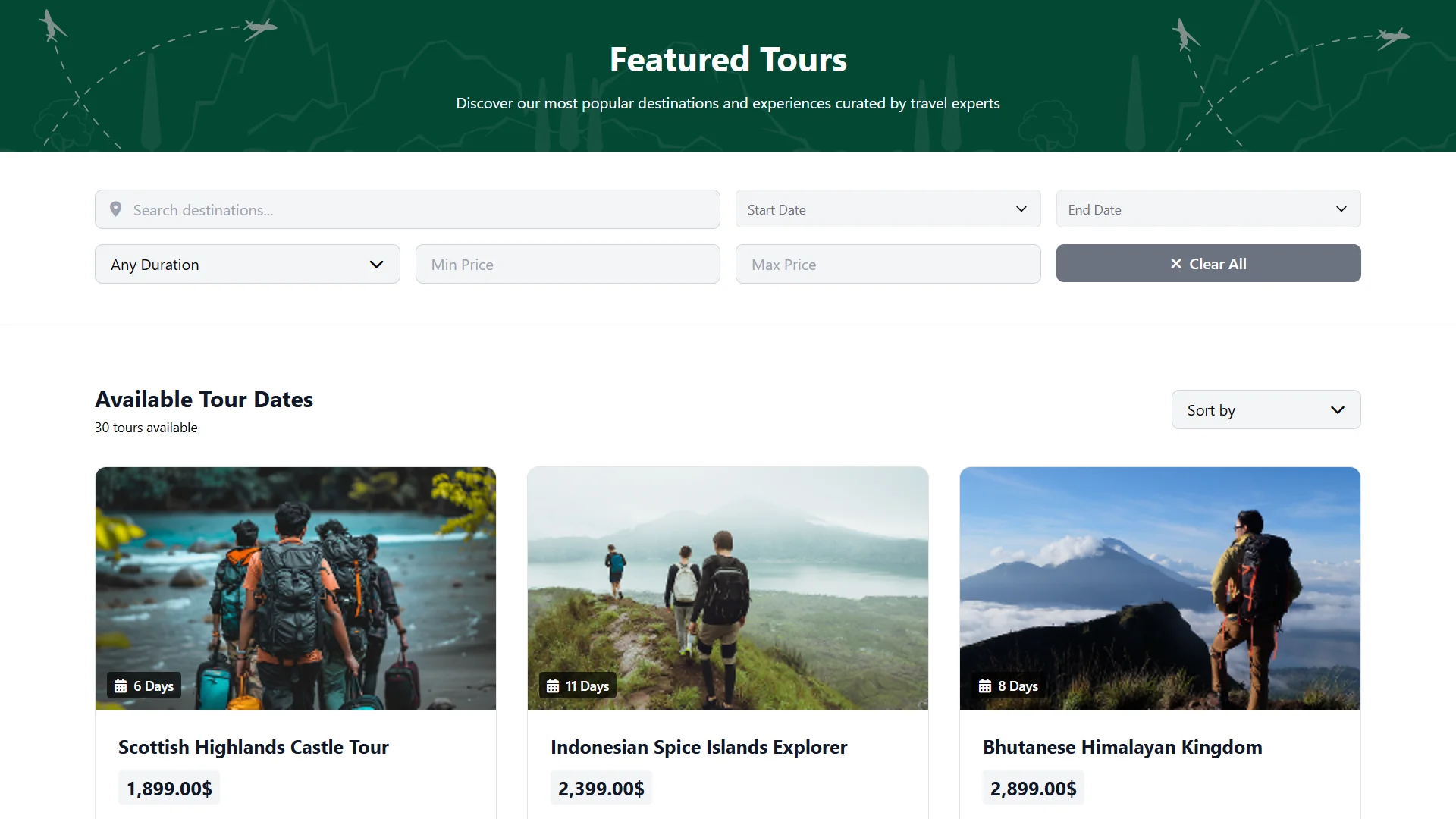
Your tour booking software also publishes a website where travelers browse tours, check dates and book without calling you. Tours appear on your homepage and your tours page.

  • Your brand: set your logo, title, footer and homepage banners.

  • Trust content: show testimonials, reviews, FAQs, contact details and social links.

  • Custom pages: edit About Us and other pages with rich text tools.

  • Booking links and QR codes: share a link or a code that opens the booking form.

Branded tour website home page with a tour search form
Bookings and Payments

Travel Booking Software for Tour Bookings and Payments

Each booking ties a traveler to a tour, a date and a payment. Online checkout runs through Stripe or PayPal.

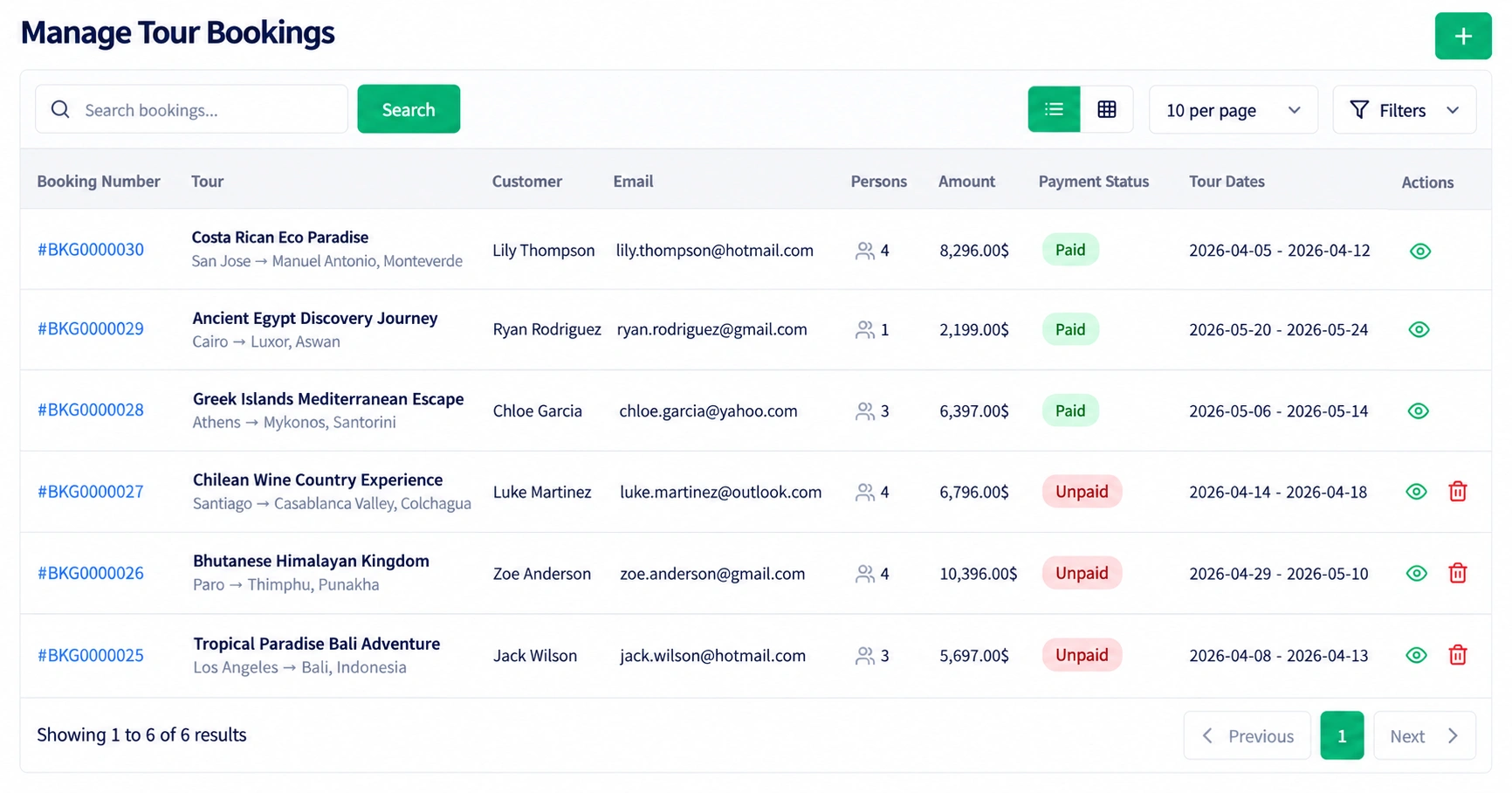
Manage Tour Bookings screen with traveler, tour, amount and payment status
  • Tour bookings: turn an inquiry into a confirmed booking and see its details in one place.
  • Payments: track status, amount, reference and date, and upload receipts.
  • Paid and pending: every booking shows what has been paid and what is still open.
  • Time slots: travelers pick an open slot; business hours, breaks and days off are set once.
  • Calendar and board: follow bookings on a calendar or a drag-and-drop board by status.

Travel Reservation Software for Services and Packages

It also handles the extras you sell around a trip, such as an airport pickup with a SIM package. Each service has its own price, duration and staff member, and its status runs from pending to completed.

Good to know: flight, hotel and car booking from supplier inventory, GDS connections and commissions are not part of the feature list.

Transfers

Transfers With Route-Based Seat Booking

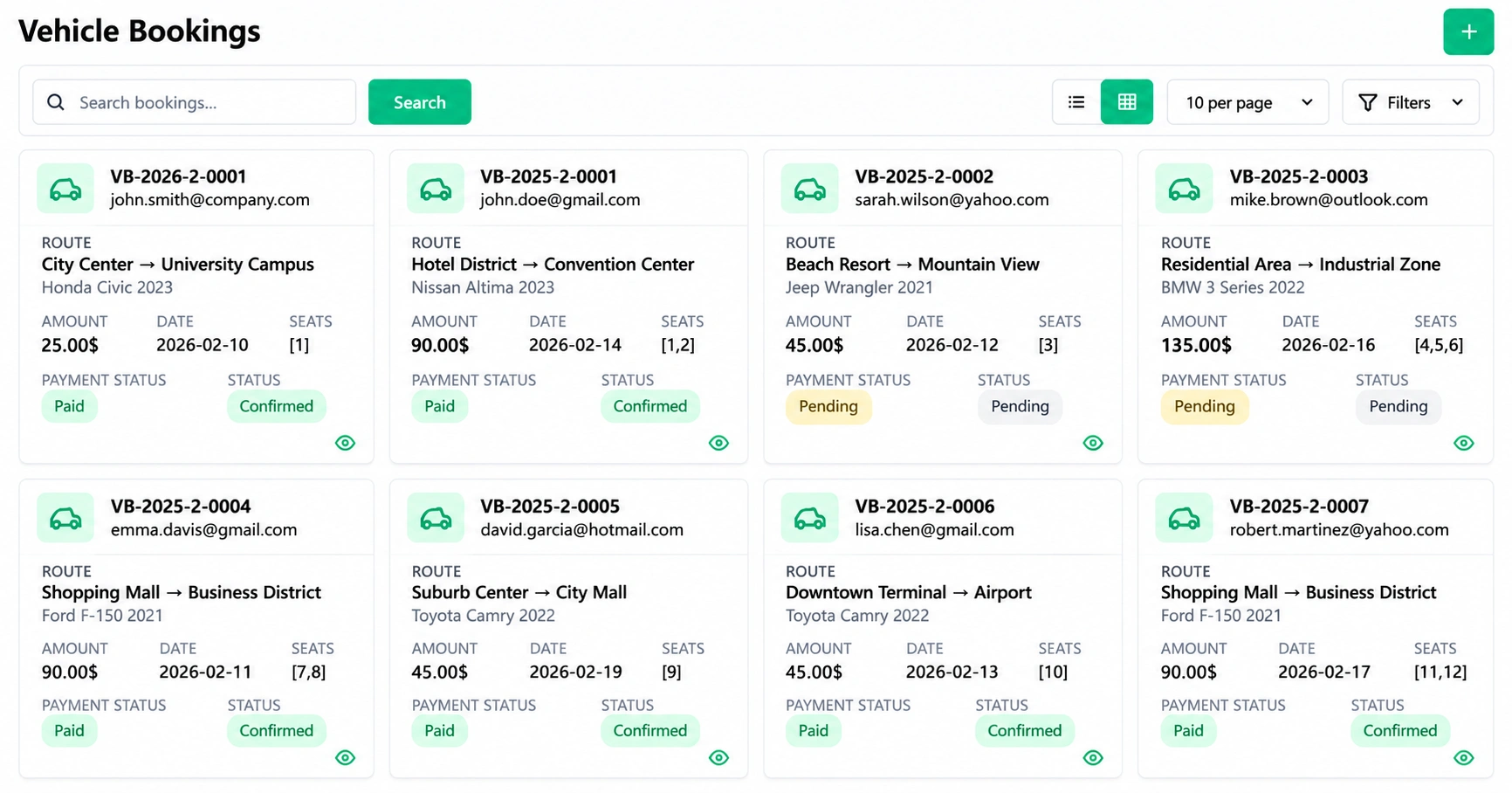
Create a booking by choosing the route, date and vehicle and entering passenger details. Seat availability updates in real time.

  • Online seat selection: customers choose seats, enter their details and pay securely.
  • Confirmation: passengers get instant confirmation and a downloadable receipt.
  • Booking list: filter, search and export every transfer booking.
  • Routes: define routes with start and drop-off points, times and pricing.
  • Fleet records: log fuel, maintenance and incidents for each vehicle.
Vehicle Bookings screen with routes, vehicles, amounts, seats and payment status
Events

Group Trips and Event Tickets

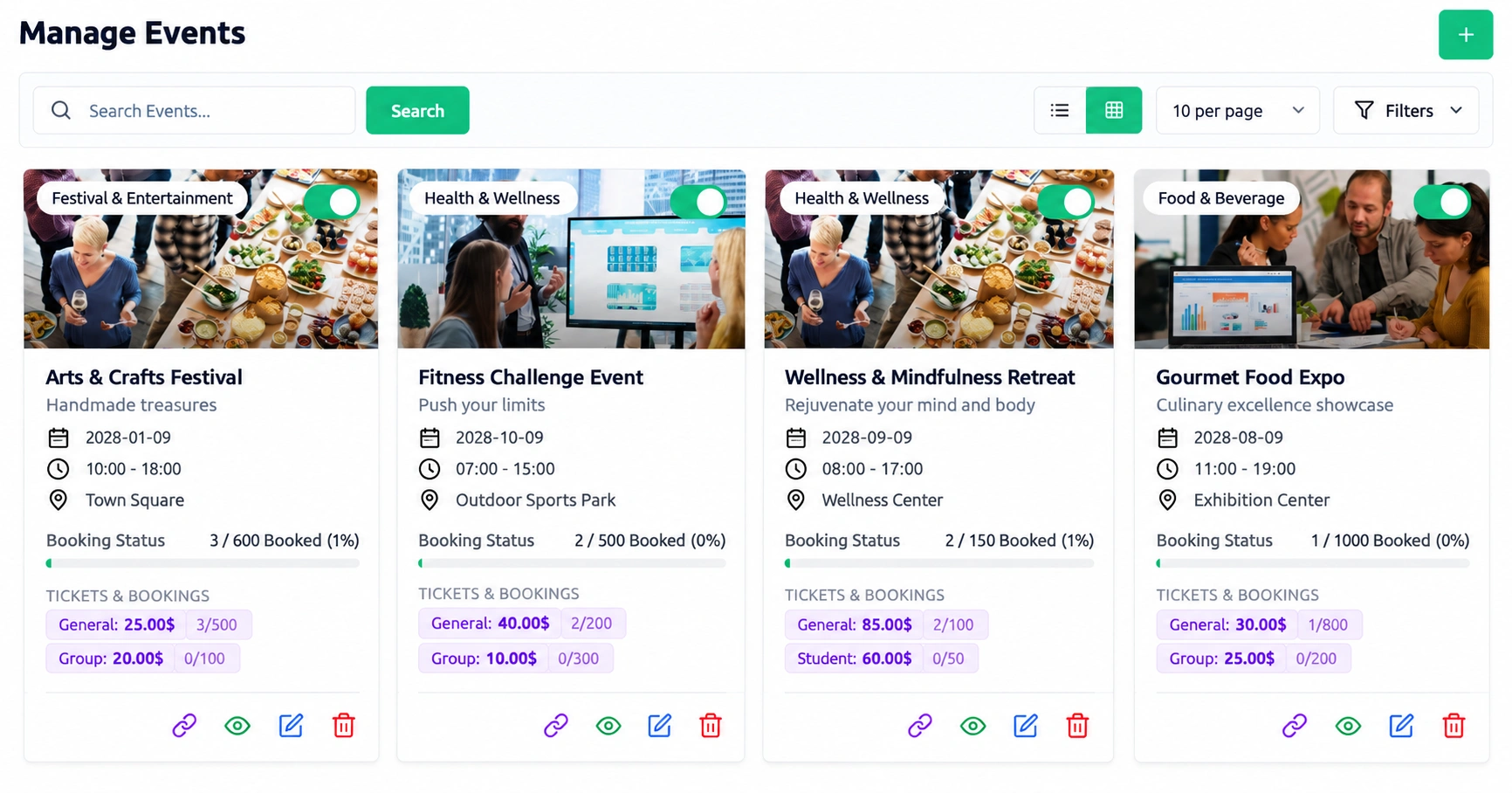
Sell festival trips and group departures with ticket types, dates and venues. Each event has its own booking link.

Manage Events screen with event dates, venues, ticket types and bookings
  • Ticket types: create early bird, group and VIP tickets with descriptions and status controls.
  • Dates and slots: schedule several dates and time slots for one event.
  • Checkout: accept online payments through Stripe or PayPal, or record offline payments.
  • Tickets: each booking gets a booking number and a downloadable PDF ticket with an entry barcode.
  • Dashboard: see bookings by status and over the last seven days.
Insurance

Travel Insurance and Claims

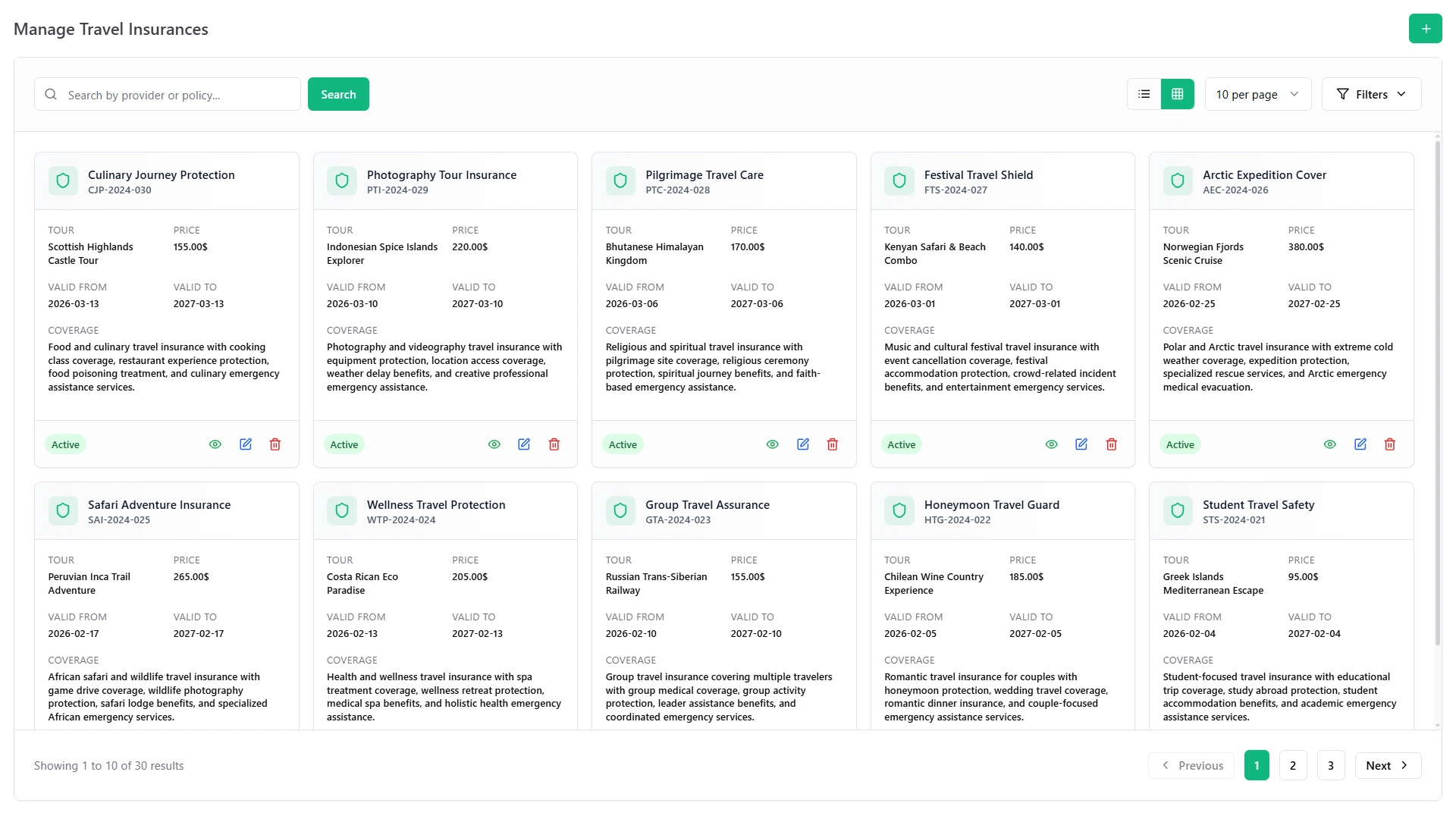
Offer cover plans next to the trip. Policies, installments and claims stay in the same system as the booking.

  1. Policy types: create policy types with their own codes, amounts, terms and tax.

  2. Approval: approve or decline each policy.

  3. Installments: split premiums into installments and generate invoices from the approved ones.

  4. Claims: track every claim to payment, with status, dates and an action history.

Manage Travel Insurances screen with policy cards, tour, price, validity and coverage
Documents and Contracts

Traveler Documents and Supplier Contracts

Keep paperwork in one place instead of email threads and paper folders.

Traveler documents

  • Traveler documents: store passport copies, visa letters and tickets as numbered documents.
  • Privacy: mark each document private or public.
  • Notes and files: add notes, comments and several attachments to one document.
Supplier contracts

  • Contracts: keep hotel, transport and guide agreements with values, dates and renewal logs.
  • E-signatures: both sides sign online, and each signature is stored with an audit trail.
Costs

Trip Costs and Petty Cash

Guides carry cash on the road, and every expense still needs a record. Give each guide a float and see every cost by category.

  • Cash floats: add funds and watch the balance, expenses and available cash.

  • Requests: request petty cash and approve or reject each one.

  • Reimbursements: submit them with receipts and send them through multi-step approval.

  • Categories: assign every expense to a category you can use in reports.

Inquiries

Inquiries, Consultations and Feedback

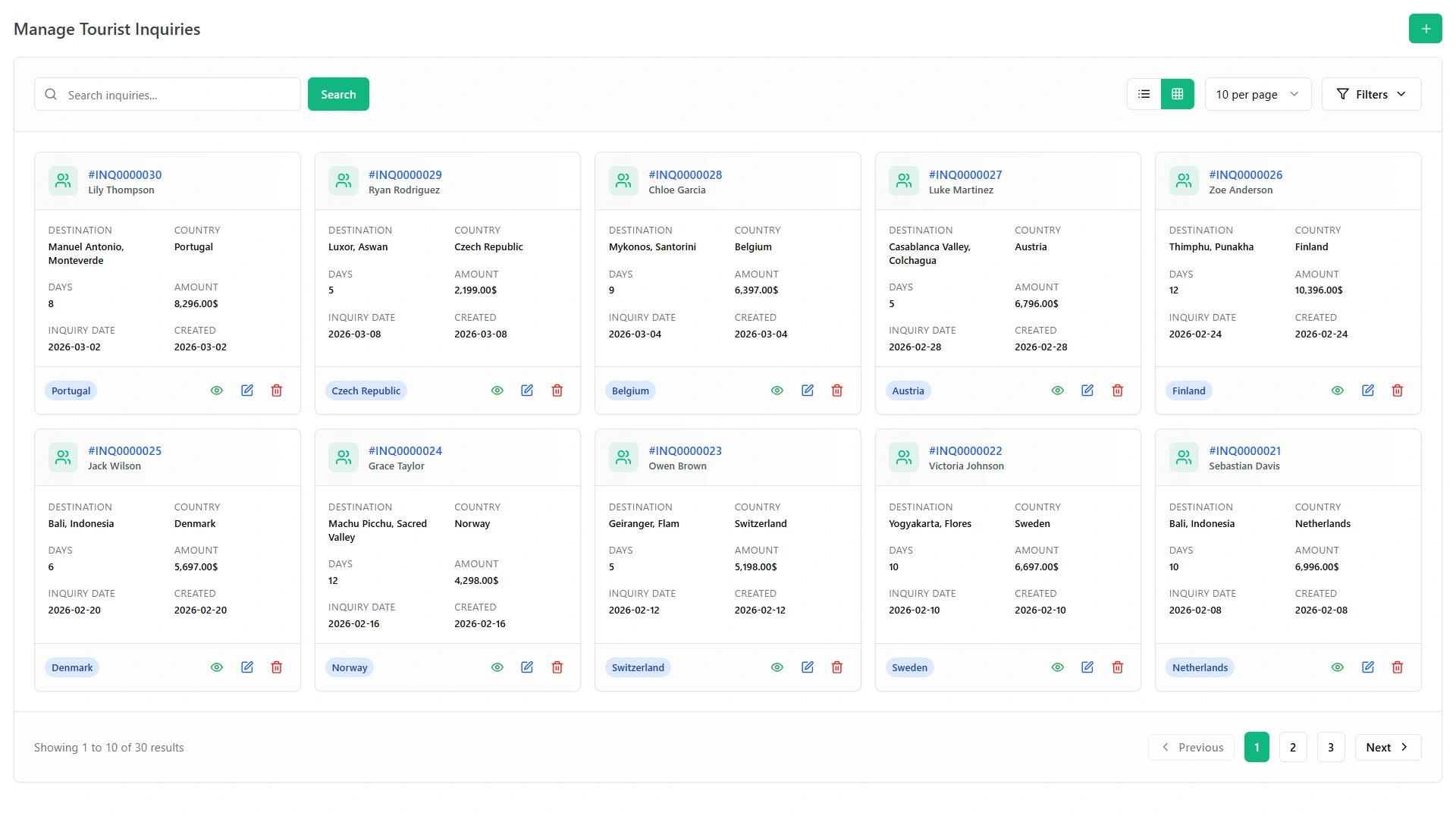
Send one link and travelers book a consultation themselves. They pick an open slot within the days and hours you set.

  • Your questions: radio buttons, dropdowns, checkboxes or short text, each required or optional.
  • Free or paid: run free or paid consultations; status reads pending, approved, complete or rejected.
  • Callbacks: after an appointment is completed, a traveler can ask for a callback.
  • Feedback: collect star ratings and comments from travelers and staff, guests included.
Tourist inquiries screen with traveler, tour, dates, budget and status
Alerts and Team

Trip Management Software for Alerts, Calendar and Team Tools

As trip management software it keeps your team on the same departure plan. Alerts and notices go out for the events you choose.

  • SMS alerts: text messages through your own SMS gateway for the events you switch on.

  • Shared calendar: one calendar for bookings, tasks and deadlines, synced with Google Calendar.

  • Notice board: post departure updates and guide rosters, pin them and track who has read them.

  • Suggestion box: staff send anonymous ideas, with categories, votes and admin replies.

Good to know: SMS needs your own gateway account, such as Twilio.

Reports

Dashboards, Reports and the AI Advisor

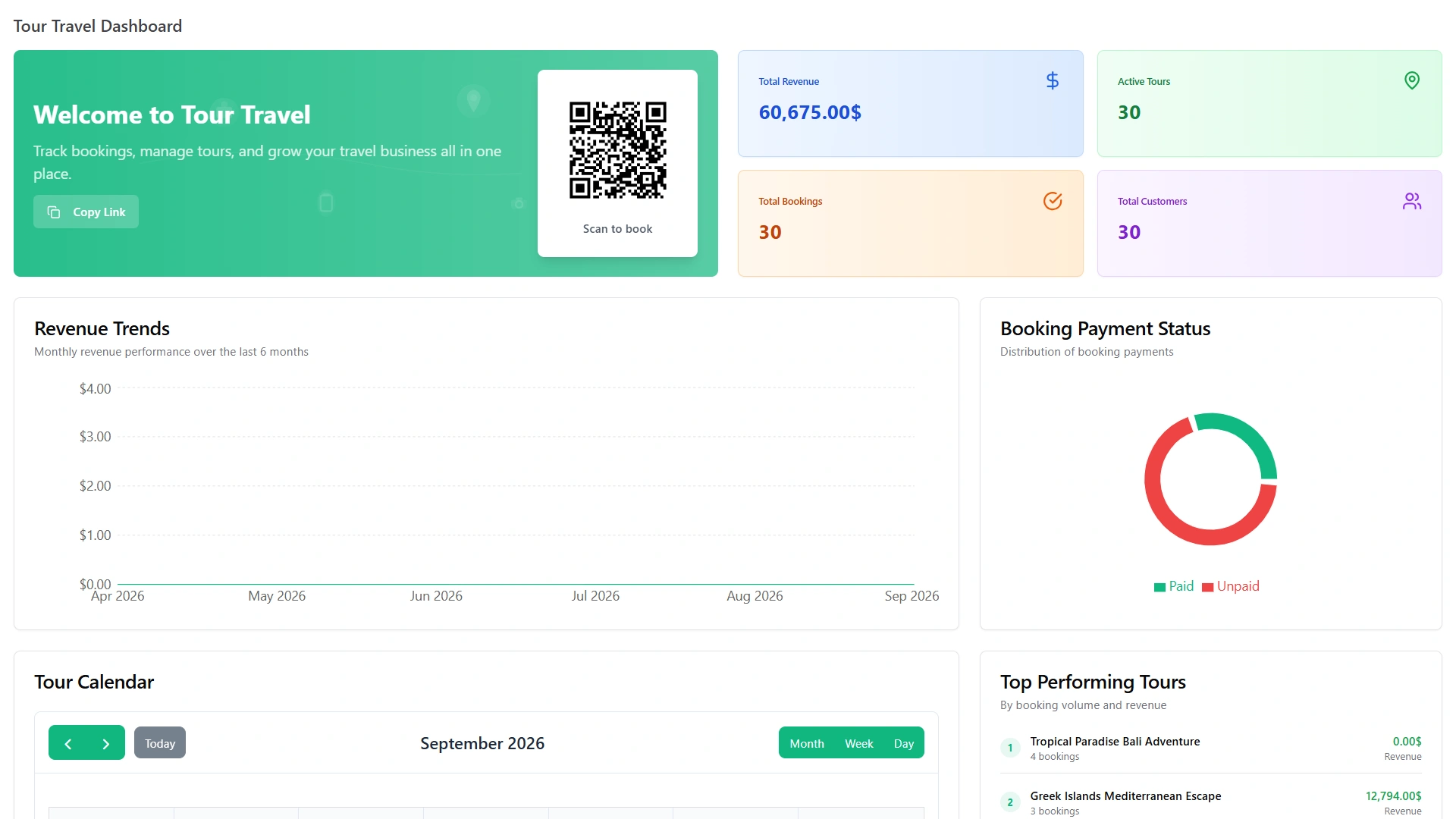
A trip management system is only useful if the owner can see the whole business. Dashboards and reports pull the numbers together.

Travel dashboard with revenue, bookings, payment status and top performing tours
  • Smart dashboards: live figures for revenue, bookings and business performance.

  • Reports: bookings, expenses and revenue, with filters and export to Excel or PDF.

  • AI advisor: recommendations for your travel business; you connect your own provider (OpenAI, Claude or Gemini) with an API key.

Problems

Match the Feature to the Problem

The problem The feature that fixes it
Day plans get repeated on calls The tour page carries the itinerary, meals and emergency contacts.
Quotes take too long The inquiry form works out group size, days, nights and totals.
Transfers are booked on spreadsheets Passengers pick seats on a route and pay online.
Festival and group tickets sit in three tools Ticket types, dates and payments run from one screen.
Insurance is added by hand Policies, installments and claims sit beside the booking.
Passports go missing Every document has its own number and a privacy setting.
Guides settle costs on paper Cash floats, requests and receipts go through approval.
Owners lack the overview Dashboards and reports show revenue, bookings and expenses.

For what these fixes add up to, see the benefits of tour operator software.

Live Demo

See Every Feature in the Live Demo

In the live demo all travel modules are already on, so you can open any feature above and try this travel booking software on sample tours and bookings.

One payment of $279 covers all 17 modules, the full source code and free future updates.

  • One Payment.
  • Lifetime Access.
  • Everything Included.
Two travelers planning a trip with maps and brochures at a travel desk
Faq's

Frequently Asked Questions About Travel Booking Software

It is one system where a tour operator or travel agency takes and tracks bookings, payments, transfers, tickets and traveler paperwork, instead of using email, spreadsheets and phone calls.
Give each day a title, date, time and description, then add meals, transport legs, emergency contacts and adult and child pricing. The tour page shows travelers the full plan.
Yes: they pick a route, date and seats online, enter their details and pay securely, and availability updates in real time. They get instant confirmation and a downloadable receipt.
You create ticket types such as early bird, group and VIP, set dates and slots, and sell online through Stripe or PayPal. Each booking gets a booking number and a PDF ticket.
Create policy types, approve or decline each policy, split premiums into installments and generate invoices from approved ones. Every claim is tracked to payment, with its status and action history.
Yes, for the events you switch on, sent through your own SMS gateway such as Twilio. The notice board and shared calendar also keep the team informed.