

workdo sale image

Get 50% off all Add-Ons today! Need more? Check Bulk Discounts!

get 50% off
School Management System

Student Management Systems Built for the Full Student Lifecycle

From admission to graduation, these student management systems track every record, attendance entry & report card in one connected system.

Introduction

Here's a question most school administrators face within their first month on the job: where exactly is that student's emergency contact? Is it in last year's admission form? The spreadsheet on the secretary's computer? The sticky note from the parent meeting? If the answer involves more than one click, your institution doesn't have a student management system - it has a scavenger hunt.

Student management systems exist to solve exactly this problem: every detail about every student, from the day they apply to the day they graduate, stored and searchable in one place. But what that actually looks like in practice - the features, the user roles, the real-world workflow - is what this page explains in full.

Definition

What Is a Student Management System?

A student management system (SMS) is software that centralises every student-related record and administrative task - admissions, enrollment, attendance, grades, fees, communication, and reporting - into a single, connected platform. Instead of student data living across paper registers, Excel files, and separate apps, an SMS gives every authorised staff member a real-time, unified view of each student.

Think of it as the operational backbone of a modern school. When a teacher marks attendance, that record immediately updates the student's profile. When a fee is paid, it reflects in the student's account. When a parent calls asking about their child's performance, the admissions officer, the class teacher, and the academic coordinator are all looking at the same information - not three different versions of it.

Student Management System vs. Student Information System (SIS)

These two terms are used interchangeably in most conversations, but there is a meaningful difference worth understanding:

A Student Information System (SIS) is primarily a data repository - it stores and organises student records like grades, demographics, and enrollment history.

A Student Management System (SMS) goes further. It includes everything an SIS does, and adds operational workflow tools: admissions pipelines, fee automation, communication portals, attendance workflows, and reporting dashboards.

In short: an SIS stores student data. An SMS uses that data to actively run the institution's day-to-day operations.

Why Switch

Why Schools Switch to a Student Management System

Consider a common scenario that plays out in thousands of schools every year. End of term arrives, report cards are due, and the class teacher realises her attendance register doesn't match the academic coordinator's spreadsheet because someone updated one and not the other. The fee office has a third version because they were tracking payments against a different student list. Three records. Three versions. One unhappy parent.

This isn't a human error problem. It's a structure problem - the kind that only a unified school student management system can fix permanently, not by trying harder, but by removing the possibility of duplication in the first place.

$15.33B$32B+

The demand for that fix is growing fast. According to industry analysts at Modern Campus, the student information system market is projected to grow from approximately $15.33 billion in 2024 to over $32 billion by 2029 - a 15.9% compound annual growth rate driven almost entirely by institutions replacing disconnected tools with integrated management platforms.

Key Features

Key Features of Student Management Systems

What separates a capable student management system from a basic student database is the depth and integration of its features. Here is what a complete system covers:

Student Admissions & Enrollment Management

The student lifecycle starts here, and how this stage is handled sets the tone for everything that follows.

  • Capture online applications with document uploads
  • Track applicants through a defined pipeline (applied → reviewed → accepted → enrolled)
  • Manage waitlists for limited-capacity classes and sections
  • Convert an accepted application directly into an enrolled student profile - no re-entry required
  • Assign the student to a class, section, and timetable automatically upon enrollment

A well-built admissions workflow means the data entered during an application becomes the student's permanent record. Nothing is re-typed. No information is lost in the handoff.

Deployment

Types of Student Management Systems

Not every system is deployed the same way. Understanding the types helps institutions choose the right architecture for their needs.

Cloud-Based Student Management Software

Hosted on internet-accessible servers and accessed through any browser, with no installation required on individual computers.

Advantages: Accessible from anywhere, no local server maintenance, automatically updated, scales easily as the institution grows.

Disadvantages: Requires a reliable internet connection; institutions must be clear on where their data is hosted and who controls it.

On-Premise Student Management Software

Installed and run on the institution's own servers, with data stored locally.

Advantages: Complete control over data and infrastructure; works without internet access once set up.

Disadvantages: Higher upfront infrastructure cost; the institution is responsible for maintenance, backups, and updates.

Self-Hosted with Cloud Deployment

A middle ground: the software runs on a cloud server the institution chooses and controls, rather than a shared environment managed by the vendor. This is the model this platform uses - institutions get the anywhere-access of cloud systems and the data ownership of on-premise deployments.

Who Uses It

Who Uses Student Management Systems?

A good student management system is not a tool for one department. Every person who interacts with the institution should have a view built for them.

  • Administrators & Principals The complete picture: enrollment numbers, financial collection, attendance trends, staff assignments, and multi-branch visibility if applicable.
  • Finance Officers Fee records, outstanding balances, payment history, and automated reconciliation without touching a spreadsheet.
  • Teachers Their own classes' attendance and grades, communication with parents in their section, and timetable management without seeing data from other sections.
  • Students Their own timetable, attendance record, results, and course materials (for institutions with an LMS component).
  • Parents Their child's attendance, fee status, upcoming events, and report cards - and nothing else. Role-based access means a parent cannot accidentally see another family's records.
Benefits

Benefits of Using a Student Management System

Here is what actually changes for institutions that make the switch from disconnected tools to a unified student management system:

  • One version of every student's record - no more reconciling three sources of the same information before a parent meeting.
  • Hours of administrative work automated - attendance, fees, report cards, and reminders that used to require manual effort happen automatically.
  • Faster, better-informed decisions - when a principal can see attendance and fee collection across the entire school in thirty seconds, they can act on problems in hours instead of finding out about them at month-end.
  • Fewer errors in grades and fees - marks entered once, in one place, generate the report card. No formula-copy risk, no transcription mistakes.
  • Parents who feel informed rather than ignored - a portal where a parent can check their child's attendance at 9 PM without calling the front desk in the morning changes the school's relationship with its families.
  • A system that scales - a school with 200 students today can grow to 1,000 without hiring proportionally more administrative staff, because the system absorbs the growth.
How It Works

How It Works: Getting From Setup to Daily Use

For institutions moving from spreadsheets or a legacy system, the practical steps look like this:

  1. 1 Configure the academic structureSet up academic years, terms, grade levels, classes, and sections. This is done once per year and takes a few days, not weeks.
  2. 2 Import or create student recordsExisting records can be brought in via bulk import rather than re-typed individually, so historical data comes along rather than being abandoned.
  3. 3 Set up user roles and accessAssign each staff member their role (admin, teacher, finance officer) so they see exactly what's relevant to them from day one.
  4. 4 Assign students to classes and timetablesStudents inherit their section's timetable automatically after assignment.
  5. 5 Begin daily operationsAttendance is marked, fees are tracked, and communication goes through the system from the first day of the term.
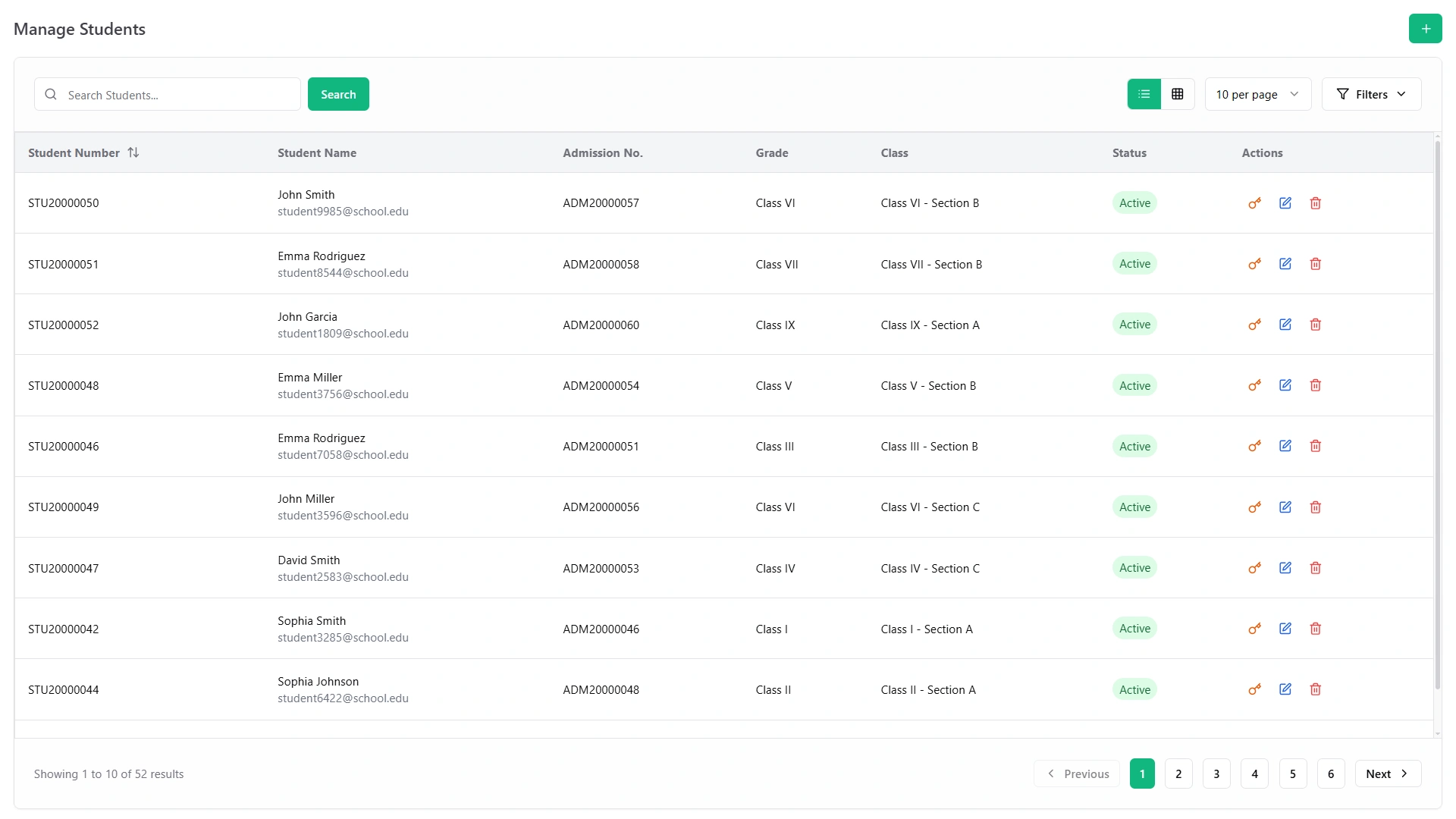
Manage Students screen with student numbers, names, admission numbers and grades

The adjustment period for staff who are used to spreadsheets is real - usually a few weeks before the new workflow feels natural - but the institutions that push through it consistently report that they don't go back.

Comparison

Student Management System vs. Spreadsheets and Separate Tools

Spreadsheets & Separate Apps Student Management System
Student records Multiple files, version drift One record per student, always current
Attendance Manual register, paper-based Digital, class-wise, auditable
Fee tracking Manual reconciliation Automated reminders and real-time status
Report cards Built by hand each term Generated automatically from entered marks
Parent access Phone calls and paper notices Self-service portal, anytime
Multi-branch Impossible without duplication Single dashboard, all locations
Scalability Breaks down above ~200 students Handles hundreds to thousands without restructuring
Challenges

Challenges to Expect (and How to Handle Them)

No software is a perfect fit for every institution from day one. Here is what implementation actually involves:

  • Initial setup takes time. Configuring classes, fee structures, and user roles before the system goes live is necessary, and it cannot be rushed. Plan for this before the academic year starts, not during it.
  • Staff resistance is normal. People who have used the same spreadsheet for five years will not immediately prefer something new. Expect a few weeks of adjustment, and plan for brief training sessions rather than assuming the interface will be self-explanatory.
  • Data migration requires attention. Importing years of existing student records accurately - especially if those records were inconsistently maintained - takes careful preparation. Messy source data produces a messy import.
  • Internet dependency (for cloud-based systems). Any cloud-based platform stops working without an internet connection at that location. For institutions in areas with unreliable connectivity, this is a genuine constraint to plan around.
How to Choose

How to Choose the Right Student Management Software

With many options on the market, these are the questions that matter most:

  • Does it cover the full lifecycle, not just grades?

    A system that handles academics but not fees - or attendance but not communication - still leaves departments in silos.

  • What does "ownership of your data" actually mean?

    Ask specifically where your student data is stored, who can access it, and what happens to it if you ever stop using the software.

  • How does user access work?

    Role-based permissions are non-negotiable in a school environment. Teachers should not see financial records; parents should not see other families' children.

  • What does migration actually involve?

    Any vendor who can't give a clear, practical answer about how your existing records come across is one to approach with caution.

  • Is there a money-back guarantee?

    Institutions making their first switch from spreadsheets need a way to validate the decision without a permanent commitment from day one.

The Record That Makes Everything Else Work

Every feature in a school - every attendance report, every report card, every fee reminder - is only as useful as the student record it's built on. Student management systems work because they make that record accurate, complete, and accessible to the right people at the right time. Everything else follows from there.

If you're evaluating options, the features page covers exactly what's included in this system. For the admin and staff side of operations - timetables, staff management, back-office tools - see the school administration software page. And if multi-location access is a factor, the cloud based school management system page covers deployment in detail.

See the complete school management system
Teacher helping a student in a school classroom
Faq's

Frequently Asked Questions About Student Management Systems

A student information system (SIS) is primarily a data repository for student records. A student management system includes everything an SIS does, plus operational tools for admissions workflows, fee automation, communication portals, and reporting dashboards.
Yes. Parents get a role-based portal where they can view their own child's attendance, fee status, results, and upcoming events - without seeing any other family's information.
Yes. Multi-branch institutions can manage every location from a single dashboard, with each branch operating independently day-to-day while head office sees consolidated data across all locations.
For most institutions, the initial configuration - academic structure, fee setup, user roles - takes a few days to two weeks, depending on the institution's size and complexity. After that, daily operations run through the system from the first day of term.
Yes. A dedicated scholarship module handles the full lifecycle - from application intake and document review to approval workflows and disbursement tracking - with separate views for administrators, students, and parents.
No fixed cap. The system is designed to handle institutions from small coaching centers to large multi-branch schools, scaling with the institution rather than requiring a platform change as enrollment grows.