School Administration Software That Runs Your Entire Back Office
Give your admin team one school administration software to manage staff, timetables, records & reporting - no more spreadsheets or separate tools.
Most school administrators arrive at work carrying the same invisible list every morning. There's a timetable conflict from yesterday that two teachers are waiting on. A leave request sitting in someone's inbox. A parent who called about a fee discrepancy. A branch manager asking for last month's enrollment numbers. A payroll deadline three days away. And somewhere in between all of that, there might be a board meeting this week.
None of that is teaching. All of it is administration - and all of it eats time that isn't tracked, isn't automated, and isn't going away. The right school administration software doesn't make those tasks disappear. It just stops them from taking most of the day.
What Is School Administration Software?
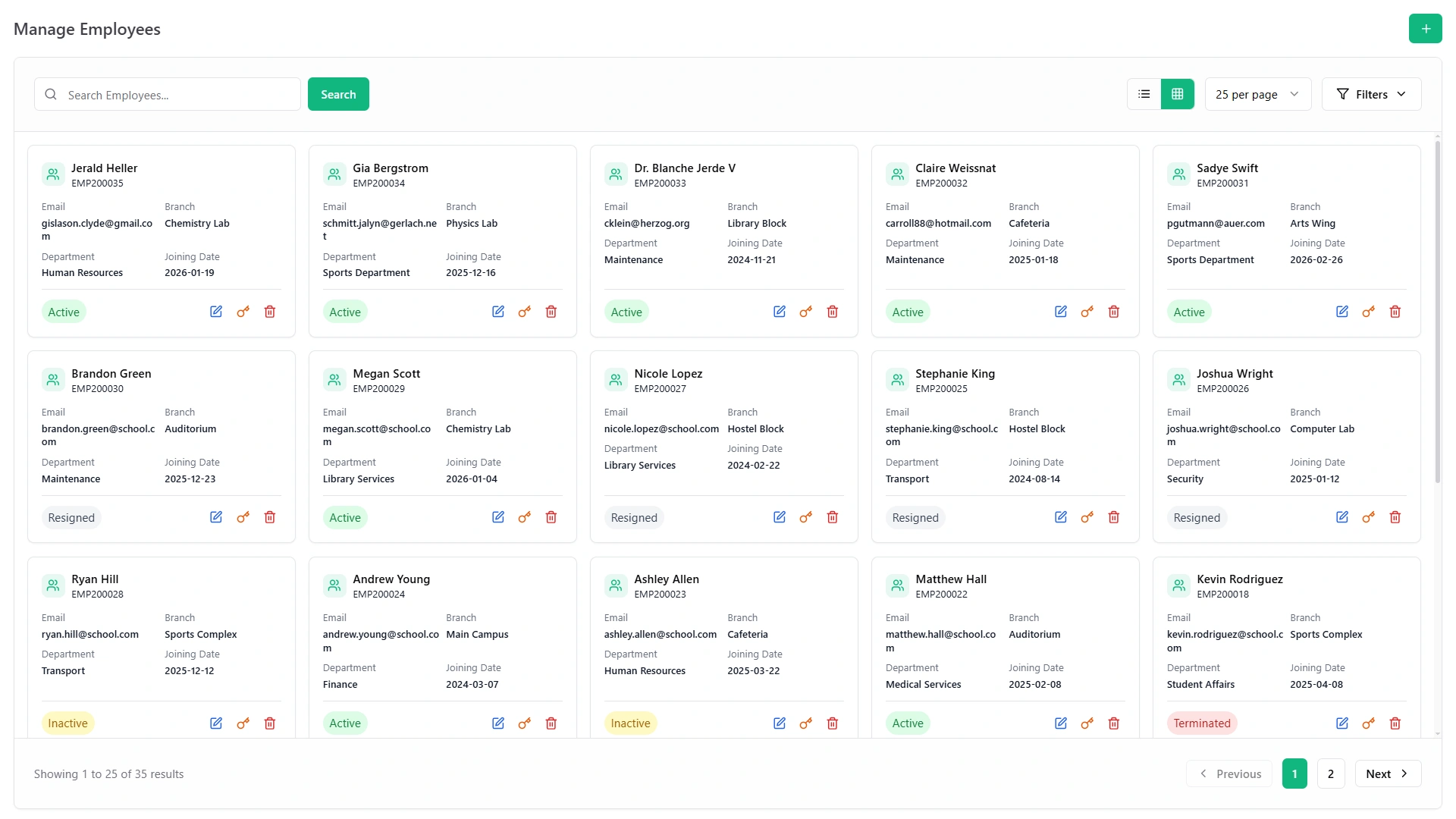
School administration software is the system a school office uses to run its non-teaching operations: staff records, timetables, payroll, leave management, reporting, permissions, and internal communication - all in one connected platform instead of a pile of spreadsheets and separate apps.
It is specifically the back-office and staff-management layer of a school's technology setup. That distinction matters, because the term gets confused with two other categories that serve completely different purposes.
How It Differs From an LMS and a Student Management System
These three categories are related but not interchangeable:
- A Learning Management System (LMS) delivers teaching - course content, assignments, quizzes, and progress tracking for learners. It's a teacher-to-student tool.
- A Student Management System (SMS) manages the student side of the institution - admissions, student records, attendance, grades, fees, and parent communication. It's built around the student lifecycle.
- School administration software manages the staff and operational side - who's on the payroll, whose timetable conflicts with room 4B, which teacher is on leave this week and needs a substitute, and what the principal needs to show the board on Friday.
Most schools need all three categories eventually. The administration layer is usually where the backlog builds first, because it's the least visible and the least automated.
Who School Administration Software Is Built For
This category exists for the people running the institution, not the people learning in it:
- Principals and Head AdministratorsInstitutional visibility, strategic reporting, multi-branch oversight
- Vice Principals and Academic CoordinatorsTimetable management, staff scheduling, academic structure
- HR and Admin OfficersStaff records, leave processing, recruitment, documents
- Finance OfficersPayroll processing, fee administration, expense tracking, audit reporting
- Department HeadsDepartment-level staff and schedule management
- Branch ManagersLocation-level operations with visibility granted by the Super Admin
What School Administrators Actually Manage Every Day
Before evaluating any administrative software for schools, it helps to be specific about where administrative time actually goes. For most school offices, the recurring load looks like this:
- Staff and timetable management - assigning teachers to subjects and sections, resolving scheduling conflicts, managing room allocation, and updating the timetable when staff absences or section changes create gaps. Research published by multiple scheduling specialists confirms that manual timetabling alone consumes between 70 and 105 hours per academic term for a mid-size school - before a single conflict is flagged or a last-minute teacher change is accommodated.
- Leave and attendance for staff - processing leave requests, tracking which staff members are absent, arranging substitute coverage, and making sure the attendance data feeds correctly into payroll at month-end.
- Payroll processing - calculating salaries based on attendance, working days, leave deductions, overtime, and any performance adjustments. In schools still doing this manually, it's a multi-day exercise every month that's highly prone to human error.
- Reporting for leadership and governance - producing enrollment summaries, fee collection reports, staff attendance data, and performance metrics for board meetings, parent associations, or multi-branch oversight reviews.
- Internal communication - notices to staff about schedule changes, event reminders, meeting coordination, announcements, and the daily operational updates that keep a school running without phone calls replacing structured communication.
- Document management - keeping staff files, contracts, qualification records, and compliance documents organized and retrievable when they're actually needed.
Core Features of School Administration Software
Staff & Teacher Records Management
Every staff member - teaching and non-teaching - gets a structured profile: personal details, department and designation assignment, joining date, qualifications, subject specializations, contract type, and a complete document archive. When an administrator needs to check a teacher's qualifications before assigning them to a new subject, or an HR officer needs to pull a joining date for a payroll query, the answer is one search away rather than a filing cabinet away.
Staff profiles also track designation history - so when a teacher is promoted or moved to a different role, the previous assignment is archived rather than overwritten. That history matters for appraisal cycles and long-service records.
Timetable & Schedule Management
The timetable is arguably the most complex administrative task a school office produces each term. It has to simultaneously satisfy teacher availability, room capacity, subject distribution across the week, and section requirements - all while avoiding conflicts that affect hundreds of students and dozens of teachers.
In a school administration system built to handle this, timetable configuration works by setting parameters - teacher-subject assignments, room capacities, period structure, and section needs - rather than filling in a grid by hand. Changes mid-term (a teacher goes on extended leave, a new section opens) update in the system without requiring a full rebuild from scratch.
Staff Attendance & Leave Management
Teachers and non-teaching staff have their own attendance records, entirely separate from student attendance. Leave requests flow through a defined approval chain - submitted by the staff member, reviewed by their department head or coordinator, approved by administration - without anyone chasing via WhatsApp or waiting for a paper form to make its way to the right desk.
Approved leave flows directly into the payroll calculation, so the finance officer doesn't need to reconcile a leave register against a salary sheet at month-end. The connection between attendance and payroll is automatic, not a manual step.
Payroll & Salary Processing
Salary calculation in most schools involves more variables than a basic multiplication of monthly rate by days worked: working days, leave deductions, overtime, allowances, performance adjustments, and tax deductions. Each of those has to be right for every staff member, every month.
Education administration software that automates payroll takes the confirmed attendance data, applies the salary structure configured for each staff member's grade and designation, and produces a salary calculation ready for review - rather than requiring the finance officer to rebuild it from scratch in a spreadsheet each month. One-click payslip generation follows from that same calculation: every staff member gets an accurate payslip without anyone compiling it individually.
Department & Branch Management
Departments, designations, and organisational hierarchy are configured once and referenced everywhere - in staff profiles, timetables, leave workflows, and reporting. When a new department is added or a designation renamed, it updates across the system rather than requiring manual correction in five different places.
For multi-branch institutions, each branch operates with its own department structure and staff roster, while the principal or Super Admin sees a consolidated view across all locations. A department head at one branch can manage their own staff without seeing another branch's records, while head office sees everything.
Performance & Training Management
Annual appraisal cycles and ongoing professional development don't usually live in the same system as payroll and timetables - which means they get managed in a separate document, or not consistently managed at all. A connected school admin software platform keeps performance records, appraisal notes, and training session assignments attached to the same staff profile that holds the attendance and payroll data.
Training management tracks which staff members have been assigned to which sessions, which trainer is responsible, and which members of staff have completed a given training programme - useful when regulatory compliance or staff development reporting is required.
Role-Based Access & Permissions
Not every staff member should see every piece of information in a school administration system. A class teacher doesn't need access to payroll data. A finance officer doesn't need to edit attendance records. A branch admin shouldn't see another branch's staff files.
Role-based permissions define exactly what each type of user can view, edit, or export - and those permissions are set once by the Super Admin rather than managed individually. This is particularly important in schools where several staff members share administration duties: clear permission tiers mean that access to sensitive data is controlled without restricting staff from doing their actual jobs.
Notices, Announcements & Internal Communication
Parent-facing communication belongs in the student management system. Staff communication belongs in the administration layer. A notice board for internal announcements, direct messaging between staff members, and automated notifications - via Slack, Telegram, or SMS - for schedule changes and urgent updates keep operational communication structured rather than scattered across phone messages and email threads.
Event & Academic Calendar Management
School events - sports days, parent-teacher meetings, staff professional development days, examination periods, public holidays - need to be visible to the whole institution in a shared, authoritative calendar rather than circulated via a flyer and forgotten. Google Calendar sync ensures that events entered in the administration system appear in the tools staff already use, without duplication.
Reporting & Analytics for Principals and Administrators
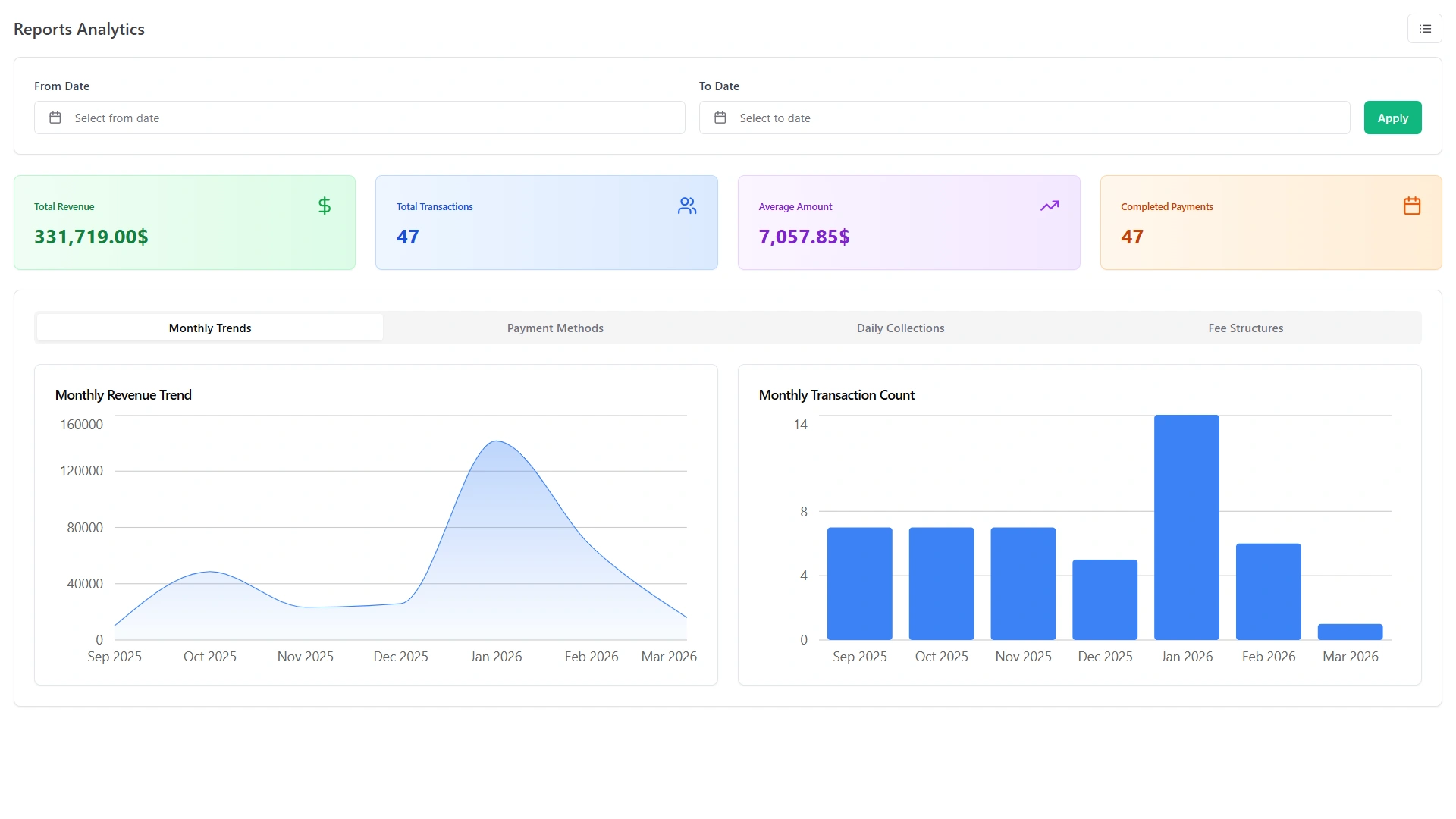
The reports a principal needs for a board meeting - enrollment by branch, fee collection rate, staff attendance trends, section-wise academic performance - shouldn't require someone to spend half a day pulling data from three different sources. A connected administration software for schools surfaces those reports from the data already in the system, filtered by date range, branch, department, or class as needed, and exportable in formats that don't require further formatting before they're usable.
What Each Role Actually Sees - And What They Don't
This is the part most vendor pages skip. Role-based access isn't just a security feature - it's what makes a school administration system usable for everyone in it. Here's the realistic view of what each persona sees:
-
Principal / Head Administrator
Full institutional visibility: all staff records, all branches, complete financial overview, enrollment trends, and the ability to configure system-wide settings. In a multi-branch setup, this is the one login that sees across every location simultaneously.
-
HR and Admin Officer
Staff profiles, leave management, attendance records, department assignments, document storage, and recruitment pipelines. No access to fee collection or payroll unless explicitly granted.
-
Finance Officer
Payroll processing, salary calculations, payslip generation, fee collection data, expense tracking, and the financial reports required for month-end and audit purposes. Not the timetable, not individual staff attendance records beyond what's needed for payroll.
-
Department Head / Academic Coordinator
Their own department's staff roster, section timetables, room allocation, and departmental reporting. Visibility into other departments' operational details is restricted.
-
Teacher
Their own timetable, their own section's attendance, their own class's grades, their own leave requests and payslips via a self-service view. No access to other sections' data, no financial records, no payroll information for colleagues.
Getting this right is not a minor configuration detail. It's what separates a system staff actually trust from one where everyone is either locked out of what they need or able to see what they shouldn't.
Teacher Management Software - A Specific Look
The secondary keyword "teacher management software" points to a specific sub-need: institutions where managing teaching staff - their qualifications, assignments, performance, and development - is the primary administrative concern rather than general back-office operations.
A dedicated teacher management software capability within a broader school administration system handles:
- Teacher profiles: Subject specialisations, assigned classes and sections, teaching load per week, qualification records
- Teacher attendance and substitution: Tracking daily presence, flagging conflicts when a teacher is absent and their section has no coverage, facilitating substitute arrangements
- Teaching load monitoring: Ensuring no teacher is over-assigned to sections across the week relative to their contracted hours
- Performance appraisal: Structured review cycles with defined indicators, assessor assignments, and recorded outcomes attached to each teacher's profile
- Professional development tracking: Training sessions attended, skills added, certifications earned - all stored against the same profile that holds the timetable assignment
- Teacher self-service: Submitting leave requests, viewing their own payslip, checking their timetable for the week - without going through HR for routine queries
For coaching centers and training institutes, where the quality and availability of teaching staff is the most operationally sensitive variable, this layer of the system often matters as much as the student-facing side.
Running Multiple Branches From One Administration Panel
In a single-campus school, the administration panel covers one institution. In a coaching chain with three branches or a school group with several campuses, the same administration software needs to handle something considerably more complex: each location running independently day-to-day, while head office maintains consolidated visibility and control.
This means:
- Each branch has its own staff roster, its own timetable, and its own leave records - managed by branch-level admins with access scoped to their location
- A transfer between branches updates the staff record rather than creating a new one, so the complete employment history follows the person
- Head office sees staff attendance, payroll costs, and enrollment data across all branches from one dashboard - not a set of separately emailed spreadsheets
- The Super Admin can set system-wide configurations (academic structure, payroll parameters, permission tiers) without each branch having to replicate the setup independently
For growing institutions, this is the difference between a system that works today and one that still works when the second or third campus opens. For the deployment angle of multi-branch access, the cloud based school management system page covers the infrastructure side in detail.
What Changes on a Monday Morning - Before and After
The administrative tasks from the opening of this page don't go away when a school adopts school administration software. But what they require of staff changes completely.
-
The timetable conflict
BeforeUsed to mean opening an Excel file, re-checking which rooms are free on which periods, and manually adjusting entries while hoping nothing else breaks.
AfterIn the system, a conflict is flagged automatically when a teacher is double-assigned, and the resolution updates the timetable for every affected teacher and section at once.
-
The leave request
BeforeUsed to sit in someone's email inbox until someone remembered to approve it, then got manually updated in a register somewhere, and eventually had to be communicated to payroll at month-end.
AfterIn the system, the request submits digitally, routes to the right approver automatically, reflects in the attendance record on approval, and feeds into payroll without a separate step.
-
The fee discrepancy call
BeforeUsed to require someone to find the right receipt book, cross-reference a bank deposit, and call back with an answer.
AfterIn the system, the finance officer searches the student ID and sees the complete payment history in the same window - one screen, thirty seconds.
-
The enrollment report for the branch manager
BeforeUsed to be a manually assembled document someone emailed as an attachment.
AfterIn the system, the branch manager generates it themselves from the dashboard, filtered to the date range and classes they need, without involving anyone else.
-
The payroll deadline
BeforeUsed to mean three days of manual calculations, checked against a leave register, with a margin of human error that didn't reveal itself until a staff member questioned their payslip.
AfterIn the system, the attendance data is already recorded, the leave is already confirmed, and payroll runs from those connected records rather than from a parallel process.
Pros and Cons of School Administration Software
- Eliminates duplicate data entry across departments - attendance recorded once feeds payroll, leave records, and reporting automatically
- Gives principals real-time visibility into operational data without waiting for staff to compile it
- Automates payroll from attendance data, reducing month-end calculation time substantially
- Structures leave and approval workflows so nothing depends on someone remembering to forward an email
- Scales cleanly from a single campus to a multi-branch organisation without requiring a different platform
- Initial configuration of staff records, permission tiers, and timetable parameters takes time - not a plug-in-and-go setup on day one
- Staff who are used to managing their own spreadsheets need a few weeks to shift workflows, and that transition requires active encouragement from leadership
- Timetable changes mid-term (new sections, staff departures) require the system to be kept current - it's only as accurate as what's entered into it
- Institutions without in-house technical staff may want professional support for the initial setup, particularly for payroll configuration where accuracy is non-negotiable
What to Look For in Administrative Software for Schools
With many options presenting similar feature lists, these questions help separate a system that will actually serve your institution from one that looks good in a demo:
-
Does it connect staff management to the student side?
An administration system that manages staff in isolation means payroll data, timetable data, and student records still live in separate worlds. A connected system means a teacher's timetable assignment automatically links to the sections they're marking attendance for on the student side.
-
Is payroll connected to attendance, or is that a manual step?
If salary calculation requires re-entering attendance data that already exists in the system, that's a duplicate process waiting to produce discrepancies. Proper integration means attendance confirms, payroll reads from it.
-
Can different admin roles have genuinely different access levels?
Role-based permissions need to be granular - not just "admin can see everything, teacher can see their class." Finance officers, HR officers, department heads, and branch managers all have different appropriate scopes of access.
-
What happens when a staff member leaves?
Their record should be archived, not deleted - for reference letters, payroll history queries, and compliance documentation. Ask explicitly what happens to historical data on offboarding.
-
Is there a money-back guarantee?
Any institution switching from a familiar system to new software is taking a risk. A 30-day money-back guarantee is the baseline standard for reducing that risk to something manageable.
-
Does it grow with the institution?
A system that handles one campus well but requires a separate product for a second branch is not school administration software - it's a single-site workaround.
From the Morning List to Month-End Payroll - One System Handles It All
The six things on that morning list - the timetable conflict, the leave request, the fee query, the enrollment report, the payroll deadline, the board meeting data - don't disappear from a school administrator's day. But they stop being the reason the day runs out of time. That's the practical value of school administration software that actually connects the parts: not fewer responsibilities, but significantly less time spent chasing the same pieces of information across disconnected tools.
For the student-facing complement to this page, see the student management systems page. For a complete view of every module in the system, the school database management system page covers it all in one place.