








Bundle Sale - Save 72% on the Dash SaaS Complete Bundle Claim Now
Legal Case Management Software

Legal Case Management Software for Small Firms, Solo Lawyers and Legal Teams

Legal case management software for small firms should keep every case in one place and every hearing date in view. This page shows how each kind of practice uses the same system.

In short: one login for cases, clients, hearings, contracts and fees, from a solo lawyer's desk to a multi-attorney firm.

Small Firms

Legal Case Management Software for Small Firms

A small firm needs everyone looking at one case list, not copies of it. Here each case shows its number, court, status and priority, and opens to its documents, notes, costs and hearings.

  • Shared list: every attorney and clerk sees the same cases.
  • Hearing dates: completing a hearing updates the case's next date.
  • Client papers: documents are numbered and marked private or public.
  • Contracts: templates turn into signed agreements without printing.
  • One price: a single $219 payment covers all 16 modules, with no monthly subscription.
Every case now has its court, advocate, next hearing date and expenses in one place, and nobody hunts through folders before a hearing.
Rohan Mehta

That is the core of case management software for small law firms: one list, one calendar and one set of files. Here is one way a new matter can move through a small firm:

  1. Clerk: saves the inquiry and books the consultation.
  2. Attorney: approves the booking and opens the case with its court, advocate and client.
  3. Clerk: files client papers under document numbers and sends the engagement contract for signature.
  4. Attorney: records each hearing and approves the costs that come with it.
  5. Accounts team: clears the fee receipts.
  6. Partner: closes the case and checks the dashboard.

Shared Knowledge and Team Alerts

A small team learns from the firm's own files. Guides, precedents and policies live in knowledge books, and WhatsApp messages can notify the team about the events you choose.

Our junior associates learn faster because filing guides and practice notes live in one searchable library of books and articles.
Viktor Petrov
Solo Lawyers

Case Management Software for Solo Lawyers

A solo lawyer is the whole back office. One working week can run through one system:

  1. Monday

    Save each new inquiry and send your booking link.

  2. Tuesday

    The client picks a slot and answers your questions.

  3. Wednesday

    Turn a saved template into a contract and have the client sign it online.

  4. Thursday

    Back from court, log the next hearing and the fee you paid.

  5. Friday

    Send case papers by protected link and see who opened them.

This system covers my cases, clients, consultations and fees without hiring extra staff.
Chidi Okafor

What to Set Up First

Legal case management software for solo practitioners works best when four things are ready before the first client:

  • Booking link: your days, time slots and questions.

  • Contract template: your standard engagement letter.

  • Court list: the courts you appear in, saved once and reused.

  • Knowledge book: your court filing steps and new-client checklist.

Litigation

Litigation Case Management Software

Litigation work runs on dates and costs. The system keeps both on the case:

  • Hearings: judge, courtroom and hearing type, with attendance and status.
  • Order sheets: kept with the hearing they belong to.
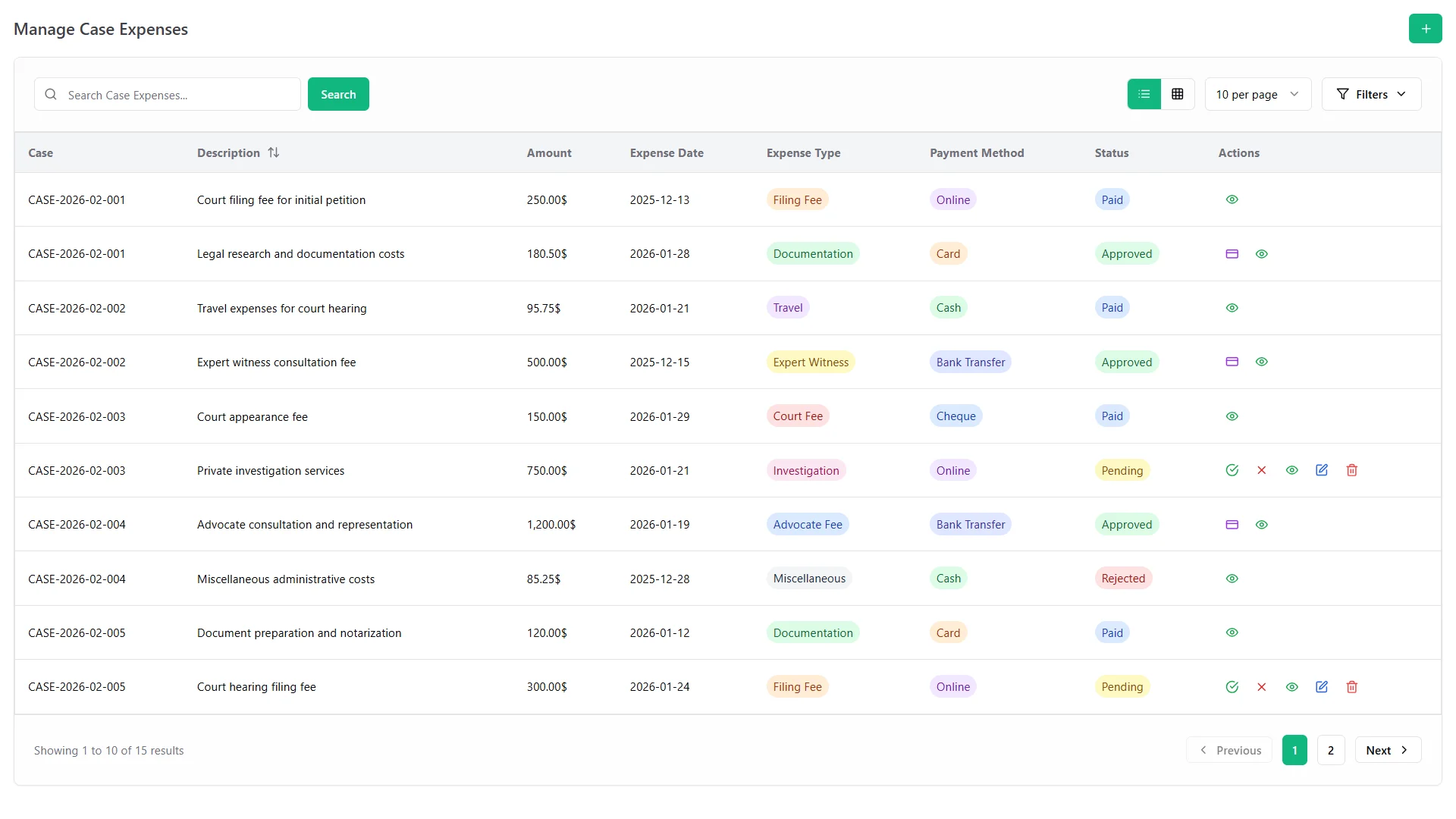
  • Costs: court fees and expenses recorded on the case, then approved and marked paid.
  • Evidence: sent to clients by protected link, with a log of every download.
  • Court trips: petty cash requests approved online.
  • Court list: court types, levels and jurisdictions saved once, so each new case picks its court.
  • Calendar: hearings and deadlines share one calendar that syncs with Google Calendar.
Manage Case Expenses screen with court fees, filing charges and expert witness costs per case

Good to know: discovery, trial preparation and e-filing are not listed among the features.

Court fees, filing charges and expert witness costs are logged against each case, so nothing is missed when it comes time to settle up with the client.
Farhan Qureshi
Family Law

Family Law Case Management Software for Sensitive Files

Family and property matters hold the most private papers a firm sees. Four features matter most:

House model and keys representing property law and real estate conveyancing
  • Private documents: mark each file private to limit who can open it.

  • Protected sharing: send papers by link with a password, or set a file to delete itself once it has been downloaded.

  • Consultations: a booking link collects your own questions before the first meeting.

  • Notes and comments: each document carries notes and comments that record who wrote them and when.

Client IDs, powers of attorney and case papers are stored as numbered documents with private access, so the right people see the right files.
Johan Lindgren

Good to know: court form automation, billing and trust accounting are not listed among the features.

In-House

In-House Legal Case Management Software for Contracts and Company Files

A corporate legal team lives in contracts and records:

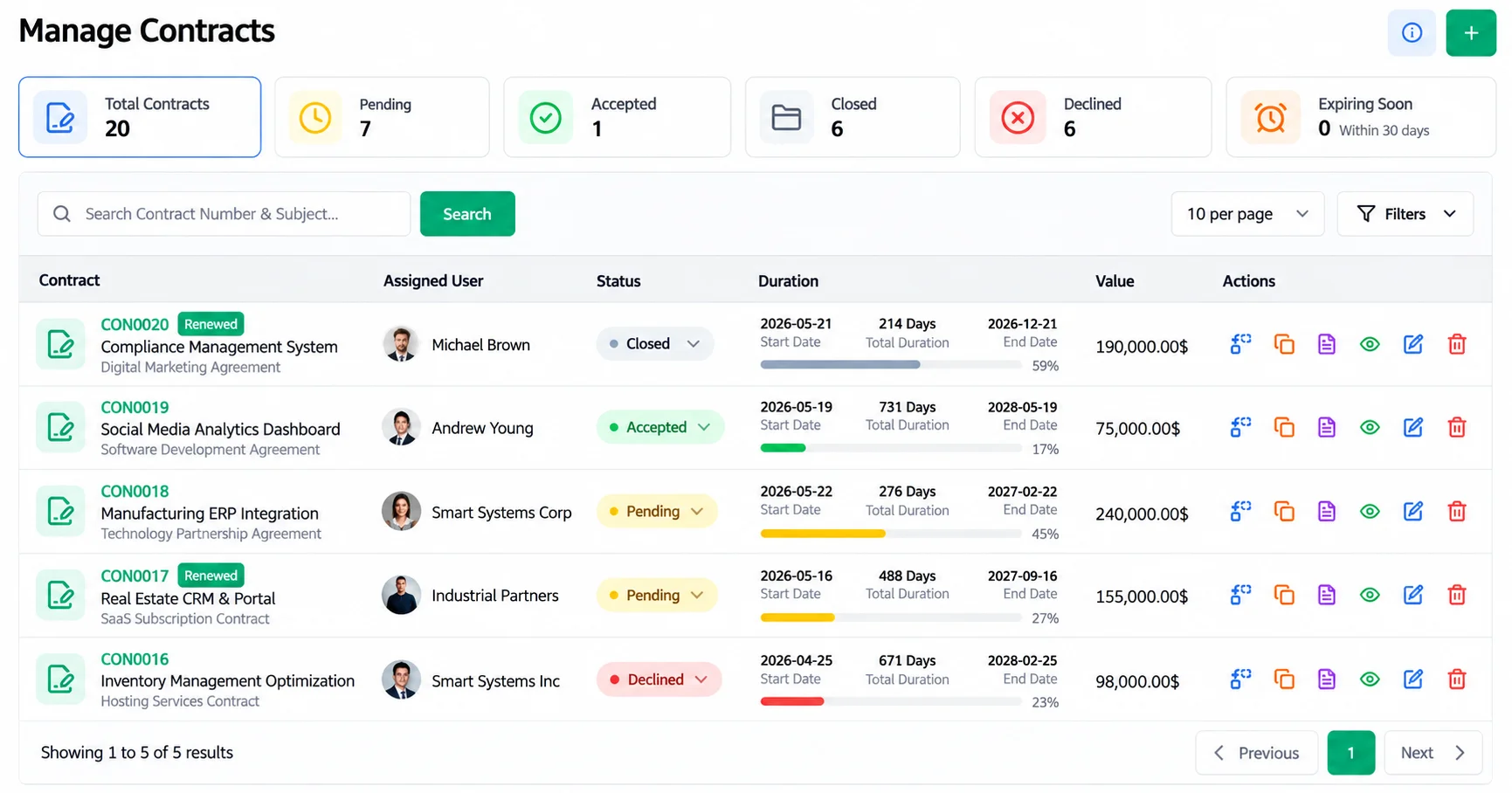
Manage Contracts screen with contract value, status, duration and expiring-soon count
  • Contracts: values, status and renewals, with an expiring-soon list and online signatures from both parties.
  • Company files: numbered documents, private or public, with notes and comments.
  • Knowledge library: policies and guides kept as knowledge books.
  • Approvals: expenses and petty cash requests routed for approval.

Good to know: outside-counsel spend tracking and e-billing are not listed among the features.

Contracts with clients and partners now show value, dates and status in one list, and we can see which ones are expiring soon.
Lucas Moreau
Consultants

Legal Consultants: Services, Applications and Appointments

An advisory practice sells services, not only cases:

  • Services: define each service and the documents a client must bring.
  • Applications: follow each one stage by stage, with payments marked cleared or cancelled.
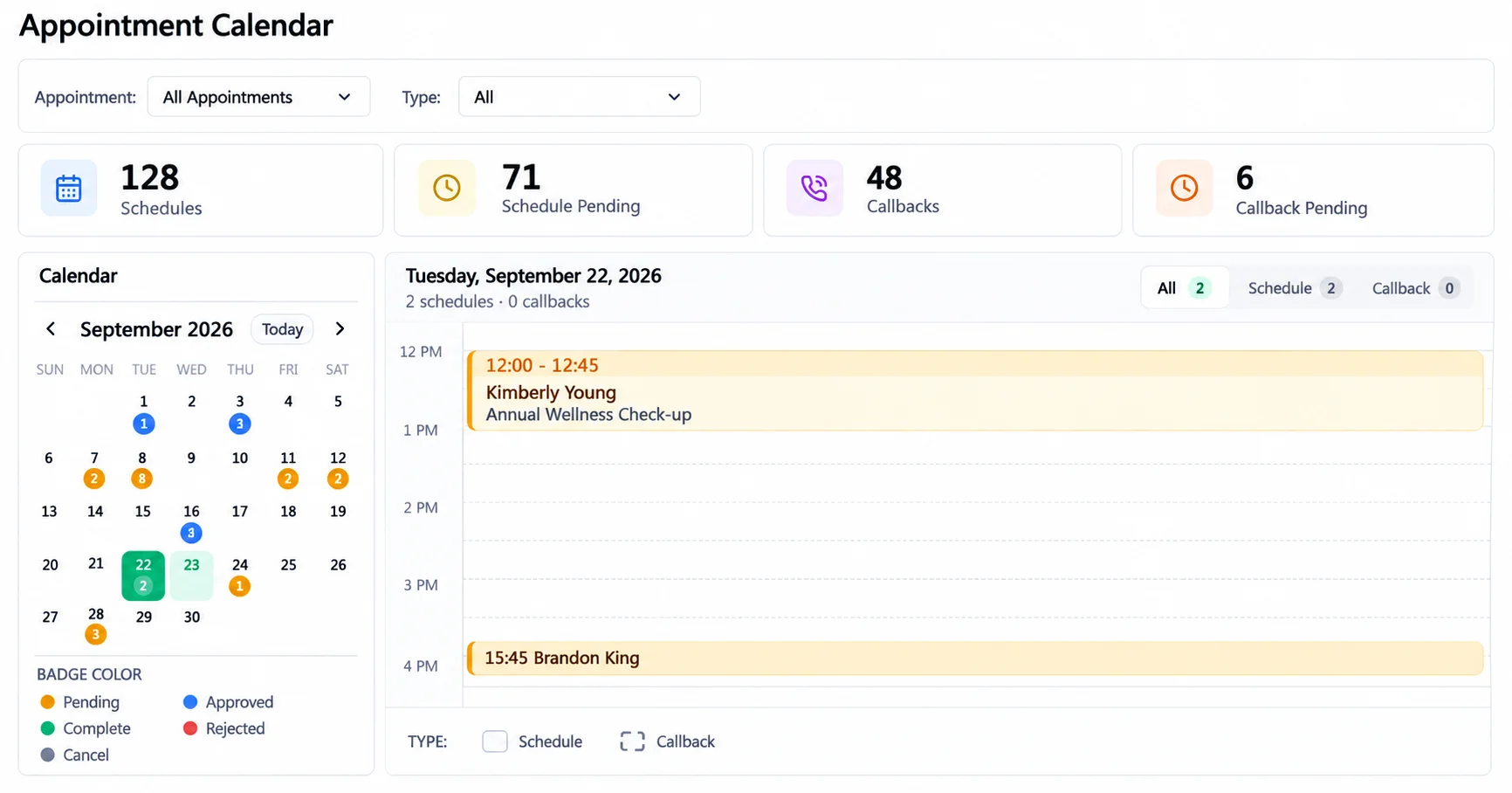
  • Appointments: free or paid consultation slots that you approve or reject.
  • Inquiries: follow up and turn them into active clients.
  • Onboarding guides: a knowledge book can hold your new-client steps and required-document lists.
Appointment calendar with scheduled, pending and callback consultations
Consultation bookings come through our link and show up in the shared calendar.
Luca Rossi
IP and Notary

IP, Trademark and Notary Practices

Intellectual property and patent professionals reviewing application documents

IP and Trademark Firms

Client filings, agreements and papers sit beside each client as numbered documents, contracts and templates.

  • Client files: numbered documents with notes, comments and several attachments.
  • Agreements: contracts and reusable templates.
  • Status: renewal logs show where each agreement stands.

Good to know: patent-office deadline docketing is not listed among the features.

Fountain pen signing official legal certificates and notary documentation

Notary Services

Appointments arrive through a booking link, papers are filed as numbered documents and signed contracts keep a record of each one.

  • Booking: free or paid appointment slots.
  • Records: each document gets a number and a privacy setting.
  • Signed copies: contracts signed online by both parties are stored with an audit trail.

Good to know: remote online notarization is not listed among the features.

Modules

Which Modules Each Practice Leans On

Every practice gets all 16 modules. These are good ones to open first:

Practice Open these first
Small and multi-attorney firms
  • Legal Case Management
  • Documents
  • Contract
  • Google Calendar
Solo lawyers
  • Appointment
  • Contract Template
  • File Sharing
  • Petty Cash Management
Litigation practices
  • Legal Case Management
  • File Sharing
  • Petty Cash Management
  • WhatsApp API
Family and property law
  • Documents
  • File Sharing
  • Consultancy
  • Contract Template
Corporate legal teams
  • Contract
  • Contract Template
  • Documents
  • Internal Knowledge
Legal consultants
  • Consultancy
  • Appointment
  • Documents
  • Smart Reports
IP, trademark and notary practices
  • Documents
  • Contract
  • Appointment
Roles

Who in the Firm Uses What

Each role works from the same records but sees what it needs.

  • Clerks: the simple view of bookings, documents and the calendar.

  • Attorneys and advocates: the detailed view of cases, hearings, expenses and contracts.

  • Partners: dashboards and reports for the full picture.

  • Accounts team: fee receipts, expenses and petty cash approvals.

Each feature named here is explained on the legal matter management software features page.

Try It

Try It on Your Own Kind of Cases

The live demo opens with every legal module on, so you can run your own practice's workflow before you buy. Try one task from your own week:

  • Small firms: open one case and follow its hearings, documents and costs.

  • Solo lawyers: send a booking link and sign an engagement letter online.

  • Litigators: add a hearing and watch the next hearing date update.

  • Consultants: book a consultation through the booking link.

  • Family law: mark a document private and share it by protected link.

  • In-house teams: create a contract from a template.

One Payment

A Single $219 Payment Includes All 16 Modules

It includes the source code and free future updates. To see what these practices gain, read the benefits of legal case management software guide.

  • One Payment.
  • Lifetime Access.
  • Everything Included.
Two lawyers reviewing case papers at a desk in a law library
Faq's

Frequently Asked Questions About Legal Case Management Software Use Cases

WorkDo's legal system names law firms, solo lawyers, corporate legal teams, legal consultants, litigation practices, family and property law, IP and trademark firms, and notary services. Each uses the same modules for cases, documents and contracts.
Look for one shared case list, hearing dates that update, contracts that sign online and protected file sharing. WorkDo includes all four under one login for a single $219 payment.
Send a booking link and clients pick a slot and answer your questions. Then turn a saved template into a contract and let the client sign online.
Hearing records that name the judge, courtroom and hearing type, a next date that updates itself, and court fees approved before payment. Evidence can go to clients by protected link with a download log.
It keeps client IDs and case papers as private numbered documents and shares files by protected link. Form automation, billing and trust accounting are not listed among the features.
Clerks use the simple view, attorneys the detailed view, partners the dashboards and reports, and the accounts team the fee, expense and petty cash approvals.