
SenangPay – WorkDo Dash SaaS Add-On Guide
Learn how to configure and manage SenangPay payment integration in Dash SaaS.
- Supported Countries: Malaysia
- Supported Currencies: MYR (Malaysian Ringgit)
Benefits of senangPay Payment Gateway
Localized Payment Experience
senangPay is purpose-built for the Malaysian market, enabling businesses to process transactions smoothly in Malaysian Ringgit and deliver a payment experience that feels familiar and convenient to local customers.
Reliable Security Standards
senangPay incorporates SSL encryption and intelligent fraud detection mechanisms to protect every transaction, giving both merchants and customers a trustworthy and secure payment environment they can rely on.
Quick & Straightforward Setup
With a simple integration process and minimal technical requirements, senangPay allows businesses to get up and running quickly, reducing setup time and enabling them to start accepting payments without unnecessary complexity.
Comprehensive Payment Method Coverage
senangPay supports a wide variety of payment options, including credit and debit cards, online banking, and e-wallets, ensuring customers always have a convenient and preferred way to complete their purchases.
How to Access senangPay Add-On?
Ready to enhance your online payment capabilities with senangPay? Follow these simple steps to get started:
- Visit WorkDo Website:
Head over to https://workdo.io/ and explore the extensive range of Dash SaaS Add-Ons. - Discover senangPay:
Navigate to the “Dash SaaS Add-Ons” section and locate the “senangPay Add-On”. - Activate the Add-On:
Click on the “Activate” button next to the senangPay Add-On to enable it for your WorkDo Dash account.
How does senangPay work?
SenangPay is a Malaysian online payment gateway that facilitates secure and seamless transactions for businesses and individuals. It allows merchants to accept payments through various methods such as credit and debit cards, internet banking, and e-wallets. Users integrate SenangPay with their websites or online stores using provided plugins and APIs. Once integrated, customers can make payments directly on the merchant’s platform, with SenangPay handling the transaction processing, security, and compliance. The service also offers features like recurring billing, transaction reports, and fraud detection, ensuring a smooth and safe payment experience for both merchants and customers.
Super Admin Settings
(Plan Purchase by the Company)
The Super Admin Settings are accessible only to the highest-level administrator. These settings allow the Super Admin to manage company-level subscriptions and payment configurations.
Key Capabilities:
- Purchase or upgrade company subscription plans
- Configure senangPay API keys for plan payments
- Enable or disable senangPay as a payment gateway
Configuration Path:
Super Admin Login → Settings → senangPay Settings
Company Settings
(Bookings, Beauty Spa, LMS & Other Payments)
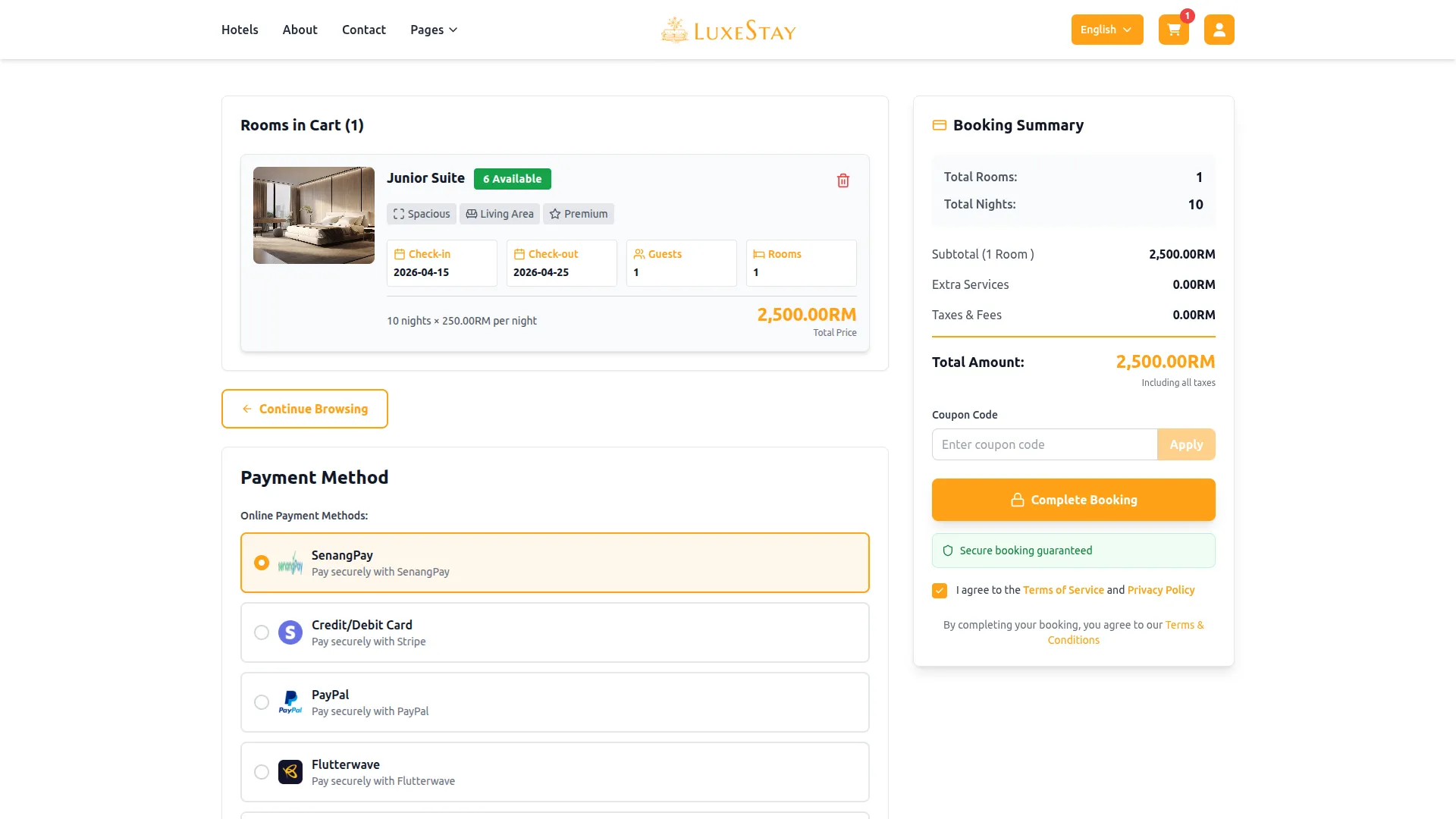
Company Settings allow organizations to configure senangPay for receiving payments from customers across multiple modules.
Supported Modules Include:
Configuration Path:
Company Login → Settings → senangPay Settings
Company-Level Capabilities:
- Configure senangPay API credentials
- Enable senangPay for selected modules
- Accept online payments from customers
- Manage Bookings, Beauty Spa, and service
- Handle tax, coupon, and discount calculations
How to Generate SenangPay API Keys?
To integrate senangPay into your (Product Name), follow the steps below:
1. Generate API Key:
- Log in to your senangPay account or create one if you don’t have an account yet.
- Access the senangPay admin portal by clicking this link: https://senangpay.my/
- Obtain comprehensive information about senangPay.
- Proceed to generate your API key by visiting the senangPay API documentation: https://developer.senangPay.com/reference/api-overview
2. Configure senangPay Gateway in (Product Name):
- Log in to your (Product Name) account with administrator credentials.
- Navigate to the settings page.
3. Set Up senangPay Gateway:
- Scroll down the page until you find the senangPay Gateway option.
- Click on the senangPay Gateway to access its configuration settings.
4. Enter Required Details:
In the senangPay settings, provide the following essential details:
- Merchant ID
- Secret Key
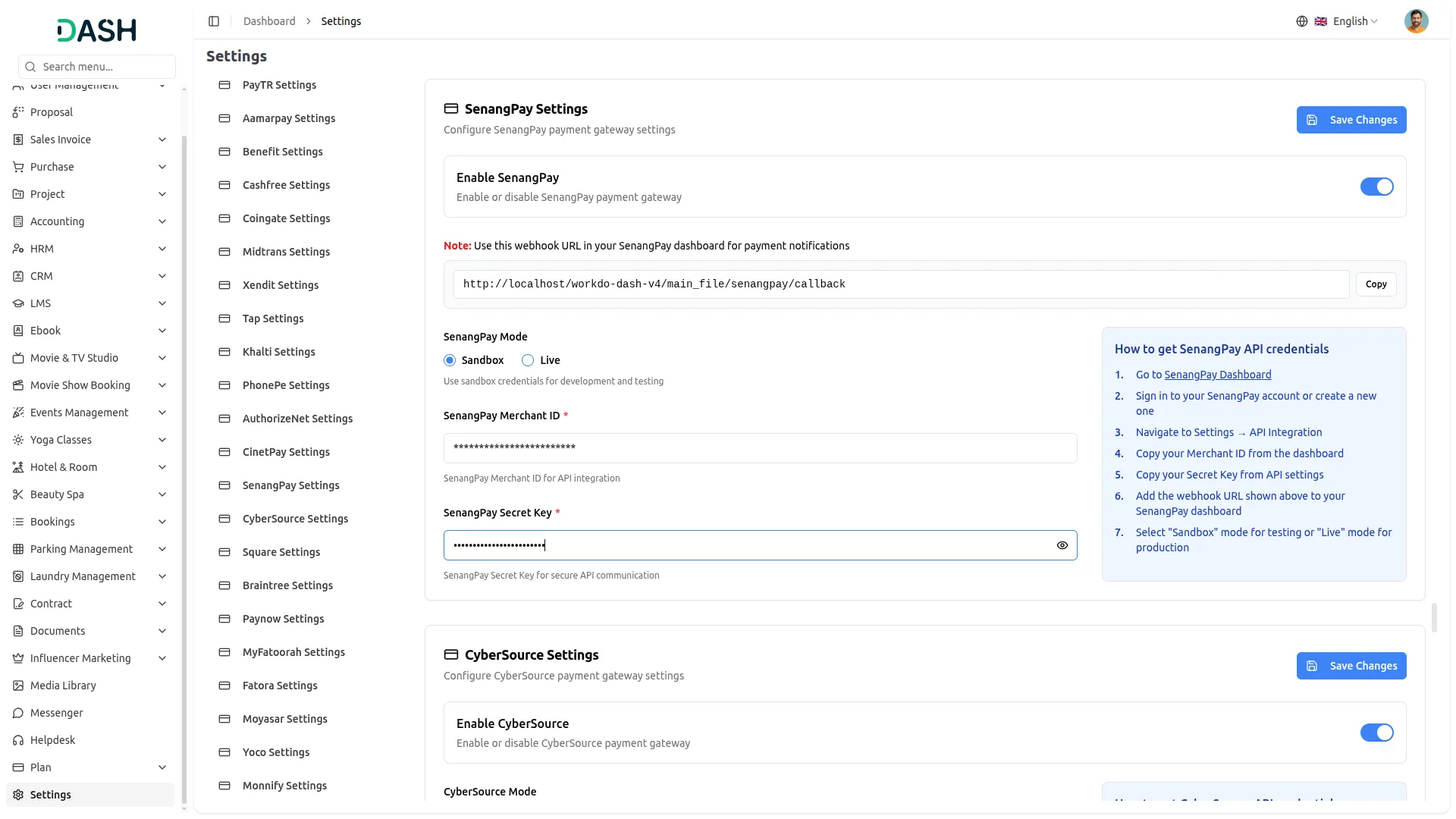
5. Save Your Settings:
- After entering the necessary details, save the settings to activate the senangPay Payment Gateway within your (Product Name) platform.
This process will enable you to seamlessly integrate senangPay as a payment gateway, allowing your users to make secure and efficient online payments in various cryptocurrencies.
Note: The senangPay Add-on is a paid feature and can be accessed by users who have purchased it. By integrating the senangPay Add-on into your WorkDo Dash SaaS account, you’ll provide a reliable and user-friendly payment gateway that supports global transactions.
Categories
Related articles
- Society Management – WorkDo Dash SaaS Add-On Guide
- Coworking Space Management – WorkDo Dash SaaS Add-On Guide
- Documents – WorkDo Dash SaaS Add-On Guide
- Tip – BookingGo SaaS Add-On Guide
- User Manual – Task SaaS
- Courier Management – WorkDo Dash SaaS Add-On Guide
- Fatora – BookingGo SaaS Add-On Guide
- Coupon List – eCommerceGo SaaS Add-On Guide
- Sign in with Slack – WorkDo Dash SaaS Add-On Guide
- User Manual – POS SaaS
- Compound Service – BookingGo SaaS Add-On Guide
- POS – WorkDo Dash SaaS Add-On Guide
We're Here to Help - Let's Talk
Have questions about our solutions, customization services, or business tools? Our team is here to help you. let's talk.