
ERP vs CRM: Key Differences, Benefits & Which One Is Right for Your Business?
ERP vs CRM: key differences, features, benefits, use cases, and when to integrate both for business growth

Stop Confusing ERP Vs CRM—Here’s What Actually Matters
If you have at some point taken a tour of a software demo and walked away more confused than when you first walked in, you’re not alone. ERP and CRM are the main points of confusion for growing businesses, and that is because of how similar they are. Both promise to “organize your business. They come with dashboards, reports, and automation features. Also, both sales reps will tell you their product does it all.
It doesn’t play out that way.
ERP and CRM are very different in what they do. Some run internal processes, and some develop customer connections. When you mix their uses or make one do the work of the other, what you get is messy data, duplicate info, and teams on different pages of the story.
We break all that down here: what each does best, where they meet, and how you can determine which one or which combination you need or if you need to go it alone with either for your business.
What Is ERP?
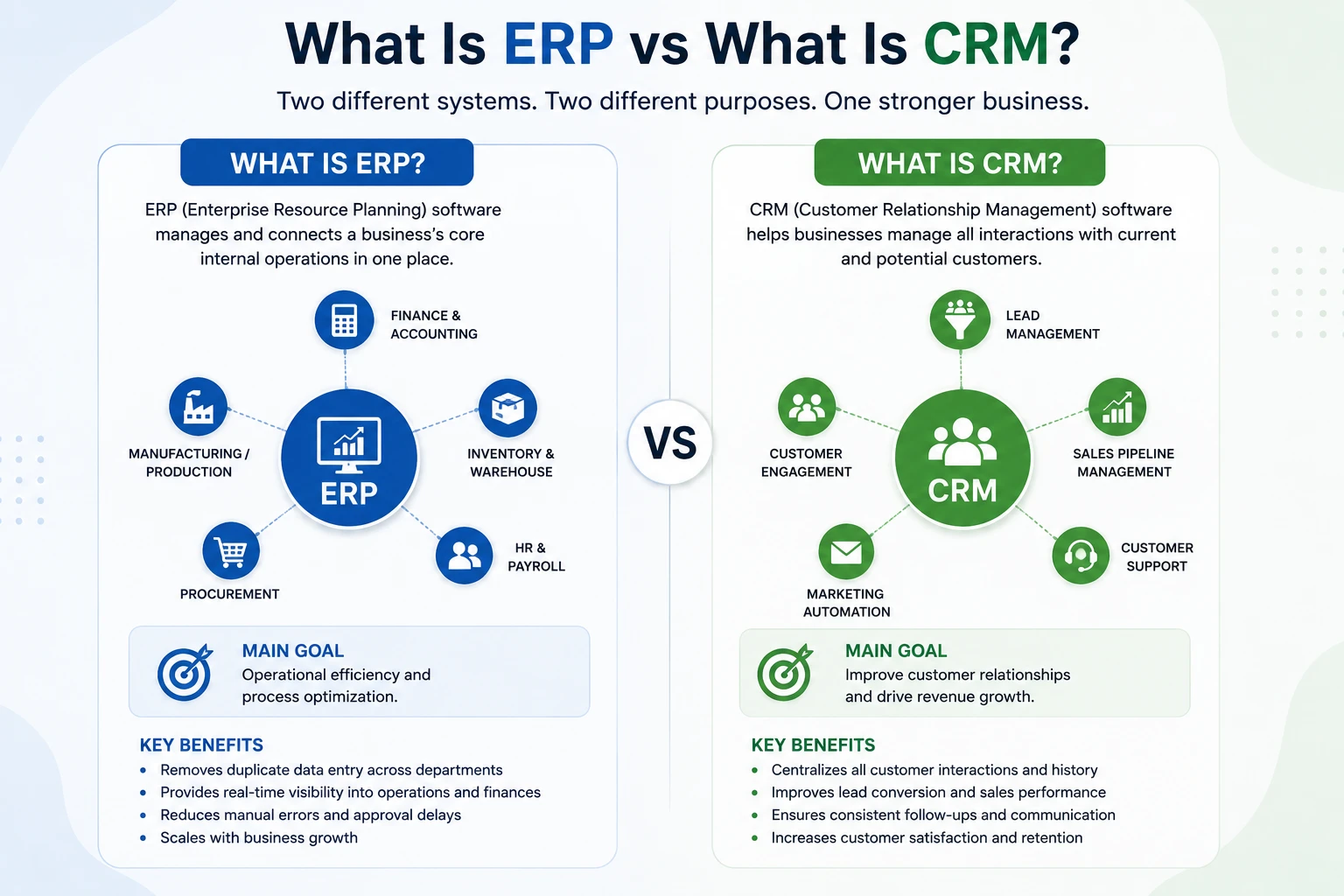
ERP stands for Enterprise Resource Planning. It’s a type of software system that helps a business manage and connect its core internal operations in one place.
Instead of separate tools for accounting, inventory, purchasing, HR, and production, what we have is an ERP system that brings all of those functions together into a single integrated platform. We are to create one single version of the truth across the organization, which in turn means different departments will have access to the same data, which is accurate and up to date.
For instance, when a sale is made, an ERP system will update inventory in real time, trigger a purchase order if stock is out, and update the accounting module, all of which is done without manual input from each team.
Core ERP modules
- Finance and accounting: ledgers, invoicing, expense tracking, financial reporting
- Inventory and warehouse management: stock levels, reorder points, warehouse locations
- HR and payroll: employee records, attendance, salary processing
- Procurement: purchase orders, vendor management, approvals
- Manufacturing or production: bill of materials, production scheduling, quality checks (for manufacturers)
Benefits of ERP
- Removes duplicate data entry across departments
- Gives leadership real-time visibility into finances and operations
- Reduces manual errors in inventory and accounting
- Speeds up approval chains for purchases and expenses
- Scales with the business as new departments or locations get added
What Is CRM?
CRM stands for Customer Relationship Management. It is software that helps businesses manage all interactions with current and potential customers.
At its simplest, a CRM is a single place where a company stores and manages every interaction it has with prospects and customers: who they are, what they’ve bought, what they’ve asked for, and what happens next. But that plain definition undersells it. A CRM is less a “contact list” and more the operational memory of a business – the layer that lets a team act on customer history instead of relying on it staying in someone’s head.
Core CRM functions
- Sales pipeline management: tracking deals from first contact to close
- Lead management: capturing, scoring, and assigning leads
- Marketing automation: email sequences, campaign tracking, follow-ups
- Customer support: ticketing, case history, response tracking
- Keeps every customer interaction in one place, no more digging through inboxes
- Improves lead-to-close conversion rates
- Makes follow-ups consistent instead of dependent on memory
- Strengthens customer retention through better visibility
- Gives marketing and sales a shared view of the pipeline
In short, CRM is the system that helps businesses attract, manage, and keep customers by making every interaction more organized and informed.
ERP vs CRM: Key Differences
You’ll often hear CRM and ERP mentioned in the same breath, but they solve different problems.
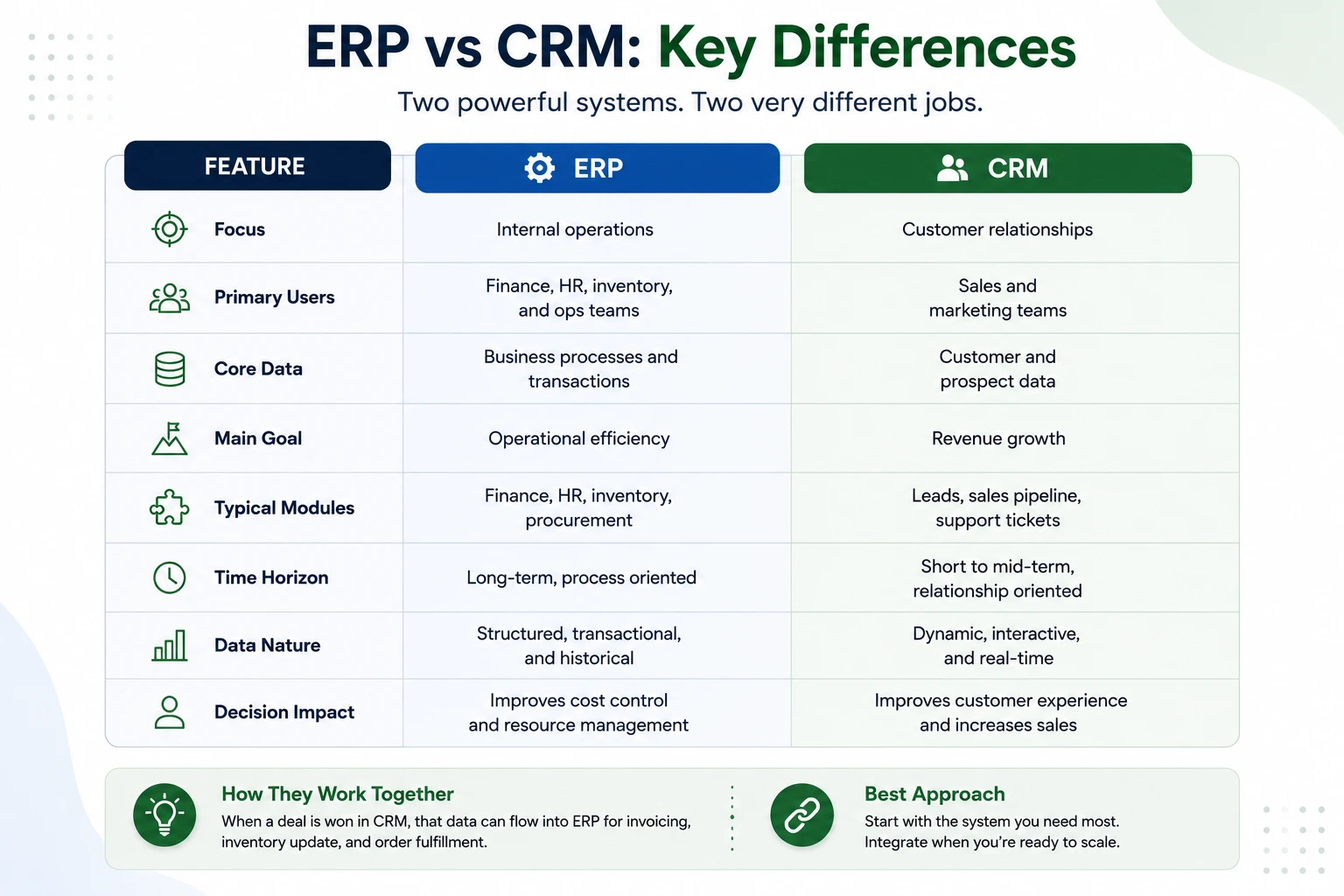
Enterprise Resource Planning (ERP) is software that manages your business’s internal operations, things like inventory, accounting, procurement, HR, and supply chain. It keeps the back office running smoothly.
CRM, on the other hand, focuses on the customer-facing side: sales, marketing, and support interactions.
| Feature | ERP | CRM |
|---|---|---|
| Focus | Internal operations | Customer relationships |
| Primary users | Finance, HR, inventory, and ops teams | Sales and marketing teams |
| Core data | Business processes and transactions | Customer and prospect data |
| Main goal | Operational efficiency | Revenue growth |
| Typical modules | Finance, HR, inventory, procurement | Leads, sales pipeline, support tickets |
Some businesses eventually use both, integrated together, so customer data from the CRM (like a closed deal) flows straight into the ERP for invoicing and fulfilment. But if you’re just starting out, it’s worth implementing them separately and connecting them later, rather than tackling both systems at once.
ERP vs CRM Features: A Closer Look
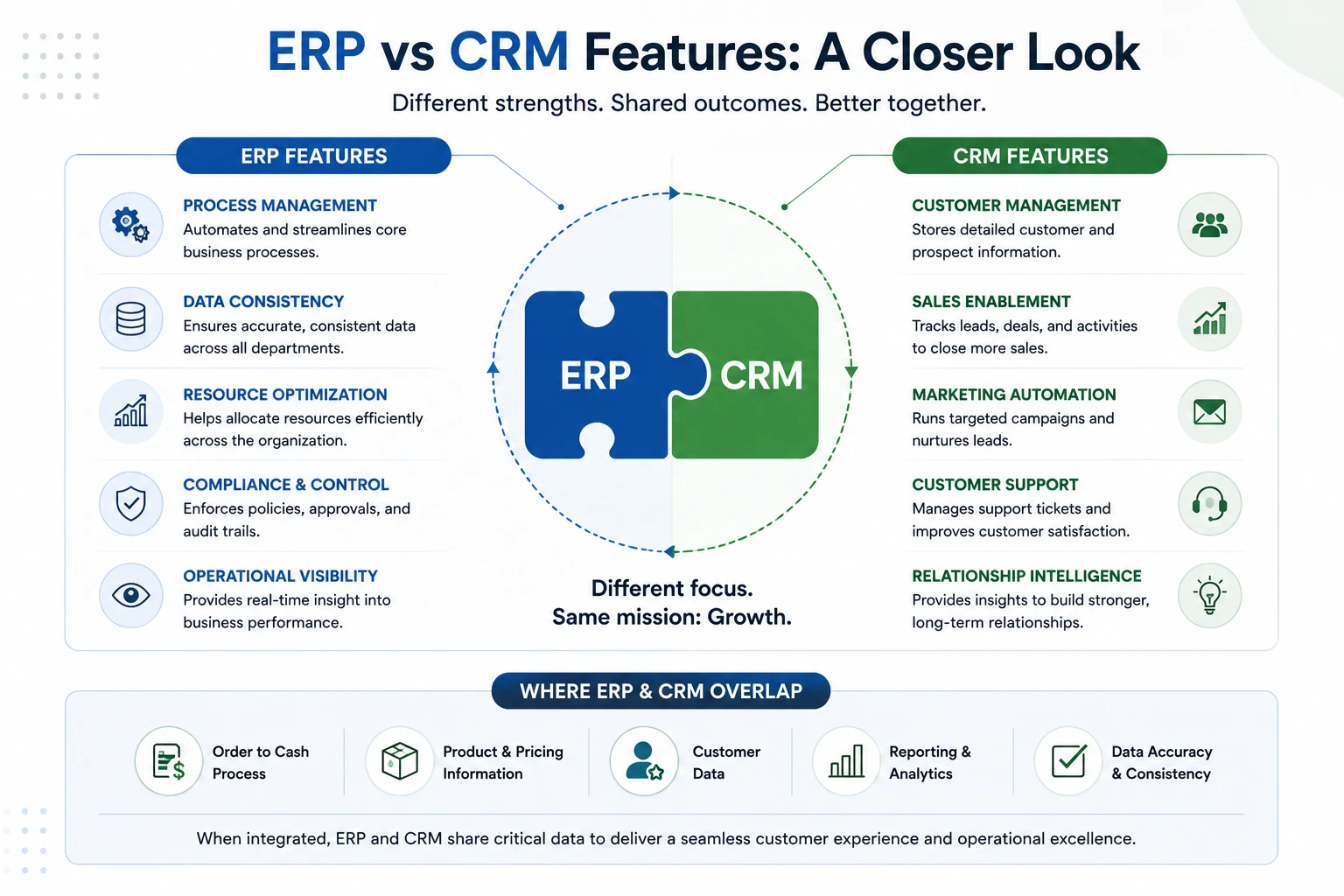
ERP features includes structured and repetitive business processes; at month end we close the books, we do inventory reconciliation, and we run payroll on time. The data is transactional and process-oriented, and accuracy is a higher value than speed of entry.
CRM features centre on relationship data that changes constantly, a lead’s interest level, a customer’s last support issue, and a deal’s likelihood of closing this quarter. The data is fluid, and timeliness often matters more than historical depth.
Where they overlap: Both systems touch customer-facing transactions. When a CRM deal closes, that sale eventually needs to become an invoice, a stock deduction, and a delivery, which is ERP territory. This is exactly where standalone tools start to show cracks, and it’s also why more businesses look for CRM ERP integration instead of running the two in isolation.
Key differentiator: ERP is process-first. CRM is relationship-first. Neither one is “better”; they’re built for different jobs.
ERP vs CRM Use Cases
ERP use case: A manufacturing company managing raw material stock, staff payroll, vendor billing, and monthly financial close, all operational, all internal, none of it customer-facing in the moment.
CRM use case: A sales team juggling forty active leads, tracking who’s ready to buy, who needs another follow-up call, and who’s gone cold, all customer-facing, all relationship-driven.
Put a CRM in front of the manufacturing team, and they’ll have nowhere to log a purchase order. Put an ERP in front of the sales team, and they’ll have no way to track a lead’s last email reply. Same category of problem, “we need software to get organized”, completely different tools.
How ERP and CRM Work Together: A Business Workflow Example
This is where the ERP vs CRM comparison stops being theoretical and starts looking like an actual day at work.
- CRM captures a lead. A prospect fills out a contact form, or a rep adds them after a trade show conversation.
- Sales works the deal in CRM. Calls, proposals, and objection-handling all happen inside the pipeline, with every touchpoint logged.
- The deal closes. The relationship phase is done; now someone has to actually deliver the product or service, which is an operational job, not a sales job.
- ERP takes over from here:
- Creates the sales order
- Deducts stock from inventory
- Generates the invoice
- Schedules delivery
- Logs the transaction in accounting
Here’s the part that trips businesses up: without integration, a human has to manually re-key the deal, customer name, product, quantity, and agreed price from the CRM into ERP, every single time.
That retyping step is where mismatches start: a discount agreed to verbally in CRM doesn’t make it onto the ERP invoice, or a product SKU gets entered slightly wrong and inventory never reconciles. With CRM and ERP integration, the handoff fires the moment the deal closes; ERP already has what it needs to fulfil the order, with nothing lost in translation.
ERP vs CRM: Which One Should You Choose?
There’s no universal answer; it depends on where your business is actually feeling pain.
Choose CRM if:
- Your sales pipeline is disorganized or leads fall through the cracks
- You’re struggling to convert inquiries into paying customers
- Customer follow-ups depend on one person’s memory instead of a system
Choose ERP if:
- Operations span multiple departments that don’t talk to each other
- Inventory counts are unreliable or manually tracked in spreadsheets
- Financial reporting takes days instead of minutes because data lives in five places
Choose both if:
- The business has scaled past the point where a manual handoff between sales and operations still works
- Sales, finance, and inventory all need to see the same customer and order data, not separate versions of it
- You want visibility from the first lead contact all the way through to final delivery, without a gap in the middle
Why ERP and CRM Integration Matters
Run ERP and CRM as two disconnected systems, and a predictable pattern shows up: Sales puts a customer in the CRM, finance re-enters the same customer in ERP for invoicing, and inventory is out of the loop until someone manually updates it. We see this play out in each of our deals, which we do a couple of dozen a month. What is meant to be a small process ends up being a large drain of time and a cause for misaligned records.
Integration fixes this by:
- Improving data flow: one customer record that both systems reference, instead of three slightly different versions
- Reducing duplication: no retyping the same deal into a second system
- Speeding up fulfillment: orders move from “closed” to “shipped and invoiced” without a manual handoff in between
Example integration workflow: A CRM deal closes → the customer and order details sync to ERP automatically → ERP generates the invoice and deducts inventory → finance sees the transaction in real time, without anyone touching a keyboard twice.
Common Mistakes Businesses Make
- Thinking ERP replaces CRM. ERP has no concept of a sales pipeline, lead scoring, or follow-up cadence; that’s simply outside what it was built to track.
- Using CRM for operations. Tracking inventory or running payroll inside CRM “custom fields” works for a while, then quietly breaks once volume grows past what manual tracking can handle.
- Delaying system adoption. Waiting until spreadsheets are unmanageable doesn’t avoid the migration; it just means migrating messier, more tangled data later.
- Not integrating both systems. Buying both tools without connecting them doesn’t remove the manual work; it just relocates it to whoever’s stuck retyping data between the two.
Workdo’s ERP with a Built-In CRM Module: Dash SaaS
A lot of businesses reach the “choose both” stage and then run into a second problem: buying, licensing, and stitching together two separate platforms from two different vendors. Dash SaaS avoids that by shipping the CRM as a built-in module inside the core ERP system, not as a separate purchase or a third-party Add-On bolted on afterward.
Inside a single self-hosted platform, teams can:
- Capture and manage leads directly in the CRM module
- Convert a closed CRM deal into a sales order without re-entering data
- Follow the full customer lifecycle, from first lead to final invoice, in one place
- Let invoicing, inventory deduction, and delivery tracking happen through the same connected system
- Give sales, finance, and operations a shared view instead of siloed tools
Why this matters: Businesses that run separate ERP and CRM tools usually deal with duplicate data entry, integration overhead, and two software bills instead of one. A single connected platform removes that friction by design rather than through a workaround.
Key advantages of this approach:
- ERP and CRM operating in one platform, not two
- No separate licensing cost for the CRM module
- Real-time visibility across sales and operations
- Faster decision-making with one shared data source
- Room to scale as the business adds departments or workspaces
If you’re evaluating ERP vs CRM and keep landing on “we probably need both”, it’s worth looking at Dash SaaS, a self-hosted ERP with multi-workspace support and CRM built into the core rather than layered on top.
Final Thought
ERP and CRM aren’t competing tools; they’re answering different questions. ERP asks, “Is the business running efficiently internally?” The CRM asks, “Are we winning and keeping customers?” Trying to make one system do both jobs is what leads to the messy spreadsheets, duplicate entries, and manual re-keying that eventually force a migration anyway.
The real decision isn’t “ERP or CRM”. It’s about identifying where your current pain actually lives: a disorganised sales pipeline, unreliable inventory, slow financial reporting, and acting accordingly. And once a business scales past manual handoffs between sales and operations, the question shifts again: not whether you need both, but whether you want to manage two disconnected systems or one integrated platform where the handoff happens automatically.
Starting simple and connecting systems later is a reasonable path. But delaying that integration decision indefinitely doesn’t avoid the work; it just means doing it later with more tangled data.
 Frequently Asked Questions (FAQs)
We're Here to Help - Let's Talk
Have questions about our solutions, customization services, or business tools? Our team is here to help you. let's talk.