Notice Board
The Notice Board supports rich-text updates, attachments, priority levels, targeted audiences, comments, and acknowledgement tracking.

Get 50% off all Add-Ons today! Need more? Check Bulk Discounts!
Construction projects involve far more than schedules and task lists. Teams need to manage construction sites, materials, budgets, procurement, safety, equipment, contracts, workloads, and reporting while keeping everything organized.
Our construction field management software brings these essential workflows into one place, giving construction businesses better visibility across project operations. From site tracking and cost control to safety inspections and business analytics, the platform helps teams manage work with greater structure and control.
Explore the complete construction project management software solution to see how these capabilities fit into the wider construction workflow.
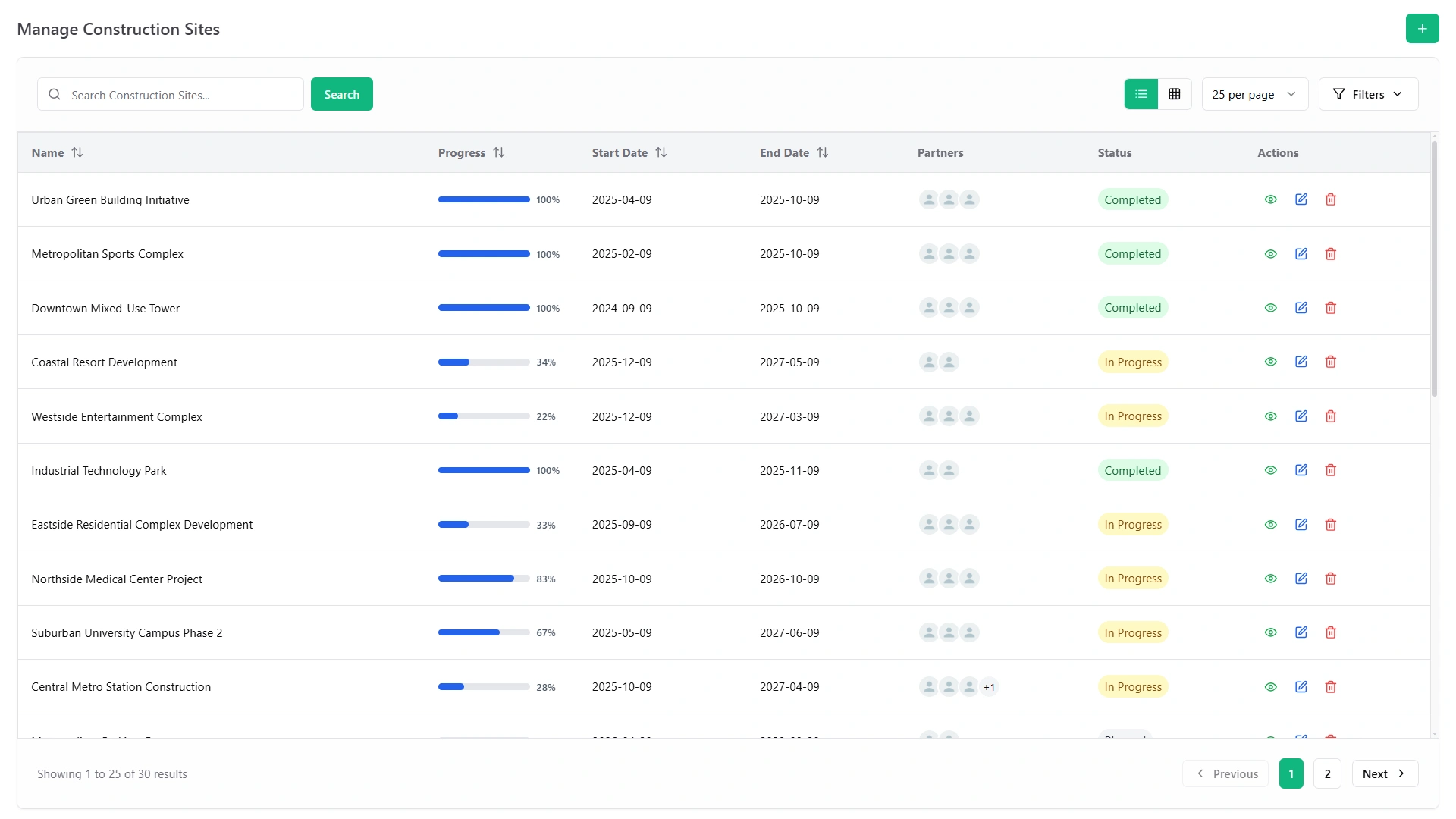
Effective field management starts with knowing what is happening at every site. The platform lets teams create construction sites, assign users and roles, track project status, monitor materials, manage pickings, record scrap, and schedule inspections.
Sites can be tracked through Planned, In Progress, and Completed statuses, while materials include quantity, unit, cost per unit, site, and availability information. Material pickings can capture supplier and delivery details, and internal pickings support movement between sites.
The field dashboard adds another layer of visibility with site status distribution, partner performance, six-month trends, low-stock and scrap breakdowns, and inspection pass/fail counts.
This gives project managers a practical way to monitor field operations without relying on disconnected records.
Good planning creates a clear path from project scope to execution. Construction planning features help teams structure sites, dates, responsibilities, and work capacity before activity begins.
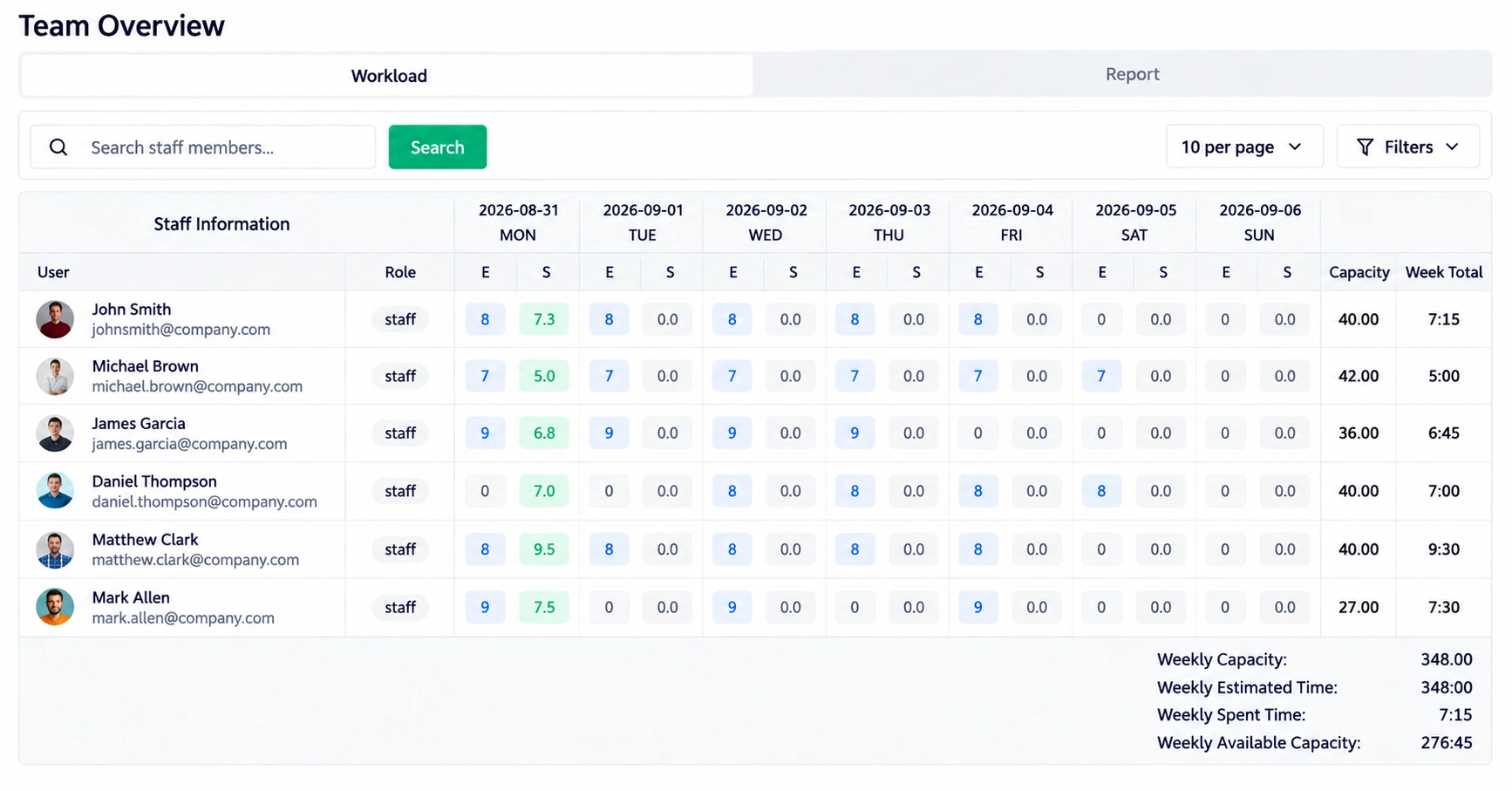
Managers can assign users to specific sites and define roles, while workload management helps them plan around daily and weekly capacity, working days, holidays, and flexible schedules. Estimated and spent time can then be compared to understand whether actual effort matches the original plan.
This makes planning more practical because teams can consider not only what needs to be done, but also who has the capacity to do it.
Construction projects depend on clear communication between field teams, managers, administrators, suppliers, and other stakeholders. The platform centralizes important information and provides tools for communication, reporting, and accountability.
The Notice Board supports rich-text updates, attachments, priority levels, targeted audiences, comments, and acknowledgement tracking.
The Suggestion Box gives employees a structured way to submit ideas, including anonymous suggestions, while managers can review responses through a defined status lifecycle.
For management reporting, the platform provides eight reports covering attendance, payroll, leave, sales invoices, purchase invoices, deal pipelines, stock, and project progress. Each report includes filters, summary metrics, charts, tables, and Excel/PDF export.
Construction costs need continuous monitoring throughout the project. Our construction cost tracking software supports budget creation, fund allocation, spending visibility, and variance analysis.
Businesses can manage Operational, Capital, and Cash Flow budgets across defined periods. Budgets move through Draft, Approved, Active, and Closed stages, while allocations track Spent and Remaining amounts. Journal-entry synchronization supports automated spend tracking, and variance analysis helps identify under- or over-budget performance.
The system also supports tracking of subcontractor costs, site labor, purchases, and expenses, helping project managers understand actual costs alongside planned budgets.
Construction procurement and safety require structured workflows because delays, missing approvals, or unresolved findings can affect project progress.
Procurement capabilities cover RFI, RFQ, and RFP processes, vendor applications, quotation comparison, vendor onboarding, purchase orders, and purchasing coordination.
For safety, teams can issue and manage permits for hot work, confined spaces, and height access. Permit workflows support statuses such as Draft, Pending, Approved, Rejected, Active, Closed, and Cancelled, together with digital signatures and risk levels.
Site safety audits add checklists, 0-10 scoring, automatic Pass/Fail results, compliance percentages, and corrective-action tracking.
Together, these capabilities provide a structured approach to procurement, permits, inspections, and compliance.
Construction operations often extend beyond the project site itself. Equipment, people, contracts, and everyday expenses all need to be managed alongside project activity.
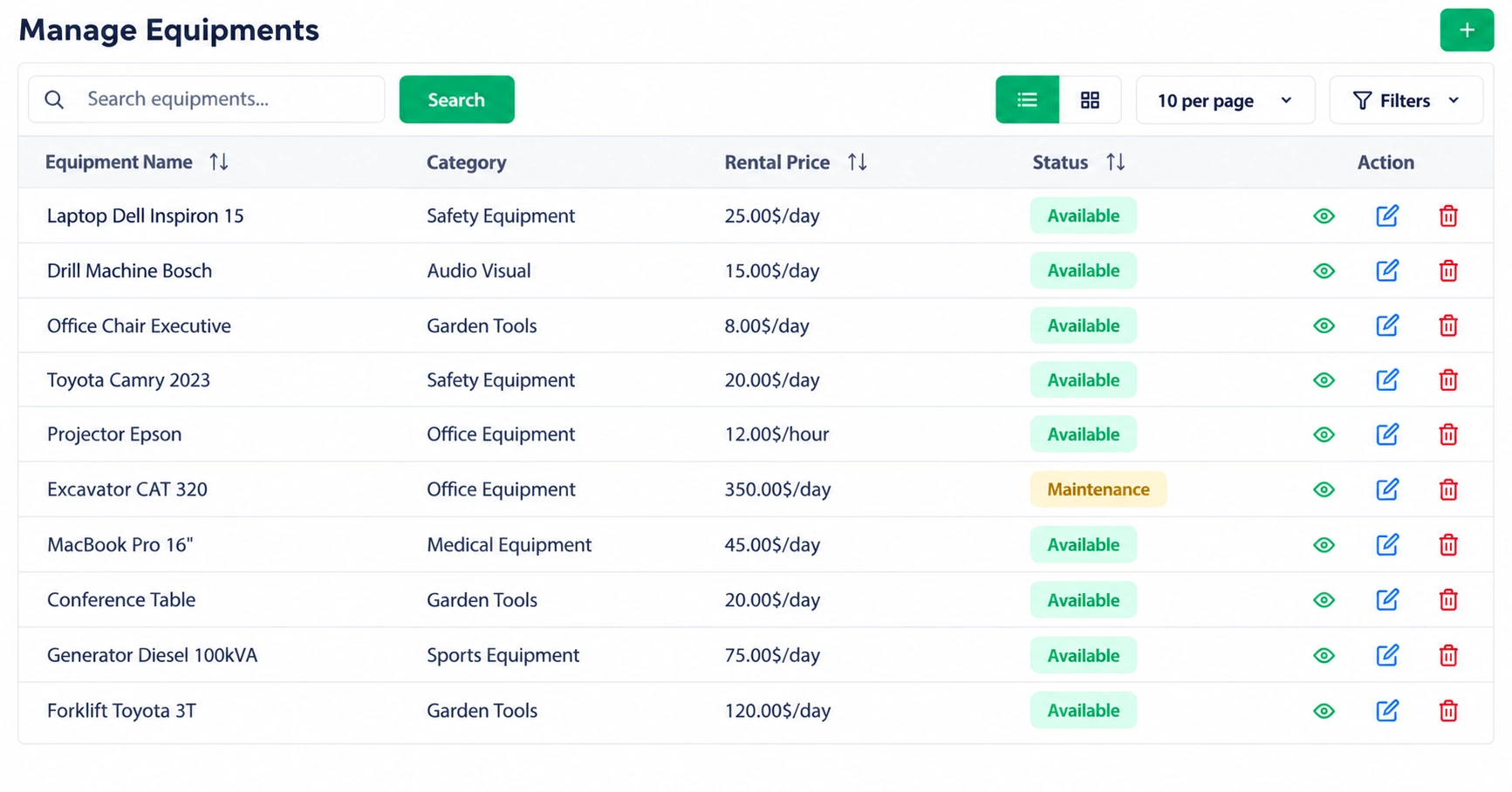
Equipment management supports inventory across warehouses, bookings, daily or hourly rental pricing, payments, returns, repairs, and lost-item tracking.
Workload management helps teams compare capacity with utilization through working-hour settings, timesheets, and estimated-versus-spent time.
Contract management supports agreements, values, dates, signatures, attachments, renewals, and audit history, while petty cash features handle funds, employee requests, reimbursements, receipts, and expense reporting.
Construction businesses need to understand more than individual project records. Managers also need visibility into financial performance, sales, inventory, operations, and cash flow.
Smart Dashboard Analytics combines these areas into a real-time management view covering executive, financial, sales and customer, and operational information. It includes metrics such as revenue, expenses, profitability, cash flow, inventory, purchases, vendors, and project performance.
The AI Business Advisor adds daily analysis through a Business Health Score, Insights, Recommendations, and Alerts, using financial, sales, team, project, and operations data.
These capabilities help management move from simply reviewing information to identifying areas that deserve attention.
Construction work moves through several stages, and each stage requires different controls. Construction operations rarely follow isolated processes. A project moves through multiple stages, and each stage requires different information.
The platform follows a six-stage workflow:
For example, a project can begin with site planning and budget setup, move into procurement and permit approvals, continue through material and team coordination, and then progress into inspections, corrective actions, reporting, and project closeout.
This approach gives teams a consistent structure for managing construction from start to finish. This workflow provides a clear structure for using construction management software features throughout the project lifecycle.
A construction platform is most useful when it supports the processes surrounding the project, not just task management.
With the right construction management software features, teams can manage field activity, materials, procurement, budgets, safety, equipment, people, contracts, expenses, reporting, analytics, and business insights from one organized system.
From construction field management software and planning tools to cost tracking, procurement, safety, equipment, reporting, analytics, and AI insights, WorkDo provides the capabilities construction teams need to organize daily operations and manage projects with greater visibility.
Explore the complete construction project management software solution and see how WorkDo can help bring your construction workflows into one place.