Most hotel management software features lists cover the same ground - front desk, reservations, channel sync, and a revenue dashboard. These are table-stakes capabilities every property needs. But a hotel's actual operational picture is wider: the restaurant taking QR-code orders at 80 tables, the events team coordinating a 200-guest conference, the parking attendant tracking which bay is occupied, the front desk logging a non-guest visitor, the finance team closing the month with a complete accounting ledger. This page maps every hotel management software feature included in this system - the standard capabilities every operator expects, and the operational layers most hotel software skips entirely.
Front Desk
Front Desk and Reservation Management Features
The hotel front desk is where every guest's experience either starts well or starts under pressure. Hotel front desk software features determine how fast your team moves, how complete the guest record is, and how reliably reservations convert to paid, satisfied stays.
Real-Time Room Inventory and Live Availability
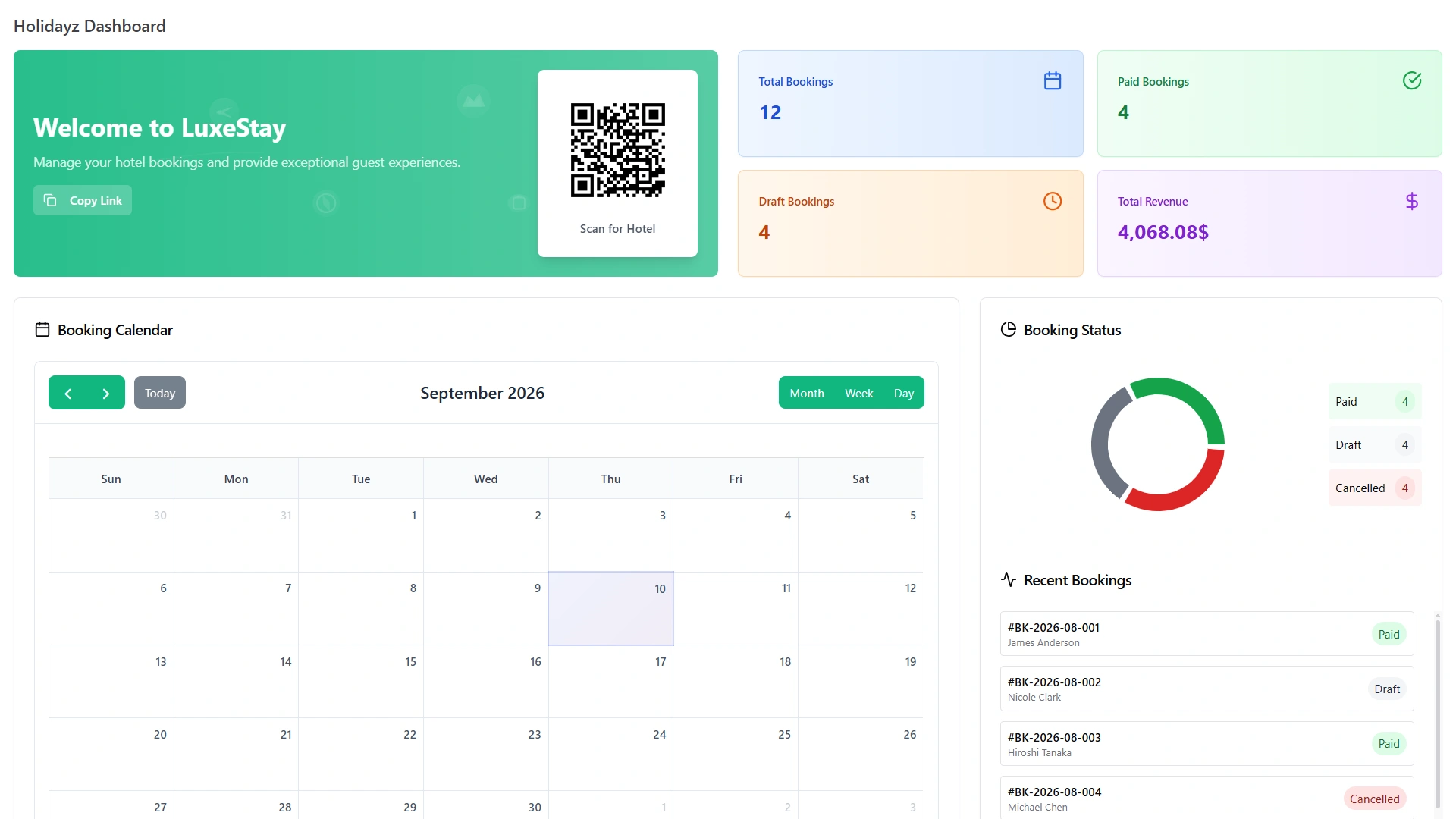
Room types are configured with unlimited detail - capacity, pricing tiers, amenities, high-resolution photos, and tax rules. Availability updates the moment any booking is created, modified, or cancelled, preventing double bookings automatically across all channels. The admin dashboard shows total bookings, draft bookings, paid bookings, and live revenue through an interactive booking calendar in month, week, and day views - no manual refresh, no delayed sync.
Reservation Management and Booking Calendar
Every reservation carries a complete record: guest information, selected room, check-in and check-out dates, added facilities, applied taxes, coupon discounts, special requests, and real-time payment status - all visible from the booking calendar without running a separate report. Walk-in guest handling, group reservations, and multi-night extended stay management are all supported within the same hotel reception software interface.
Guest Profiles and Front Office Records
Every guest profile connects contact details, booking history, previous stay notes, uploaded documents, and payment records in one place. The hotel front office software pulls the complete guest record at check-in - so returning guests feel recognized and the front desk has the full picture before the guest reaches the desk. Check-in takes minutes, not processes. The guest directory is searchable by name, email, or booking reference at any time.
Hotel Service Portal - Guest Self-Service From Any Device
The hotel service portal is the guest-facing layer where registered guests interact with the property beyond the front desk. From a mobile-responsive guest account, they view their booking history, manage upcoming reservations, access their payment history, download invoices, and submit post-stay reviews - without contacting the front desk for any of it. The portal is accessible from any device, at any time, without an app download.
On-site, QR codes placed at dining tables, parking bays, locker areas, and lobby displays let guests order food, book a parking slot, request safe deposit locker access, and track open requests from their own phone. Every action through the portal posts automatically to the guest's folio, the relevant department's dashboard, and the hotel's financial reports in one connected update - no manual entry, no handoff between systems.
This is the hotel front office software feature that most reduces routine inbound front-desk contact. When guests can self-serve the questions they would otherwise call about, front desk staff reclaim time for the service interactions that actually benefit from a human conversation.
Restaurant and Food & Beverage Management Features
Hotel restaurant software is typically offered as a POS integration - a separate system that syncs with the hotel management platform when it works and creates reconciliation gaps when it does not. These restaurant management features are built into the same system as room reservations, guest profiles, and hotel accounting - sharing one data layer with no synchronisation required.
Digital Menu Builder and QR Code Table Ordering
Menu categories are configured with custom colours and images. Individual items support variant pricing (size, toppings, extras), nutritional information, and promotional discounts. Guests scan table-specific QR codes from their own devices and place orders directly, viewing real-time status from Placed to Preparing to Delivered without waiting for a waiter. Order history and dietary preferences build automatically per guest across visits.
Table Management and Online Restaurant Reservations
Dining tables are configured with unique identifiers, seating capacity, and real-time occupancy status. Online reservations accept bookings with date and time selection, party size, special occasion notes, and dietary restrictions - sending automatic confirmation emails without front desk involvement. The kitchen dashboard shows active orders by table and status simultaneously, reducing communication gaps between floor and kitchen.
Promotional Offers and Multi-Venue Support
Percentage and fixed-amount promotional offers are created with validity periods, applied automatically at the point of order. For hotels with multiple restaurants or dining venues, each location runs its own menu, table configuration, and order management from the same platform - one login, no separate hotel restaurant software subscription per venue.
Events
Events and Banquet Management Features
No mainstream hotel management software features list includes events management - yet conferences, weddings, and corporate functions are among the highest-margin revenue streams a hotel generates. These features cover the complete event lifecycle from listing to ticket sale to entry to post-event analytics.
Event Planning and Multi-Slot Scheduling
Events are created with venue, category, capacity, timing, and ticket pricing. Multi-slot scheduling supports properties with multiple function rooms or recurring event formats - each slot manages its own bookings, capacity, and attendee list independently. A public-facing event portal displays available functions with descriptions, photos, testimonials, FAQ content, and direct booking links.
Online Ticket Booking and Barcode Entry Validation
Guests book event tickets through the hotel's event portal, paying via Stripe or PayPal. Each booking generates an auto-referenced ticket number and a downloadable PDF ticket with a barcode. At the event entrance, staff scan barcodes for instant entry validation - no paper guest list, no manual check-off. QR code links to specific event booking pages can be placed on signage, email campaigns, or social posts.
Event Analytics and Revenue Reporting
The real-time analytics dashboard tracks total events created, bookings by status (confirmed, pending, cancelled), monthly booking volume by category, and total ticket revenue by period. Category-wise line charts show performance trends across event types - conferences, weddings, training sessions, or any custom category the property defines. All event ticket income flows directly into the hotel's financial reports without a manual export or reconciliation step.
For hotels running events alongside room operations, this means the general manager sees banquet revenue, room revenue, restaurant income, and parking fees on the same financial dashboard - an accurate view of total property performance rather than separate reports from disconnected systems. Properties hosting regular functions can compare event periods and identify which formats, pricing structures, or venues drive the strongest returns.
Guest Services Features - Parking, Lockers, and Visitor Management
These are the hotel management system features that most software treats as optional bolt-ons or ignores entirely. For properties managing a parking facility, a safe deposit locker service, or controlled access for non-guests, they are daily operational necessities.
Hotel Parking Management
Guests view real-time parking slot availability - green for open, red for occupied - and complete a four-step online booking: select slot type, choose start and end times, pay via Stripe, PayPal, or cash, and receive a booking confirmation with reference number. Check-in and check-out are tracked with visit duration calculated automatically. PDF receipts generate on demand from the guest's booking record.
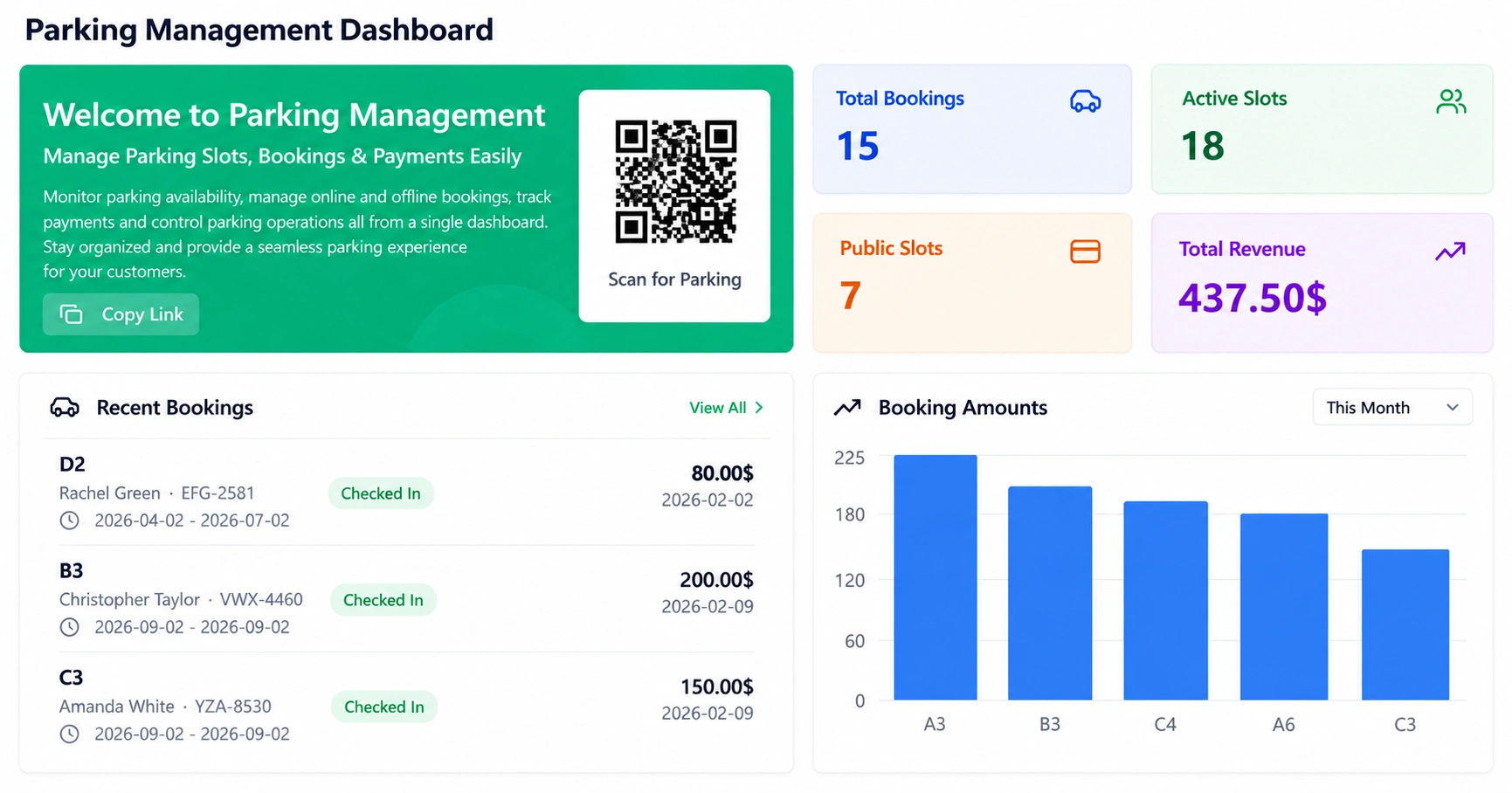
The hotel parking management dashboard shows slot occupancy at a glance, with weekly revenue trend charts and booking history per slot type. Parking revenue tracks alongside room revenue and restaurant income in the hotel's main financial dashboard - one report covering every department, one system managing every booking. For hotels where parking is a meaningful revenue line, this visibility changes how the facility is managed and priced.
Safe Deposit Locker Management
Lockers are configured by type, size, capacity, and rental pricing (monthly or yearly). Membership plans allocate lockers automatically based on date availability. Key access control records key type, condition, and current holder per locker. Renewal alerts fire before any membership lapses. A maintenance log per locker records repair jobs - technician assigned, issue description, and resolution date - accessible in the locker's permanent history.
Visitor Management and Hotel Front Desk Log
Every non-guest visitor is logged digitally at the front desk on arrival: name, purpose, host, arrival time, and assigned badge number. Pre-registration allows expected visitors to be entered before they arrive, reducing reception congestion during busy check-in periods. Compliance document types and verification dates track per visitor for properties with regulated access - every entry builds an auditable compliance record without a paper register.
Departure time records automatically when the visitor checks out, calculating total visit duration. Incidents are logged with location, the responsible staff member, priority level, and Open or Closed resolution status - creating a searchable accountability trail for any on-site event. A real-time timeline shows who is currently on the property, updated instantly as each visitor enters or leaves. Visual bar-chart and pie-chart reports show visitor volume and visit purpose patterns across any selected date range.
Finance
Financial Management and Accounting Features
Hotel financial management features should connect every revenue stream and expense category into one live accounting picture - not generate a standalone invoice and stop there.
Chart of Accounts and Journal Entries.
A structured Chart of Accounts covers every income and expense category across the hotel: room revenue, F&B income, parking fees, event ticket sales, supplier invoices, and operational costs. Journal Entries are created manually or generated automatically from system transactions.
General Ledger, Balance Sheet, and Trial Balance.
Every transaction posts to the General Ledger in real time. The Balance Sheet and Trial Balance are always current - month-end is a review, not a compilation exercise.
Automated invoice generation.
Invoices generate when bookings are confirmed. Room rate, selected facilities, applicable tax, and any coupon discount are calculated and applied to the guest folio automatically. Partial payments, deposits, and refunds are handled within the same accounting ledger.
Asset management with depreciation.
Every piece of hotel furniture, equipment, and fixture is catalogued with location, condition, purchase date, and acquisition cost. Annual depreciation calculates automatically using Straight Line, Declining Balance, or Sum of Years - configured per asset with useful life and salvage value. The asset register gives the finance team an accurate capital value picture at any time.
Maintenance cost tracking.
Maintenance jobs logged through the system carry contractor assignment, priority level (Low / Medium / High / Critical), resolution date, and repair cost - automatically updating the per-property expense report. Separate hotel maintenance software is not required.
Communication
Guest Communication and Operations Automation Features
These hotel management software features handle the communication and accountability layer - keeping every department connected without manual coordination between shifts, systems, or staff.
WhatsApp Business API Integration
Reservation confirmations, pre-arrival reminders, check-in instructions, and post-stay thank-you messages reach guests on WhatsApp automatically. For hotels serving guests in India, Southeast Asia, the Middle East, and Latin America, WhatsApp is not a supplementary channel - it is where guests actually open and respond to messages. Email confirmation open rates in hospitality average below 25%; WhatsApp messages regularly see open rates above 90%.
Messages are triggered automatically by booking events: confirmation on reservation, reminder 24 hours before arrival, welcome message at check-in, and feedback request after checkout. The hotel team sets the triggers once; the system handles every communication that follows. No additional messaging platform subscription is required - WhatsApp communication is a built-in hotel management software feature, not a connected third-party tool.
Automated Reminders and Scheduled Alerts
Upcoming arrivals, overdue payments, contract renewal dates, maintenance schedules, and license expiry dates generate alerts automatically before each event arrives. Nothing in hotel operations depends on a staff member remembering to follow up. Reminders are configured once and fire on schedule for every property the system manages.
Post-Stay Feedback Collection
Checkout triggers an automated feedback email to the guest collecting a star rating and written comments. Feedback stores per stay in a filterable history - visible by date, rating, or guest name. Rather than waiting for a third-party review site to surface a problem, the hotel receives structured feedback directly after every checkout and can act on it the same day.
Activity Log and Audit Trail
A permanent, timestamped record of every action taken by every user across all hotel management software features - filterable by staff member, date, and module. Records cannot be edited after the fact. When a payment is disputed, an invoice is questioned, or a booking is changed without explanation, the activity log shows exactly who acted, what changed, and when - without relying on staff recall or reconstructing events from email threads.
For hotels with multiple staff members accessing the system across different shifts, the audit trail is the accountability layer that makes distributed operations manageable. Every department's activity is logged in the same place: front desk check-ins, restaurant order updates, parking assignments, maintenance closures, contract modifications, and financial entries all appear in one searchable, permanent record.
One System
What These Hotel Management Software Features Have in Common
Every feature described on this page runs on the same data layer - not assembled from separate tools connected at the login screen.
When a restaurant order is placed, it posts to the guest's room folio automatically - no manual transfer between hotel restaurant software and the PMS.
When an event ticket is purchased, the revenue appears in the hotel's financial report immediately - no export, no reconciliation.
When a maintenance job closes, the repair cost updates the per-property expense report - no entry into a separate hotel maintenance software platform.
When a visitor checks in at the front desk, the log is timestamped and searchable - no paper register to transcribe later.
When a parking slot is booked, it appears as unavailable instantly - no phone call to confirm with the front desk.
When a guest submits post-stay feedback, it stores in the hotel's feedback history with the stay date and rating - no third-party survey tool required, no manual collection.
When a vendor contract is signed digitally, it saves to the document vault with both signatures confirmed - no separate contract management platform and no filing system to maintain.
According to Market Research Intellect, hotels that automate operational workflows reduce costs by up to 30%. That reduction compounds only when the modules covering every revenue stream and operational touchpoint are in one connected system - not split across separate subscriptions that each require their own maintenance, training, and monthly fee.
One purchase covers every hotel management software feature on this page. Front desk, reservations, hotel service portal, restaurant, events, parking, lockers, visitor management, double-entry accounting, asset management, WhatsApp, reminders, feedback, contracts, documents, calendar sync, and activity log - all included, all connected, no recurring licence.
Frequently Asked Questions About Hotel Management Software Features
Complete hotel management software features include front desk and reservation management, restaurant management, events and banquet booking, parking, safe deposit lockers, visitor tracking, double-entry accounting, WhatsApp communication, and automated feedback collection.
A hotel service portal is a guest-facing account where registered guests view bookings, access payment history, submit reviews, and - through QR codes on site - order food, book parking, and request locker access from their own device.
Hotel front desk software manages check-in, check-out, room assignment, guest profiles, reservation records, and billing from one interface - giving front desk staff a complete operational view without switching between separate tools.
Built-in hotel restaurant software connects menus, QR code table orders, online reservations, and dining charges directly to the guest folio - no manual transfer between a separate POS system and the hotel management platform.
Most hotel management platforms do not include events management. This system does - covering event creation, multi-slot scheduling, online ticket booking with payment processing, barcode entry validation, and event revenue analytics.
Self-hosted hotel front desk software runs on your own server, keeping all guest data and booking history under your control. No vendor cloud dependency, no monthly licence fee, and no risk of access changes if the provider changes pricing.