


Digital Document Management system for Modern Workplaces
A document management system for secure, digital storage and easy organization of employee records.
Complete Document Lifecycle Management
Manage documents seamlessly from creation to archival with structured workflows, secure access, and compliance-ready controls.
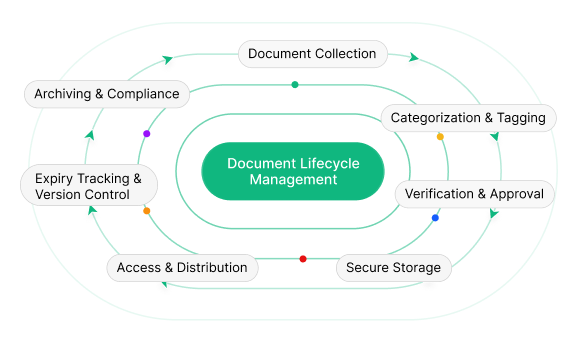
Complete How the Document Management Process Works
A modern system streamlines file handling with secure workflows, automation, and clear visibility across the entire lifecycle.
-
Step 1
Upload or Create Documents
Using the system software, HR teams can upload files in multiple formats or create them using built-in templates. This ensures every file enters the platform securely and in an organized structure.
-
Step 2
Categorize & Organize Files
Files are arranged through categories, departments, and tags to support effective records handling. This structured approach improves searchability and keeps information organized.
-
Step 3
Configure Access & Rules
HR teams define viewing, editing, and download permissions using role-based controls. This step ensures secure software document management while allowing HR to set expiry dates and acknowledgment requirements.
-
Step 4
Review, Verify & Publish
Before files are shared, they can be reviewed and verified within the software. Once approved, they are published and made available to the right users through controlled access.
-
Step 5
Employee Access via HR Document Management
Employees access assigned files through the HR platform, ensuring clarity and transparency. Important policies and notices can require acknowledgment, supporting structured HR processes.
-
Step 6
Track Usage & Compliance
The system tracks views, downloads, and acknowledgments in real time. This visibility helps HR teams manage compliance efficiently using reliable document management solutions and reduces manual follow-ups.
-
Step 7
Version Control & Expiry Monitoring
Every update is tracked with version control while expiry monitoring highlights outdated files. This ensures accurate records and supports consistent HR practices.
-
Step 8
Archive & Audit Readiness
Expired or inactive files are archived securely, maintaining a complete history for audits. This documentation management software keeps organizations audit-ready while ensuring long-term data integrity.
Common Document Management Features
Quickly manage, track, and share HR documents with secure access and employee self-service tools.
Comprehensive HR Document Management System
Centralize, organize, and control all company documents with advanced HR compliance, templates, and access tracking.
HR Documents Management
Manage all employee and company files using reliable software built for HR teams. This solution supports multiple file formats and ensures accurate tracking throughout the document lifecycle.
The system automatically captures metadata such as file size, version, and uploader details. HR teams can publish or expire files and configure validity dates to avoid outdated or non-compliant records, making it a dependable management solution.
Centralized Document Repository
A powerful platform for HR teams to store, organize, and secure all company records in one place. This centralized repository improves accessibility, compliance, and control while acting as a scalable solution.
- Centralized HR repository
- Department and category based file management
- Secure employee documentation handling
- Controlled access with HR software
Document Categories Management
This feature enables HR teams to create structured categories for better organization. Categories can be customized with names, descriptions, icons, and colors to improve clarity and usability.
HR can configure categories as mandatory or optional, manage category order, view file counts, and activate or deactivate categories anytime—ensuring flexible and organized usage.
Access Control & Security
Ensure complete data protection with role-based permissions. This HR system clearly separates admin and employee views to prevent unauthorized access.
Access is strictly controlled with defined viewing and download permissions, making it a secure solution for modern HR teams.
Expiry Management
Track file validity effortlessly with expiry-date–based monitoring. This feature ensures outdated files are identified on time and compliance risks are reduced. Expired files are visually highlighted, helping HR teams take quick action.
- Expiry-date based tracking
- Visual highlighting of expired files
- Improved compliance awareness
Download & Usage Tracking
Gain visibility into file access and usage with intelligent tracking. HR teams can analyze engagement to improve internal communication. The system tracks downloads automatically, offering clear insights.
- One-click download
- Download count tracking per file
- usage and engagement visibility
Document Acknowledgment Management
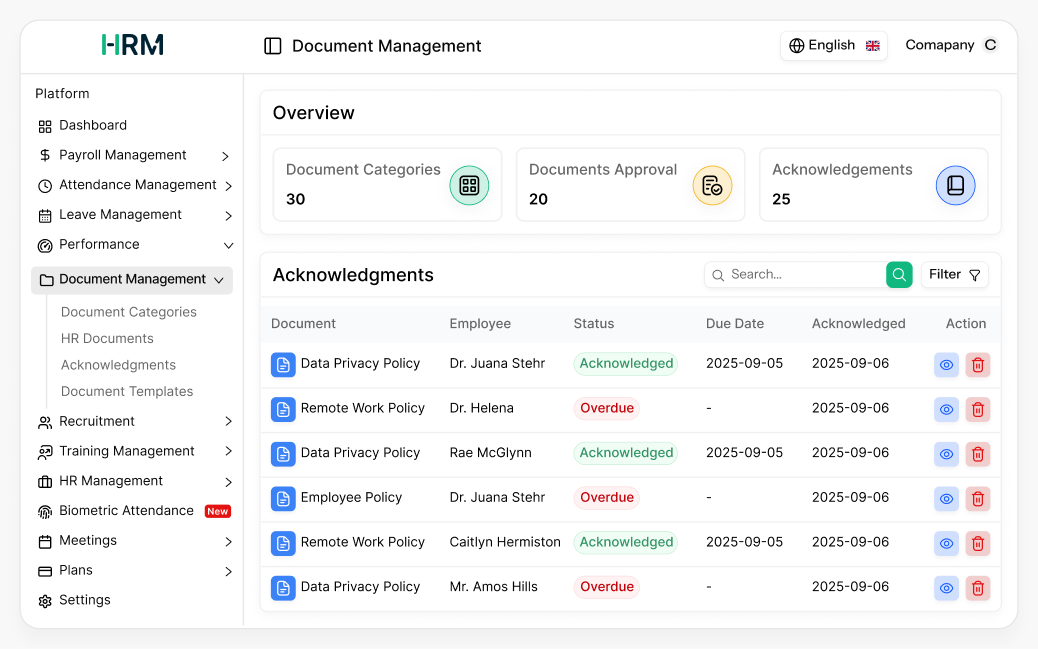
Ensure employees read and acknowledge critical files using structured workflows. Documents can be assigned by HR or managers with defined due dates. HR teams can track progress in real time, reducing follow-ups and strengthening compliance.
- Assign documents for employee acknowledgment
- Track Pending, Acknowledged, or Overdue status
- Configure acknowledgment due dates
- Track assignment source (HR or Manager)
Acknowledgment Status & Overdue Visibility
Maintain transparency in employee document management solutions with clear acknowledgment status indicators. The system automatically calculates overdue days and displays timelines for each assigned file.
HR teams can instantly view assigned dates, due dates, and acknowledgment dates, making follow-ups more efficient and data-driven.
Compliance & Audit Tracking
Strengthen compliance with employee-level tracking. This ensures no acknowledgment is missed and all records remain audit-ready. Complete history is maintained for every file, supporting audits with confidence.
- Employee-level compliance monitoring
- Overdue acknowledgment detection
- Complete acknowledgment history
- Audit-ready compliance records
Document Templates Management
Standardize HR communication with reusable templates. Templates help teams save time while maintaining consistency across records. Each template tracks placeholder count and content length, supports PDF generation, and can be activated or deactivated as needed.
- Create and manage HR templates
- Track placeholder count and content length
- Generate in PDF format
- Activate or deactivate templates
Employee Document Access (ESS)
Provide employees with secure self-service portal access. They can view only assigned and published records, ensuring privacy and clarity.
The file list is clean, intuitive, and easy to navigate, improving overall user experience.
Access & Document Control Management
HR teams maintain complete control over document handling, visibility, and lifecycle using permission-based access in this doc management software. Sensitive files remain protected while HR retains operational control.
- Preview HR and company files easily
- Upload and manage records securely
- Download files with permission control
- Edit details when required
- Update or replace existing files
- Manage status: published or expired
- HR-controlled access permissions
Employee Self-Service Document Portal (ESS)
Empower employees with self-service access to assigned HR files. This reduces HR workload and improves transparency.
- View assigned HR documents securely
- Download permitted files anytime
- Acknowledge assigned policies and guidelines
- Access offer letters and certificates
- Track acknowledgment status in real time
- Reduced HR follow-ups and manual requests
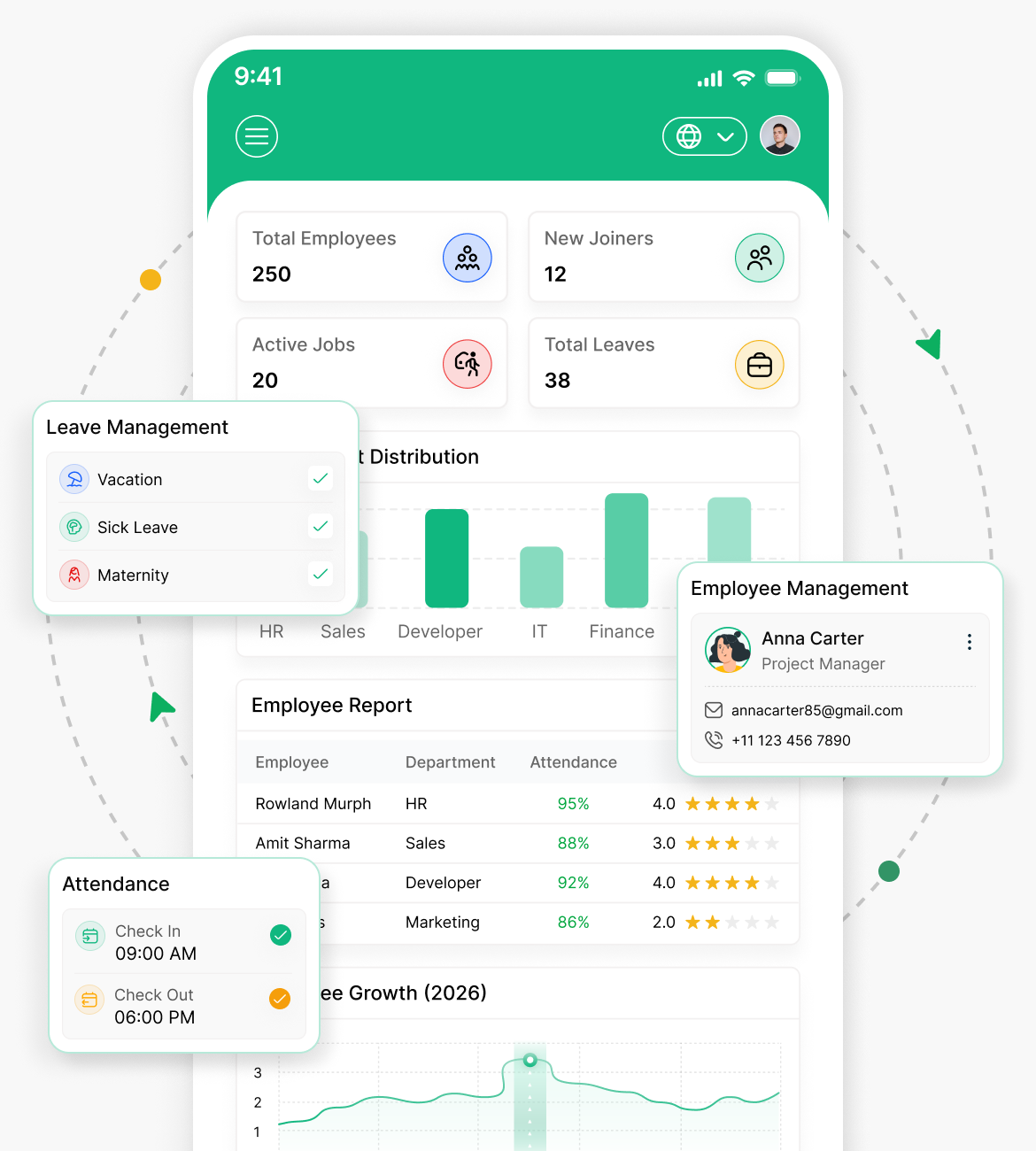
Easily Access & Manage Documents Anytime, Anywhere
Keep your HR files organized, secure, and available right from your mobile device. Simplify workflows and save time.
Automatically categorize files for quick search
Role-based access for maximum security
Manage files directly from your phone
Stay updated on document changes
Why Choose Our Document Management System?
A secure software solution that centralizes, organizes, and manages files for faster access, stronger security, and better efficiency.
Centralized Document Management Software
Manage all business files in one secure system that acts as a central hub for easy access, smart organization, and full control.
Secure & Scalable File Management Solution
This reliable solution offers role-based permissions and secure storage, making it ideal for growing organizations.
Advanced HR Document Management System
Simplify employee records with modern tools designed to support compliance, confidentiality, and smooth HR workflows.
Smart Search & Easy Document Control
Quickly find, manage, and update files using an intuitive interface that boosts productivity and reduces manual effort.
What Our Clients Say About Us
See what our customers are saying about their experience with our products.

infinitiedip09
Great code quality of HRM SaaS. The structure is well designed and the implementation feels solid, stable, and reliable for real development usage.
akhrot-1989
Latest software with an easy-to-manage admin panel. The support team is very friendly and responsive, and they quickly resolve issues whenever they appear. They also helped me fix AWS storage integration smoothly and efficiently, which made the overall setup experience much better. Highly recommended.
luiseduardo_galindo
It’s an easy-to-customize website that perfectly fits my development project needs. The flexibility allows me to modify and adapt features without difficulty, making it very useful for practical implementation.
aoxoex
Not good experience because the installation process is not working properly and caused multiple issues during setup, making it difficult to use the system effectively.
fairuzajaff
This script is one of the best HRM systems I have used so far. It is practical, useful, and covers most essential requirements needed for managing HR-related tasks efficiently. Recommended for anyone looking for a reliable HRM solution.
kenyalifestyle
The code quality is good, clean, and structured in a way that makes it easy to understand and use for development purposes without unnecessary complexity.
Mr0Human
The script works well and is easy to use for generating monthly payslips. However, it currently lacks a bi-weekly payment option, which could be useful for some businesses depending on their payroll structure and needs.
DevUSA
Thanks for the support provided during usage, everything was handled professionally and the assistance helped resolve my queries in a simple and clear manner.
NisvetReiz
Great system overall with very helpful support. The experience has been smooth, and the support team is always responsive and ready to assist whenever required, making it reliable for long-term use.
eximanshu
Loved the product and I am fully satisfied with both the support and the script. Everything works as expected and the overall experience has been very smooth and reliable from start to finish.
Intelligent Document Management for Efficient HR Operations
Access, upload, and track important files anytime, anywhere with mobile-ready tools.