

Property Management Software Features - Every Module, Fully Listed
Here is the complete breakdown of every property management system feature included - from tenant onboarding to security guard shift scheduling, from lease e-signatures to equipment audit trails.
Most property management software features lists show eight items and stop. Rent collection, a maintenance tracker, a tenant portal - then nothing. Buyers discover months later that their system cannot handle housing society billing, security guard scheduling, visitor compliance tracking, or petty cash approval workflows. This page is different. It covers every feature of this property management system, grouped by the work you actually do, so nothing is a surprise after purchase.
The global property management software market surpassed $26.55 billion in 2025 and is projected to nearly double by 2032, according to Fortune Business Insights - a number that reflects how central these tools have become to property businesses of every scale. Whether you manage five rental units or fifty society towers, this system covers the same operational ground. Fourteen modules, one purchase, one connected platform.
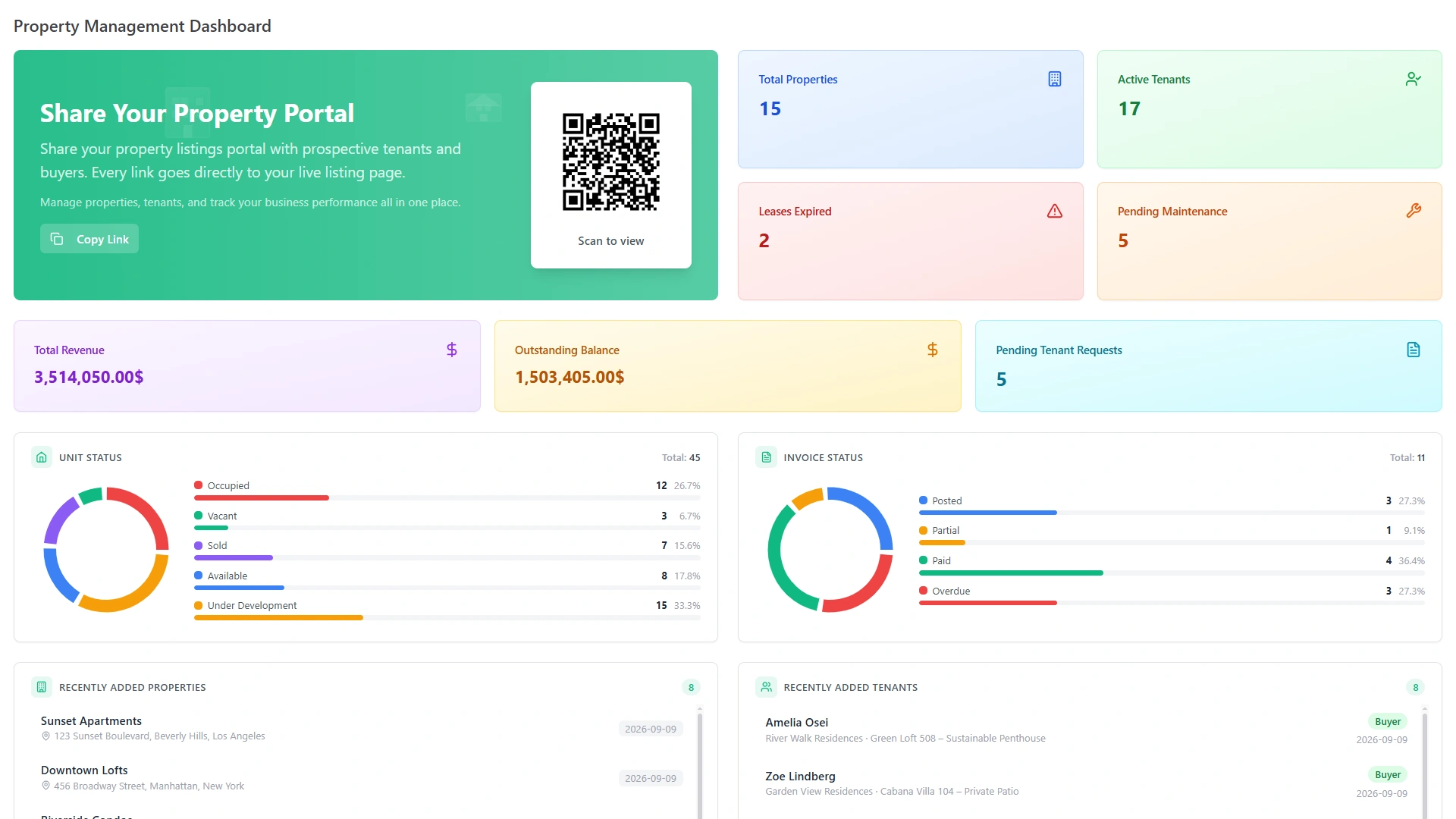
Tenant Management & Lease Administration
The operational relationship between a property and its tenant begins before the lease is signed and extends beyond the day they leave. This section of the system covers the full tenant lifecycle - onboarding, self-service access, lease creation, renewal management, and offboarding - without gaps.
-
Tenant onboarding and profile creation. When a tenant joins a property, their complete profile is created inside the system: contact details, emergency contacts, family members, uploaded documents, and primary occupant designation. Everything is linked to the assigned unit from day one.
-
Tenant self-service portal. Each tenant gets a dedicated account. From there they can check their active lease terms, view their full payment history, download documents, submit maintenance requests, and message the property manager - at any hour, from any device - without a phone call to the office. What used to require staff time is handled by the tenant directly.
-
Lease creation with ready-made templates. New lease agreements are generated in minutes using pre-built property and rental contract templates. No blank document to format, no clause searching - select the template, fill in the tenant and property details, and send.
-
E-signatures from both parties. Lease management extends beyond creation. A lease is only marked complete when both the property management company and the tenant have signed digitally. Until both signatures are recorded, the contract status remains open. This creates a clear, undisputed record of agreement with no printing, posting, or follow-up.
-
Renewal date tracking and automatic alerts. Every active lease's end date is monitored inside the system. Reminders are triggered automatically before the lease approaches expiry - giving the management team time to act on renewals without maintaining a separate calendar.
-
Stored lease history and renewal records. Every contract has a five-tab detail view: terms and dates, attached documents, internal comments, notes, and a log of every renewal cycle. Each renewal is recorded separately with updated dates, revised terms, status, and notes. Nothing about the contract's history exists outside the system.
-
Move-in and move-out workflow. Tenant arrivals and exits are tracked from first inspection through to data archiving. When a tenancy closes, the record is preserved - the full lease history, payment ledger, and communication log remain accessible for reference, deposit reconciliation, or any future dispute.
Rent Collection & Payment Tracking
Ask any property manager what task consumes the most time each month, and rent collection is almost always the answer. Chasing payments, reconciling records by hand, calculating late fees - all of it adds up. This system automates the operational side of rent collection so the management team focuses on exceptions, not routine processing.
-
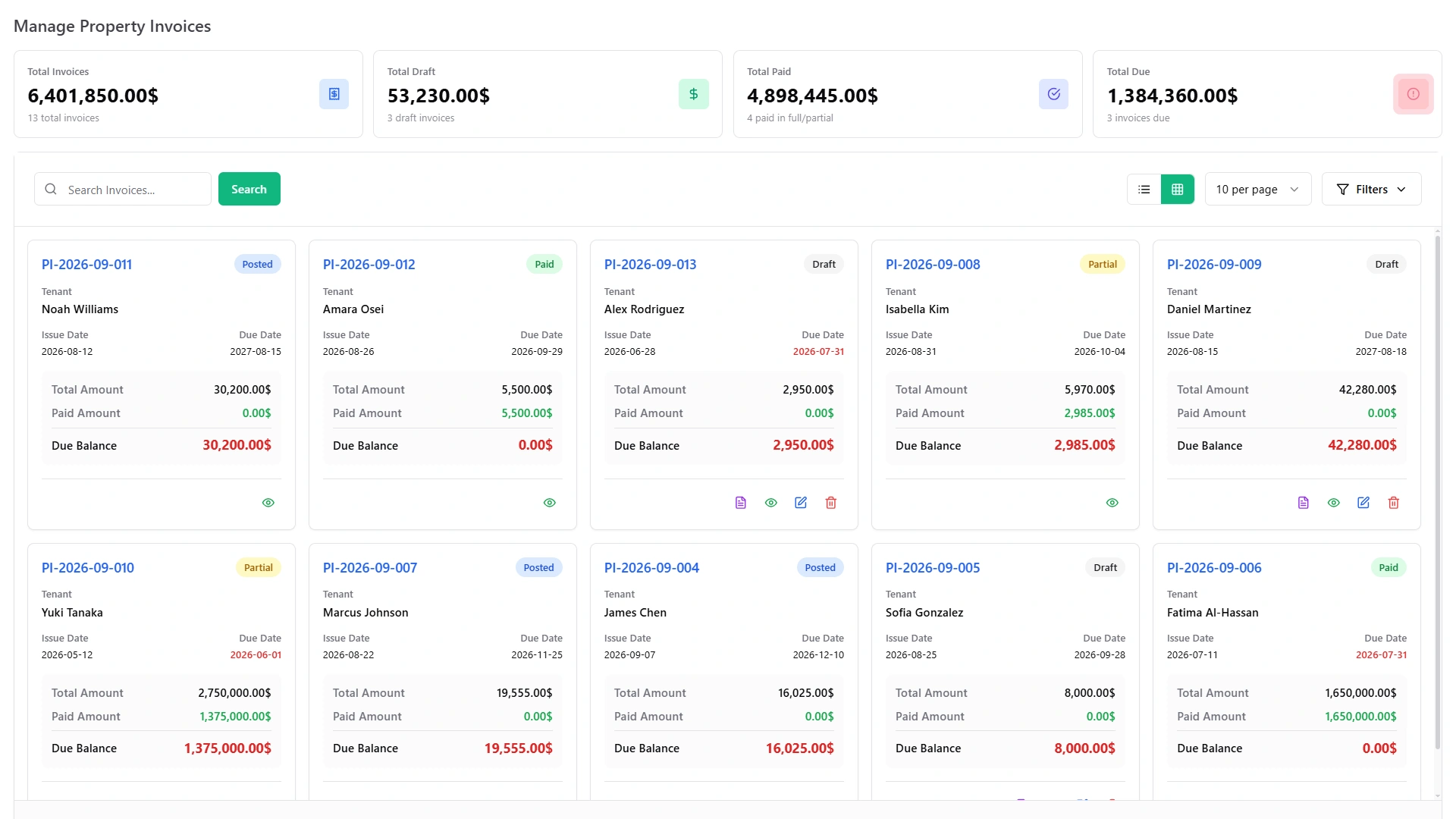
Automated invoice generation. Invoices are created automatically when rent falls due - the correct amount, the correct tenant, the correct date - without manual entry. Every invoice is numbered in sequence and available for PDF download by both the manager and the tenant.
-
Real-time payment status. Every invoice carries a live status: Paid, Pending, or Overdue. The moment a payment is recorded, the status updates across the tenant's ledger, the property report, and the manager dashboard simultaneously. No manual reconciliation is required to know where things stand.
-
Automatic payment reminders. Reminders go out to tenants before payments fall due. Late collections reduce without a single manual follow-up from the management team. The system handles the communication; the manager reviews only the exceptions.
-
Overdue detection. When a payment crosses its due date without being recorded, the system flags it as overdue automatically. Overdue accounts surface on the dashboard without the manager needing to run a report or cross-reference a spreadsheet.
-
Full tenant payment ledger. A complete per-tenant ledger displays every invoice, every payment date, every amount received, and every outstanding balance across the full history of the tenancy. Nothing needs to be reconstructed from emails or bank statements.
Maintenance Request Management
One of the most-used features of any property management system, maintenance request tracking is where slow response directly damages both the property's condition and the tenant relationship. Untracked requests, forgotten jobs, and unclear contractor communication create compounding problems. This system eliminates each of those failure points.
-
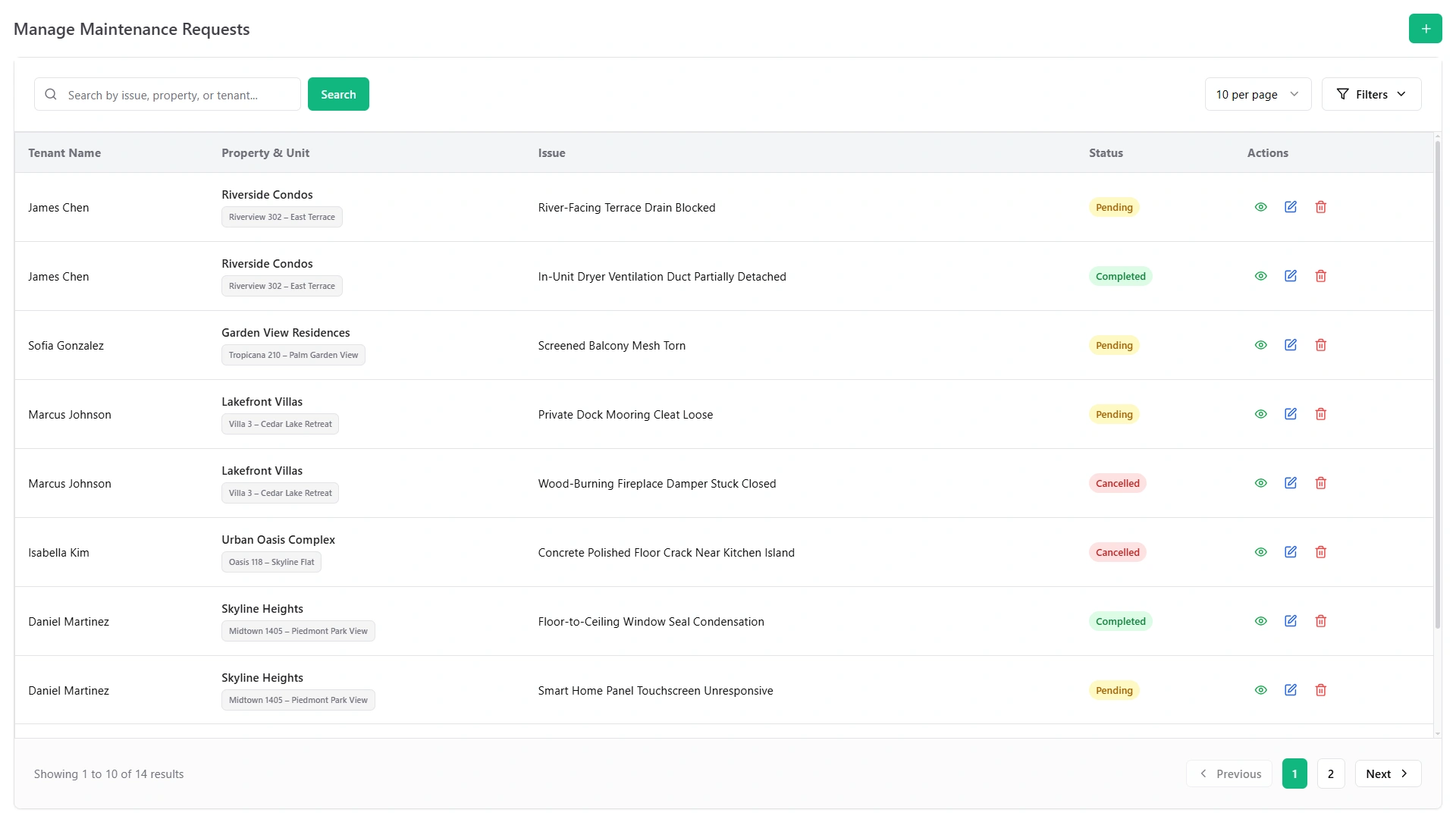
Tenant-submitted requests. Tenants log issues directly from their portal - describing the problem, noting the location, and submitting without a phone call. The moment a request arrives, it appears in the manager's maintenance queue with a timestamp and the submitting tenant's details.
-
Work order assignment and priority levels. Each request is assigned to a contractor with a priority classification: Low, Medium, High, or Critical. Priority determines how the request is queued and how urgently it is followed up. Nothing sits unassigned.
-
Contractor management. Contractor profiles are stored inside the system - contact details, area of work, job history against specific properties. Work is assigned directly from the maintenance request to the relevant contractor without switching to a separate communication tool.
-
Repair cost tracking. Every job carries a cost record. Expenses are logged against the specific property, building a running total of upkeep costs that feeds directly into the financial reporting view.
-
Full maintenance history per property. Every completed job is archived permanently: the original request, the contractor assigned, what was done, when it was resolved, and what it cost. The history is searchable and always accessible - useful for warranty resolution, recurring issue identification, and compliance documentation.
Property & Portfolio Management
Before a tenant is onboarded or rent is collected, the property itself needs to be structured correctly inside the property management system. This layer connects properties to units, units to tenants, tenants to leases, and leases to financials - automatically.
-
Multi-property and multi-unit setup. Properties are added once - with GPS coordinates, multiple images, facilities detail, and complete unit configuration. Every subsequent function (tenant assignment, maintenance, reporting) links back to this base record without duplication.
-
Occupancy and availability tracking. Unit status updates automatically: when a tenant is assigned, the unit becomes occupied; when a tenancy closes, it reverts to vacant. No manual update is needed at either transition.
-
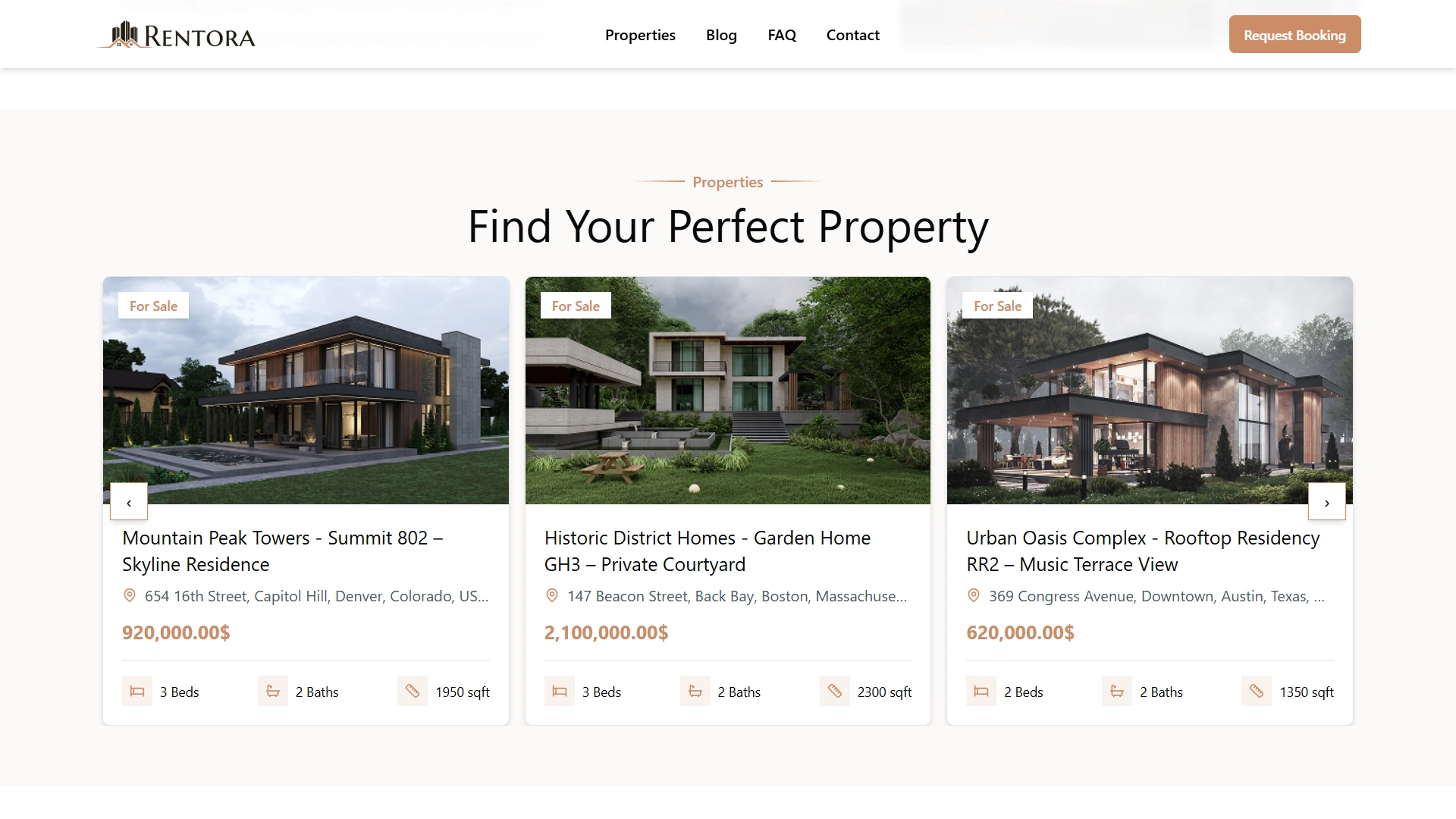
Public property listing website. Available units are displayed on a built-in, publicly accessible listing portal. Prospective tenants browse available properties and submit booking requests directly - without requiring a third-party listing platform or a separate website.
-
Portfolio dashboard and reports. A master dashboard shows occupancy rates, rent collection trends, open maintenance items, and financial performance across all properties in one view. Any single property can be drilled into from the same screen; the portfolio-level overview is always one click away.
Housing Society & Community Management
Managing a housing society is operationally different from managing individual rental properties. Societies involve resident hierarchies, shared billing, community communication, and on-site staff operations - none of which a standard rental management system handles adequately. This system does.
Resident Records, Maintenance Billing & Cost Allocation
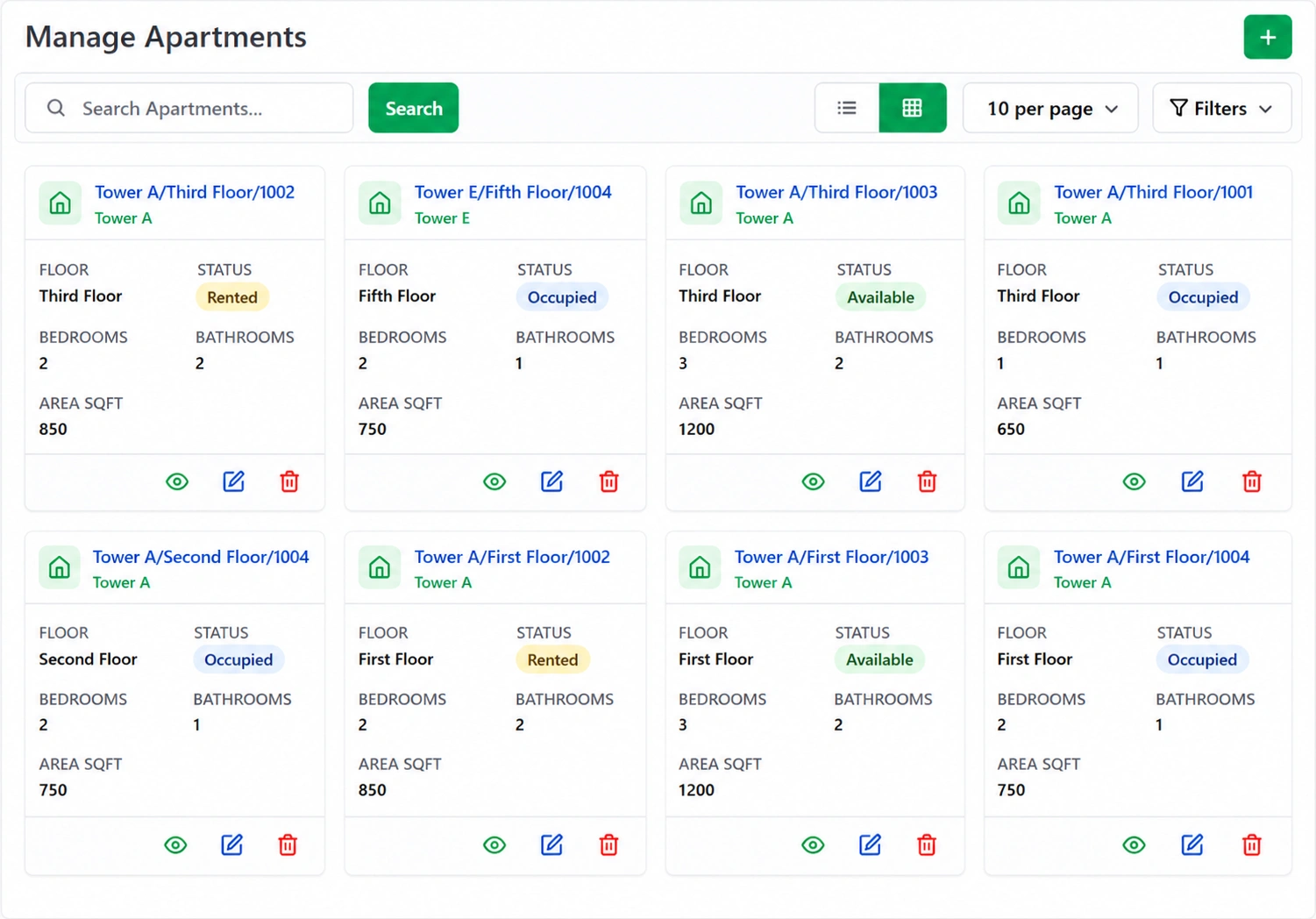
Societies are organised as a hierarchy: Towers → Floors → Apartments, with no limit on depth or scale. Every apartment holds its own resident records, separated by Owner and Tenant type, each with move-in date, emergency contacts, primary occupant designation, and document uploads stored per resident.
Monthly maintenance billing cycles are generated automatically. Each cycle combines the maintenance charge, utility bills, and common area costs into a single invoice per apartment. Late payment penalties apply automatically based on configurable grace periods and percentage rates set by the society administrator - no manual calculation.
Common area cost splitting distributes shared expenses - repairs, cleaning, lighting, landscaping, security - equally across all apartments. No spreadsheet. No manual division. Every apartment receives its proportional share as part of the billing cycle.
Utility bills are handled per apartment, with individual meter readings recorded each cycle and billed based on actual consumption.
Community Tools & On-Site Operations
-
Community notice board. Administrators post announcements to specific audiences: All Residents, Owners Only, Tenants Only, or selected individual apartments. Each notice carries a priority level, a publish date, and an expiry date - relevant communications stay visible; outdated ones disappear automatically.
-
Complaint management. Residents raise complaints through a formal channel. Each complaint is assigned to a staff member and tracked through a resolution workflow: Open → In Progress → Resolved → Closed. The complaint closes with a resident satisfaction rating. Management always knows what is unresolved and for how long.
-
Parking spot assignment. Spots are categorised by type - Car, Bike, or Visitor - and allocated to specific residents or apartments. Parking records are maintained centrally, not on a whiteboard or separate register.
-
Service staff clock-in/out. On-site cleaning, maintenance, and security staff attendance is tracked via clock-in and clock-out records linked to each staff member's profile. The society administrator can view attendance at any point without a separate HR tool.
Security, Visitor & On-Site Control
Most property management software treats "security" as a settings category - two-factor authentication, data encryption, user permissions. This system treats security as an operational discipline: security guard scheduling, incident reporting, visitor logging, and compliance tracking are day-to-day management functions, not IT configurations.
Security Guard Management
-
Guard profiles store complete employment records for every security personnel - salary, work experience, emergency contacts, and guard type category - in one place.
-
Shift scheduling assigns guards to defined posts (specific locations on the property) across Morning, Night, and General shifts. Shifts can be open-ended or fixed-duration. Multiple guards can be assigned across simultaneous shifts at different posts on the same property.
-
Attendance tracking logs each guard's attendance against their assigned shift. If a guard was scheduled and did not clock in, the absence is recorded - without requiring a separate attendance system.
-
Incident reporting creates a permanent formal record when something occurs on-site: the location, the guard involved, a priority level, a description, and an Open or Closed resolution status. The incident log is searchable and never deleted.
-
Equipment management tracks security equipment as a managed inventory: what is in stock, which guard each item is assigned to, the condition of each item, and when it was returned. No equipment goes unaccounted.
Visitor Tracking & Compliance
-
Digital visitor entry and exit logs record every visitor at arrival - name, purpose, host, arrival time - and at departure, with duration calculated automatically. The log is permanent, digital, and requires no paper register.
-
Badge management issues a badge number to each visitor with an issue date and a return date. Pre-registration allows expected visitors to be created in advance; their entry is verified on arrival rather than entered from scratch.
-
Visitor compliance tracks required document types, document numbers, and verification dates per visitor. For properties with regulatory requirements around visitor identity verification, this creates an auditable compliance record that is accessible without digging through paper files.
-
Visitor incident records capture incidents involving specific visitors - the date, the action taken, and a description - logged against that visitor's record separately from general security incidents.
-
Visual reports. The system generates a daily timeline view showing every visitor currently on the property. It also produces line charts, pie charts, and bar charts broken down by visit purpose and compliance status - filterable by any date range - giving both the on-site team and management a structured, data-based picture of on-site activity.
Contract & Document Management
Contracts and documents are the legal foundation of every property operation - tenancy agreements, vendor contracts, ownership papers, inspection reports. In most operations they are managed across email threads, shared folders, and filing cabinets that no single person has complete visibility over. This system consolidates all of it.
-
Contract creation from the builder or a pre-built template library. Contracts are built using the in-system editor or generated in minutes from pre-made property and rental templates. Either way, the contract exists inside the system the moment it is created - not emailed, not stored locally on one person's machine.
-
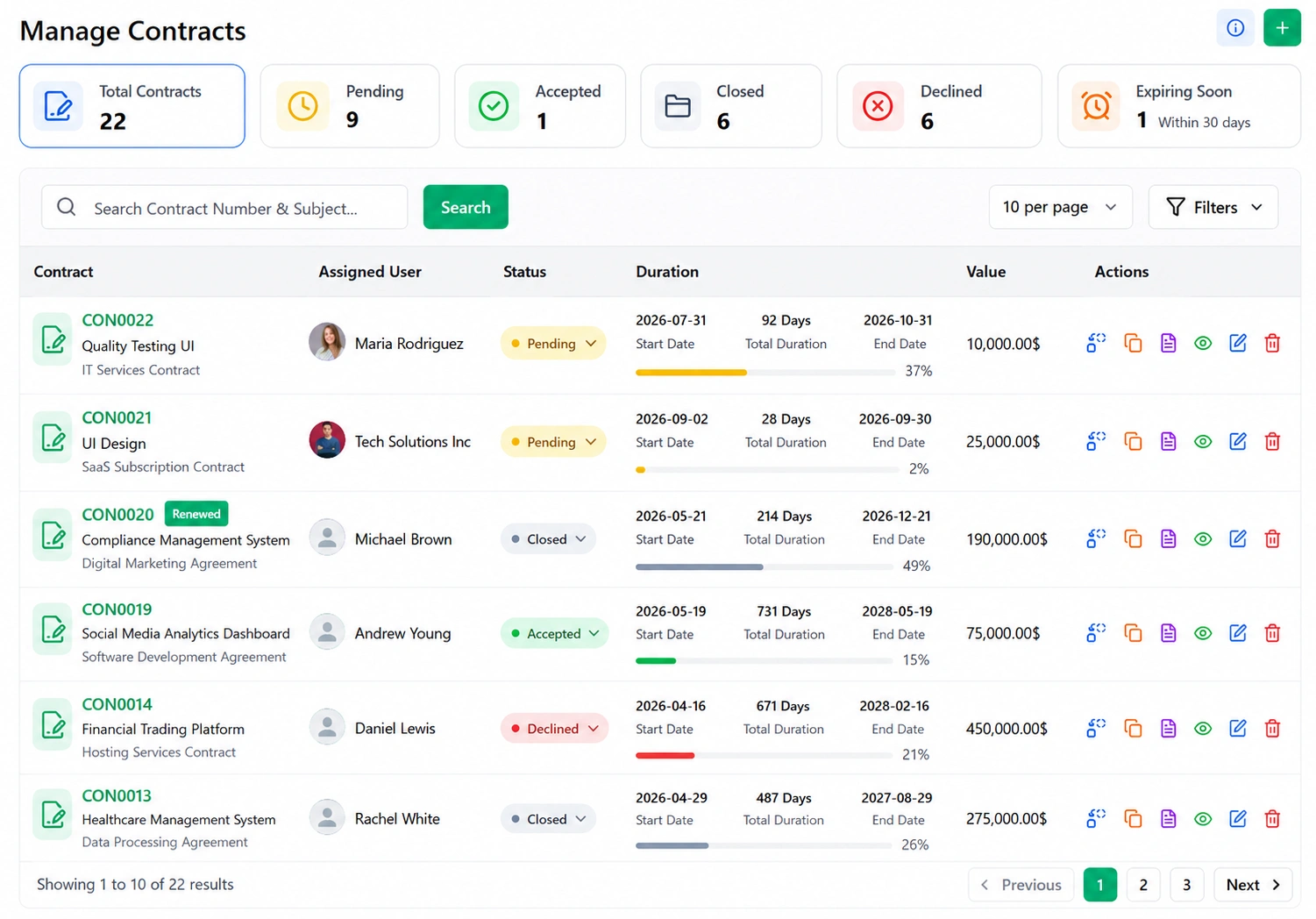
E-signatures from both parties. Both the company and the counterparty sign digitally. A contract is marked complete only when both signatures are recorded. A progress bar in the contract detail view shows exactly how far through the duration the agreement currently sits.
-
Full contract history in one place. Every contract has a detailed view with five tabs: the core terms and dates, uploaded attachments, an internal comments thread, a notes section, and a renewals log. Each renewal cycle is recorded separately with updated dates, value, status, and notes - not overwritten on the original.
-
Renewal alerts. Every contract's renewal date is tracked and flagged before it arrives, so no agreement lapses by oversight.
-
Document vault. Lease agreements, ownership papers, inspection reports, compliance certificates, and any supporting property document are stored in a searchable central vault. Document types are fully configurable. Each document supports comments and notes, so context stays attached to the record rather than in a separate email chain.
-
Role-based document access. Documents are visible only to users whose permission level allows it. Access is structured - not every user in the system sees every document.
Asset & Equipment Management
Properties accumulate physical assets over time - furniture, appliances, machinery, tools, and infrastructure. Without a system tracking them, businesses gradually lose visibility into what they own, where it is, what it costs, and when it needs servicing. Spreadsheets cannot handle this at scale. This system does.
-
Asset register with categories and locations. Every asset is added with its category, location (building, floor, room, or warehouse), purchase date, unit price, quantity, and serial code. Purchase cost is calculated automatically. Warranty periods are recorded per asset.
-
Asset assignment and condition tracking. Assets are assigned to specific staff members or locations. At assignment, the condition is recorded - Excellent, Good, Fair, or Poor - along with the expected return date. When an asset is reassigned or returned, the transition is logged.
-
Maintenance scheduling. Preventive and corrective maintenance is scheduled against specific assets, with service type, cost, technician, and completion date recorded. Assets with upcoming maintenance due are surfaced before the date arrives.
-
Depreciation calculations. Three methods are supported: Straight Line, Declining Balance, and Sum of Years. Useful life and salvage value are configured per asset, and annual depreciation is calculated automatically - no separate accounting worksheet needed.
-
Equipment register. Fixed equipment is tracked at a deeper level than general assets: model number, serial number, manufacturer, supplier, purchase date, category, and location - all stored on the equipment's own record, separate from the broader asset register.
-
License management. Software licenses or compliance licenses attached to equipment are stored with issue date, license number, price, and expiry date. Approaching expiry triggers an alert before the license lapses and creates a compliance gap.
-
Consumables, accessories, and kits. Expendable items - toner cartridges, cables, spare parts - are tracked as consumables with their own quantity and pricing records. Optional components are linked to parent equipment as accessories. Standard equipment configurations are grouped into predefined kits, making deployment consistent and faster.
-
Equipment audits. Audit records are created against individual equipment entries: inspection date, status, and auditor notes. Every audit links to the equipment's full history, building a searchable compliance trail without a separate audit register.
Financial Reporting & Expense Control
Knowing what money is moving - and why - requires more than a rent ledger. This section covers the financial reporting tools and expense management workflow that give property businesses full financial visibility without a separate accounting platform.
-
Per-property expense reports. Expenses are tracked per property, broken down by category and date range. Reports are exportable and give an accurate picture of what each property costs to operate - useful for owner reporting, budget reviews, and year-end accounting.
-
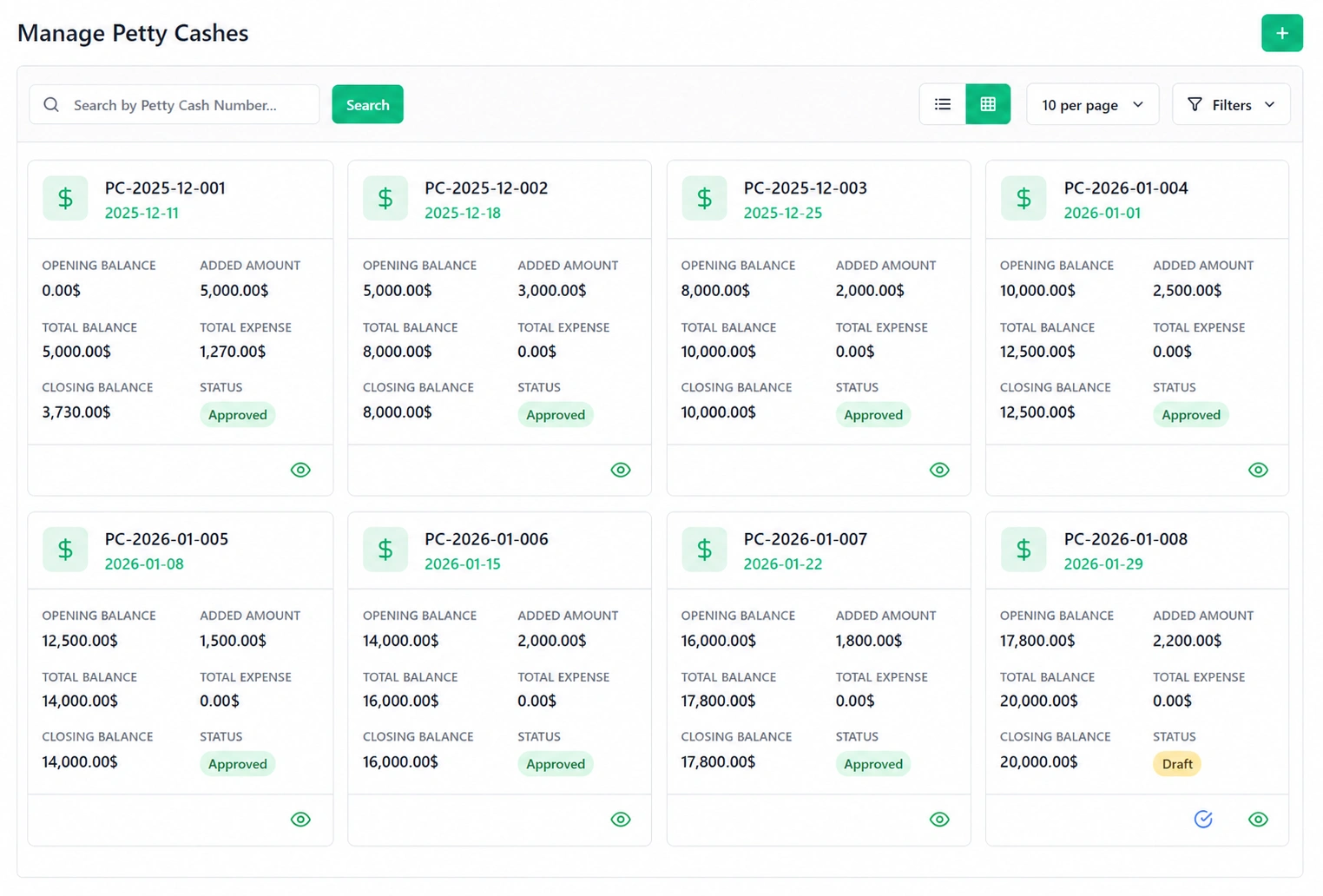
Petty cash allocation. Administrators allocate a petty cash amount to specific staff members. The system tracks the opening balance, amounts added, total expenses drawn, and closing balance - automatically, with no manual reconciliation at the end of each cycle.
-
Staff expense request and approval workflow. Staff who need to draw from the petty cash allocation submit a request with a description and amount. The administrator approves or rejects inside the system. Approved amounts decrement the closing balance automatically and are recorded as categorised expenses.
-
Reimbursements. Staff who covered a cost personally submit a reimbursement claim with a description and receipt upload. The same approval workflow applies. Once approved, the record is immutable - it cannot be edited or deleted - preserving financial integrity and creating a clean audit trail.
-
Full activity log and audit trail. Every action taken by every user across all modules is recorded with a timestamp, the staff member's name, the module where the action occurred, and a description of what changed. The log is filterable by staff member and by module. Whether a lease was modified, a payment was approved, a document was uploaded, or a contract was closed - the activity log captures exactly who did what and when, and the record is permanent.
Role-Based Access & Team Collaboration
Not every user needs access to everything. Role-based access ensures each person in the system sees exactly what their role requires - and nothing outside it.
-
Property owner and administrator. Full access to all properties, leases, financial reports, system configuration, and user management. The administrator controls payment settings, role assignments, and platform-wide preferences.
-
Property manager. Operational access to rentals, maintenance queues, tenant queries, and lease workflows. Managers handle day-to-day operations without touching system-level settings or financial administrative functions reserved for the administrator.
-
Security and site staff. Access is scoped to shift schedules, visitor logs, and incident reports. Site staff see what they need to carry out their responsibilities - nothing about leases, finances, or system settings is visible to this role.
-
Tenant self-service portal. Each tenant accesses only their own data - their active lease, their payment history, their submitted maintenance requests, and their direct communications with the property manager. No tenant can view another tenant's information.
-
Built-in meeting scheduling. Video meetings with tenants, property owners, or the management team are created, scheduled, and joined from inside the platform. Participants see a join option in the system when the meeting begins - no external link, no calendar juggling, no switching between tools.
-
Tenant feedback collection. Feedback emails are sent automatically when a trigger event occurs - a maintenance request resolved, an invoice paid, a lease renewed. Tenants respond with a rating and a comment. The complete response history is visible inside the system, filterable by module, giving management a structured view of tenant satisfaction without running a survey separately.
One-Time Purchase, Full Ownership
Every platform on a features comparison page covers rent collection, maintenance, and a tenant portal. What changes between them is the pricing model - and this is where the functions of property management system software look very different from a subscription perspective.
This is a one-time purchase. No monthly subscription, no per-user fees, no module paywalls, no annual renewal charges. You pay once, host the platform on your own server, and own it completely - including the full source code. Your technical team can modify any function, any interface, or any workflow to suit your operation.
Your data stays on your server. No third-party cloud holds your tenant records, financial data, or lease documents. You control the hosting location, the access permissions, and the backup schedule. Nothing leaves unless you choose to move it.
The platform is fully white-label ready. Your logo, your domain, your brand - with no visible trace of the underlying software. Agencies, developers, and operators who present a branded management platform to their clients can do so from day one.
And every property management software feature listed on this page is included in that single purchase. Not sold separately. Not gated behind premium tiers. The complete property management system - all 14 modules - owned outright, with lifetime updates and no recurring licence fees.